
Fanttik WB10 NOVA
Fanttik WB10 Nova 1/4 انچ ڈرائیو منی بائک ٹارک رینچ سیٹ یوزر مینوئل
Model: WB10 NOVA
تعارف
This manual provides comprehensive instructions for the safe and effective use of your Fanttik WB10 Nova 1/4 Inch Drive Mini Bike Torque Wrench Set. This tool is designed for precise torque applications on bicycles, particularly those with carbon fiber components, to prevent overtightening and damage.
براہ کرم ڈیوائس کو چلانے سے پہلے اس دستی کو اچھی طرح پڑھیں اور اسے مستقبل کے حوالے کے لیے اپنے پاس رکھیں۔
باکس میں کیا ہے۔
The Fanttik WB10 Nova Torque Wrench Set includes the following components:
- Torque Wrench (1 pc)
- 1/4" Extension Bar (1 pc)
- 1/4" Screwdriver Bit Adapter (1 pc)
- Tire Levers (2 pcs)
- Screwdriver Bits (14 pcs): Slotted (SL3, SL4), Hex (H2, H2.5, H3, H4, H5, H6), Phillips (PH1, PH2), Torx (T10, T15, T20, T25)
- Tire Patches (6 pcs)
- Tire Repair Sandpaper (1 pc)
- PU Bag (1 pc)
- Bag Straps (2 pcs)
- یوزر مینوئل (1 پی سی)
- Certificate of Calibration (1 pc)
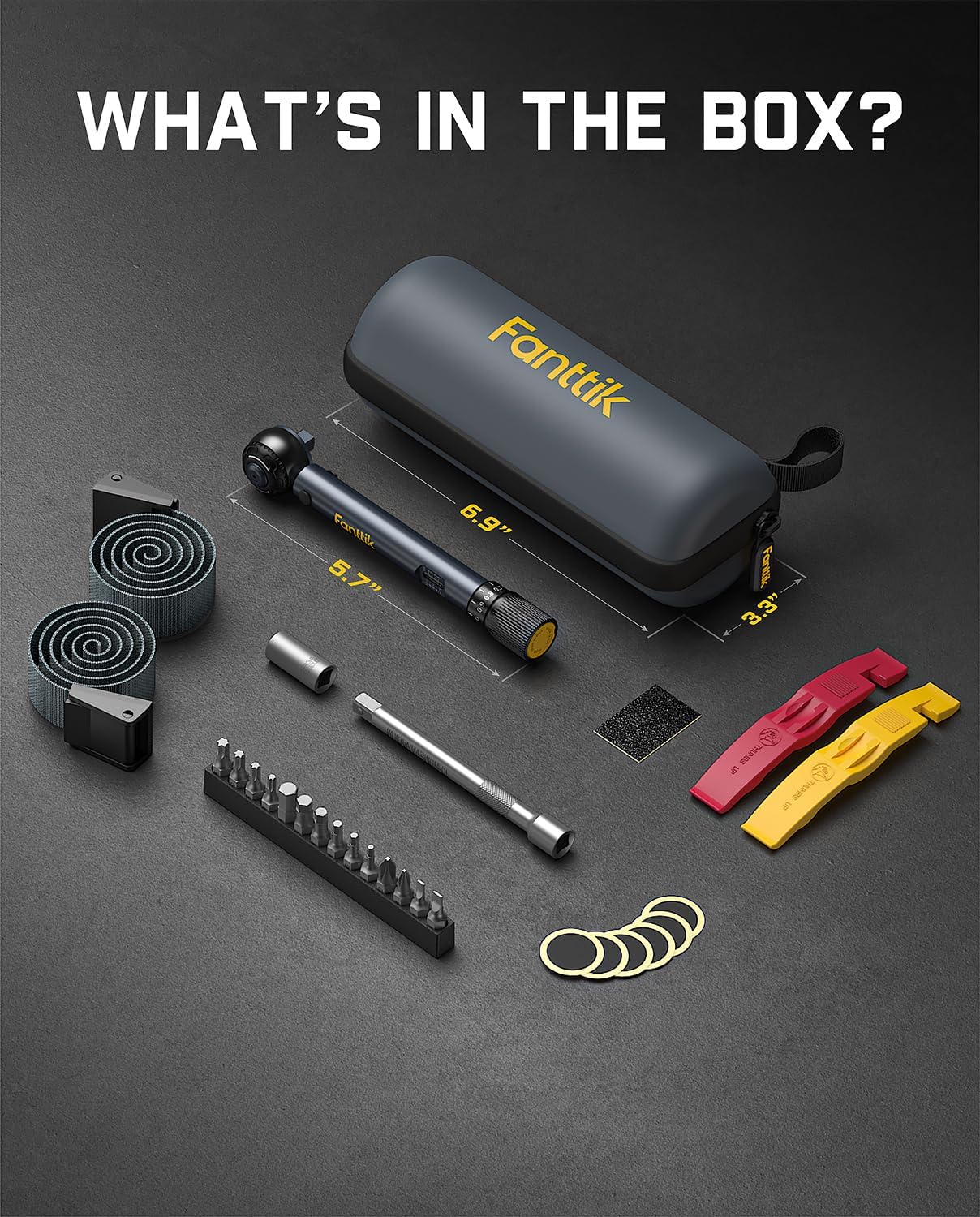
Image: All components included in the Fanttik WB10 Nova Torque Wrench Set, neatly arranged in their carrying case.
وضاحتیں
| فیچر | تفصیل |
|---|---|
| برانڈ | فانٹیک۔ |
| ماڈل نمبر | WB10 NOVA |
| Torque کی حد | 2-10 Nm (1.47-7.37 ft-lb) |
| درستگی | ±4% |
| ڈرائیو کا سائز | 1/4 انچ |
| Ratchet Teeth | 72-دانت |
| مواد | Aluminum (Wrench Body), Chromium-Vanadium Steel (Bits) |
| آئٹم کی لمبائی | 5.7 انچ |
| شے کا وزن | 0.47 کلوگرام (تقریباً 1.04 پاؤنڈ) |
| شامل بٹس | Slotted, Phillips, Hex, Torx (14 total) |
سیٹ اپ
Before using the torque wrench, ensure all components are present and in good condition. No assembly is required for the main torque wrench unit itself, but bits and adapters need to be installed.
- صحیح بٹ منتخب کریں: Identify the appropriate screwdriver bit for your application from the included 14-piece set.
- بٹ انسٹال کریں:
- Press the push button on the ratchet head to release the locking mechanism.
- Insert the selected bit or the 1/4" Screwdriver Bit Adapter into the ratchet head.
- Ensure the bit is fully seated and the locking mechanism engages securely.

Image: A hand demonstrating how to press the button and insert a bit into the torque wrench head for quick installation.
- Attach Extension Bar (Optional): If additional reach is needed, insert the 1/4" Extension Bar into the ratchet head before attaching a bit.
آپریٹنگ ہدایات
Follow these steps to accurately apply torque using your Fanttik WB10 Nova torque wrench:
1. Understanding the Torque Wrench Components
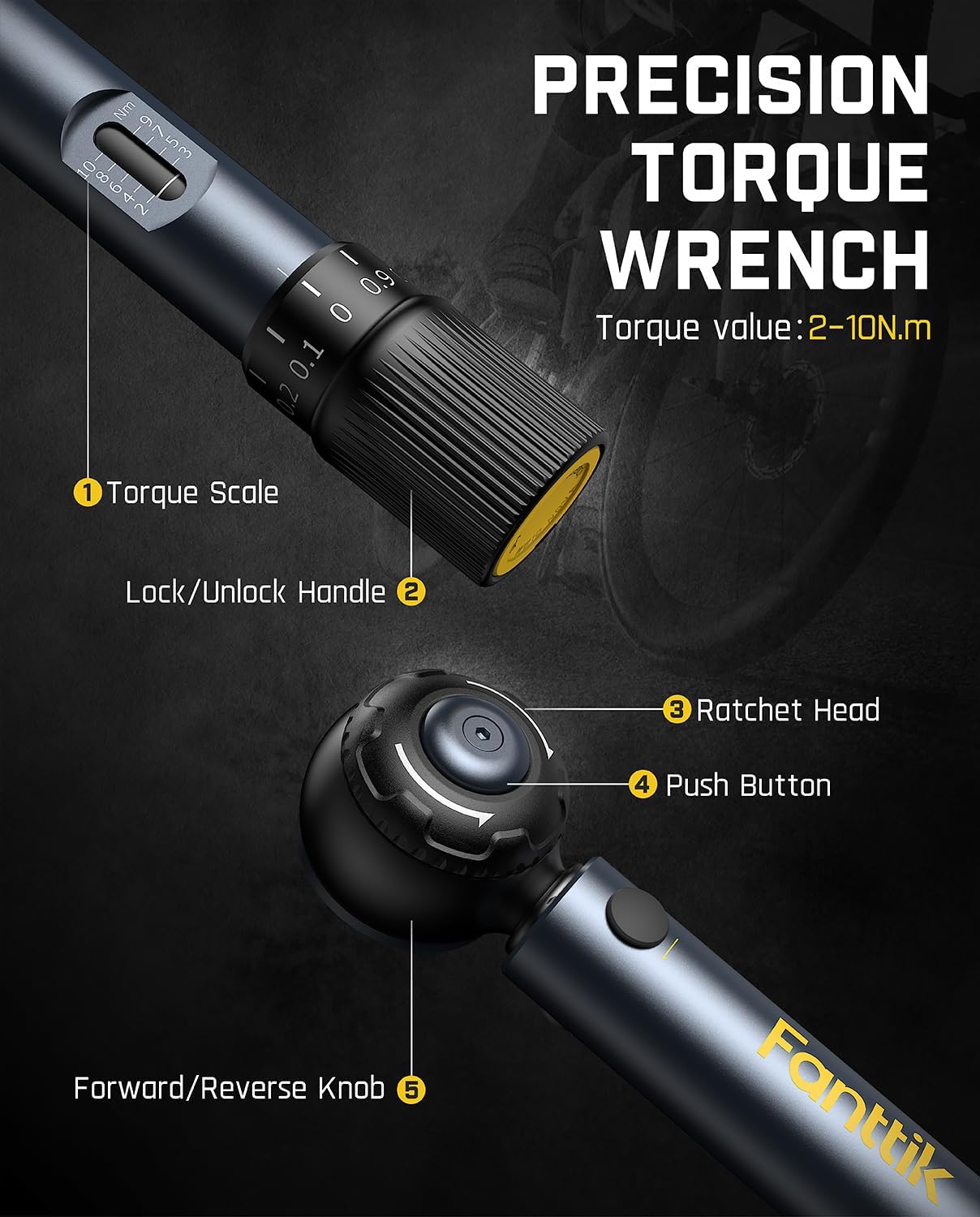
تصویر: ایک تفصیلی view of the torque wrench highlighting its key components: Torque Scale, Lock/Unlock Handle, Ratchet Head, Push Button, and Forward/Reverse Knob.
- Torque Scale: Displays the set torque value.
- Lock/Unlock Handle: Used to secure or adjust the torque setting.
- Ratchet Head: Holds the bits and applies torque.
- دبانے والا بٹن: Releases bits from the ratchet head.
- Forward/Reverse Knob: Changes the direction of the ratchet mechanism.
2. Setting the Torque Value
- غیر مقفل کریں: Pull down the Lock/Unlock Handle at the bottom of the wrench.
- ایڈجسٹ کریں: Rotate the handle to set the desired torque value on the Torque Scale. The white printed numbers are designed for high visibility.
- تالا: Release the Lock/Unlock Handle to secure the set torque value. Ensure it clicks into place to prevent accidental changes during use.

Image: A visual guide demonstrating the four steps to set the torque: pull down to unlock, rotate to set value, release to lock, and the audible click when torque is reached.
3. ٹارک لگانا
- سمت منتخب کریں: Use the Forward/Reverse Knob on the ratchet head to select the desired tightening or loosening direction. The 72-tooth reversible ratchet allows for operation in tight spaces.
- طاقت کا اطلاق کریں: Place the wrench onto the fastener. Apply smooth, even force to the wrench handle.
- کلک کے لیے سنیں: Continue applying force until an audible "click" sound is heard and a slight impulse is felt. This indicates that the preset torque value has been reached.
- Stop Immediately: Cease applying force immediately after the click. Continuing to apply force will overtighten the fastener beyond the set torque.

Image: A hand using the Fanttik WB10 Nova torque wrench to tighten a bolt on a bicycle wheel, illustrating the "click" stop mechanism.
4. General Usage Scenarios
The Fanttik WB10 Nova is suitable for various bicycle maintenance tasks:
- اجزاء کی تنصیب: Use for precise tightening of bottle cages, handlebars, seatposts, and other accessories.

Image: A person using the torque wrench to install a bottle cage on a bicycle frame.
- مرمت: Ideal for adjusting derailleurs, brakes, and other critical components where specific torque is required.

Image: A person using the torque wrench to perform a repair on a bicycle's rear derailleur.
- برقرار رکھنا: Regular checks and tightening of bolts to manufacturer specifications.

Image: A person using the torque wrench to maintain the handlebar stem bolts on a bicycle.
- Tire Repair: The kit includes tire levers, patches, and sandpaper for roadside tire repairs.

Image: Hands using the included tire levers to remove a bicycle tire from the rim.

Image: A hand applying a tire patch to a bicycle inner tube after preparing the surface with sandpaper.
دیکھ بھال
Proper maintenance ensures the longevity and accuracy of your torque wrench:
- استعمال کے بعد صاف کریں: After each use, promptly wipe the torque wrench and bits clean with a soft, dry cloth. Avoid using harsh chemicals or solvents.
- ذخیرہ: Store the torque wrench in its provided PU bag in a cool, dry place. Do not store the wrench with a torque value set; always return the scale to its minimum torque setting (2 Nm) before storage to relieve spring tension and maintain accuracy.
- آپریٹنگ رینج: For best results and to extend tool life, use the torque wrench within 20-80% of its full range (approximately 3-8 Nm). Never exceed the maximum capacity of 10 Nm.
- انشانکن: Torque wrenches are precision instruments that require periodic calibration.
- For regular use, recalibrate every 2 years or after 5,000 uses, whichever comes first.
- For light use, recalibrate every 3 years.
- Calibration should be performed by ISO/IEC 17025 accredited providers or a local tool supplier. Do not attempt to calibrate the wrench yourself.
Image: A graphic detailing important maintenance tips and calibration recommendations for torque wrenches, including certificates of calibration.
خرابی کا سراغ لگانا
If you encounter issues with your Fanttik WB10 Nova torque wrench, consider the following:
| مسئلہ | ممکنہ وجہ | حل |
|---|---|---|
| Wrench does not "click" at set torque. |
|
|
| Bit falls out of ratchet head. |
|
|
| Difficulty adjusting torque value. |
|
|
وارنٹی اور سپورٹ
Fanttik products are manufactured to high-quality standards. For warranty information, product support, or to inquire about calibration services, please refer to the official Fanttik webسائٹ یا ان کی کسٹمر سروس سے براہ راست رابطہ کریں۔
آن لائن مدد: وزٹ کریں۔ www.fanttik.com FAQs، پروڈکٹ رجسٹریشن، اور رابطہ کی معلومات کے لیے۔
کسٹمر سروس: اپنے پروڈکٹ کی پیکیجنگ یا اہلکار پر فراہم کردہ رابطے کی تفصیلات دیکھیں webمدد کے لئے سائٹ.
Ask a question about this manual
Ask about setup, troubleshooting, compatibility, parts, safety, or missing instructions. Manuals+ will review the question and use this page’s manual context to help answer it.