
تعارف
This manual provides instructions for the Disney Spiderman 3D Digital Alarm Clock with Nightlight, Model SPD3621. This device features an LED display for time and date, an alarm function, and a comforting nightlight. Please read these instructions carefully before use to ensure proper operation and to maximize the product's lifespan.
پیکیج کے مشمولات
- 1 x Spiderman 3D Digital Alarm Clock with Nightlight (Model SPD3621)
- 1 ایکس ہدایات دستی (یہ دستاویز)
نوٹ: بیٹریاں شامل نہیں ہیں اور انہیں الگ سے خریدنا ضروری ہے۔
حفاظتی معلومات
- آلے کو پانی اور نمی سے دور رکھیں۔
- انتہائی درجہ حرارت یا براہ راست سورج کی روشنی کو بے نقاب نہ کریں۔
- Use only the recommended battery type and ensure correct polarity during installation.
- بیٹریاں ہٹا دیں اگر آلہ طویل مدت تک استعمال نہیں کیا جائے گا۔
- پرانی اور نئی بیٹریاں، یا مختلف قسم کی بیٹریوں کو مکس نہ کریں۔
- یہ پروڈکٹ کھلونا نہیں ہے۔ چھوٹے بچوں کے لیے بالغوں کی نگرانی کی سفارش کی جاتی ہے۔
سیٹ اپ
- بیٹری کی تنصیب: Locate the battery compartment on the underside of the alarm clock. Open the compartment cover. Insert the required batteries (e.g., 3 x AAA, specific type not provided in data) ensuring correct polarity (+/-). Close the battery compartment cover securely.
- ابتدائی پاور آن: Once batteries are installed, the LED display should illuminate, showing a default time.
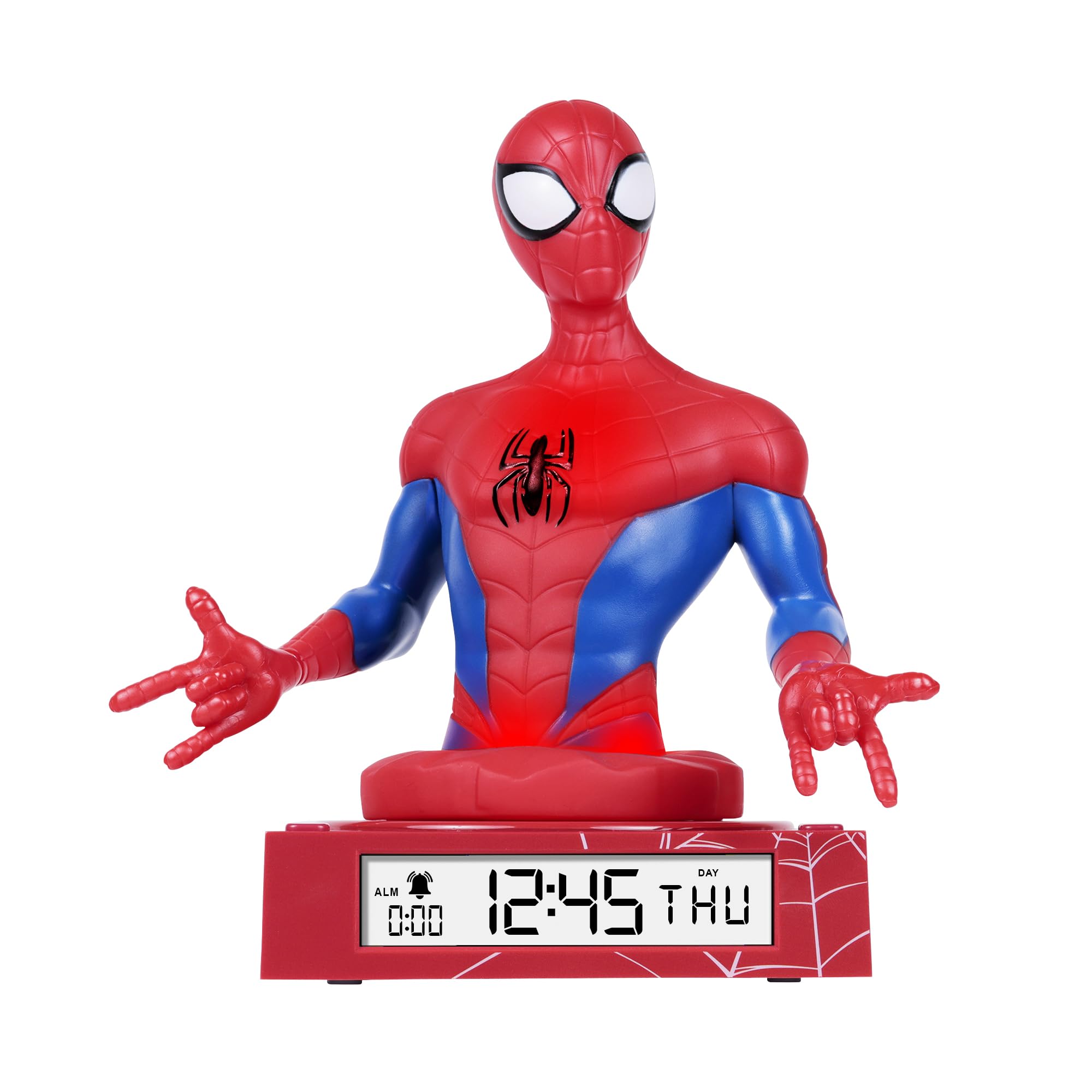
Figure 1: Spiderman 3D Digital Alarm Clock. The image displays the red and blue Spiderman figure on a red base, with the digital time '12:45 THU' visible on the LED display. The base also shows a spiderweb پیٹرن
آپریٹنگ ہدایات
The alarm clock features several buttons, typically located on the back or bottom of the unit, for setting time, date, and alarm functions. Refer to the labels on your specific unit for exact button identification.
وقت اور تاریخ کی ترتیب
- Enter Time/Date Setting Mode: دبائیں اور تھامیں۔ سیٹ button (or similar, e.g., MODE) for a few seconds until the time display starts flashing.
- اوقات کو ایڈجسٹ کریں: استعمال کریں۔ UP اور نیچے buttons (or similar, e.g., HOUR/MINUTE) to adjust the hour. Press سیٹ تصدیق کرنے اور منٹوں میں منتقل کرنے کے لیے دوبارہ۔
- منٹ ایڈجسٹ کریں: استعمال کریں۔ UP اور نیچے منٹ کو ایڈجسٹ کرنے کے لئے بٹن. دبائیں سیٹ again to confirm and move to date settings (Year, Month, Day).
- تاریخ کو ایڈجسٹ کریں: Follow the same procedure using UP/نیچے اور سیٹ buttons to set the Year, Month, and Day.
- سیٹنگ موڈ سے باہر نکلیں: دن مقرر کرنے کے بعد، دبائیں سیٹ one last time, or wait a few seconds for the display to stop flashing automatically.
الارم سیٹ کرنا
- الارم سیٹنگ موڈ درج کریں: دبائیں الارم سیٹ button (or similar, e.g., ALM) once. The alarm time will be displayed, and the hour digits may flash.
- Adjust Alarm Hours: استعمال کریں۔ UP اور نیچے buttons to set the desired alarm hour. Press الارم سیٹ تصدیق کرنے اور منٹوں میں منتقل کرنے کے لیے۔
- Adjust Alarm Minutes: استعمال کریں۔ UP اور نیچے buttons to set the desired alarm minutes. Press الارم سیٹ تصدیق کرنے کے لیے
- الارم کو فعال/غیر فعال کریں: After setting the alarm time, there may be a separate switch or button (e.g., ALARM ON/OFF) to enable or disable the alarm. A bell icon on the display usually indicates the alarm is active.
- اسنوز فنکشن: جب الارم بجتا ہے ، دبائیں۔ اسنوز کریں button (if available, often a large button on top) will temporarily silence the alarm for a few minutes.
- الارم بند کرو: To stop the alarm completely, press any other button (e.g., الارم آف or سیٹ). The alarm will reset for the next day.
نائٹ لائٹ کا استعمال۔
The Spiderman figure on the alarm clock functions as a nightlight. There is typically a dedicated button or switch to control this feature.
- Turn On/Off Nightlight: دبائیں رات کی روشنی button (or similar, e.g., LIGHT) to turn the nightlight on or off.
- The nightlight provides a soft glow, helping children feel secure in the dark.
دیکھ بھال
- صفائی: Wipe the surface of the alarm clock with a soft, dry cloth. Do not use abrasive cleaners or solvents, as these may damage the finish.
- بیٹری کی تبدیلی: When the display dims or the functions become erratic, it is time to replace the batteries. Follow the battery installation steps in the "Setup" section.
خرابی کا سراغ لگانا
| مسئلہ | ممکنہ وجہ | حل |
|---|---|---|
| ڈسپلے خالی یا مدھم ہے۔ | بیٹریاں کم ہیں یا غلط طریقے سے نصب ہیں۔ | درست قطبیت کو یقینی بناتے ہوئے بیٹریوں کو نئی سے تبدیل کریں۔ |
| الارم نہیں بجتا ہے۔ | الارم چالو نہیں ہے یا غلط طریقے سے سیٹ کیا گیا ہے۔ | Ensure the alarm is set and activated (check for bell icon on display). Verify alarm time. |
| نائٹ لائٹ کام نہیں کر رہی ہے۔ | Nightlight function is off or batteries are low. | Press the NIGHTLIGHT button to turn it on. Replace batteries if necessary. |
| وقت غلط ہے۔ | Time was not set correctly or batteries were removed. | Reset the time and date following the operating instructions. |
وضاحتیں
- برانڈ: ڈزنی
- ماڈل نمبر: ایس پی ڈی 3621
- ڈسپلے کی قسم: ڈیجیٹل ایل ای ڈی
- خصوصی خصوصیات: Alarm, 3D Spiderman Design, Nightlight Mode
- طاقت کا منبع: Battery Operated (Batteries not included)
- طول و عرض: تقریباً 20 سینٹی میٹر (L) x 17 سینٹی میٹر (H)
- مواد: پلاسٹک
- رنگ: سرخ
وارنٹی اور سپورٹ
This product comes with a one-year warranty from the date of purchase. This warranty covers manufacturing defects under normal use. It does not cover damage caused by misuse, accidents, unauthorized modifications, or normal wear and tear.
For warranty claims or technical support, please contact the retailer where the product was purchased. Please retain your proof of purchase for warranty validation.