
1. تعارف
خریداری کے لیے آپ کا شکریہasing the WASAGUN SZ001 L-Shaped Gaming Desk. This desk is designed to provide a versatile and functional workspace for gaming, home office, or study. It features integrated LED lighting, convenient power outlets, a monitor stand, and storage shelves to enhance your productivity and comfort. Please read this manual thoroughly before assembly and use to ensure proper setup and safe operation.
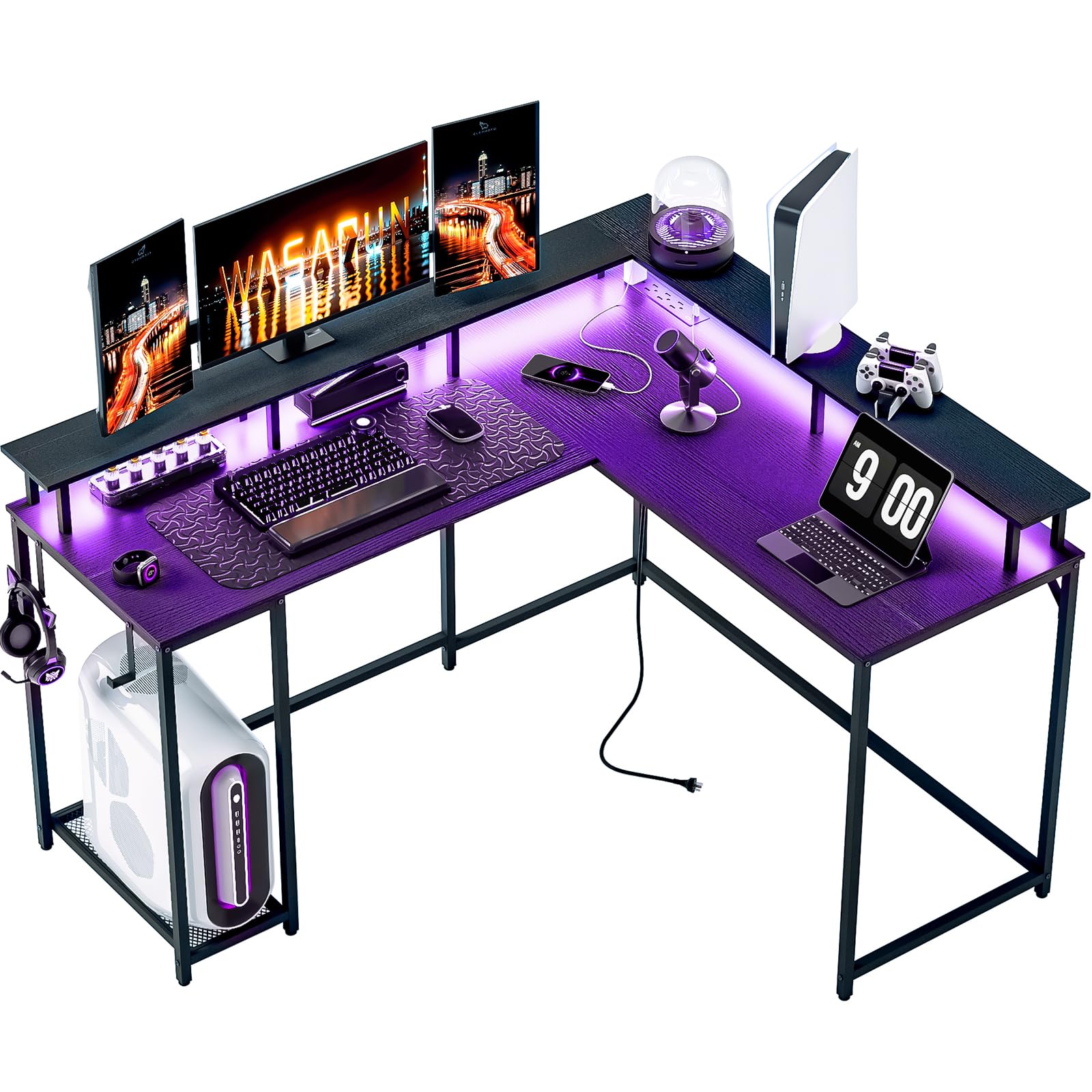
Figure 1: WASAGUN SZ001 L-Shaped Gaming Desk (White)
2. حفاظتی ہدایات
- تمام ہدایات پڑھیں: اس بات کو یقینی بنائیں کہ آپ آگے بڑھنے سے پہلے اسمبلی کے تمام اقدامات اور حفاظتی انتباہات کو سمجھتے ہیں۔
- بچوں اور پالتو جانوروں کو دور رکھیں: چھوٹے حصے دم گھٹنے کا خطرہ ہو سکتے ہیں۔ اسمبلی کے دوران انہیں پہنچ سے دور رکھیں۔
- ایک نرم، صاف سطح پر جمع کریں: This prevents scratching the desk components.
- پیچ کو زیادہ سخت نہ کریں: Overtightening can damage the material. Hand-tighten until snug, then use a tool for a final quarter turn.
- مناسب اوزار استعمال کریں: صرف اس دستی میں فراہم کردہ یا تجویز کردہ ٹولز استعمال کریں۔
- استحکام چیک کریں: After assembly, ensure the desk is stable and all connections are secure before placing items on it.
- برقی حفاظت: When using the power outlets and LED lights, ensure they are connected to a properly grounded power source. Do not overload the outlets.
- وزن کی صلاحیت: Do not exceed the recommended weight capacity for the desk surface or shelves.
3. پیکیج کے مشمولات
Please verify that all parts listed below are present before beginning assembly. If any parts are missing or damaged, please contact customer support.
| حصہ نمبر | تفصیل | مقدار |
|---|---|---|
| A | Main Desktop Panel (Left) | 1 |
| B | Main Desktop Panel (Right) | 1 |
| C | Corner Desktop Panel | 1 |
| D | مانیٹر اسٹینڈ پینل | 1 |
| E | سائیڈ شیلف پینلز | 2 |
| F | Main Frame Legs | 4 |
| G | Crossbars | 6 |
| H | کنٹرولر کے ساتھ ایل ای ڈی لائٹ پٹی۔ | 1 |
| I | پاور آؤٹ لیٹ یونٹ | 1 |
| J | سایڈست فٹ پیڈ | 6 |
| K | Screw Pack (M6x30mm) | 16 |
| L | Screw Pack (M4x15mm) | 8 |
| M | ایلن رنچ | 1 |
Figure 2: Illustrative diagram of all included components. Actual appearance may vary slightly.
4. اسمبلی کی ہدایات
Follow these steps carefully to assemble your WASAGUN SZ001 L-Shaped Gaming Desk. It is recommended to have two people for assembly.
مرحلہ 1: مین فریم کو جمع کریں۔
Attach the crossbars (G) to the main frame legs (F) using screws (K). Ensure all connections are secure but do not fully tighten yet.
شکل 3: ابتدائی فریم اسمبلی۔
مرحلہ 2: ڈیسک ٹاپ پینل منسلک کریں۔
Carefully place the main desktop panels (A and B) and the corner desktop panel (C) onto the assembled frame. Align the pre-drilled holes and secure them with screws (K). Now, fully tighten all screws from Step 1 and Step 2.
Figure 4: Desktop panels attached to the frame.
Step 3: Install Monitor Stand and Shelves
Attach the monitor stand panel (D) to the designated area on the desktop using screws (L). Then, assemble and attach the side shelf panels (E) to the frame using screws (L).
Figure 5: Monitor stand and shelves in place.
Step 4: Attach LED Lights and Power Outlet Unit
Adhere the LED light strip (H) to the underside of the desktop or along the back edge as desired. Connect the LED controller. Mount the power outlet unit (I) to the designated grommet hole or side of the desk using screws (L) or adhesive if provided.
Figure 6: LED strip and power outlet installation.
Step 5: Install Foot Pads
Screw the adjustable foot pads (J) into the bottom of each leg. Adjust them to level the desk on uneven surfaces.
Figure 7: Adjustable foot pads for stability.
5. آپریٹنگ ہدایات
5.1. ایل ای ڈی لائٹس آپریشن
The integrated LED light strip is controlled by a remote or an inline controller. Connect the LED strip to a USB power source (e.g., a USB port on your computer or a USB wall adapter, not included). Use the controller to:
- پاور آن/آف: پاور بٹن دبائیں۔
- رنگ تبدیل کریں: Select from various static colors.
- چمک کو ایڈجسٹ کریں: Increase or decrease light intensity.
- موڈز منتخب کریں: Choose from dynamic lighting effects (e.g., flash, fade, strobe).
شکل 8: سابقample of LED light controller.
5.2 پاور آؤٹ لیٹس کا استعمال
The desk includes a built-in power outlet unit with AC outlets and USB ports. Connect the power cord from the unit to a grounded wall outlet. You can then plug in your devices directly to the desk's integrated outlets.
- AC آؤٹ لیٹس: For standard electronic devices (monitors, computers, lamps)۔
- USB پورٹس: اسمارٹ فونز، ٹیبلیٹس، اور USB سے چلنے والے دیگر آلات کو چارج کرنے کے لیے۔
احتیاط: Do not exceed the maximum power rating of the outlet unit. Refer to the specifications section for details. Avoid spilling liquids near the power outlets.
Figure 9: Integrated power and USB outlets.
6 دیکھ بھال
مناسب دیکھ بھال آپ کی میز کی زندگی اور ظاہری شکل کو بڑھا دے گی۔
- صفائی: میز کی سطحوں کو نرم سے صاف کریں، ڈیamp کپڑا سخت کیمیکلز یا کھرچنے والے کلینر سے پرہیز کریں، جو ختم کو نقصان پہنچا سکتے ہیں۔
- پھیلاؤ: داغدار ہونے یا مواد کو پہنچنے والے نقصان کو روکنے کے لیے چھلکوں کو فوری طور پر صاف کریں۔
- ہارڈ ویئر چیک: وقتاً فوقتاً تمام پیچ اور فاسٹنرز کو چیک کریں تاکہ یہ یقینی بنایا جا سکے کہ وہ سخت ہیں۔ اگر ضروری ہو تو دوبارہ سخت کریں۔
- براہ راست سورج کی روشنی سے بچیں: براہ راست سورج کی روشنی میں طویل عرصے تک نمائش دھندلاہٹ یا رنگت کا سبب بن سکتی ہے۔
- حرارت سے تحفظ: ڈیسک ٹاپ کو گرمی سے ہونے والے نقصان کو روکنے کے لیے گرم اشیاء کے نیچے کوسٹرز یا حفاظتی پیڈ استعمال کریں۔
7 خرابیوں کا سراغ لگانا
اگر آپ کو کوئی مسئلہ درپیش ہے تو درج ذیل عام مسائل اور حل کا حوالہ دیں:
| مسئلہ | ممکنہ وجہ | حل |
|---|---|---|
| ڈیسک لرز رہا ہے۔ | ناہموار فرش؛ ڈھیلا پیچ. | Adjust the foot pads at the bottom of the legs. Ensure all assembly screws are tightened securely. |
| ایل ای ڈی لائٹس آن نہیں ہو رہی ہیں۔ | Not connected to power; faulty connection; remote battery dead. | Ensure the USB cable is securely plugged into a working power source. Check all connections. Replace remote battery if applicable. |
| پاور آؤٹ لیٹس کام نہیں کررہے ہیں۔ | Desk power cord unplugged; wall outlet not working; overloaded circuit. | Verify the desk's main power cord is securely plugged into a functional wall outlet. Test the wall outlet with another device. Reduce the number of devices plugged into the desk outlets. |
| پرزے اسمبلی کے دوران سیدھ میں نہیں ہوتے ہیں۔ | حصوں کی غلط سمت بندی؛ پیچ وقت سے پہلے زیادہ سخت ہو گئے. | Review the assembly diagrams and ensure parts are oriented correctly. Loosen screws slightly, adjust alignment, then retighten. |
8. وضاحتیں
| فیچر | تفصیل |
|---|---|
| برانڈ | واساگن |
| ماڈل نمبر | SZ001 |
| شکل | ایل شکل |
| پروڈکٹ کے طول و عرض (D x W x H) | 17"D x 45"W x 30"H (Overall: 47.24" x 55.12" x 34.84" inches) |
| بنیادی مواد | مرکب سٹیل |
| کمرے کی قسم | دفتر |
| اسمبلی کی ضرورت ہے۔ | جی ہاں |
| خصوصی خصوصیات | LED Lights, Power Outlets, Monitor Stand, Shelves |
| عمر کی حد کی تفصیل | بالغ |
9. وارنٹی اور سپورٹ
WASAGUN products are manufactured with quality and durability in mind. This product comes with a standard manufacturer's warranty against defects in materials and workmanship. Please refer to the warranty card included in your package for specific terms and conditions, or visit the official WASAGUN webمزید تفصیلات کے لیے سائٹ۔
For technical support, missing parts, or warranty claims, please contact WASAGUN customer service:
- Webسائٹ: Visit the WASAGUN Store on Amazon
- ای میل: [Insert Customer Service Email Here - e.g., support@wasagun.com]
- فون: [کسٹمر سروس فون نمبر یہاں داخل کریں]
Please have your model number (SZ001) and purchase date ready when contacting support.