1. تعارف
The GENERIC K3 Professional RC Drone is a compact, foldable drone equipped with a 4K dual camera system, designed for ease of use and stable flight. This manual provides essential information for setting up, operating, maintaining, and troubleshooting your drone to ensure a safe and enjoyable experience.

Figure 1: K3 Drone showing its folded (12.5x8x5.5cm) and unfolded (29x23x5.5cm) dimensions.
2. باکس میں کیا ہے۔
براہ کرم ان باکسنگ پر پیکیج کے مواد کو چیک کریں تاکہ یہ یقینی بنایا جا سکے کہ تمام اشیاء موجود ہیں:
- ہوائی جہاز (ڈرون) x 1
- ریموٹ کنٹرول x 1
- Protective Frame x 4
- سکریو ڈرایور x 1
- USB چارجنگ کیبل x 1
- دستی x 1
- بیٹری ایکس 1
3. مصنوعات کی خصوصیات
-
Hover Air Intelligent Hover: The drone utilizes air pressure technology to maintain a stable hover at a consistent height, allowing for better control and clearer aerial photography.
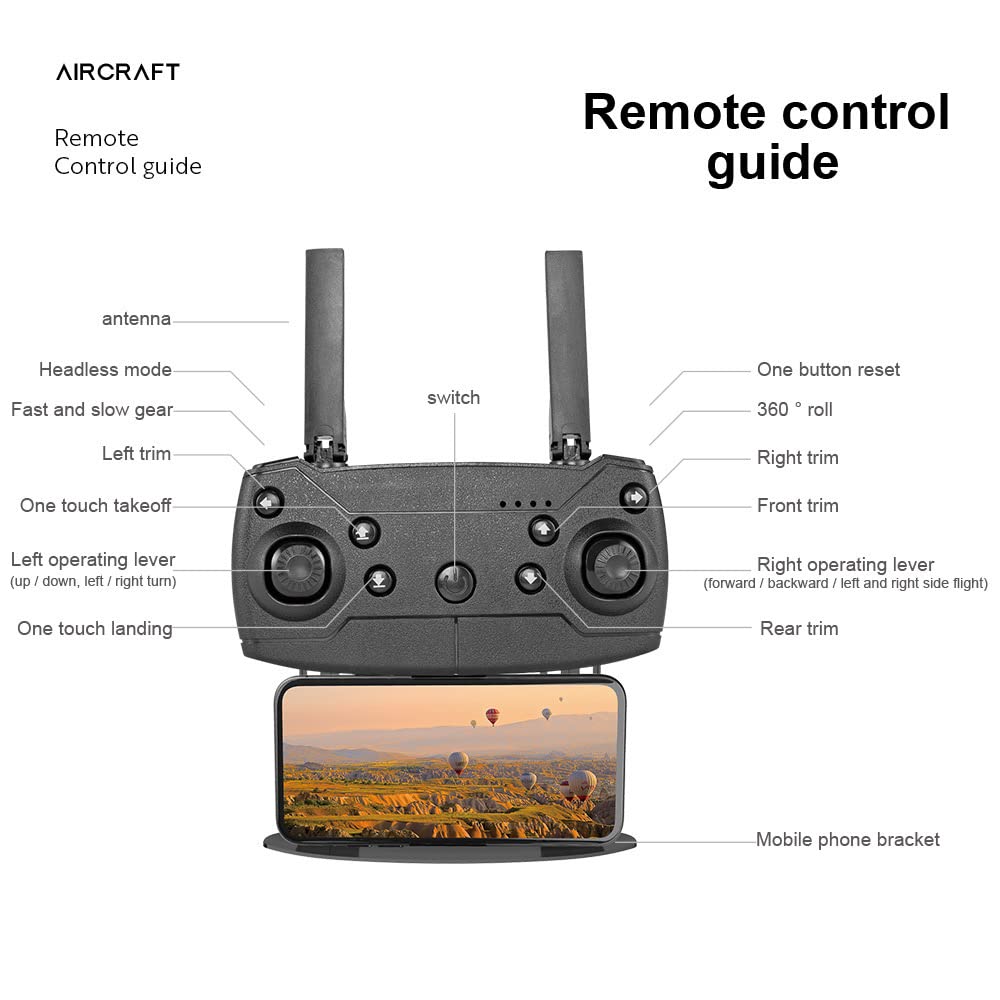
Figure 2: Drone demonstrating stable hover capability.
-
Night Flight Capability: Equipped with high-brightness LED night lights, the drone can be operated in low-light conditions, aiding navigation and direction discrimination during night flights.

Figure 3: Drone with illuminated LED lights for night operation.
-
50x زوم شوٹنگ: The integrated camera features 1-50x zoom technology, allowing the remote control to enlarge and capture distant scenes with clarity.

Figure 4: Visual representation of the 50x zoom function.
-
4K Dual Camera System: Features dual 4K cameras with adjustable angles, providing both head-up and top-view shooting options for diverse photographic needs.

Figure 5: Drone's dual 4K cameras with adjustable viewزاویہ
4. سیٹ اپ گائیڈ
4.1. بیٹری کی تنصیب اور چارجنگ
- Insert the provided 1800mAh modular battery into the drone's battery compartment. Ensure it clicks securely into place.
- Connect the USB charging cable to the drone's charging port and a suitable USB power adapter (not included).
- Allow approximately 100 minutes for a full charge. The battery provides about 20 minutes of flight time per charge.

Figure 6: Modular battery installation into the drone.
4.2. Drone Unfolding
Gently unfold the drone's arms until they lock into position. Ensure all four arms are fully extended before flight.
4.3. ریموٹ کنٹرول سیٹ اپ
Install batteries into the remote control (batteries not included). Extend the antennas and attach your mobile phone to the bracket if using the app for FPV (First Person View) or advanced controls.

Figure 7: Remote Control Guide with labeled functions.
5. آپریٹنگ ہدایات
5.1. ڈرون اور ریموٹ کنٹرول کا جوڑا بنانا
- ڈرون کو فلیٹ ، سطح کی سطح پر رکھیں۔
- Turn on the drone's power switch. The indicator lights will flash.
- Turn on the remote control. Push the left operating lever (throttle) fully up, then fully down. The drone's lights will become solid, indicating successful pairing.
5.2. Basic Flight Controls (Refer to Figure 7 for button locations)
- One Touch Takeoff: Press the 'One touch takeoff' button to automatically launch the drone to a stable hovering height.
- One Touch Landing: Press the 'One touch landing' button to automatically land the drone.
- Left Operating Lever (Throttle/Yaw): اونچائی کو کنٹرول کرنے کے لیے اوپر/نیچے دھکیلیں۔ ڈرون کو گھمانے کے لیے بائیں/دائیں دبائیں۔
- Right Operating Lever (Forward/Backward/Side Flight): Push up/down for forward/backward movement. Push left/right for left/right side flight.
- ہیڈ لیس موڈ: Activates headless mode, where the drone's orientation is relative to the pilot, simplifying control.
- Fast and Slow Gear: Adjusts the drone's flight speed (3 gear speed regulation).
- Trims (Left, Right, Front, Rear): Use these buttons to fine-tune the drone's stability if it drifts in any direction during hover.
- 360° رول: Press this button and move the right operating lever in a direction to perform a 360-degree flip.
- One Button Reset: Resets certain flight parameters or calibration.
5.3. کیمرہ آپریشن
- تصویر/ویڈیو کیپچر: Specific buttons on the remote control or within the mobile app are used to initiate photo capture or video recording.
- زوم فنکشن: Use the designated controls on the remote or app to activate the 1-50x zoom feature.
- زاویہ ایڈجسٹمنٹ: The camera angle can be adjusted manually or via remote control, depending on the model variant.
6 دیکھ بھال
- صفائی: ڈرون کی باڈی اور کیمرے کے لینس کو صاف کرنے کے لیے نرم، خشک کپڑا استعمال کریں۔ سخت کیمیکل استعمال کرنے سے گریز کریں۔
- پروپیلر معائنہ: Regularly check propellers for damage or cracks. Replace any damaged propellers immediately using the provided screwdriver.
- بیٹری کی دیکھ بھال: Store batteries in a cool, dry place. Do not overcharge or over-discharge. If storing for extended periods, charge to approximately 50% capacity.
- ذخیرہ: When not in use, fold the drone and store it in its designated storage bag to protect it from dust and physical damage.

Figure 8: Drone and remote control stored in the designated bag.
7 خرابیوں کا سراغ لگانا
| مسئلہ | ممکنہ وجہ | حل |
|---|---|---|
| ڈرون پاور آن نہیں ہوتا۔ | بیٹری چارج نہیں ہے یا صحیح طریقے سے انسٹال نہیں ہے۔ | یقینی بنائیں کہ بیٹری پوری طرح سے چارج ہے اور صحیح طریقے سے ڈالی گئی ہے۔ |
| Remote control does not connect to drone. | Incorrect pairing procedure or low remote control battery. | Repeat pairing steps (Section 5.1). Replace remote control batteries. |
| ڈرون پرواز کے دوران اڑتا ہے۔ | Improper calibration or environmental factors (wind). | Perform a flight calibration. Use trim buttons to adjust stability. Fly in calm conditions. |
| Camera not recording or taking photos. | SD card full/missing or camera not activated. | Ensure an SD card is inserted and has free space. Activate camera via remote or app. |
| مختصر پرواز کا وقت۔ | بیٹری پوری طرح سے چارج نہیں ہے یا بیٹری پرانی ہے۔ | Ensure battery is fully charged. Consider replacing the battery if it's old. |
8. وضاحتیں
| فیچر | تفصیل |
|---|---|
| ماڈل کا نام | K3 |
| آئٹم ماڈل نمبر | DGMT-4338-SRK001 |
| پروڈکٹ کے طول و عرض (جوڑا ہوا) | 12 x 10 x 5 سینٹی میٹر |
| پروڈکٹ کے طول و عرض (توسیع شدہ) | 26 x 26 x 5.5 cm (approximate, derived from image) |
| شے کا وزن | 410 گرام |
| رنگ | سیاہ |
| مواد | پلاسٹک |
| کیمرہ | Dual 4K cameras, adjustable angle, 50x zoom |
| ویڈیو کیپچر ریزولوشن | 4K |
| بیٹری کی صلاحیت | 1800 ایم اے ایچ |
| چارج کرنے کا وقت | تقریباً 100 منٹ |
| بیٹری کی زندگی | تقریباً 20 منٹ |
| ریموٹ کنٹرول سگنل | 2.4G، Wi-Fi |
| ریموٹ کنٹرول فاصلہ | تقریباً 100 میٹر |
| پرواز کی رفتار | 3 Gear Speed Regulation |
| خصوصی خصوصیات | Foldable, Integrated Camera, Rechargeable, Hover Air, LED Night Lights |
| عمر کی حد (تفصیل) | بالغ |
| مہارت کی سطح | پیشہ ورانہ |
9. وارنٹی اور سپورٹ
وارنٹی کی معلومات، تکنیکی مدد، یا سروس کے استفسارات کے لیے، براہ کرم اپنی خریداری کے ساتھ فراہم کردہ دستاویزات کا حوالہ دیں یا بیچنے والے سے براہ راست رابطہ کریں۔ کسی بھی وارنٹی دعووں کے لیے اپنی خریداری کا ثبوت رکھیں۔


