
تعارف
This manual provides detailed instructions for the setup, operation, and maintenance of your HORI PS4 Onyx Plus Wireless Controller. Please read this manual thoroughly before use to ensure proper functionality and longevity of your device.
پروڈکٹ ختمview
The HORI PS4 Onyx Plus Wireless Controller is designed for use with the PlayStation 4 console, offering wireless connectivity and a range of features for an enhanced gaming experience.
کلیدی خصوصیات
- وائرلیس رابطہ: Connects wirelessly to the PS4 console.
- Adjustable Triggers: Customizable trigger pressure.
- دوہری اینالاگ اسٹکس: عین مطابق کنٹرول کے لیے۔
- مائک بلٹ ان: For online chat and voice commands.
- ملٹی فنکشنل: Various buttons and features for diverse gameplay.
کنٹرولر لے آؤٹ
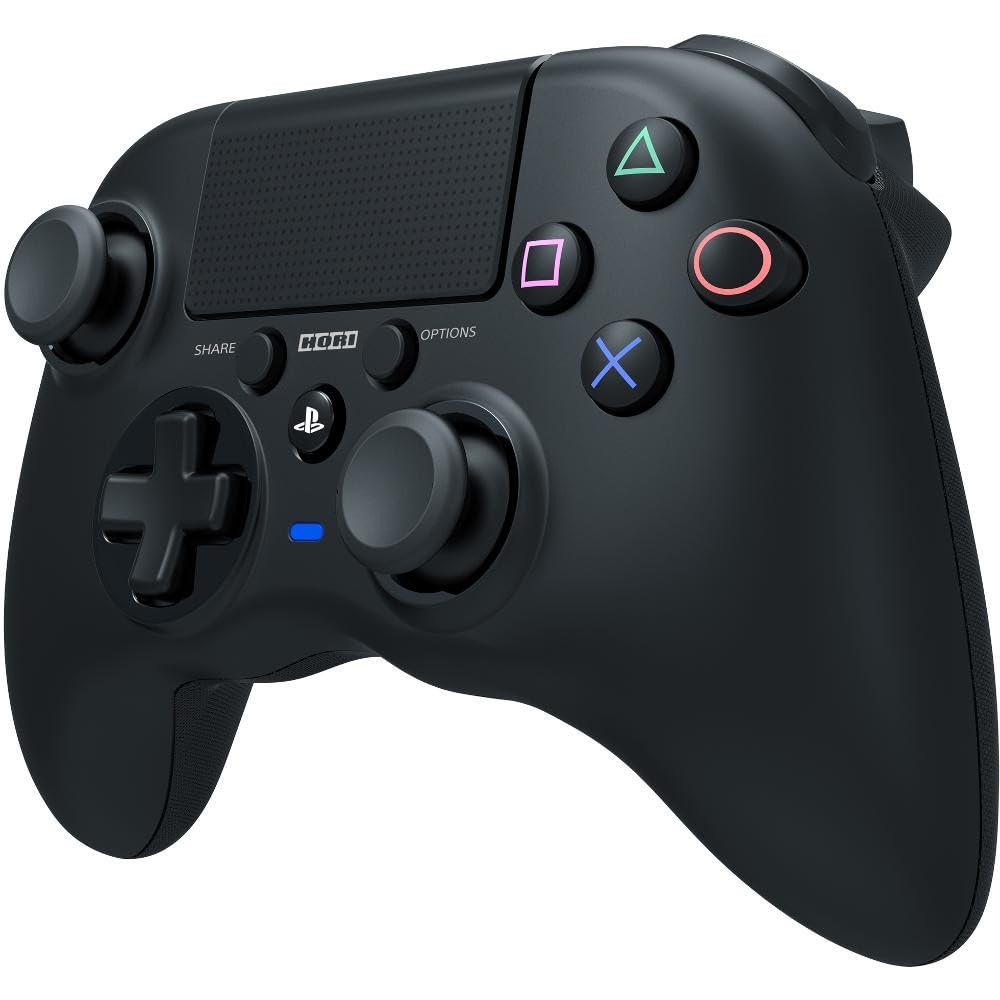
تصویر: سامنے view of the HORI PS4 Onyx Plus Wireless Controller. It features two analog sticks, a D-pad, four action buttons (Triangle, Circle, Cross, Square), Share and Options buttons, a PS button, a touchpad, and a light bar. The controller is black with textured grips.
سیٹ اپ اور ابتدائی کنکشن
کنٹرولر کو چارج کرنا
The controller includes a built-in rechargeable battery. Before first use, fully charge the controller using a standard USB charging cable. Connect the cable to the controller's charging port and a powered USB port on your PS4 console or a USB wall adapter. The light bar on the controller will indicate charging status.
پلے اسٹیشن 4 کے ساتھ جوڑا بنانا
- یقینی بنائیں کہ آپ کا پلے اسٹیشن 4 کنسول آن ہے۔
- With the controller powered off, press and hold the PS بٹن اور شیئر بٹن simultaneously until the light bar begins to flash rapidly.
- On your PS4 console, navigate to ترتیبات > آلات > بلوٹوتھ ڈیوائسز.
- Select the "HORI Onyx Plus" controller from the list of available devices.
- Once paired, the light bar will glow a solid color, indicating a successful connection.
Note: Some versions of this controller may require a USB wireless dongle for connection. If direct Bluetooth pairing is unsuccessful, refer to any included quick start guide for dongle-specific instructions.
کنٹرولر کو چلانا
بنیادی کنٹرولز
The HORI PS4 Onyx Plus Wireless Controller features standard PlayStation button layouts:
- اینالاگ اسٹکس: Used for movement and camera control. Push the sticks in for L3/R3 functions.
- ڈی پیڈ: For directional input in menus and certain games.
- ایکشن بٹن (مثلث، دائرہ، کراس، مربع): درون گیم ایکشنز انجام دیں۔
- شیئر بٹن: Access sharing options (screenshots, video clips).
- آپشنز بٹن: Pause games or access in-game menus.
- PS بٹن: Access the PS4 Home screen, switch users, or power off the console.
- ٹچ پیڈ: Functions as a clickable button and a touch-sensitive surface for specific game interactions.
Adjustable Triggers
The L2 and R2 triggers feature adjustable pressure. Consult your game's settings or the controller's specific software (if available) for customization options. This allows users to fine-tune trigger sensitivity for different game genres.
بلٹ ان مائیکروفون
The integrated microphone allows for voice chat in online multiplayer games and voice commands for the PS4 system. Ensure your PS4 audio settings are configured to use the controller's microphone.
دیکھ بھال اور دیکھ بھال
صفائی
To clean the controller, use a soft, dry cloth. For stubborn dirt, slightly dampen the cloth with water. Avoid using harsh chemicals, solvents, or abrasive materials, as these can damage the controller's finish and internal components.
بیٹری کی دیکھ بھال
- بیٹری کی عمر کو طول دینے کے لیے اسے بار بار مکمل طور پر ڈسچارج کرنے سے گریز کریں۔
- Store the controller in a cool, dry place when not in use for extended periods.
- Do not expose the controller to extreme temperatures.
خرابی کا سراغ لگانا
کنکشن کے مسائل
- کنٹرولر منسلک نہیں ہو رہا ہے: Ensure the controller is charged. Re-attempt the pairing process as described in the "Pairing with PlayStation 4" section. Move closer to the PS4 console to rule out range issues.
- وقفے وقفے سے رابطہ: Check for potential interference from other wireless devices. Ensure the controller is fully charged. If using a dongle, ensure it is securely plugged into the PS4.
ٹچ پیڈ کی حساسیت
Some users may find the touchpad to be highly sensitive. If accidental inputs occur, adjust your grip or check in-game settings for touchpad sensitivity options. There is no physical adjustment for touchpad sensitivity on the controller itself.
بیٹری کی زندگی کا اشارہ
The controller does not display battery life on the PS4 system menu. The light bar will indicate charging status, and the controller will power off when the battery is depleted.
Controller Not Turning On Console
This controller may not support turning on the PS4 console directly from a powered-off state. Power on the console manually before connecting the controller.
وضاحتیں
| فیچر | تفصیل |
|---|---|
| ماڈل نمبر | PS4-149E |
| کنیکٹوٹی | وائرلیس |
| طول و عرض (L x W x H) | 2.76 x 6.3 x 7.09 انچ |
| وزن | 8.1 اونس |
| بیٹری | 1 بیٹری (شامل) |
| سب سے پہلے دستیاب ہے۔ | 30 جنوری 2022 |
وارنٹی اور سپورٹ
مصنوعات کی وارنٹی
For information regarding the product warranty, please refer to the warranty card included with your purchase or visit the official HORI webسائٹ وارنٹی کی شرائط و ضوابط علاقے کے لحاظ سے مختلف ہو سکتے ہیں۔
کسٹمر سپورٹ
If you encounter any issues not covered in this manual or require further assistance, please contact HORI customer support. You can find contact information on the official HORI webسائٹ یا خوردہ فروش کے ذریعے جہاں آپ نے پروڈکٹ خریدی تھی۔
Visit the HORI Store on Amazon مزید مصنوعات کی معلومات اور معاون وسائل کے لیے۔