تعارف
The Volkano Cobalt Series Wireless Keyboard and Mouse Combo is designed for seamless integration with laptops and desktops, offering a compact and lightweight solution for both home and office environments. This versatile combo provides the freedom of wireless connectivity, enhancing productivity and comfort.
The keyboard features a full number pad and multimedia shortcut keys for efficient data entry and quick access to common functions. The accompanying mouse offers smooth tracking and adjustable DPI settings, ensuring precise navigation for various tasks.
حفاظتی معلومات
- آلے کو پانی اور نمی سے دور رکھیں۔
- آلہ کو خود سے جدا کرنے یا مرمت کرنے کی کوشش نہ کریں۔ تمام خدمات کو اہل اہلکاروں سے رجوع کریں۔
- ڈیوائس کو انتہائی درجہ حرارت یا براہ راست سورج کی روشنی میں بے نقاب کرنے سے گریز کریں۔
- مقامی ضابطوں کے مطابق بیٹریوں کو ذمہ داری سے ٹھکانے لگائیں۔
- Use only specified battery types (AAA) for both keyboard and mouse.
پیکیج کے مشمولات

Image: The retail packaging of the Volkano Cobalt Series Wireless Keyboard and Mouse Combo, showing the wireless mouse, wireless keyboard, and Nano Receiver.
- وولکانو کوبالٹ سیریز وائرلیس کی بورڈ
- وولکانو کوبالٹ سیریز وائرلیس ماؤس
- Nano USB Unifying Receiver
- صارف دستی (یہ دستاویز)
نوٹ: AAA batteries for both the keyboard and mouse are not included and must be purchased separately.
سیٹ اپ
1. بیٹریاں نصب کرنا

تصویر: اوپر سے نیچے view of the keyboard and mouse, highlighting the battery compartments for each device and the slot for the Nano USB receiver within the mouse.
- کی بورڈ: Locate the battery compartment on the underside of the keyboard. Open the cover and insert one (1) AAA battery, ensuring correct polarity (+/-). Close the cover.
- ماؤس: Locate the battery compartment on the underside of the mouse. Open the cover and insert one (1) AAA battery, ensuring correct polarity (+/-). Close the cover.
2. Connecting the Nano USB Receiver

تصویر: ایک تفصیلی view of the compact Nano USB receiver, with accompanying graphics illustrating its wireless capability (up to 26 ft) and compatibility with both iOS and Windows operating systems.
- The Nano USB receiver is typically stored inside the mouse's battery compartment for convenience. Remove it before use.
- Insert the Nano USB receiver into an available USB port on your computer (PC, Desktop, Laptop).
- The system will automatically detect and install the necessary drivers. No additional software installation is required.
Once the receiver is connected, turn on both the keyboard and mouse using their respective On/Off switches, usually located on the underside of each device. The devices should connect automatically within a few seconds.
آپریٹنگ ہدایات
کی بورڈ کا استعمال
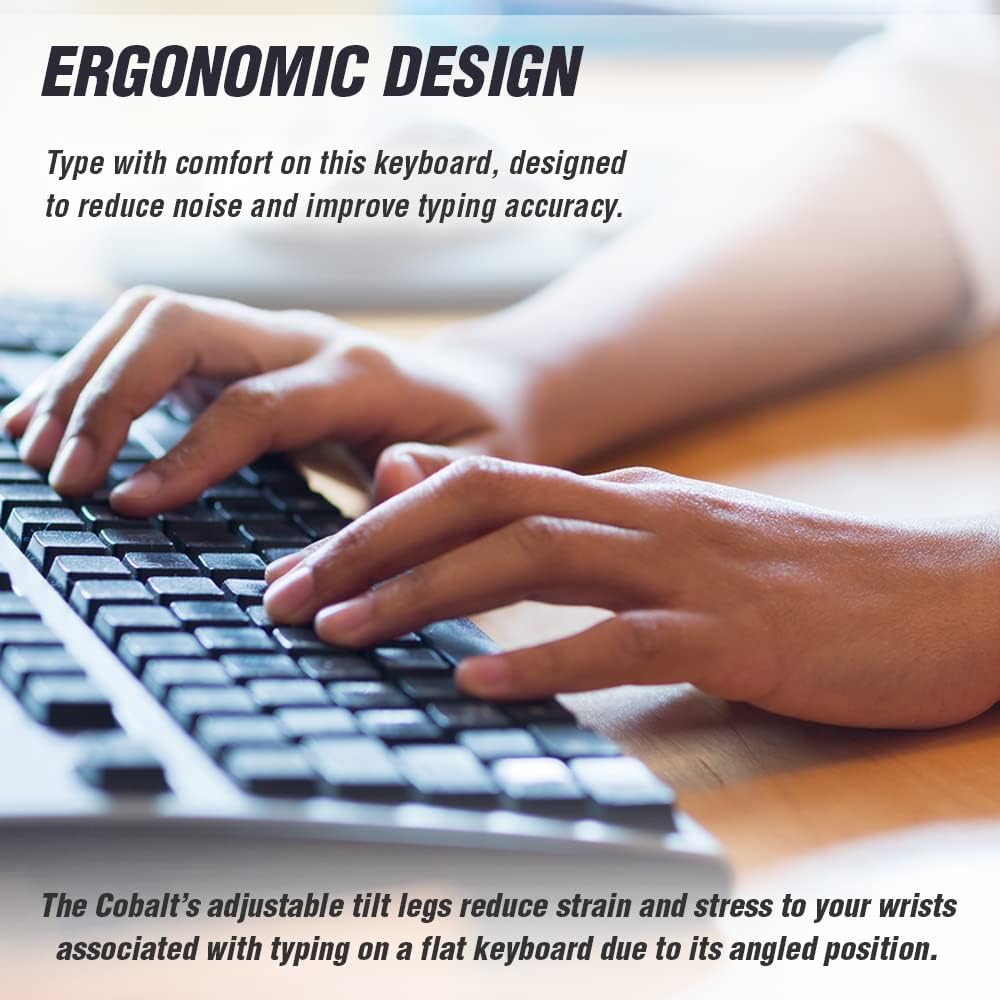
Image: A user's hands positioned on the Volkano Cobalt Series keyboard, demonstrating comfortable typing posture. The image emphasizes the ergonomic design and adjustable tilt legs that help reduce wrist strain.
- معیاری ٹائپنگ: Use the keyboard as a standard QWERTY layout for text input.
- ملٹی میڈیا ہاٹکیز: The keyboard features 12 FN multimedia hotkeys (F1-F12) that allow for quick access to various functions. To use these, press the Fn key simultaneously with the desired F-key. Functions include:
- میڈیا چلائیں/روکیں۔
- والیوم اوپر/نیچے/خاموش کریں۔
- پچھلا/اگلا ٹریک۔
- Web browser launch
- Email client launch
- My Computer/This PC
- تلاش کریں
- سایڈست جھکاؤ ٹانگیں: For improved ergonomics and comfort, extend the tilt legs located on the underside of the keyboard to adjust the typing angle.
ماؤس کا استعمال

تصویر: اوپر سے نیچے view of the Volkano Cobalt Series mouse, accompanied by illustrations of hands demonstrating both left-handed and right-handed grips, emphasizing its ambidextrous design.
- بنیادی آپریشن: The mouse features standard left-click, right-click, and scroll wheel functions.
- سایڈست DPI: The mouse offers three adjustable DPI (Dots Per Inch) levels: 800, 1200, and 1600. To change the DPI, press the DPI button, usually located near the scroll wheel. Each press cycles through the available DPI settings, allowing you to adjust cursor sensitivity for different tasks (e.g., lower DPI for precision work, higher DPI for faster navigation).
- محیطی ڈیزائن: The mouse is designed to be comfortable for both left-handed and right-handed users.
دیکھ بھال
- صفائی: کی بورڈ اور ماؤس کی سطحوں کو صاف کرنے کے لیے نرم، خشک کپڑا استعمال کریں۔ ضدی گندگی کے لیے، تھوڑا سا ڈیamp ہلکے صابن کے ساتھ کپڑا استعمال کیا جا سکتا ہے، اس بات کو یقینی بناتے ہوئے کہ آلات میں کوئی مائع داخل نہ ہو۔
- بیٹری کی تبدیلی: When the devices become unresponsive or exhibit erratic behavior, it is likely time to replace the AAA batteries. Turn off the devices before replacing batteries.
- ذخیرہ: When not in use for extended periods, turn off both the keyboard and mouse to conserve battery life. Store the Nano USB receiver inside the mouse's battery compartment to prevent loss.
خرابی کا سراغ لگانا
| مسئلہ | ممکنہ حل |
|---|---|
| کی بورڈ یا ماؤس جواب نہیں دے رہا ہے۔ |
|
| وقفہ یا وقفے وقفے سے رابطہ۔ |
|
| ماؤس کا کرسر بے ترتیب ہے یا آسانی سے حرکت نہیں کر رہا ہے۔ |
|
| Multimedia hotkeys not working. |
|
وضاحتیں
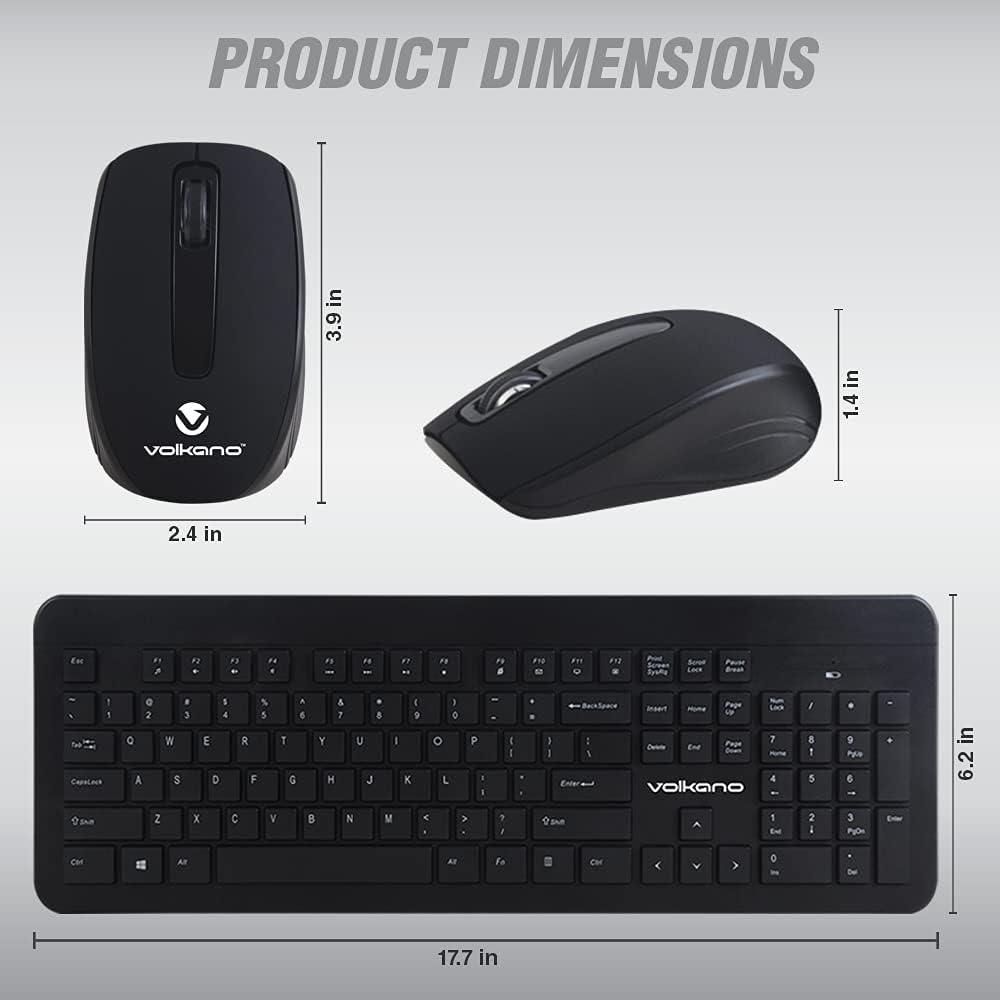
Image: A technical diagram illustrating the physical dimensions of both the Volkano Cobalt Series wireless mouse (3.9 in length, 2.4 in width, 1.4 in height) and keyboard (17.7 in length, 6.2 in width).
- ماڈل: VK-20120-BK
- کنیکٹوٹی: 2.4 گیگا ہرٹز وائرلیس
- وصول کنندہ: Nano USB 2-in-1 Receiver
- وائرلیس رینج: 26 فٹ (8 میٹر) تک
- کی بورڈ بیٹری: 1 x AAA (شامل نہیں)
- ماؤس بیٹری: 1 x AAA (شامل نہیں)
- ماؤس ڈی پی آئی لیولز: 800/1200/1600 DPI
- مطابقت: Windows 2000 / XP / 7 / 8 / 10 / Vista, iOS (via USB)
- رنگ: سیاہ
- کی بورڈ کے طول و عرض: Approximately 17.7 in (L) x 6.2 in (W)
- ماؤس کے طول و عرض: Approximately 3.9 in (L) x 2.4 in (W) x 1.4 in (H)
وارنٹی اور سپورٹ
Volkano products are covered by a 1 سال کی محدود وارنٹی from the date of purchase. This warranty covers manufacturing defects and workmanship. It does not cover damage caused by misuse, accident, unauthorized modification, or normal wear and tear.
For warranty claims, technical support, or any questions regarding your Volkano Cobalt Series Wireless Keyboard and Mouse Combo, please contact Volkano customer service through the official Volkano website or your retailer's support channels. Please have your model number (VK-20120-BK) and proof of purchase ready when contacting support.
You may also be eligible to extend your coverage for an additional 12 months by registering your product on the official Volkano website, providing a total of 24 months of coverage.