
تعارف
Thank you for choosing the LAOPAO PS6100 Digital Stopwatch. This handheld, waterproof stopwatch features a large LCD display, 1/100 second precision timing, and multiple functions including a daily alarm, timer, and metronome. Designed for sports, training, and general timing needs, this manual provides detailed instructions for its operation and maintenance.

Image: The LAOPAO PS6100 Digital Stopwatch, a silver-colored device with a large LCD display and three control buttons on top, attached to a white lanyard.
پروڈکٹ ختمview اور بٹن کے افعال
The LAOPAO PS6100 stopwatch features three primary control buttons and a clear LCD display. Understanding these controls is essential for proper operation.
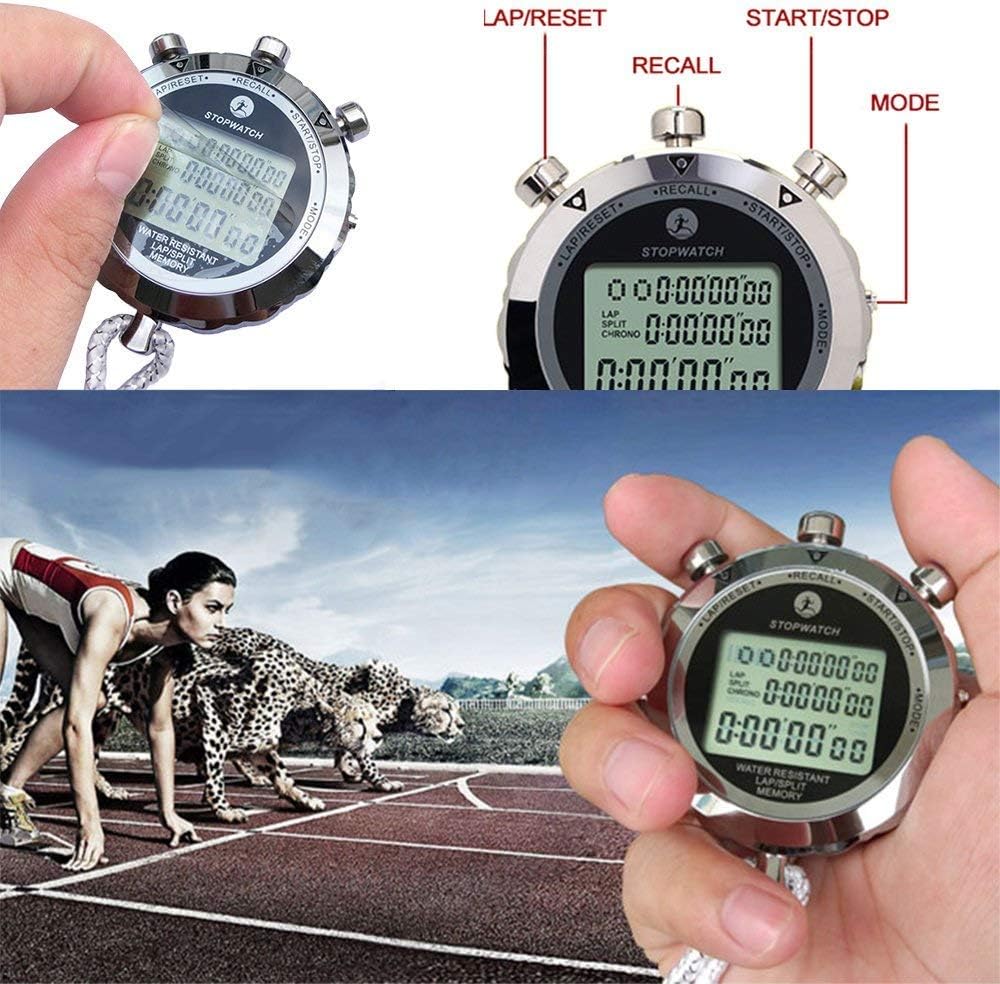
Image: Close-up of the LAOPAO PS6100 stopwatch highlighting the three buttons: "LAP/RESET" (left), "RECALL" (top center), and "START/STOP" (right). The "MODE" button is indicated on the right side of the stopwatch body.
- اسٹارٹ/اسٹاپ بٹن: Initiates and pauses timing in stopwatch mode. Used for setting values in other modes.
- لیپ/ری سیٹ بٹن: Records lap times or resets the stopwatch. Used for adjusting values in other modes.
- موڈ بٹن: Cycles through different operational modes (Time, Stopwatch, Alarm, Timer, Metronome).
- یاد کریں بٹن: Accesses stored lap/split times in stopwatch mode.
سیٹ اپ
بیٹری کی تنصیب
The LAOPAO PS6100 stopwatch requires one Lithium-ion battery for operation. Ensure the battery is correctly installed according to the polarity markings inside the battery compartment. If the display is dim or unresponsive, replace the battery.
ابتدائی وقت کی ترتیب
Upon first use or after battery replacement, you may need to set the current time and date.
- دبائیں موڈ button repeatedly until the time display mode is shown (typically displaying hour, minute, second, day, month, and date).
- دبائیں اور تھامیں۔ ایل اے پی/ری سیٹ button until the digits begin to flash, indicating setting mode.
- استعمال کریں۔ شروع/روکیں۔ button to adjust the flashing value (e.g., seconds, minutes, hours).
- استعمال کریں۔ ایل اے پی/ری سیٹ button to move to the next setting (e.g., from seconds to minutes, then hours, date, month, day of the week).
- تمام ترتیبات درست ہونے کے بعد، دبائیں موڈ سیٹنگ موڈ سے باہر نکلنے کے لیے بٹن۔
آپریٹنگ ہدایات
The stopwatch offers several modes for various timing and display needs. Use the موڈ ان کے ذریعے سائیکل کرنے کے لئے بٹن.

Image: A composite image showing the different display modes of the LAOPAO PS6100 stopwatch: Clock, Alarm clock, Stopwatch, Timer, and Metronome (Pace).
1. Time Display Mode (Clock)
This mode displays the current time (hour, minute, second), day of the week, month, and date. It also supports 12-hour and 24-hour formats. To switch between 12/24-hour display, press the شروع/روکیں۔ button while in time display mode.
2. Stopwatch Mode (Chronograph)
This mode is used for precise timing of events, accurate to 1/100th of a second. It supports split and lap timing.
- دبائیں موڈ until "STOPWATCH" or "CHRONO" is displayed.
- دبائیں شروع/روکیں۔ وقت شروع کرنے کے لیے۔
- ریکارڈ کرنا a گود کا وقت (time for a segment while the main timer continues), press ایل اے پی/ری سیٹ. The lap time will be displayed briefly.
- ریکارڈ کرنا a تقسیم وقت (time from the start to a specific point, pausing the display but not the timer), press ایل اے پی/ری سیٹ. The split time will be displayed. Press ایل اے پی/ری سیٹ دوبارہ چلانے کے وقت پر واپس آنے کے لیے۔
- دبائیں شروع/روکیں۔ اسٹاپ واچ کو روکنے کے لیے دوبارہ۔
- موقوف ہونے پر، دبائیں۔ ایل اے پی/ری سیٹ اسٹاپ واچ کو صفر پر ری سیٹ کرنے کے لیے۔
- To recall stored lap/split times, press the یاد کریں button while the stopwatch is paused and reset. Use شروع/روکیں۔ اور ایل اے پی/ری سیٹ to navigate through stored records.
3. Daily Alarm Mode
ایک مخصوص وقت پر آواز دینے کے لیے روزانہ کا الارم سیٹ کریں۔
- دبائیں موڈ until "ALARM" is displayed.
- دبائیں اور تھامیں۔ ایل اے پی/ری سیٹ الارم کے وقت کے ہندسے فلیش تک۔
- استعمال کریں۔ شروع/روکیں۔ to adjust the flashing value (hours, then minutes).
- استعمال کریں۔ ایل اے پی/ری سیٹ گھنٹے اور منٹ کی ترتیبات کے درمیان منتقل کرنے کے لیے۔
- دبائیں موڈ ترتیب موڈ کی تصدیق اور باہر نکلنے کے لیے۔
- الارم کو آن/آف کرنے کے لیے، دبائیں۔ شروع/روکیں۔ while in alarm display mode (not setting mode). An alarm icon will appear/disappear.
4. Timer Mode (Countdown)
Use the timer for countdown functions.
- دبائیں موڈ until "TIMER" or "TR" is displayed.
- دبائیں اور تھامیں۔ ایل اے پی/ری سیٹ until the timer digits flash.
- استعمال کریں۔ شروع/روکیں۔ to adjust the flashing value (hours, minutes, seconds).
- استعمال کریں۔ ایل اے پی/ری سیٹ to move between settings.
- دبائیں موڈ ترتیب موڈ کی تصدیق اور باہر نکلنے کے لیے۔
- دبائیں شروع/روکیں۔ to start the countdown. Press again to pause.
- موقوف ہونے پر، دبائیں۔ ایل اے پی/ری سیٹ ٹائمر کو اس کی سیٹ ویلیو پر ری سیٹ کرنے کے لیے۔
5. Metronome Mode (Pace)
The metronome function provides a rhythmic beat for training.
- دبائیں موڈ until "PACE" is displayed.
- دبائیں اور تھامیں۔ ایل اے پی/ری سیٹ until the pace value flashes.
- استعمال کریں۔ شروع/روکیں۔ to adjust the desired pace (beats per minute).
- دبائیں موڈ ترتیب موڈ کی تصدیق اور باہر نکلنے کے لیے۔
- دبائیں شروع/روکیں۔ to start the metronome. Press again to stop.
دیکھ بھال
To ensure the longevity and optimal performance of your LAOPAO PS6100 stopwatch, follow these maintenance guidelines:
- صفائی: سٹاپ واچ کو نرم، خشک کپڑے سے صاف کریں۔ ضدی گندگی کے لیے، تھوڑا سا ڈیamp کپڑے کو فوری طور پر خشک کرنے کے بعد استعمال کیا جا سکتا ہے۔ سخت کیمیکلز یا کھرچنے والے کلینر سے پرہیز کریں۔
- پانی کی مزاحمت: The stopwatch is designed to be waterproof for daily use and sports activities. However, avoid prolonged submersion or operating buttons underwater to prevent water ingress.
- ذخیرہ: اسٹاپ واچ کو براہ راست سورج کی روشنی اور انتہائی درجہ حرارت سے دور ٹھنڈی، خشک جگہ پر اسٹور کریں۔
- بیٹری کی تبدیلی: If the display becomes dim or functions are erratic, replace the battery promptly. Refer to the "Battery Installation" section for guidance.
خرابی کا سراغ لگانا
If you encounter issues with your LAOPAO PS6100 stopwatch, refer to the following common problems and solutions:
- کوئی ڈسپلے یا مدھم ڈسپلے نہیں:
- Check battery level. Replace the battery if necessary.
- Ensure the battery is installed with correct polarity.
- غیر جوابی بٹن:
- یقینی بنائیں کہ اسٹاپ واچ لاک موڈ میں نہیں ہے (اگر قابل اطلاق ہو، اگرچہ اس ماڈل کے لیے مخصوص نہیں کیا گیا ہے)۔
- بیٹری کو ہٹا کر اور دوبارہ ڈال کر آلہ کو دوبارہ ترتیب دینے کی کوشش کریں۔
- غلط وقت/تاریخ:
- Refer to the "Initial Time Setting" section to re-adjust the time and date.
- پانی کا نقصان:
- While waterproof, extreme conditions or button presses underwater can cause issues. If water ingress is suspected, discontinue use and allow the device to dry completely in a dry, warm environment. Do not attempt to open the device.
وضاحتیں
| فیچر | تفصیل |
|---|---|
| ماڈل نمبر | PS6100 |
| مواد | سٹینلیس سٹیل |
| ابعاد (پروڈکٹ) | 6 x 1 x 4 سینٹی میٹر (تقریبا) |
| شے کا وزن | 180 گرام |
| ڈسپلے کی قسم | بڑا LCD |
| ڈسپلے سائز | 3.6 سینٹی میٹر |
| وقت کی درستگی | 1/100 سیکنڈ |
| پانی کی مزاحمت | Yes (suitable for daily use and sports) |
| بیٹری درکار ہے۔ | 1 لیتھیم آئن بیٹری |
| افعال | Clock, Stopwatch (Lap/Split), Daily Alarm, Timer, Metronome |
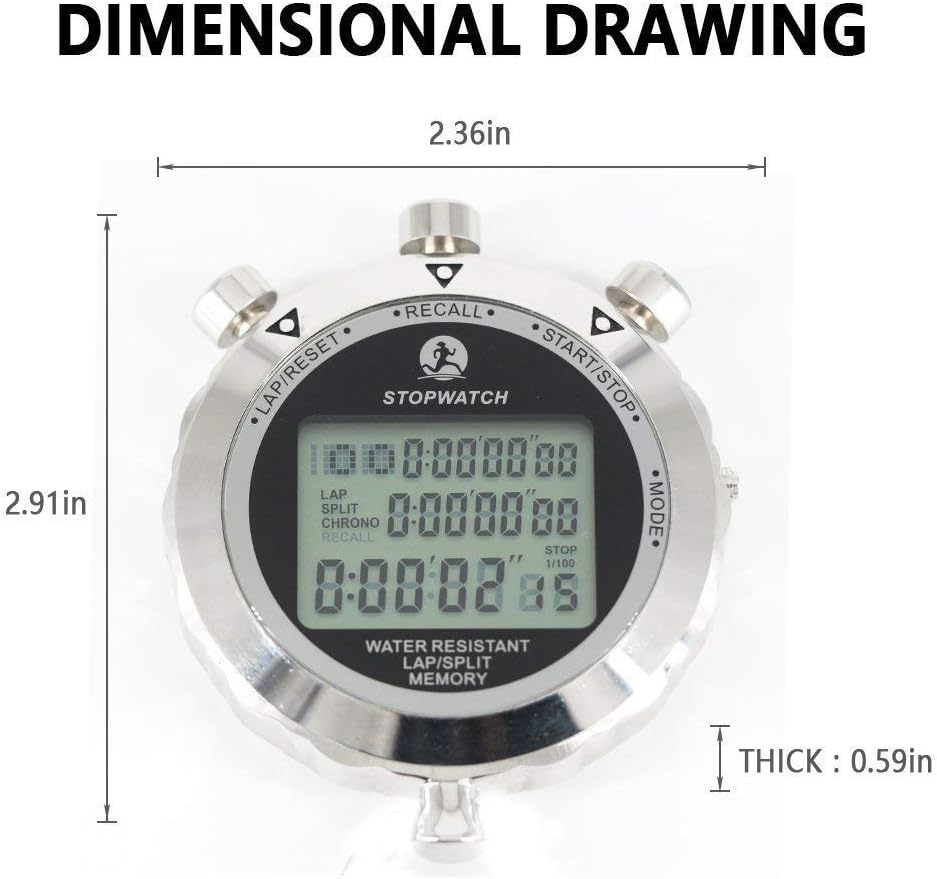
Image: A dimensional drawing of the LAOPAO PS6100 stopwatch, indicating its width as 2.36 inches, height as 2.91 inches, and thickness as 0.59 inches.
وارنٹی اور سپورٹ
Information regarding specific warranty terms or direct customer support contacts for the LAOPAO PS6100 Digital Stopwatch is not available in the provided product data. For warranty claims or technical assistance, please refer to the retailer or the official LAOPAO webاگر دستیاب ہو تو سائٹ۔