
1. تعارف
The ZEBRONICS ZEB-DB250JP is a versatile Bluetooth wireless gamepad designed for an enhanced gaming experience across multiple platforms. It features 17 buttons, dual analog sticks, dual vibration motors, and quad front triggers for precise control. This gamepad is compatible with Android smartphones, tablets, Android TV boxes, Android TVs, and PCs running Windows 98 / 2000 / ME / XP / NT / VISTA / 7 / 8 / 10. It also supports PS3 consoles. The ergonomic design ensures comfortable use, and a phone mount is included for mobile gaming.
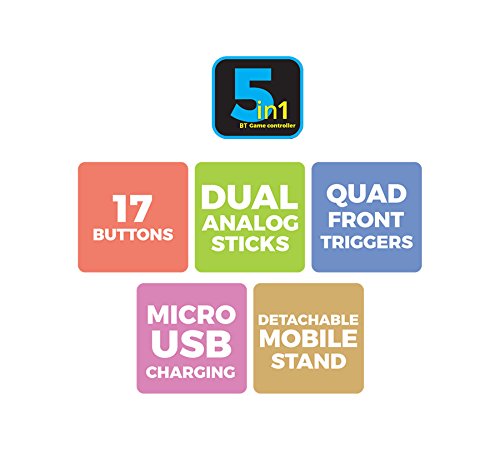
تصویر 1: ختمview of ZEB-DB250JP key features including 17 buttons, dual analog sticks, quad front triggers, micro USB charging, and a detachable mobile stand.
2. باکس میں کیا ہے۔
- 1 x ZEB-DB250JP Joypad
- 1 ایکس مائیکرو USB چارجنگ کیبل
- 1 x Detachable Phone Mount
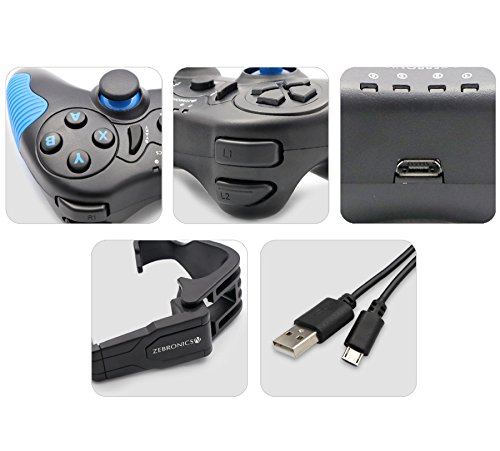
Image 2: A collage showing the ZEB-DB250JP gamepad, its triggers, micro USB port, detachable phone mount, and charging cable.
3. سیٹ اپ
3.1 گیم پیڈ کو چارج کرنا
Before initial use, fully charge the gamepad. Connect the provided Micro USB cable to the gamepad's charging port and the other end to a USB power source (e.g., computer USB port, USB wall adapter). The built-in 300mAh battery provides extended playtime.

تصویر 3: اوپر view of the ZEB-DB250JP gamepad, highlighting the Micro USB charging port located between the L1/R1 and L2/R2 triggers.
3.2 Bluetooth Pairing (Android Devices & PS3)
- یقینی بنائیں کہ گیم پیڈ چارج ہے۔
- دبائیں اور تھامیں۔ گھر button along with the X button simultaneously until the indicator lights on the gamepad begin to flash, indicating it is in pairing mode.
- On your Android smartphone, tablet, Android TV box, or Android TV, navigate to the Bluetooth settings.
- تلاش کریں۔ available devices and select "ZEB-DB250JP" (or similar name) from the list.
- Once connected, the indicator light on the gamepad will become solid. The Bluetooth range is approximately 8 meters.
- For PS3, connect the gamepad via USB cable first, then follow the console's instructions for pairing a new controller.
3.3 پی سی کنکشن
For PC gaming, the ZEB-DB250JP can be connected via the provided USB cable. Simply plug the Micro USB end into the gamepad and the USB-A end into an available USB port on your computer. The gamepad is compatible with Windows 98 / 2000 / ME / XP / NT / VISTA / 7 / 8 / 10 and should be recognized automatically.
3.4 Attaching the Phone Mount
To use the gamepad with your smartphone, attach the included phone mount to the designated slot on the gamepad. Secure your smartphone firmly into the mount.
4. آپریٹنگ ہدایات
4.1 بٹن لے آؤٹ
The ZEB-DB250JP features a standard gamepad layout with 17 buttons, including:
- دوہری اینالاگ اسٹکس: عین مطابق حرکت اور کیمرے کے کنٹرول کے لیے۔
- ڈی پیڈ: Directional pad for menu navigation and specific game inputs.
- ایکشن بٹن (A, B, X, Y): درون گیم ایکشنز کے لیے۔
- Quad Front Triggers (L1, L2, R1, R2): For additional actions, often used for shooting or accelerating.
- ہوم بٹن: For power on/off and system functions.
- SELECT/BACK and START/MENU Buttons: For game menus and options.


Image 4: Left side of the ZEB-DB250JP gamepad showing the D-pad and left analog stick. Image 5: Right side of the ZEB-DB250JP gamepad showing the action buttons (A, B, X, Y) and right analog stick.
4.2 پاور آن/آف
- پاور آن کرنے کے لیے، دبائیں۔ گھر بٹن
- بجلی بند کرنے کے لئے ، دبائیں اور دبائیں گھر button for a few seconds until the gamepad shuts down.
4.3 گیمنگ
Once connected, the gamepad should be recognized by compatible games. Refer to your game's settings for controller configuration and button mapping. The dual vibration motors provide haptic feedback for an immersive gaming experience.
5 دیکھ بھال
- صفائی: Use a soft, dry cloth to clean the gamepad. Avoid using harsh chemicals or abrasive materials.
- ذخیرہ: گیم پیڈ کو براہ راست سورج کی روشنی اور انتہائی درجہ حرارت سے دور ٹھنڈی، خشک جگہ پر اسٹور کریں۔
- بیٹری کی دیکھ بھال: بیٹری کی زندگی کو طول دینے کے لیے، بار بار بیٹری کو مکمل طور پر خارج کرنے سے گریز کریں۔ گیم پیڈ کو باقاعدگی سے چارج کریں، چاہے وہ طویل عرصے تک استعمال میں نہ ہوں۔
6 خرابیوں کا سراغ لگانا
- گیم پیڈ بلوٹوتھ کے ذریعے منسلک نہیں ہو رہا ہے:
- Ensure the gamepad is charged.
- Make sure the gamepad is in pairing mode (HOME + X).
- Turn off and on Bluetooth on your device.
- Forget the device from your Bluetooth settings and try pairing again.
- Ensure your device is within the 8-meter Bluetooth range. - Buttons unresponsive or delayed input:
- بیٹری کی سطح چیک کریں اور کم ہونے پر چارج کریں۔
- Ensure there are no obstructions between the gamepad and the connected device.
- For PC, try connecting via USB cable to rule out wireless interference.
- Restart the gamepad and the connected device. - گیم پیڈ چارج نہیں ہو رہا ہے:
- Verify the Micro USB cable is securely connected to both the gamepad and the power source.
- Try a different Micro USB cable or power adapter.
- Ensure the power source is functional. - کمپن کام نہیں کر رہا ہے:
- Check if the game supports vibration feedback.
- Ensure vibration settings are enabled in the game or device settings.
7. وضاحتیں
| برانڈ | زیبراونکس |
| ماڈل کا نام | ینالاگ چھڑی |
| ہم آہنگ آلات | Android, PC, PS3 |
| کنٹرولر کی قسم | گیم پیڈ |
| کنیکٹوٹی ٹیکنالوجی | بلوٹوتھ(v3.0) |
| مصنوعات کی خصوصیات | Wireless, Dual Vibration Motors |
| بٹن کی مقدار | 17 |
| پاور ماخذ کی قسم | بیٹری سے چلنے والا |
| بیٹری | Built-in 300mAH |
| بلوٹوتھ رینج | 8m |
| شے کا وزن | 370 گرام |
| آئٹم کے طول و عرض | 17 x 12 x 6 سینٹی میٹر |
| رنگ | Red (as per product details, though main image shows black/red) |
| ماڈل نمبر | DB250JP |
8. وارنٹی اور سپورٹ
The ZEBRONICS ZEB-DB250JP Bluetooth Gamepad Joystick comes with a 1 سال کی وارنٹی. For any warranty claims or service, please carry the product to an authorized ZEBRONICS Service Center. For a list of service centers, refer to the product information provided at the time of purchase or visit the official ZEBRONICS webسائٹ
For further assistance or technical support, please contact ZEBRONICS customer service.