
تعارف
The Pioneer Elite VSX-LX302 is an advanced audio/video component receiver designed to deliver immersive sound and high-quality video experiences. It supports DTS:X and Dolby Atmos for multi-dimensional audio, enhanced by Reflex Optimizer for Atmos-enabled speakers. The receiver is compatible with Ultra HD video, HDR10, and Dolby Vision, supporting 4K/60p/4:4:4/24-bit content. Connectivity features include FireConnect, Chromecast built-in, and DTS Play-Fi for multi-room audio streaming. It offers a phono input and six HDMI inputs, providing versatile options for various home entertainment setups.
کلیدی خصوصیات
- پاور آؤٹ پٹ: 200 W/Ch. (6 ohms, 1 kHz, THD 10 %, 1Ch Driven) / 100 W/Ch. (8 ohms, 20 Hz-20 kHz, THD 0.08 %, 2Ch Driven, FTC)
- آڈیو فارمیٹس: Multi-dimensional sound processing with Dolby Atmos & DTS:X.
- ویڈیو مطابقت: Ultra HD pass-through with HDCP 2.2, Dolby Vision compatible with HDR10 and BT.2020 support (4K/60p/4:4:4/24-bit).
- انشانکن: MCACC Auto Room Tuning and synchronized sound with Phase Control.
- اسپیکر سپورٹ: Supports 4 Ohm speakers.
- Wireless & Multi-room Audio: Features FireConnect, Chromecast built-in, and DTS Play-Fi Technologies.
سیٹ اپ
پیک کھولنا اور مشمولات
پیکیجنگ سے تمام اجزاء کو احتیاط سے ہٹا دیں۔ یقینی بنائیں کہ درج ذیل اشیاء موجود ہیں:
- Pioneer Elite VSX-LX302 Receiver
- ریموٹ کنٹرول
- AAA بیٹریاں (2)
- Room Calibration Microphone
- ہدایات دستی (یہ دستاویز)
- ایف ایم اینٹینا
- AM اینٹینا
Connecting Your Receiver
Before making any connections, ensure the receiver is powered off and unplugged from the wall outlet.
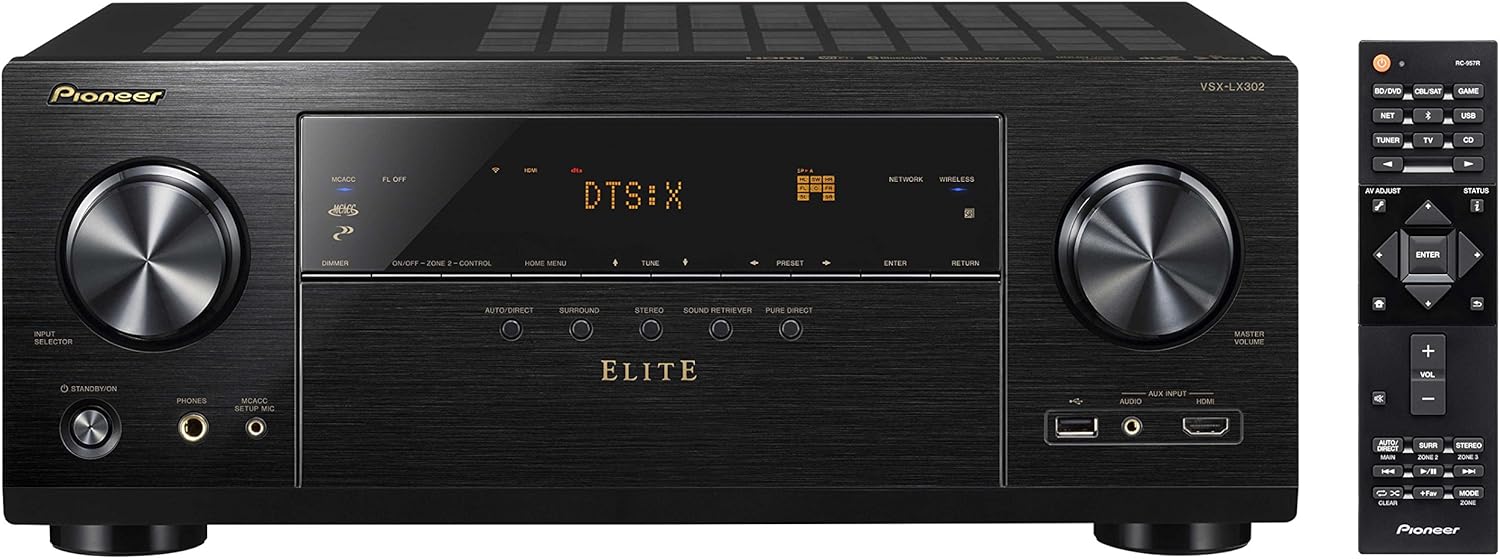
شکل 1: سامنے view of the Pioneer Elite VSX-LX302 receiver, showing input selector, display, and volume controls.

شکل 2: پیچھے view of the Pioneer Elite VSX-LX302 receiver, detailing various audio and video input/output ports.
اسپیکر کنکشنز
Connect your speakers to the corresponding terminals on the rear panel (Figure 2). The VSX-LX302 supports a 7.2 channel configuration. Ensure correct polarity (+ to + and - to -) for optimal sound quality. This receiver supports 4 Ohm speakers.
HDMI کنکشن۔
Connect your video sources (e.g., Blu-ray player, gaming console, streaming device) to the HDMI IN ports on the rear panel. Connect your TV or projector to the HDMI OUT (ARC) port. The receiver features 6 HDMI inputs and 2 HDMI outputs, all supporting HDCP 2.2, Dolby Vision, HDR10, and BT.2020.
آڈیو کنکشنز
Utilize the various audio inputs for other devices. A dedicated PHONO input is available for turntables. Digital audio inputs (optical and coaxial) are also provided.
نیٹ ورک کنکشن
Connect the receiver to your home network via an Ethernet cable to the NETWORK port or use the built-in Wi-Fi for wireless connectivity. This enables features like Chromecast built-in, DTS Play-Fi, and internet radio.
Automatic Room Calibration (MCACC)
Use the included Room Calibration Microphone and the MCACC (Multi-Channel Acoustic Calibration System) feature to automatically optimize the sound settings for your specific listening environment. Follow the on-screen instructions displayed on your TV.
آپریٹنگ ہدایات
پاورنگ آن/آف
رسیور کو آن یا آف کرنے کے لیے فرنٹ پینل یا ریموٹ کنٹرول پر پاور بٹن دبائیں۔
ان پٹ سلیکشن
Use the INPUT SELECTOR knob on the front panel or the corresponding buttons on the remote control to switch between connected audio/video sources (e.g., BD/DVD, GAME, SAT/CATV, CD).
والیوم کنٹرول
Adjust the volume using the MASTER VOLUME knob on the front panel or the VOLUME +/- buttons on the remote control.
ساؤنڈ موڈز
Select various sound modes (e.g., Auto Direct, Surround, Stereo, Pure Direct) to optimize audio playback for different content types. The receiver supports Dolby Atmos and DTS:X for immersive surround sound.
نیٹ ورک کی خصوصیات
Access streaming services, internet radio, and multi-room audio functionalities (FireConnect, Chromecast built-in, DTS Play-Fi) through the receiver's network connection. Control these features using the Pioneer Remote App on your smartphone or tablet.
دیکھ بھال
To ensure optimal performance and longevity of your Pioneer Elite VSX-LX302 receiver, follow these maintenance guidelines:
- صفائی: نرم، خشک کپڑے سے باہر کو باقاعدگی سے صاف کریں۔ کھرچنے والے کلینر یا سالوینٹس کے استعمال سے پرہیز کریں۔
- وینٹیلیشن: Ensure adequate ventilation around the receiver. Do not block ventilation openings. Allow sufficient space (at least 6 inches) above and around the unit for proper airflow.
- دھول ہٹانا: Periodically use a soft brush or a vacuum cleaner with a brush attachment to remove dust from the ventilation grilles.
- پاور کی ہڈی: Inspect the power cord for any damage. If damaged, discontinue use and contact qualified service personnel.
- ماحولیاتی حالات: Avoid exposing the receiver to extreme temperatures, humidity, direct sunlight, or excessive dust.
خرابی کا سراغ لگانا
اگر آپ کو اپنے وصول کنندہ کے ساتھ مسائل کا سامنا کرنا پڑتا ہے تو، مندرجہ ذیل عام ٹربل شوٹنگ کے اقدامات سے رجوع کریں:
- کوئی طاقت نہیں: Ensure the power cord is securely plugged into the receiver and a working wall outlet. Check if the power outlet is active.
- کوئی آواز نہیں: Verify that the correct input source is selected. Check all speaker connections for proper polarity and secure fit. Ensure the volume is not muted or set too low. Confirm that the speakers are enabled in the receiver's settings.
- کوئی ویڈیو نہیں: Confirm that the correct HDMI input is selected. Check HDMI cable connections between the source, receiver, and TV/projector. Ensure the TV/projector is set to the correct HDMI input.
- نیٹ ورک کنیکٹیویٹی کے مسائل: Check your router and internet connection. Ensure the receiver is within range of your Wi-Fi network or the Ethernet cable is securely connected. Try restarting the receiver and your network equipment.
- ریموٹ کنٹرول کام نہیں کر رہا: Check and replace the batteries in the remote control. Ensure there are no obstructions between the remote and the receiver's IR sensor.
- مسخ شدہ آواز: Check speaker impedance compatibility. Ensure speaker wires are not frayed or shorting. Reduce the volume if distortion occurs at high levels.
For more detailed troubleshooting, consult the full instruction manual or visit the Pioneer support webسائٹ
وضاحتیں
| مصنوعات کے طول و عرض | 14.6 x 17.1 x 6.8 انچ |
| شے کا وزن | 22 پاؤنڈ |
| آئٹم ماڈل نمبر | VSX-LX302 |
| برانڈ | پیانڈر |
| کنیکٹوٹی ٹیکنالوجی | HDMI |
| کنٹرولر کی قسم | اینڈرائیڈ |
| خصوصی خصوصیت | ملٹی روم |
| ہم آہنگ آلات | سپیکر |
| کل HDMI پورٹس | 9 (6 انچ، 2 باہر) |
| کنیکٹر کی قسم | HDMI |
| آڈیو انکوڈنگ | ڈی ٹی ایس |
| آڈیو آؤٹ پٹ وضع | گھیراؤ |
| سراؤنڈ ساؤنڈ چینل کنفیگریشن | 7.2 |
| پہلی تاریخ دستیاب ہے۔ | 12 مئی 2017 |
وارنٹی اور سپورٹ
وارنٹی کی تفصیلی معلومات کے لیے، براہ کرم اپنے پروڈکٹ کے ساتھ شامل وارنٹی کارڈ سے رجوع کریں یا آفیشل پاینیر پر جائیں website. For technical support, product registration, or service inquiries, please visit the Pioneer support section on their official webسائٹ یا ان کی کسٹمر سروس سے براہ راست رابطہ کریں۔