
SONY NEX-5TL/W
SONY Digital Camera NEX-5T PowerZoom Lens Kit
صارف دستی
تعارف
The SONY NEX-5T is a compact mirrorless interchangeable lens camera designed to deliver DSLR-quality photos and videos. Featuring a 16.1MP APS-C sensor, fast autofocus, and built-in Wi-Fi and NFC connectivity, it offers advanced imaging capabilities in a portable form factor. This manual provides essential information for setting up, operating, and maintaining your NEX-5T camera.
باکس میں کیا ہے۔
- کیمرہ باڈی
- لینس
براہ کرم یقینی بنائیں کہ ان باکسنگ پر تمام اجزاء موجود ہیں۔
پروڈکٹ ختمview


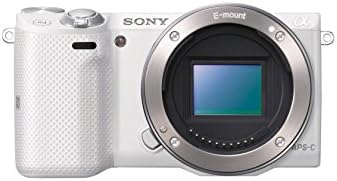


The NEX-5T features a sleek, minimalist design. Key components include the interchangeable E-mount lens system, a tilting LCD screen for flexible shooting angles, and various control buttons for intuitive operation. The camera's compact size makes it ideal for portability without compromising image quality.
سیٹ اپ
1. بیٹری کی تنصیب
- Open the battery cover located at the bottom of the camera.
- Insert the supplied Lithium Ion battery pack, ensuring the correct orientation as indicated inside the compartment.
- Close the battery cover until it clicks securely.
- Charge the battery using the supplied AC adapter and USB cable before first use.
2. میموری کارڈ داخل کرنا
- میموری کارڈ سلاٹ کور کو کھولیں، جو عام طور پر کیمرے کے سائیڈ یا نیچے ہوتا ہے۔
- Insert a compatible memory card (e.g., SD card) into the slot with the correct orientation until it locks into place.
- میموری کارڈ سلاٹ کور بند کریں۔
3. عینک لگانا
- لینس پر سفید انڈیکس نشان کو کیمرے کے جسم پر سفید انڈیکس کے نشان کے ساتھ سیدھ میں کریں۔
- عینک کو گھڑی کی سمت میں گھما کر اس وقت تک لگائیں جب تک کہ یہ جگہ پر نہ آجائے۔
- علیحدہ کرنے کے لیے، کیمرہ باڈی پر لینس ریلیز بٹن دبائیں اور عینک کو گھڑی کی مخالف سمت میں گھمائیں۔
4۔ ابتدائی ترتیبات
Upon first power-on, the camera may prompt you to set the date, time, and region. Follow the on-screen instructions to complete these initial settings.
کیمرہ آپریٹ کرنا
بنیادی فوٹوگرافی۔
- پاور آن/آف: Use the ON/OFF switch located on the top of the camera.
- شوٹنگ کے طریقے: Rotate the mode dial to select your desired shooting mode (e.g., Intelligent Auto, Program Auto, Shutter Priority, Aperture Priority, Manual).
- توجہ مرکوز کرنا: The camera utilizes a Fast Hybrid phase-detection AF system for quick and accurate focusing. Half-press the shutter button to autofocus.
- تصویر لینا: Fully press the shutter button to capture an image. The 16.1 MP APS-C sensor ensures high-quality results.
- مسلسل شوٹنگ: The camera supports a fast 10 fps shooting speed, ideal for capturing fast-moving subjects.
ویڈیو ریکارڈنگ
To record video, press the dedicated MOVIE button. Press it again to stop recording. The camera supports high-definition video recording.
پلے بیک
Press the Playback button (usually marked with a triangle icon) to review your captured photos and videos on the LCD screen.
Connectivity (Wi-Fi & NFC)
The NEX-5T features built-in Wi-Fi and NFC for easy sharing and remote control. Use the Sony PlayMemories Mobile app on your smartphone or tablet to connect to the camera, transfer images, and control shooting functions remotely.
دیکھ بھال
- کیمرہ باڈی کی صفائی: کیمرے کے جسم کو صاف کرنے کے لیے نرم، خشک کپڑا استعمال کریں۔ ضدی گندگی کے لیے، قدرے ڈیampپانی کے ساتھ کپڑے.
- لینز کی صفائی: Use a lens brush or blower to remove dust. For smudges, use a lens cleaning solution and a microfiber cloth. Avoid touching the lens surface directly.
- بیٹری کی دیکھ بھال: بیٹریوں کو ٹھنڈی، خشک جگہ پر اسٹور کریں۔ ان کی عمر کو طول دینے کے لیے بیٹریوں کو کثرت سے مکمل طور پر ڈسچارج کرنے سے گریز کریں۔
- ذخیرہ: When not in use for extended periods, store the camera in a dry, dust-free environment, preferably with a desiccant to prevent mold growth.
خرابی کا سراغ لگانا
| مسئلہ | حل |
|---|---|
| کیمرہ آن نہیں ہوتا ہے۔ | Ensure the battery is fully charged and correctly inserted. Check if the battery is depleted. |
| تصاویر دھندلی ہیں۔ | Check focus settings. Ensure sufficient lighting. Use a tripod in low light. Clean the lens. |
| میموری کارڈ کی خرابی۔ | Reinsert the memory card. Try a different memory card. Format the card (this will erase all data). |
| Wi-Fi/NFC connection issues. | Ensure Wi-Fi/NFC is enabled on both camera and smart device. Restart both devices. Check app settings. |
وضاحتیں
| فیچر | تفصیل |
|---|---|
| ماڈل کا نام | NEX 5T |
| زیادہ سے زیادہ Webکیم امیج ریزولوشن | 16.1 MP |
| فوٹو سینسر ٹیکنالوجی | CMOS |
| تصویری استحکام | ہائبرڈ |
| حمایت کی File فارمیٹ | جے پی ای جی ، را |
| ہم آہنگ mountings | سونی ای |
| بیٹریاں درکار ہیں۔ | 1 لیتھیم آئن |
| مصنوعات کے طول و عرض | 4.36 x 1.53 x 2.31 انچ |
| شے کا وزن | 9.7 اونس |
| پہلی تاریخ دستیاب ہے۔ | 5 ستمبر 2013 |
وارنٹی اور سپورٹ
Please note that this is an International Version of the SONY Digital Camera NEX-5T and comes with کوئی وارنٹی نہیں۔ from the manufacturer in certain regions. For technical support or service inquiries, please refer to the official SONY support website or contact your local SONY service center. Keep your purchase receipt for any potential service needs.
مزید مدد کے لیے، آپ ملاحظہ کر سکتے ہیں۔ ایمیزون پر سونی اسٹور.