
1. Вступ
This user manual provides comprehensive instructions for the NICGIGA 10-Port 10Gbps Unmanaged Ethernet Switch, Model S25-0802T. It covers product features, installation, operation, and troubleshooting to ensure optimal performance and longevity of your device. Please read this manual thoroughly before using the switch.
2. Продукт закінчивсяview
The NICGIGA S25-0802T is an unmanaged Ethernet switch designed to expand your network capabilities with high-speed connectivity. It features a durable metal casing and a fanless design for quiet operation.
- Конфігурація порту: 8 x 2.5Gb Base-T RJ45 ports and 2 x 10Gb RJ45 uplink ports.
- Speed Compatibility: Ports 1-8 support 2.5G/1G/100Mbps. Ports 9-10 support 10G/5G/2.5G/1G/100Mbps.
- Автоматичний MDI/MDIX: Автоматично виявляє та налаштовує для прямих або перехресних кабелів.
- Plug and Play: No software configuration required for operation.
- High Switching Capacity: До 60 Гбіт/с.
- Тепловий дизайн: Fanless for silent operation, with double-sided cooling holes and a metal case for efficient heat dissipation.
- Варіанти монтажу: Supports desktop placement and wall mounting.

3. Вміст упаковки
Перевірте наявність усіх елементів в упаковці:
- NICGIGA 10-Port Unmanaged Ethernet Switch (Model: S25-0802T)
- Адаптер живлення (DC 12V 1.5A)
- Посібник користувача (цей документ)
4. Інструкції з налаштування
The NICGIGA S25-0802T switch is designed for simple plug-and-play operation. No software installation or complex configuration is required.
- Підключення живлення: Connect the included DC 12V 1.5A power adapter to the switch's power input port and then to a power outlet. The Power LED on the switch will illuminate.
- Підключення мережевого пристрою: Connect your network devices (e.g., computers, NAS, routers, access points) to any of the RJ45 ports (1-10) on the switch using standard Ethernet cables.
- Перевірте підключення: Once connected, the corresponding Link/Act LEDs for each port will illuminate, indicating an active connection.

5. Інструкція з експлуатації
The switch operates automatically once powered on and devices are connected. It supports auto-negotiation for speed and duplex mode, and auto MDI/MDIX for cable type detection.
- Automatic Speed Detection: The switch ports automatically detect the speed of the connected device (100Mbps, 1Gbps, 2.5Gbps, 5Gbps, or 10Gbps) and adjust accordingly.
- Повний дуплексний режим: All ports support full-duplex mode for maximum data throughput.
- Non-Blocking Architecture: The switch provides full wire-speed forwarding on all ports, ensuring efficient data transfer without bottlenecks.

6. Монтаж
The NICGIGA S25-0802T switch offers flexible installation options:
- Розміщення на робочому столі: Розмістіть комутатор на рівній, стійкій поверхні. Забезпечте достатню вентиляцію навколо пристрою.
- Настінне кріплення: The switch can be mounted on a wall using appropriate screws (not included) and the mounting slots on the underside of the device. Ensure the mounting surface is sturdy enough to support the switch's weight.


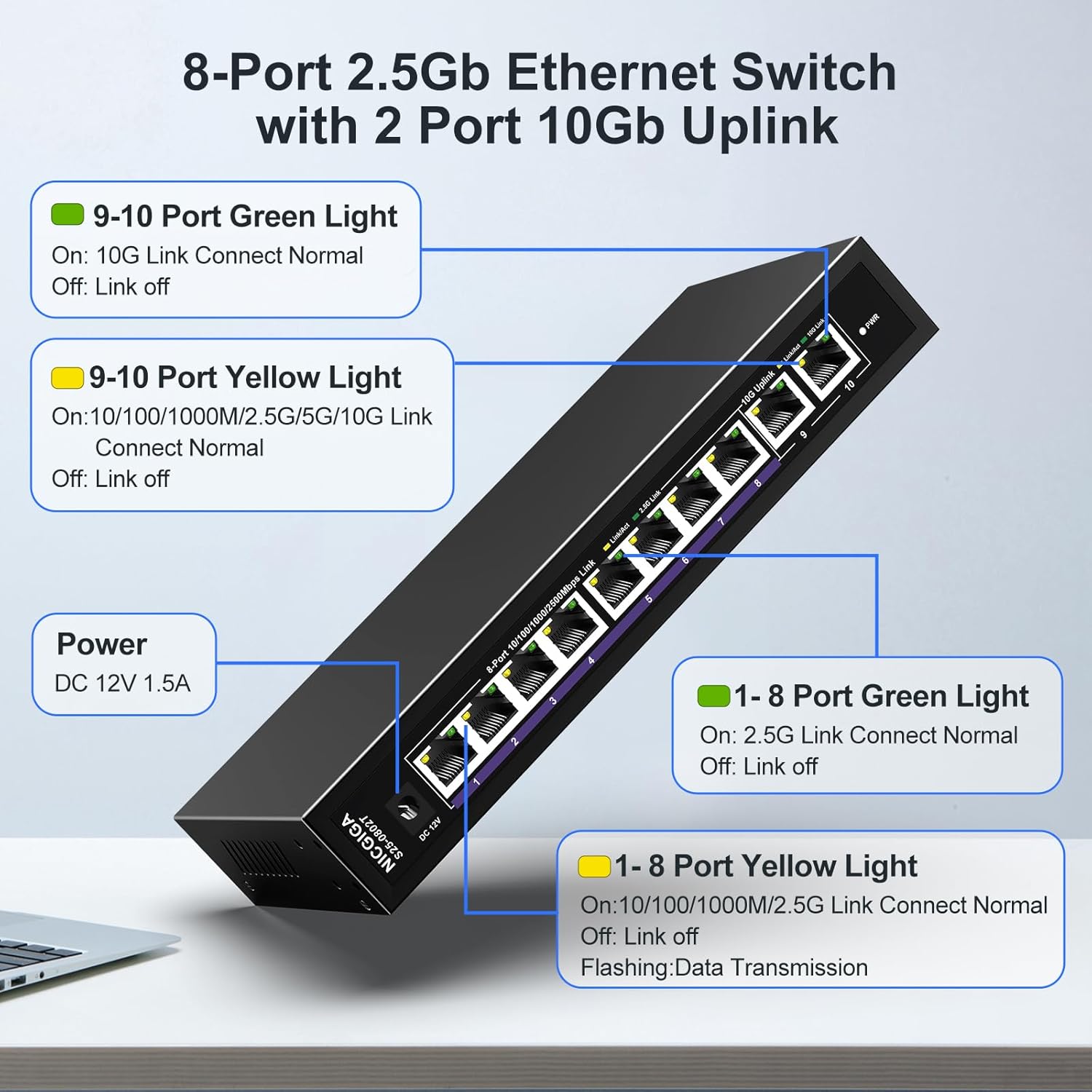
7. Світлодіодні індикатори
The switch features LED indicators to provide real-time status information for each port and the device itself.
| Індикатор | Статус | опис |
|---|---|---|
| потужність | On | Вимикач увімкнено. |
| Ports 1-8 Green Light | On | 2.5G Link Connect Normal. |
| Вимкнено | Link off. | |
| Ports 1-8 Yellow Light | On | 10/100/1000M/2.5G Link Connect Normal. |
| Блимає | Data Transmission. | |
| Вимкнено | Link off. | |
| Ports 9-10 Green Light | On | 10G Link Connect Normal. |
| Вимкнено | Link off. | |
| Ports 9-10 Yellow Light | On | 10/100/1000M/2.5G/5G/10G Link Connect Normal. |
| Блимає | Data Transmission. | |
| Вимкнено | Link off. |
8. Network Cable Compatibility
Using appropriate Ethernet cables is crucial for achieving optimal network speeds.
- For 2.5Gbps Ports (1-8):
- CAT5e Cable (≤100m)
- CAT6/6a Cable (≤100m)
- CAT7 Cable (≤100m)
- For 10Gbps Ports (9-10):
- CAT6 Cable (≤55m)
- CAT6a Cable (≤100m)
- CAT7 Cable (≤100m)


9. Технічні характеристики
| Особливість | Деталь |
|---|---|
| Номер моделі | С25-0802Т |
| Кількість портів | 10 (8 x 2.5Gb RJ45, 2 x 10Gb RJ45) |
| Тип інтерфейсу | RJ45 |
| Швидкість передачі даних | 60 гігабіт на секунду (комутаційна ємність) |
| Верхня температура | 50 градусів Цельсія |
| Вага товару | 1.76 фунта |
| Розміри упаковки | 9.8 x 9.61 x 2.99 дюймів |
| Колір | чорний |
| Сумісні пристрої | Настільний комп'ютер, ігрова консоль, ноутбук, принтер, маршрутизатор |
| Виробник | NICGIGA |
10. Вирішення проблем
If you encounter issues with your NICGIGA switch, refer to the following common troubleshooting steps:
- Немає живлення:
- Переконайтеся, що адаптер живлення надійно підключено до комутатора та справної розетки.
- Перевірте справність розетки.
- Індикатор відсутності з’єднання:
- Перевірте, чи кабель Ethernet надійно підключено як до порту комутатора, так і до мережевого пристрою.
- Спробуйте інший кабель Ethernet.
- Переконайтеся, що підключений пристрій увімкнено, а його мережевий адаптер увімкнено.
- Verify the cable type is appropriate for the desired speed (refer to Section 8).
- Низька швидкість мережі:
- Ensure your network cables are rated for the desired speed (e.g., CAT6a or CAT7 for 10Gbps).
- Check the network adapter settings on your connected devices to ensure they are configured for auto-negotiation or the correct speed.
- Confirm that the connected devices themselves support the higher speeds (2.5Gbps or 10Gbps).
- Переривчасте підключення:
- Перевірте кабелі Ethernet на наявність пошкоджень.
- Ensure the switch is placed in a well-ventilated area to prevent overheating, although its fanless design is optimized for heat dissipation.
- Avoid placing the switch near strong electromagnetic interference sources.
11. Технічне обслуговування
To ensure the longevity and optimal performance of your switch, follow these maintenance guidelines:
- Прибирання: Використовуйте м’яку суху тканину для очищення зовнішньої частини вимикача. Не використовуйте рідкі або аерозольні засоби для чищення.
- Вентиляція: Ensure that the ventilation holes on the sides of the switch are not obstructed to allow for proper heat dissipation.
- Середовище: Operate the switch within its specified temperature range (-10~50°C) and humidity levels.
- Цикл живлення: If the switch becomes unresponsive, disconnect the power adapter, wait for 10 seconds, and then reconnect it.

12. Гарантія та підтримка
NICGIGA provides the following support for this product:
- Гарантія: Річна гарантія надається з дати покупки.
- Технічна підтримка: Lifetime technical support is available for the product.
For warranty claims or technical assistance, please contact NICGIGA customer support through the retailer where the product was purchased or visit the official NICGIGA webсайт.