
1. Вступ
This manual provides detailed instructions for the setup, operation, and maintenance of your Bikevee GPS Wireless Cycling Computer, model BKV300B. Please read this manual thoroughly before using the device to ensure proper function and to maximize your cycling experience.
The Bikevee BKV300B is a 2.4-inch LCD display cycling computer designed to accurately track various cycling data, including speed, distance, and trip time. It features automatic start/stop functionality, an auto-backlight for visibility in varying light conditions, and an IPX7 waterproof rating for reliable performance in diverse weather.
2. Вміст упаковки
Перевірте, чи всі перелічені нижче предмети входять до вашої упаковки:
- Bike Computer (Main Unit)
- Зарядний кабель USB-C
- Out Front Extended Mount
- Гвинт із внутрішнім шестигранником
- Шестигранний ключ
- Sponge Pads

Image: Contents of the Bikevee GPS Cycling Computer package, including the main unit, charging cable, mount, screw, wrench, and sponge pads.
3. Продукт закінчивсяview
The Bikevee BKV300B is designed for ease of use and comprehensive data tracking. Key features include:
- 2.4-дюймовий РК-дисплей: Provides clear visibility of cycling data.
- GPS увімкнено: Accurate speed and distance measurement without external sensors.
- Автоматичний запуск/зупинка: Automatically records ride data when in motion and pauses when stopped.
- Автоматичне підсвічування: Adjusts display brightness automatically for optimal viewвдень чи вночі.
- IPX7 водонепроникний: Protected against temporary immersion in water.
- Тривалий термін служби батареї: До 28 годин безперервної роботи на одному заряді.

Image: The Bikevee GPS Cycling Computer main unit shown alongside its out-front extended mount.

Image: The Bikevee cycling computer display illustrating various data types such as ride time, distance, speed, ascent, gradient, altitude, and clock.

Image: A visual representation of the Bikevee cycling computer's compact dimensions (70mm x 45mm) and lightweight design (50g).
4. Налаштування
4.1 Монтаж пристрою
The Bikevee BKV300B uses a wireless GPS system, eliminating the need for magnets or wires. Installation is straightforward:
- Attach the Out Front Extended Mount to your bicycle's handlebar using the provided hexagon socket screw and wrench. Ensure it is securely fastened.
- Insert the Bikevee computer into the mount. It should click into place.
- Power on the device. The computer will automatically search for GPS signals to calibrate time and begin tracking.

Image: A comparison showing the complex installation of a wired bike computer versus the simple, wireless installation of the Bikevee GPS computer on a handlebar mount.
4.2 Початкові налаштування
Під час першого використання або після скидання налаштувань вам може знадобитися налаштувати основні параметри:
- Unit Selection (MPH/KM/H): Use the device buttons to navigate to the settings menu and select your preferred speed and distance units.
- часовий пояс: Set your local time zone. The device will automatically synchronize time via GPS.
5. Інструкція з експлуатації
5.1 Увімкнення/вимкнення живлення
Press and hold the power button (usually located at the bottom left) to turn the device on or off.
5.2 Автоматичний запуск/зупинка
The computer automatically detects movement. When you start cycling, it begins recording data. When you stop for a period, it automatically pauses the recording. This feature conserves battery and simplifies operation.
5.3 Автоматичне підсвічування
The device features an automatic backlight that adjusts based on ambient light conditions. This ensures readability in both bright daylight and low-light environments. To manually control the backlight:
- Press two specific buttons simultaneously (refer to device interface for exact buttons, often power and mode) to toggle the backlight on or off.
- Turning off the backlight during the day can help extend battery life.
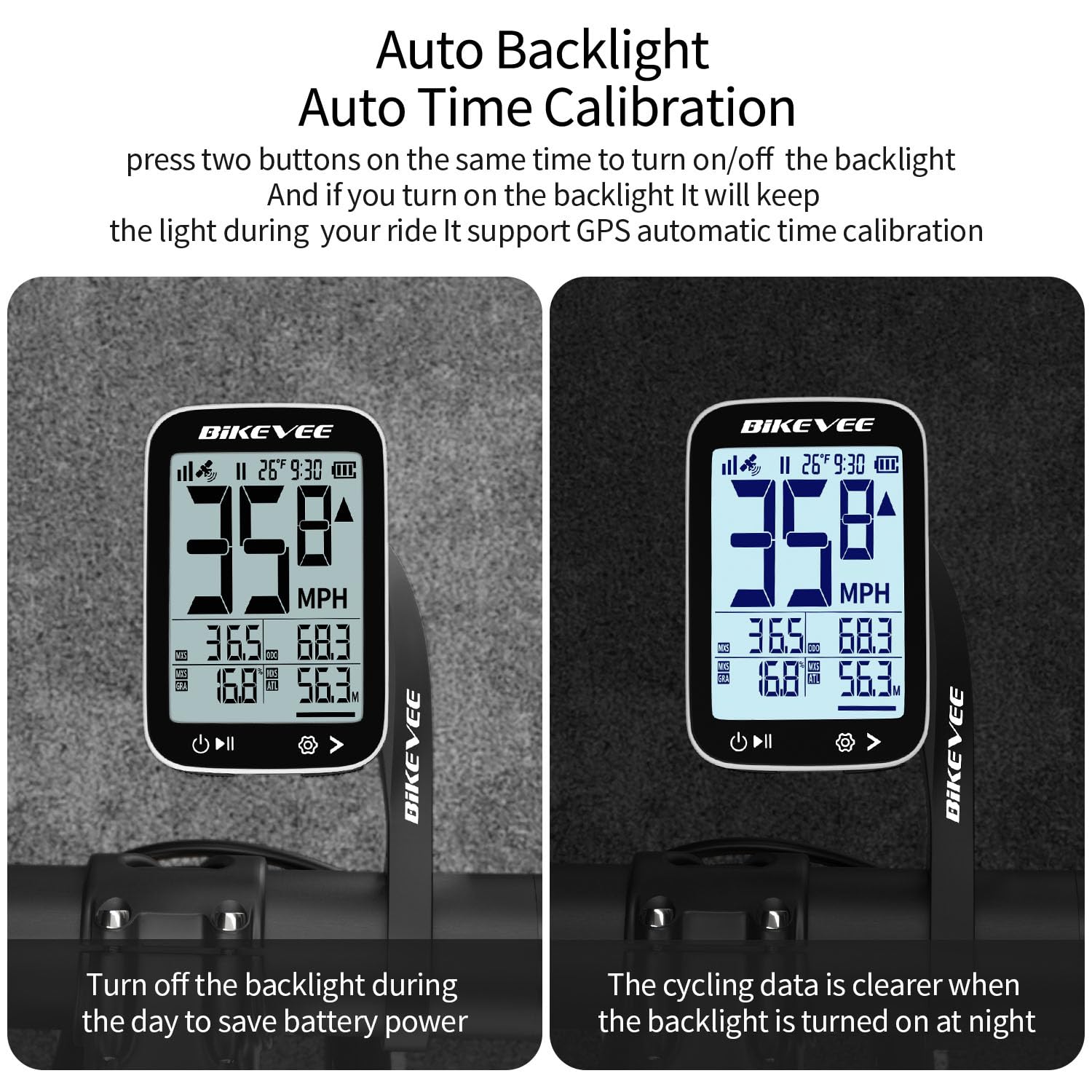
Image: The Bikevee cycling computer display showing the difference in visibility with the auto backlight off (left) and on (right), demonstrating improved clarity in low light.
5.4 Data Display
The 2.4-inch LCD displays various cycling metrics. Use the mode button (usually bottom right) to cycle through different data screens or views. Data points typically include:
- Current Speed (MPH/KM/H)
- Середня швидкість
- Максимальна швидкість
- Час їзди
- Ride Distance
- Total Distance (Odometer)
- Висота
- Градієнт
- температура
- Годинник
6. Технічне обслуговування
6.1 Заряджання батареї
The Bikevee BKV300B is equipped with a 650mAh rechargeable Lithium-Ion battery, providing up to 28 hours of use. When the battery indicator is low:
- Connect the device to a USB power source using the provided USB-C charging cable.
- A charging indicator on the screen will confirm the device is charging.
- Ensure the charging port cover is securely closed after charging to maintain water resistance.
6.2 Гідроізоляція
The device has an IPX7 international protection rating, meaning it is protected against temporary immersion in water (up to 1 meter for 30 minutes). While it is suitable for use in rain, avoid prolonged immersion or high-pressure water jets.

Image: The Bikevee cycling computer shown with water droplets, illustrating its IPX7 waterproof capability. A note advises against prolonged immersion.
6.3 Очищення
Протріть пристрій м’якою, damp тканина. Не використовуйте абразивні засоби чи розчинники.
7. Вирішення проблем
- Пристрій не вмикається:
Переконайтеся, що акумулятор заряджений. Підключіть до джерела живлення та спробуйте ще раз.
- Немає сигналу GPS:
Переконайтеся, що ви перебуваєте на відкритій місцевості з вільним view of the sky. Initial GPS lock may take a few minutes. Avoid using indoors or under heavy tree cover.
- Неточна швидкість/відстань:
Verify that the device has a stable GPS signal. Ensure unit settings (MPH/KM/H) are correct.
- Підсвічування не працює:
Check if the auto-backlight feature is enabled or if it has been manually turned off. Try toggling it using the designated button combination.
- Проблеми з дисплеєм:
If the display is frozen or unresponsive, try performing a soft reset by pressing and holding the power button for an extended period (e.g., 10-15 seconds) until the device restarts.
8. Технічні характеристики
| Бренд | Bikevee |
| Номер моделі | BKV300B |
| колір | Чорно-біле |
| Розміри продукту | 70L x 45W x 16H Millimeters |
| Вага товару | 100 Grams (50g for main unit) |
| Розмір екрана | 2.4 дюймів |
| Тип дисплея | ЖК |
| Термін служби батареї | До 28 годин |
| Тип батареї | 650 мАг літій-іонний |
| Рейтинг водонепроникності | IPX7 |
| Тип монтажу | Handlebar Mount (Out Front Extended Mount) |
| Введення людського інтерфейсу | кнопки |
9. Гарантія та підтримка
For warranty information and technical support, please refer to the documentation provided with your purchase or visit the official Bikevee webсайт. Зберігайте чек про покупку для гарантійних претензій.
For further assistance, you may contact Bikevee customer service through their official channels.