
Bikevee Bikevee Cycling GPS Computer & Bikevee Out Front Mount
Посібник користувача
Bikevee Wireless Cycling GPS Computer
Model: Bikevee Cycling GPS Computer & Out Front Mount
1. Вступ
This manual provides detailed instructions for the Bikevee Wireless Cycling GPS Computer, a device designed to track and display various cycling data. It features a 2.4-inch LCD display with auto backlight, IPX7 waterproofing, and multi-satellite GPS tracking for accurate data collection.
1.1 Основні характеристики
- Подовжений термін служби батареї: Equipped with a 650mAh rechargeable battery, providing up to 28 hours of continuous use.
- Precision GPS Tracking: Utilizes 5-satellite systems (GPS, BDS, GLONASS, Galileo, QZSS) for stable and accurate signal reception.
- Міцний і водонепроникний: IPX7 waterproof rating ensures resistance to rain and splashes.
- Чіткий дисплей: 2.4-inch LCD screen with automatic backlight for visibility in various lighting conditions.
- Вичерпні дані: Tracks speed (MPH/KM/H), distance, time, temperature, altitude, gradient, and more.
1.2 Що в коробці
Перевірте наявність усіх компонентів в упаковці:
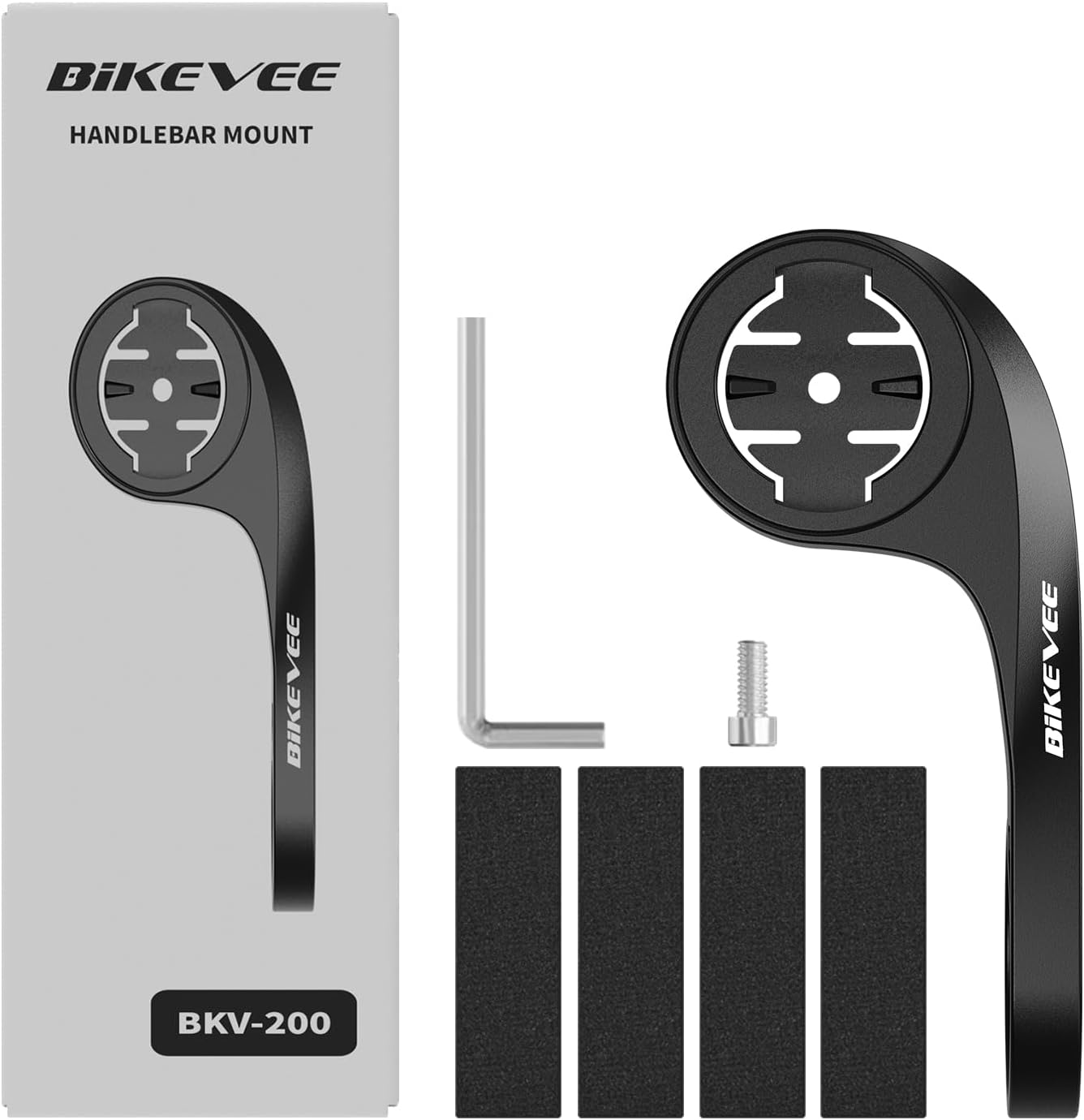
Figure 1.1: Package Contents. Includes Bike Computer, Charging Cable, Rubber Rings, Mount, Rubber Pad, and User Manual.
- Bikevee GPS Cycling Computer
- Стандартне кріплення для велосипеда
- Out Front Mount
- Гумові накладки
- Зарядний кабель (тип C)
- Rubber Rings for Mount Installation
- Посібник користувача
2. Налаштування та встановлення
2.1 Зарядка пристрою
Before first use, fully charge the Bikevee GPS Computer. Connect the provided Type-C charging cable to the device's charging port and a USB power source. The battery indicator on the screen will show charging status.
2.2 Монтаж пристрою
The Bikevee GPS Computer comes with both a standard bike mount and an out front mount. Choose the mount that best suits your preference and bicycle setup.
2.2.1 Standard Bike Mount Installation
- Помістіть гумову накладку на кермо або виніс вашого велосипеда.
- Розмістіть стандартне кріплення для велосипеда поверх гумової прокладки.
- Secure the mount using the provided rubber rings, wrapping them around the handlebar/stem and hooking them onto the mount.
- Align the Bikevee GPS Computer with the mount's grooves and twist clockwise until it locks into place.
2.2.2 Out Front Mount Installation

Figure 2.1: Bikevee Out Front Mount.
- Place the rubber pad around your bicycle's handlebar where you intend to install the mount.
- Position the out front mount over the rubber pad.
- Use the provided Allen key to tighten the screw on the mount's clamp around the handlebar until it is secure.
- Align the Bikevee GPS Computer with the mount's grooves and twist clockwise until it locks into place.
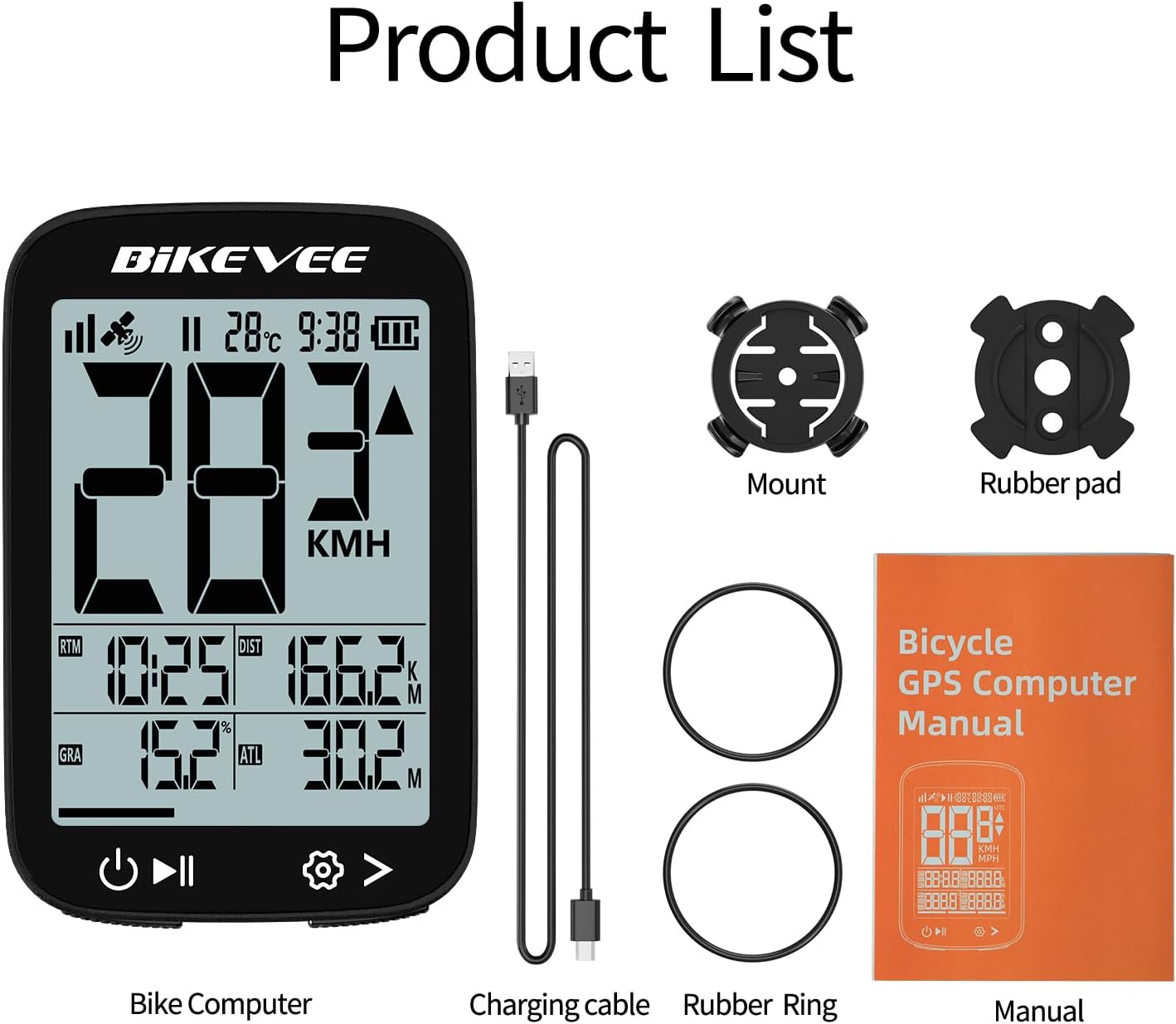
Figure 2.2: Handlebar Mount Components.
2.3 Початкове увімкнення та налаштування
- Увімкнення: Press and hold the power button (usually located at the bottom left) until the screen illuminates.
- Вибір одиниці: Upon first power-on or after a reset, you may be prompted to select your preferred unit of measurement (MPH or KM/H). Use the navigation buttons to select and confirm.
- GPS-отримання даних: Take the device outdoors to an open area to allow it to acquire GPS satellite signals. This may take a few moments. A stable GPS signal icon will appear once connected.
3. Інструкція з експлуатації
3.1 Основна операція
- Увімкнення/вимкнення живлення: Натисніть і утримуйте ліву кнопку, щоб увімкнути або вимкнути живлення.
- Start/Pause/Stop Ride: Press the middle button to start recording a ride. Press again to pause. Press and hold to stop and save the ride data.
- Page Switching: Use the right button to cycle through different data display pages.
- Підсвічування: The device features an automatic backlight that adjusts based on ambient light conditions.
3.2 Data Display and Interpretation
The Bikevee GPS Computer displays up to 14 types of cycling data, providing comprehensive insights into your ride.
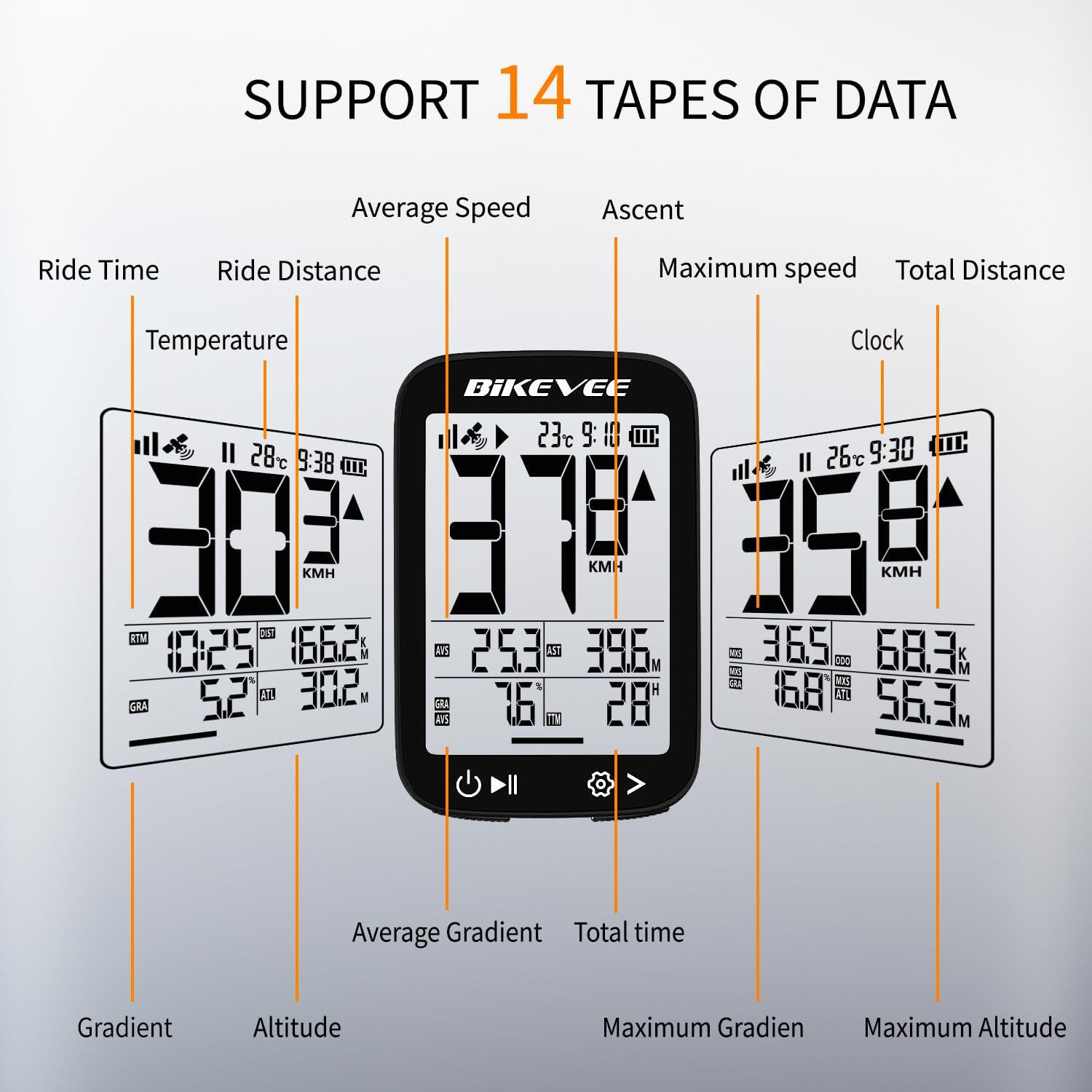
Figure 3.1: Supported Data Types Display.
- Поточна швидкість: Displays your real-time speed (MPH or KM/H).
- Середня швидкість: The average speed for the current ride.
- Максимальна швидкість: The highest speed recorded during the current ride.
- Час поїздки: Duration of the current active ride.
- Ride Distance: Distance covered during the current ride.
- Загальна відстань (одометр): Cumulative distance recorded by the device.
- температура: Температура навколишнього середовища.
- годинник: Поточний час.
- Підйом: Total elevation gained during the ride.
- градієнт: Current incline or decline percentage.
- Висота: Current elevation above sea level.

Figure 3.2: Display Icons and Their Meanings.
- Супутниковий сигнал: Показує силу сигналу GPS.
- IPX7: Confirms waterproof rating.
- Рівень заряду батареї: Показує залишок заряду батареї.
- Автоматичне підсвічування: Indicates auto backlight feature is active.
- Тип C: Denotes the charging port type.
- Порівняння швидкості: Arrow indicates if current speed is higher or lower than average speed.
4. Технічне обслуговування та догляд
4.1 Очищення пристрою
To maintain optimal performance and appearance, clean the device regularly:
- Протріть екран і корпус м’якою губкоюamp тканина.
- Avoid using abrasive cleaners, solvents, or chemical sprays, as these can damage the device's surface or internal components.
- Ensure the charging port cover is securely closed to prevent dust and water ingress.
4.2 Водостійкість (IPX7)

Рисунок 4.1: Водонепроникність IPX7.
The Bikevee GPS Computer has an IPX7 waterproof rating, meaning it is protected against temporary immersion in water (up to 1 meter for 30 minutes). However, it is important to note:
- Не занурюйте пристрій у воду на тривалий час.
- Уникайте струменів води під високим тиском.
- Ensure the charging port cover is sealed before exposure to water.
4.3 Догляд за акумулятором та його зберігання
- Зберігайте пристрій у прохолодному сухому місці, коли він не використовується.
- Уникайте тривалого впливу екстремальних температур (високих або низьких).
- Для тривалого зберігання зарядіть акумулятор приблизно до 50%, щоб зберегти його справність.
5. Вирішення проблем
If you encounter issues with your Bikevee GPS Computer, refer to the following common problems and solutions:
| проблема | Можлива причина | Рішення |
|---|---|---|
| Пристрій не включається. | Низький заряд батареї. | Повністю зарядіть пристрій за допомогою кабелю Type-C, що постачається в комплекті. |
| No GPS signal or inaccurate readings. | Заважає view of sky; initial signal acquisition. | Move to an open outdoor area. Wait a few minutes for signal acquisition. Avoid dense forests or tunnels. |
| Дисплей тьмяний або нечитабельний. | Auto backlight setting; low battery. | Ensure sufficient battery charge. The backlight adjusts automatically; try moving to a different lighting condition. |
| Пристрій зависає або перестає реагувати. | Збій програмного забезпечення. | Perform a soft reset by pressing and holding the power button for 10-15 seconds until the device restarts. |
6. Технічні характеристики
Detailed technical specifications for the Bikevee Wireless Cycling GPS Computer:

Figure 6.1: Device Dimensions and Weight.
- модель: Bikevee Cycling GPS Computer
- Дисплей: 2.4-inch LCD, Automatic Backlight
- Батарея: Літій-іонний акумулятор 650 мАг
- Термін служби батареї: До 28 годин (безперервне використання)
- GPS Systems: GPS, BDS, GLONASS, Galileo, QZSS (5-satellite tracking)
- Рейтинг водонепроникності: IPX7
- Розміри: Approximately 70mm (Height) x 45mm (Width) / 2.76in x 1.77in
- вага: Approximately 50g / 0.11lb
- Порт зарядки: Type-C USB
- Data Types Supported: 14 types (e.g., Speed, Distance, Time, Temperature, Altitude, Gradient)
7. Інформація про гарантію
The Bikevee Wireless Cycling GPS Computer is covered by a limited manufacturer's warranty. This warranty typically covers defects in materials and workmanship under normal use. Please retain your proof of purchase for warranty claims.
For specific warranty terms and conditions, including duration and coverage details, please refer to the warranty card included with your product or contact Bikevee customer support directly.
8. Підтримка клієнтів
If you have any questions, require technical assistance, or need to report an issue with your Bikevee Wireless Cycling GPS Computer, please contact our customer support team.
- Інтернет-підтримка: Visit the official Bikevee webсайт із поширеними запитаннями, посібниками з усунення несправностей та контактними формами.
- Підтримка електронною поштою: Зверніться до упаковки вашого продукту або до офіційного webсайт для адреси електронної пошти служби підтримки клієнтів.
When contacting support, please be prepared to provide your product model number (Bikevee Cycling GPS Computer) and a detailed description of the issue.
Ask a question about this manual
Ask about setup, troubleshooting, compatibility, parts, safety, or missing instructions. Manuals+ will review the question and use this page’s manual context to help answer it.