
Важливі інструкції з безпеки
Please read these instructions carefully before using the Avtech DGM5907SVSGAT IP Dome Camera. Keep this manual for future reference.
- Ensure proper power supply (PoE or compatible adapter) to prevent damage.
- Do not expose the camera to extreme temperatures, humidity, or direct sunlight beyond its operating specifications.
- Handle the camera with care. Avoid dropping or subjecting it to strong vibrations.
- Installation should be performed by qualified personnel and comply with local electrical codes.
- Не намагайтеся розбирати або модифікувати камеру. Це призведе до анулювання гарантії.
- Протирайте об’єктив і корпус камери м’якою сухою тканиною. Уникайте агресивних хімікатів.
Продукт закінченийview
The Avtech DGM5907SVSGAT is a 5MP AI IP Dome Camera designed for advanced surveillance. It features AI-based human and vehicle detection to minimize false alarms, ONVIF support for system integration, and Power-over-Ethernet (PoE) for simplified installation. The camera provides clear images with Starlight visibility, an integrated microphone for audio recording, and an effective IR range of up to 50 meters for night surveillance. Its WDR (Wide Dynamic Range) function enhances image clarity in challenging lighting conditions, and the IP66 housing ensures durability in various environments.
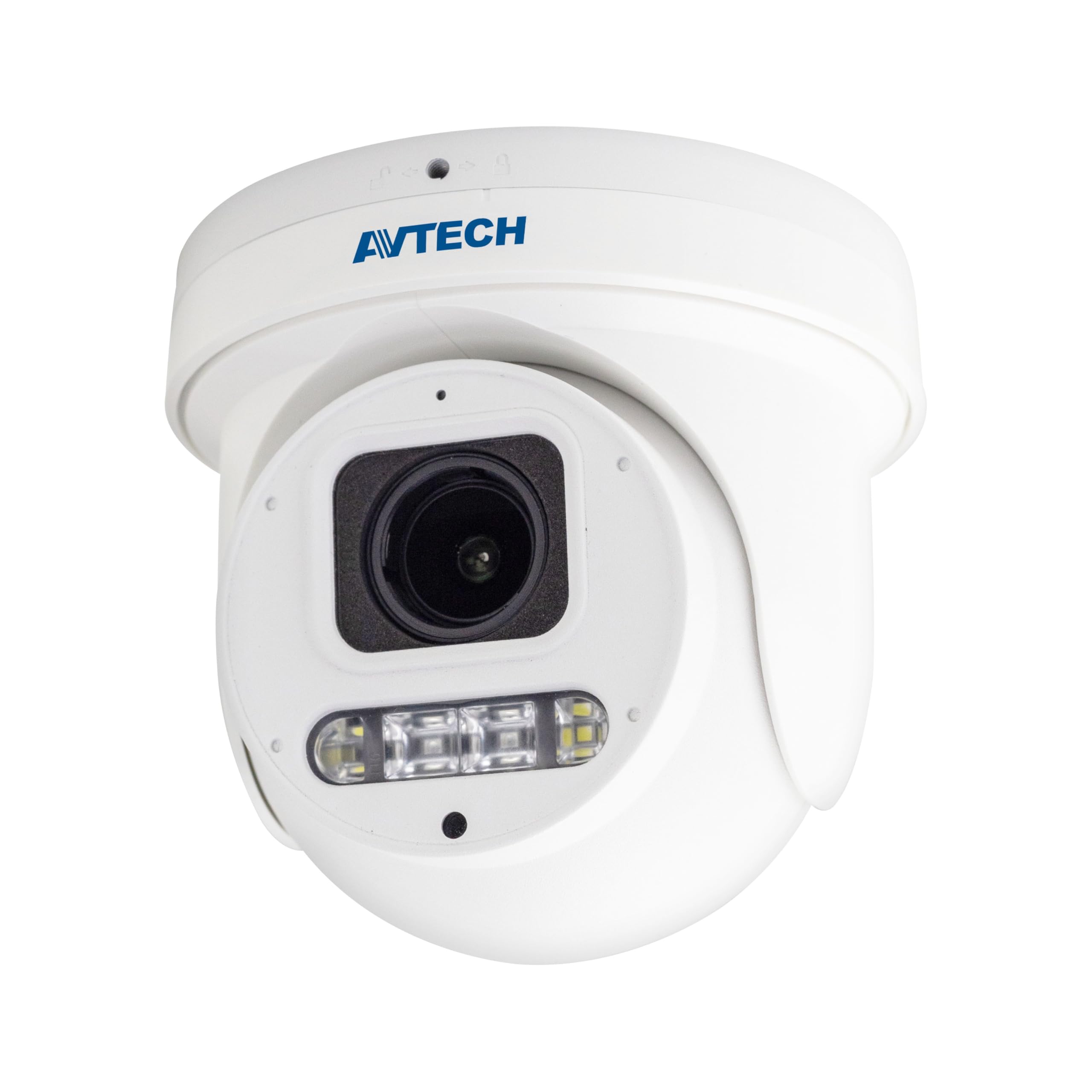
малюнок 1: Фронт view of the Avtech DGM5907SVSGAT 5MP AI IP Dome Camera. This image shows the dome-shaped camera housing, the lens assembly, and the IR LEDs visible around the lens.
Вміст упаковки
Verify that all items are present in the package. If any items are missing or damaged, contact your dealer immediately.
- Avtech DGM5907SVSGAT 5MP AI IP Dome Camera
- Mounting Screw Kit (screws, wall anchors)
- Водонепроникний роз'єм для кабелю Ethernet
- Короткий посібник
- Шаблон буріння
Налаштування
1. Фізичне встановлення
Before mounting, ensure the installation location provides a clear field of view and is within range of your network infrastructure (PoE switch/injector).
- Підготуйте монтажну поверхню: Use the provided drilling template to mark the screw holes on the wall or ceiling.
- Свердлити отвори: Просвердліть початкові отвори у позначених місцях. Вставте анкери до стіни, якщо монтуєте на гіпсокартон або цегляну кладку.
- Закріпіть основу камери: Прикріпіть монтажну основу камери до поверхні за допомогою гвинтів, що додаються.
- Підключіть мережевий кабель: Connect an Ethernet cable (RJ-45) from your PoE switch/injector to the camera's network port. Ensure the waterproof connector is properly sealed if installing outdoors.
- Відрегулюйте кут камери: Loosen the adjustment screws on the dome to position the camera lens for the desired viewкута. Затягніть гвинти після регулювання.
малюнок 2: Illustrative diagram of the Avtech DGM5907SVSGAT camera mounting process. This image depicts the camera base being secured to a surface, with an Ethernet cable connected.
2. Конфігурація мережі
The camera typically obtains an IP address automatically via DHCP. If your network does not use DHCP, you may need to use a discovery tool provided by Avtech or manually configure the IP address.
- Підключення до мережі: Ensure the camera is powered via PoE and connected to your local network.
- Discover IP Address: Use the Avtech IP Camera Utility software (available on the Avtech webсайт), щоб дізнатися IP-адресу камери у вашій мережі.
- Доступ Web Інтерфейс: Відкрийте a web browser (Internet Explorer 6+, Microsoft Edge, or Google Chrome) and enter the camera's IP address in the address bar.
- Логін: Введіть ім’я користувача та пароль за замовчуванням (див. короткий посібник користувача щодо облікових даних за замовчуванням). Наполегливо рекомендується негайно змінити пароль за замовчуванням з міркувань безпеки.
- Майстер початкового налаштування: Follow the on-screen wizard to configure basic network settings, date/time, and user accounts.
Інструкція з експлуатації
1. Жити View і Запис
Після входу в систему web interface, you can access the live video feed and manage recording settings.
- Жити View: Перейдіть до розділу «Живий ефір» View' section to see the real-time video feed from the camera.
- Recording to MicroSD: The camera supports a MicroSD card up to 256 GB. Insert the card into the designated slot (usually accessible by opening the dome cover). Configure recording schedules and event-triggered recording (e.g., motion detection, AI detection) in the 'Storage' or 'Recording' settings.
- Стиснення відео: The camera supports H.265 and H.264 compression. H.265 offers better compression efficiency, reducing storage and bandwidth requirements. Adjust this in the 'Video Settings'.
2. AI Detection (Human and Vehicle)
The AI detection feature helps reduce false alarms by distinguishing between humans/vehicles and other moving objects.
- Enable AI Detection: Go to 'Event' or 'AI Settings' in the web interface. Enable 'Human Detection' and/or 'Vehicle Detection'.
- Configure Detection Zones: Draw specific areas on the live view where you want AI detection to be active.
- Set Sensitivity: Adjust the sensitivity levels to optimize detection performance and minimize false positives.
- Configure Actions: Specify actions to be taken upon detection, such as recording, sending notifications, or triggering alarms.
3. Image Enhancement Features
- ІЧ-нічне бачення: The camera automatically switches to IR mode in low light conditions, providing clear black and white images up to 50 meters. Ensure the IR LEDs are not obstructed.
- WDR (широкий динамічний діапазон): Enable WDR in 'Image Settings' to improve image quality in scenes with both very bright and very dark areas, such as entrances or windows.
- Starlight Visibility: This feature enhances low-light performance, allowing the camera to capture color images in very dim conditions before switching to IR mode.
Технічне обслуговування
Регулярне технічне обслуговування забезпечує оптимальну продуктивність та довговічність вашої камери.
- Прибирання: Periodically clean the camera lens and housing with a soft, lint-free cloth. For stubborn dirt, use a mild cleaning solution specifically designed for optical lenses. Do not use abrasive cleaners.
- Оновлення прошивки: Check the Avtech official website regularly for firmware updates. Firmware updates can improve performance, add new features, and enhance security. Follow the instructions provided with the firmware update package carefully.
- Управління сховищем: If using a MicroSD card for recording, periodically review записаний footage and manage storage space. Format the MicroSD card occasionally to maintain performance.
- Перевірка кабелю: For outdoor installations, inspect network cables and waterproof connectors for any signs of wear or damage.
Усунення несправностей
У цьому розділі розглядаються поширені проблеми, з якими ви можете зіткнутися під час використання камери.
| проблема | Можлива причина | Рішення |
|---|---|---|
| Немає зображення/відео | No power; Network connection issue; Incorrect IP address | Check PoE connection; Verify network cable; Use IP utility to find camera IP; Ensure firewall is not blocking access. |
| Камера офлайн | Network cable disconnected; Router/switch issue; IP address conflict | Check physical network connections; Restart network equipment; Verify unique IP address. |
| Погана якість зображення | Dirty lens; Incorrect resolution settings; Insufficient lighting; WDR not enabled | Clean the lens; Adjust resolution in settings; Ensure adequate lighting or enable IR; Enable WDR for high contrast scenes. |
| Часті помилкові тривоги | Sensitivity too high; Detection zone too wide; Environmental factors (e.g., moving branches) | Adjust AI detection sensitivity; Refine detection zones; Ensure AI detection is enabled for human/vehicle only. |
| Неможливо отримати доступ web інтерфейс | Incorrect IP address; Browser compatibility; Firewall blocking | Verify IP address; Use recommended browsers (IE, Edge, Chrome); Temporarily disable firewall for testing. |
Технічні характеристики
Detailed technical specifications for the Avtech DGM5907SVSGAT IP Dome Camera.
- Датчик зображення: 1/2.8” CMOS
- Максимальна роздільна здатність: 2592 x 1944 (5 МП)
- Об'єктив: f2.7 ~ 13.5mm / F1.6 ~ F2.2
- Viewing Angle (Diagonal): Tele 40° ~ Wide 117°
- Мінімальна освітленість: 0.001 Lux (IR off), 0 Lux (IR on)
- Витримка: АВТО, 1/25 с ~ 1/100000 с
- ІЧ-світлодіоди: 4 одиниць
- Effective IR Distance: До 50 метрів
- Режим день/ніч: Автоматичний
- WDR: Так (120 дБ)
- RTC (годинник реального часу): так
- Слот MicroSD: До 256 Гб
- Стиснення відео: H.265 / H.264
- Main Stream Resolution: 5MP (2592x1944) / 4MP (2560x1440) / 3MP (2304x1296) / 2MP (1080P) / 720P
- Частота кадрів: 5MP @ 25FPS
- Кілька відеопотоків: 2 потоки
- Контроль бітрейту: 512Kbps - 12Mbps, VBR/CBR
- Покращення зображення: WDR / BLC / HLC / 2D DNR / 3D DNR
- Аудіо: Вбудований мікрофон
- Мережні протоколи: ONVIF supported
- Потужність: PoE (Power-over-Ethernet)
- Житло: IP66 атмосферостійкий
- Сумісність: Internet Explorer 6+, Microsoft Edge, Google Chrome, Windows 10/8/7, DirectX 9.0+
Гарантія та підтримка
Avtech products are designed for reliability and performance. This product comes with a standard manufacturer's warranty against defects in materials and workmanship.
- Гарантійний термін: Please refer to your purchase documentation or the Avtech official webна сайті, щоб дізнатися про конкретні гарантійні умови та термін дії, що діють у вашому регіоні.
- Технічна підтримка: For technical assistance, troubleshooting, or warranty claims, please contact Avtech customer support.
- Інтернет-ресурси: Visit the official Avtech website for FAQs, driver downloads, firmware updates, and additional product information.
Контактна інформація:
Webсайт: www.avtech.com.tw
Електронна пошта: support@avtech.com
телефон: +1-XXX-XXX-XXXX