
вступ
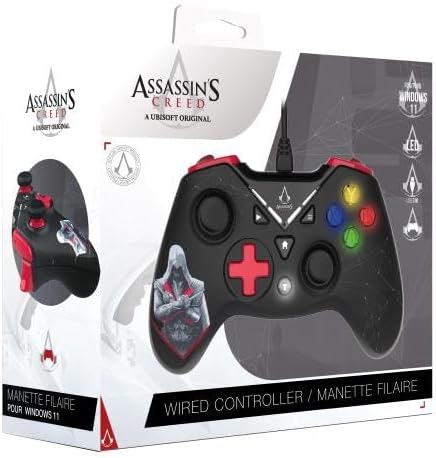
Дякуємо за покупкуasing the Freaks And Geeks Assassin's Creed Wired USB Controller. This manual provides detailed instructions for setting up, operating, and maintaining your controller to ensure optimal performance and an enhanced gaming experience on your PC. Please read this manual thoroughly before use.
Вміст упаковки
- Freaks And Geeks Assassin's Creed Wired USB Controller
- Посібник користувача
Продукт закінченийview
The Freaks And Geeks Assassin's Creed Wired USB Controller is designed for PC gaming, offering precise control and immersive feedback. It features an ergonomic design, dual vibration motors, and a 3-meter cable for comfortable gameplay.
Макет контролера
Фронт view of the Freaks And Geeks Assassin's Creed Wired USB Controller, showing the D-pad, analog sticks, action buttons (A, B, X, Y), and central function buttons.
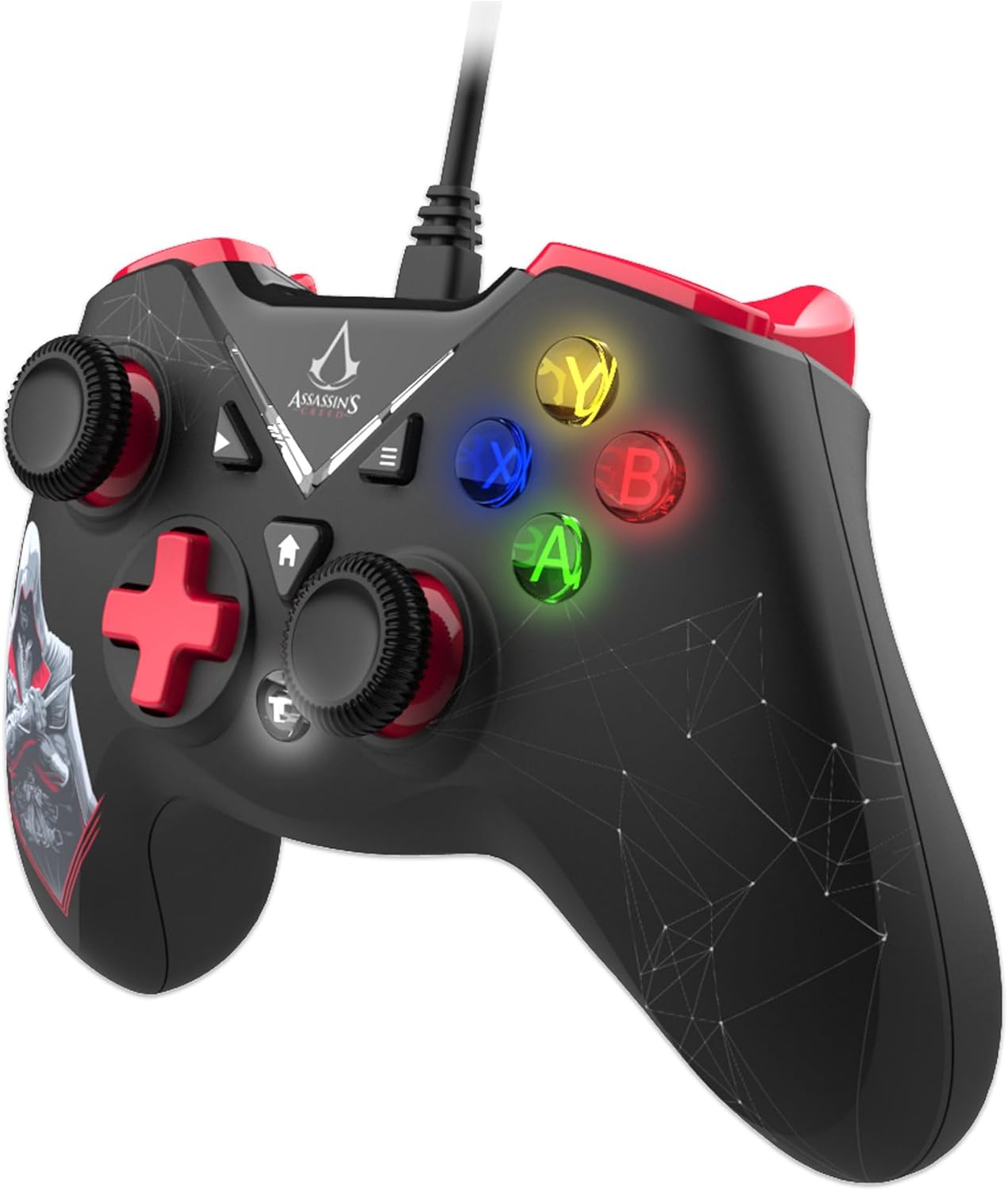
сторона view of the controller, highlighting the ergonomic triggers and shoulder buttons.

Назад view of the controller, showing the grip texture and cable connection point.
Ключові характеристики
- Double Vibration Motor: Provides immersive haptic feedback for in-game actions.
- Ergonomic Triggers: Designed for comfortable and responsive input during extended gameplay.
- 12 Keys with Turbo Function: Customizable buttons with a turbo feature for rapid input.
- Extra Long Cable: A 3-meter cable offers flexibility and freedom of movement.
- 2 High Precision Analog Sticks: Provides 360-degree control for accurate movement and aiming.
Налаштування
Системні вимоги
- ПК з доступним портом USB
- Operating System: Windows 11 (compatible with other Windows versions)
Підключення контролера
- Знайдіть вільний USB-порт на вашому ПК.
- Plug the USB connector of the controller into the USB port.
- Ваша операційна система автоматично виявить та встановить необхідні драйвери. Цей процес може тривати кілька хвилин.
- Once the drivers are installed, the controller is ready for use. You may need to configure the controller settings within your game or PC's control panel.
Інструкція з експлуатації
Основні елементи керування
- Аналогові стіки: Use the two high-precision analog sticks for 360-degree movement and camera control in games.
- D-Pad: The directional pad provides digital input for menu navigation and specific game actions.
- Кнопки дій (A, B, X, Y): Perform in-game actions such as jumping, attacking, or interacting.
- Плечові кнопки (L1, R1) та тригери (L2, R2): Used for various in-game functions like aiming, firing, or special abilities.
Турбофункція
The controller features a turbo function for rapid, repeated input of specific buttons. To activate turbo for a button:
- Натисніть і утримуйте Турбо кнопку.
- Поки тримає Турбо, press the desired action button (e.g., A, B, X, Y, L1, R1, L2, R2).
- Release both buttons. The selected action button will now continuously repeat its input when held down.
To deactivate turbo for a button, repeat the same steps.
Відгук про вібрацію
The double vibration motors provide tactile feedback during gameplay, enhancing immersion. This feature is automatically enabled when supported by the game. If vibration is not working, check your game's settings to ensure vibration feedback is turned on.
Технічне обслуговування
- Прибирання: Використовуйте м’яку суху тканину для очищення контролера. Не використовуйте агресивні хімікати або абразивні матеріали.
- Зберігання: Зберігайте контролер у прохолодному, сухому місці, подалі від прямих сонячних променів та екстремальних температур.
- Догляд за кабелем: Уникайте надмірного згинання або скручування кабелю, щоб запобігти пошкодженню.
Усунення несправностей
| Випуск | Рішення |
|---|---|
| Контролер не розпізнається ПК | Ensure the USB cable is securely plugged into a working USB port. Try a different USB port. Restart your PC. |
| Buttons or analog sticks not responding | Check in-game settings for controller configuration. Ensure drivers are correctly installed (usually automatic). Test the controller on another PC if possible. |
| Не працює вібрація | Verify that the game supports vibration feedback and that the feature is enabled in the game's settings. |
| Turbo function not activating | Ensure you are pressing and holding the Turbo button simultaneously with the desired action button. Release both buttons to set. |
Технічні характеристики
| Особливість | Деталь |
|---|---|
| Номер моделі | 803510b |
| Підключення | Провідний USB |
| Довжина кабелю | 3 метрів |
| вібрація | Подвійний вібраційний двигун |
| кнопки | 12 keys with Turbo function |
| Аналогові палички | 2 high precision, 360-degree control |
| Сумісність | PC (Windows 11 and compatible versions) |
| Розміри посилки | 19 х 17 х 8 см |
| вага | 355 г |
| Виробник | Торгові загарбники |
| Країна походження | Німеччина |
Гарантія та підтримка
This product is covered by a manufacturer's warranty. For specific warranty details, please refer to the documentation included with your purchase or contact the retailer. For technical support or further assistance, please visit the official Freaks And Geeks webсайту або зв’яжіться зі своїм відділом обслуговування клієнтів.


