
1. Вступ
This manual provides essential information for the safe and effective use of your Panasonic ZS99 Digital Camera (DC-ZS99K). The ZS99 is a compact, high-performance camera featuring a 20.3MP MOS sensor, a Leica DC Vario-Elmarit 30x optical zoom lens, 4K photo and video capabilities, and a 5-axis Hybrid O.I.S. system. Please read this manual thoroughly before using the camera and retain it for future reference.

малюнок 1.1: Фронт view of the Panasonic ZS99 Digital Camera. This image displays the camera's lens, flash, and grip, highlighting its compact design.
2. Що в коробці
Перевірте, чи всі наступні елементи входять до комплекту вашої камери:
- Panasonic ZS99 Digital Camera (Black)
- Battery (DMW-BLG10)
- Адаптер змінного струму
- USB-з'єднувальний кабель
- Ремінець на руку
- 2 x Shoulder Strap Adapter

малюнок 2.1: The Panasonic ZS99 Digital Camera shown with its standard included accessories, such as the battery, charger, and cables.
3. Налаштування
3.1. Встановлення та зарядка акумулятора
- Відкрийте кришку відсіку для акумулятора/картки на нижній частині камери.
- Insert the battery (DMW-BLG10) with the contacts facing the correct direction, as indicated inside the compartment. Push until it clicks into place.
- Надійно закрийте кришку відділення.
- To charge, connect the camera to the AC adapter using the USB connection cable. Plug the AC adapter into a power outlet. The charging indicator will illuminate.
- Заряджання завершено, коли індикатор згасне.
3.2. Встановлення карти пам'яті
Камера підтримує карти пам'яті SD, SDHC і SDXC.
- Відкрийте кришку відсіку для акумулятора/картки.
- Insert the memory card into the designated slot with the label facing the front of the camera, pushing gently until it clicks.
- Закрийте кришку відсіку.
3.3. Прикріплення ремінця на руку
Thread the hand strap through the strap eyelet on the side of the camera to prevent accidental drops.
4. Робота з камерою
4.1. Увімкнення/вимкнення живлення
Натисніть УВІМК./ВИМК кнопка, розташована на верхній частині камери, щоб увімкнути або вимкнути її.

малюнок 4.1: Топ view of the camera, illustrating the mode dial, shutter button, zoom lever, and ON/OFF button.
4.2. Базова фотографія
- Диск режимів: Rotate the mode dial on the top of the camera to select your desired shooting mode (e.g., Intelligent Auto (iA), Program AE (P), Aperture Priority (A), Shutter Priority (S), Manual (M), Scene Guide, Creative Control).
- Масштаб: Use the zoom lever around the shutter button to adjust the 30x optical zoom. Push towards 'W' for wide-angle and 'T' for telephoto.
- Фотографування: Натисніть кнопку спуску затвора наполовину, щоб сфокусуватися, потім натисніть повністю, щоб зробити знімок.
- Запис відео: Press the dedicated video recording button to start and stop video capture.

малюнок 4.2: The Panasonic ZS99 with its Leica DC Vario-Elmarit 30x optical zoom lens extended, demonstrating its telephoto capability.
4.3. 4K Photo and Video
The ZS99 supports 4K video recording and advanced 4K Photo modes.
- Відео 4K: Record ultra-high-definition video at 30 frames per second.
- Режими фотозйомки 4K: Utilize 4K Burst, 4K Burst (Start/Stop), and 4K Pre-Burst to capture 8MP still images from 4K video sequences. Access these modes via the camera's menu.
- Постфокус: This feature allows you to select the focus point after the image has been taken. Capture an image in Post Focus mode, then review it and tap on the desired focus area on the LCD to save a new photo with that focus.
4.4. Tilting LCD Screen
The 3.0-inch LCD screen can be tilted upwards 180 degrees, which is useful for self-portraits or shooting from low angles.
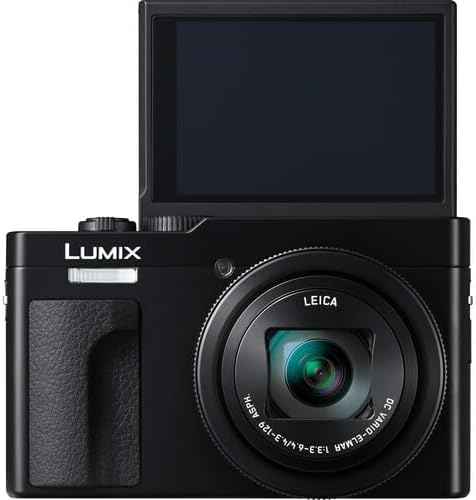
малюнок 4.3: The camera with its 3.0-inch LCD screen tilted upwards, facilitating self-portraits and creative low-angle shots.
4.5. Підключення (Wi-Fi та Bluetooth)
The camera features built-in Wi-Fi and Bluetooth 5.0 for seamless transfer of photos and videos to a smartphone or tablet using the Panasonic Image App. Refer to the camera's menu for pairing and connection instructions.
4.6. Стабілізація зображення
The 5-axis Hybrid O.I.S. (Optical Image Stabilizer) system automatically compensates for camera shake, helping to produce sharp, clear images and stable videos, especially in low light or when using the telephoto zoom.
5. Технічне обслуговування
- Очищення корпусу камери: Використовуйте м’яку суху тканину для протирання корпусу камери. Для стійкого бруду злегкаampпромийте тканину водою. Уникайте використання органічних розчинників.
- Очищення лінзи: Використовуйте щіточку для об’єктивів, щоб видалити пил, потім обережно протріть тканиною для чищення об’єктивів. Уникайте дотику до поверхні об’єктива пальцями.
- Догляд за акумулятором: Store batteries in a cool, dry place. Do not expose them to extreme temperatures. If not using the camera for an extended period, remove the battery.
- Зберігання: Зберігайте камеру в сухому, добре провітрюваному місці, подалі від прямих сонячних променів та високої вологості.
6. Вирішення проблем
Якщо у вас виникли проблеми з камерою, зверніться до наступних поширених рішень:
- Камера не вмикається: Переконайтеся, що акумулятор повністю заряджений та правильно вставлений.
- Зображення розмиті: Check that the lens is clean. Ensure the camera is stable during shooting, or enable the O.I.S. function. Adjust shutter speed or ISO in manual modes if necessary.
- Помилка карти пам'яті: Переконайтеся, що карта пам’яті вставлена правильно, не переповнена та не пошкоджена. Спробуйте відформатувати карту (це призведе до видалення всіх даних).
- Cannot connect to smartphone via Wi-Fi/Bluetooth: Ensure Wi-Fi/Bluetooth is enabled on both the camera and your smartphone. Restart both devices and try pairing again. Ensure the Panasonic Image App is installed and updated.
- Акумулятор швидко розряджається: Reduce screen brightness, limit Wi-Fi/Bluetooth usage, or carry a spare charged battery.
7. Технічні характеристики
| Особливість | Деталь |
|---|---|
| Назва моделі | DC-ZS99K |
| Ефективне вирішення проблеми | 20 Мп |
| Технологія фотосенсора | MOS |
| Стабілізація зображення | Optical (5-axis Hybrid O.I.S.) |
| Об'єктив камери | Leica DC Vario-Elmarit 30x optical zoom lens |
| Мінімальна витримка | 1/16000 с |
| Розмір екрана | 3 дюймів (поворотний РК-дисплей) |
| Підтримується File Формат | JPEG, MP4 |
| Формат захоплення відео | MP4 |
| Частота кадрів (відео) | 30 fps (for 4K) |
| Бездротова технологія | Bluetooth, WiFi |
| Viewшукач | електронні |
| Спалах камери | Вбудований |
| Джерело живлення | DMW-BLG10 Battery |
| Вага товару | 3.07 фунта |
| Колір | чорний |
8. Гарантія та підтримка
Щоб отримати інформацію про гарантію, зверніться до гарантійного талона, що додається до вашого продукту, або відвідайте офіційну службу підтримки Panasonic. website. For technical assistance or further inquiries, contact Panasonic customer support.
Підтримка Panasonic Webсайт: www.panasonic.com/us/support.html