
1. Вступ
The FiiO BTR13 is a versatile Bluetooth headphone amplifier designed to elevate your audio experience. It combines advanced decoding capabilities with powerful amplification in a compact, portable form factor. This manual provides detailed instructions for setting up, operating, and maintaining your BTR13 to ensure optimal performance.

Image: The FiiO BTR13 Bluetooth DAC and Headphone Ampліфірник.
Відео: Оверview of the FiiO BTR13 Bluetooth Headphone Amplifier, highlighting its key features and design.
2. Вміст упаковки
Будь ласка, перевірте вміст упаковки після розпакування, щоб переконатися в наявності всіх елементів:
- Блок FiiO BTR13
- Screen Protector (pre-installed)
- Dual Type-C Data Cable
- Шнурок
- Короткий посібник
- Гарантійний талон

Image: All items included in the FiiO BTR13 package.
3. Особливості продукту
- Аудіо високої якості: Equipped with dual Cirrus Logic CS43131 DACs, one for each channel, to minimize crosstalk and deliver pure, high-quality sound.
- Потужний вихід: Independent headphone amplifier power supply boosting balanced output power to 220mW+220mW.
- Розширене підключення Bluetooth: Features Qualcomm QCC5125 Bluetooth chip supporting LDAC, aptX, aptX LL, aptX Adaptive, aptX HD, AAC, and SBC codecs. Achieves up to 96kHz sampling rate for high-definition audio.
- Багаторежимна робота: PC/BT/PHONE three-position switch allows quick transitions between computer sound card, Bluetooth decoding, and mobile phone modes.
- Настроюваний звук: Supports various preset sound effects and allows fine adjustment of EQ frequencies, gain, and bandwidth via FiiO's proprietary algorithms and app/web інтерфейс.
- Компактний і портативний: Weighs just 28.6g, designed for easy portability.
- Дисплей: 0.96-inch color IPS display for clear visual feedback.
- Підтримка вбудованих елементів керування: The 3.5mm jack supports the CTIA standard for in-line controls, allowing use of microphone, play/pause, and volume adjustment from your headphones' cable.

Image: Dual high-end CS43131 DACs for fully balanced audio.

Image: Independent headphone amplifier power supply for immense force.
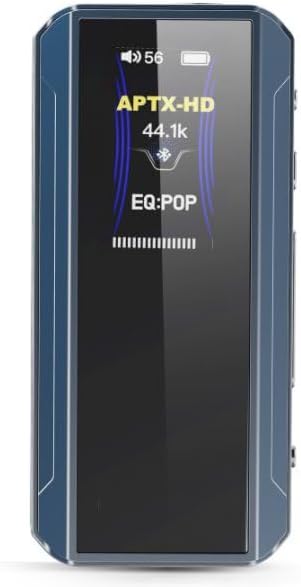
Image: The BTR13 display showing APTX-HD codec and EQ settings.
4. Налаштування
4.1 Початкове заряджання
Before first use, fully charge your FiiO BTR13. Connect the provided Dual Type-C data cable to the BTR13's USB-C port and the other end to a USB power adapter (not included) or a computer's USB port. The charging time is approximately 2 hours.
4.2 Увімкнення/вимкнення живлення
- Увімкнення: Натисніть і утримуйте кнопку живлення, поки екран не загориться.
- Вимкнення живлення: Натисніть і утримуйте кнопку живлення, доки екран не вимкнеться.
4.3 Підключення до пристроїв
The BTR13 features a PC/BT/PHONE three-position switch on its side for easy mode selection.

Image: The PC/BT/PHONE three-position switch and connection exampлес.
- PC Mode (Computer Sound Card): Set the switch to 'PC'. Connect the BTR13 to your computer via the USB-C cable. The device will function as a USB DAC and headphone amplifier, powered by the computer.
- BT Mode (Bluetooth Decoding): Set the switch to 'BT'. The BTR13 will act as a Bluetooth decoder and headphone amplifier, powered by its internal battery. To pair, put the BTR13 into pairing mode (refer to the Quick Start Guide for specific button combinations) and select 'FiiO BTR13' from your device's Bluetooth settings.
- PHONE Mode (Mobile Phone Sound Dongle): Set the switch to 'PHONE'. Connect the BTR13 to your mobile phone via the USB-C cable. It will function as a USB DAC audio dongle, powered by its internal battery.
4.4 Підключення навушників
The BTR13 offers both unbalanced and balanced headphone outputs:
- 3.5-мм небалансний вихід: For standard headphones.
- 4.4 мм збалансований вихід: For headphones with a balanced connection, offering enhanced audio performance.
5. Інструкція з експлуатації
5.1 Основні елементи керування
The BTR13 features physical buttons for various functions:
- Регулювання гучності: Use the dedicated volume buttons (+/-) on the side of the device.
- Відтворення/пауза: Typically controlled via the multi-function button or in-line controls on your headphones.
- Навігація по доріжці: Skip tracks forward/backward using the multi-function button (refer to Quick Start Guide for specific presses).

Image: All-around in-line controls for total control at your fingertips.
5.2 EQ and Sound Customization
The FiiO BTR13 allows for extensive sound customization:
- Додаток керування FiiO: Download the FiiO Control app (available for Android and iOS) to access advanced settings, including detailed EQ adjustments, preset sound effects, and online EQ sharing.
- Web Інтерфейс: Some advanced settings may also be accessible via a web interface when connected to a computer (refer to FiiO's official webсайт для деталей).

Image: Global PEQ settings accessible via app or web.
5.3 Автомобільний режим
The BTR13 features a patented car mode for seamless integration with vehicle audio systems. When connected to a car's USB port, the BTR13 can automatically power on/off with the car's ignition, providing convenient audio playback.
6. Технічне обслуговування
- Прибирання: Використовуйте м’яку суху тканину для очищення пристрою. Уникайте використання агресивних хімікатів або абразивних матеріалів.
- Зберігання: Store the BTR13 in a cool, dry place away from direct sunlight and extreme temperatures.
- Догляд за акумулятором: Щоб продовжити термін служби акумулятора, уникайте частого повного розряджання пристрою. Регулярно заряджайте його, навіть якщо він не використовується протягом тривалого часу.
- Оновлення прошивки: Periodically check FiiO's official website or the FiiO Control app for available firmware updates to ensure optimal performance and access to new features.
7. Вирішення проблем
If you encounter issues with your FiiO BTR13, please refer to the following common troubleshooting steps:
- Немає звуку:
- Ensure the BTR13 is powered on and charged.
- Check headphone connections (3.5mm or 4.4mm).
- Verify the volume level on both the BTR13 and the connected source device.
- Confirm the correct mode is selected (PC/BT/PHONE switch).
- Проблеми з підключенням Bluetooth:
- Ensure the BTR13 is in BT mode and pairing mode.
- Delete the BTR13 from your source device's Bluetooth list and attempt to re-pair.
- Move the BTR13 closer to the source device to reduce interference.
- Restart both the BTR13 and the source device.
- Device Not Recognized by PC/Phone:
- Ensure the BTR13 is in PC or PHONE mode.
- Спробуйте інший кабель USB-C.
- Connect to a different USB port on your computer or try another phone.
- Короткий термін служби батареї:
- Переконайтеся, що пристрій повністю заряджено.
- High volume levels or demanding codecs (like LDAC) can consume more power.
- If the issue persists, contact FiiO support.
8. Технічні характеристики
| Особливість | Специфікація |
|---|---|
| Назва моделі | БТР13 |
| Бренд | FiiO |
| Технологія підключення | Wireless (Bluetooth), USB |
| Технологія бездротового зв'язку | Bluetooth 5.1 |
| Підтримувані кодеки Bluetooth | LDAC, aptX, aptX LL, aptX Adaptive, aptX HD, AAC, SBC |
| Чіп ЦАП | Dual Cirrus Logic CS43131 |
| Гніздо для навушників | 3.5 мм небалансний, 4.4 мм балансний |
| Збалансована вихідна потужність | 220мВт + 220мВт |
| SampШвидкість передачі (макс.) | 96kHz (Bluetooth/USB DAC) |
| Діапазон частот | 20 Гц - 20 000 Гц |
| Імпеданс | 150 Ом |
| Час зарядки | 2 години |
| Вага товару | 28.6 г (приблизно 1 унції) |
| матеріал | пластик |
| Дисплей | 0.96-inch Color IPS |
9. Гарантія та підтримка
FiiO products come with a limited warranty. Please refer to the included Warranty Card for specific terms and conditions regarding your FiiO BTR13. For technical support, troubleshooting assistance, or warranty claims, please visit the official FiiO webсайт або зверніться безпосередньо до служби підтримки клієнтів.
Офіційний представник FiiO Webсайт: www.fiio.com