
1. Вступ
The OSD Audio DAC-X200 is a powerful 2-channel Class D stereo amplifier designed to deliver high-fidelity audio. It features a built-in Hi-Res 24bit/192khz DAC, offering superior digital audio conversion. With versatile input options including USB, Optical, and RCA, and A/B speaker switching, this amplifier is suitable for various home audio setups, from driving bookshelf speakers to powering floorstanding units.
2. Техніка безпеки
- Джерело живлення: Підключайте пристрій лише до зазначеної мережі живлення.tage.
- Вентиляція: Забезпечте належну вентиляцію. Не блокуйте вентиляційні отвори.
- Вода і вологість: Не піддавайте пристрій впливу дощу, вологи або надмірної вологості.
- Джерела тепла: Тримайте пристрій подалі від джерел тепла, таких як радіатори, обігрівачі, печі або інші прилади, що виробляють тепло.
- Прибирання: Чистіть тільки сухою ганчіркою.
- Обслуговування: Не намагайтеся самостійно обслуговувати цей виріб. Зверніть усі послуги до кваліфікованого обслуговуючого персоналу.
- Розміщення: Place the unit on a stable, flat surface. Avoid placing heavy objects on top of the ampліфірник.
3. Вміст упаковки
Перевірте наявність усіх елементів в упаковці:
- OSD Audio DAC-X200 Ampлібератор
- Короткий посібник
- Кабель живлення
- Remote Control (if included with your model)
4. Продукт закінчивсяview
4.1 Передня панель
The front panel provides access to essential controls for daily operation.

малюнок 4.1: Фронт view of the DAC-X200 amplifier, showing the power button, speaker selectors, balance, and volume controls.

малюнок 4.2: Detail of the front panel, highlighting the Power button and Speaker A/B selection buttons.

малюнок 4.3: Detail of the front panel, showing the Balance and Volume control knobs.
4.2 Задня панель
The rear panel houses all input and output connections for audio sources and speakers.
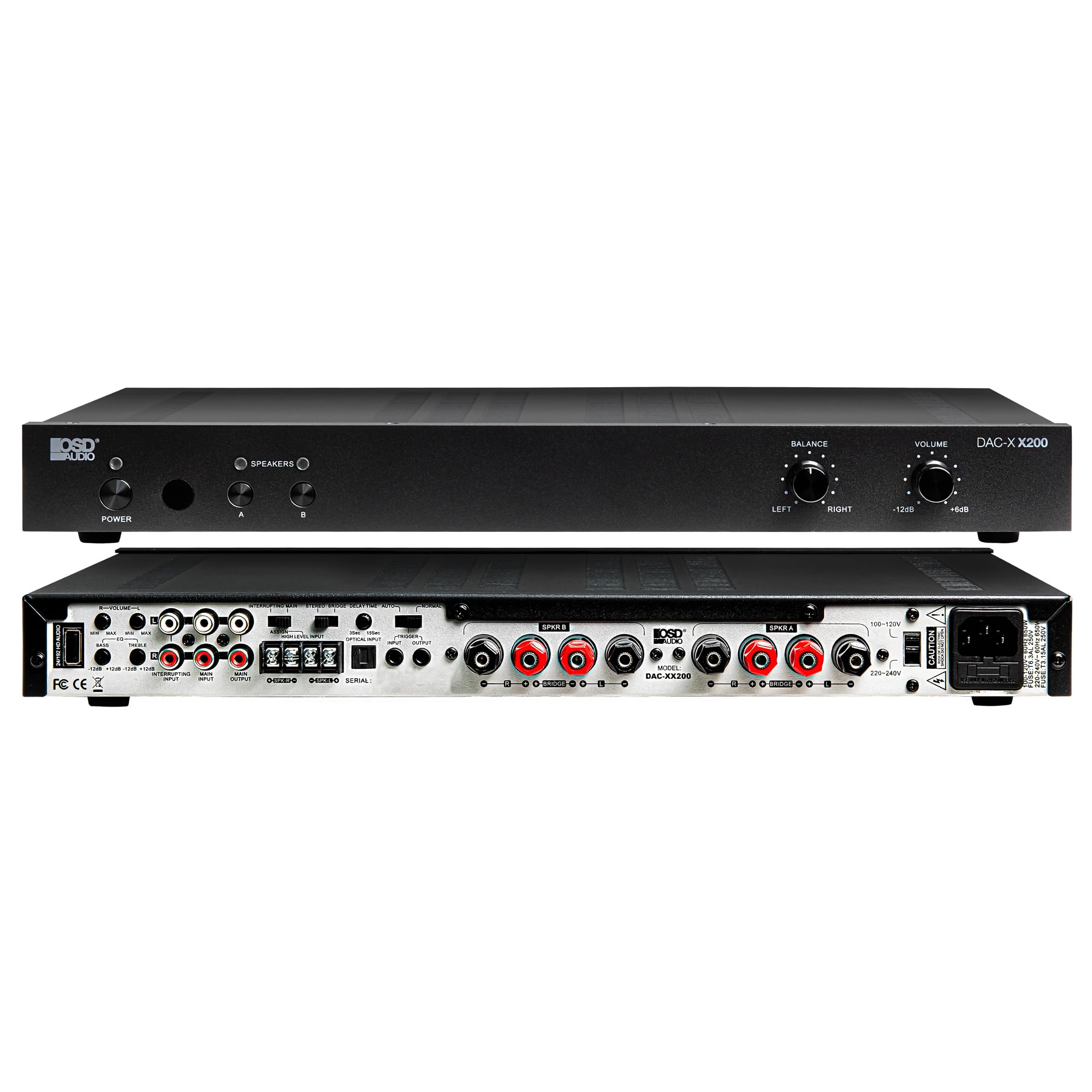
малюнок 4.4: Задня view of the DAC-X200 amplifier, displaying various audio inputs (USB, Optical, RCA), speaker outputs, and power input.

малюнок 4.5: Detail of the rear panel inputs, including USB, Optical, and RCA connections.

малюнок 4.6: Detail of the rear panel speaker output terminals for Speaker A and Speaker B.
5. Налаштування
5.1 Розміщення
Place the DAC-X200 on a flat, stable surface with adequate space around it for ventilation. Avoid enclosed cabinets or areas with poor airflow to prevent overheating.
5.2 Підключення динаміків
- Забезпечити ampрятувальник вимкнено та від’єднано від мережі.
- Підключіть пасивні колонки до СПІКЕР А та/або СПІКЕР Б terminals on the rear panel. Observe correct polarity (+ to + and - to -).
- For optimal performance, use high-quality speaker wire.
5.3 Підключення аудіоджерел
The DAC-X200 supports multiple input types:
- USB вхід: Connect a computer or other USB audio source using a Type A to Type A USB 2.0 cable.
- Оптичний вхід: Connect digital audio sources like TVs or CD players using an optical cable.
- Входи RCA: Connect analog audio sources such as music streamers, turntables (with a pre-amp), or other devices using RCA cables.
5.4 Підключення живлення
After all audio and speaker connections are made, connect the supplied power cable to the ampрозетки живлення випарника, а потім до відповідної розетки змінного струму.
6. Інструкція з експлуатації
6.1 Увімкнення/вимкнення живлення
Натисніть ПОТУЖНІСТЬ кнопку на передній панелі, щоб увімкнути ampувімкнення або вимкнення пристрою. Індикатор живлення світитиметься, коли пристрій увімкнено.
6.2 Вибір входу
The DAC-X200 features smart source switching, automatically detecting and switching to an active input. If multiple inputs are active, you may need to manually select the desired input using the remote control (if applicable) or by cycling through inputs.
6.3 Регулювання гучності
Відрегулюйте загальну гучність виходу за допомогою ОБ'ЄМ knob on the front panel. Rotate clockwise to increase volume and counter-clockwise to decrease it.
6.4 Регулятори тембру
Використовуйте БАЛАНС knob to adjust the left/right channel balance. The DAC-X200 also includes bass and treble adjustment knobs (located on the rear panel or accessible via remote, depending on model variation) to fine-tune the sound to your preference or room acoustics.
6.5 A/B Speaker Switching
Натисніть A or B buttons on the front panel to select which set of speakers (Speaker A, Speaker B, or both) are active. This allows for multi-room audio configurations.
7. Технічне обслуговування
- Прибирання: Використовуйте м’яку суху тканину для очищення зовнішньої частини ampНе використовуйте рідкі засоби для чищення або аерозолі.
- Вентиляція: Періодично перевіряйте, чи вентиляційні отвори чисті від пилу та сміття.
- Зберігання: Якщо пристрій зберігатиметься протягом тривалого часу, від’єднайте його від розетки та зберігайте у прохолодному сухому місці.
8. Вирішення проблем
| проблема | Можлива причина | Рішення |
|---|---|---|
| Немає живлення | Power cable not connected; Power outlet not active; Ampвимикач вимкнений. | Check power cable connection; Test power outlet; Press the Power button. |
| Ні звуку | Incorrect input selected; Speaker cables loose; Volume too low; Speakers A/B not selected. | Select correct input; Check speaker connections; Increase volume; Ensure Speaker A or B is active. |
| Спотворений звук | Input signal too high; Speaker impedance mismatch; Faulty cable. | Reduce source volume; Verify speaker impedance (8̣ or 4̣); Replace audio cables. |
| Input not switching automatically | Multiple active sources; Specific source not detected. | Manually select input; Ensure only one source is playing if auto-switching is desired. |
9. Технічні характеристики
- модель: DAC-X200
- Вихідна потужність: 100W RMS per channel at 8̣; 225W RMS per channel at 4̣; 450W bridged mono
- Кількість каналів: 2
- ЦАП: Hi-Res 24bit/192khz, DSD formats supported
- входи: USB, Optical, RCA
- Зони динаміків: A/B Switching
- Розміри (Д x Ш x В): 16.7 x 10 x 2 дюймів
- Тип матеріалу: пластик
- UPC: 810074881173
10. Інформація про гарантію
OSD Audio products are designed for reliability and performance. This product is covered by a limited warranty against defects in materials and workmanship. Please refer to the official OSD Audio webна сайті або в документації щодо покупки, щоб дізнатися про конкретні гарантійні умови, включаючи термін дії та деталі покриття. Зберігайте підтвердження покупки для гарантійних претензій.
11. Підтримка
For technical assistance, troubleshooting not covered in this manual, or service inquiries, please contact OSD Audio customer support. You can find contact information, FAQs, and additional resources on the official OSD Audio webсайт.
Webсайт: www.osdaudio.com