
TEYES CC3 2K
Автомобільний радіоприймач TEYES CC3 2K, мультимедійний відеоплеєр, навігаційна стереосистема, GPS-головний пристрій, інструкція з експлуатації
Model: CC3 2K
1. Вступ
This manual provides comprehensive instructions for the installation, operation, and maintenance of your TEYES CC3 2K Car Radio Multimedia Video Player Navigation Stereo GPS Headunit. Please read this manual thoroughly before using the product to ensure proper functionality and safety.

Зображення: спереду view of the TEYES CC3 2K Headunit displaying its user interface.
2. Інформація про безпеку
Завжди дотримуйтесь наступних запобіжних заходів, щоб запобігти травмуванню або пошкодженню пристрою:
- Не намагайтеся розбирати або модифікувати пристрій. Це може призвести до пошкодження та анулювання гарантії.
- Переконайтеся, що всі з'єднання проводів надійно закріплені та належним чином ізольовані, щоб запобігти коротким замиканням.
- Уникайте експлуатації пристрою за екстремальних температур або високої вологості.
- Не блокуйте вентиляційні отвори на пристрої.
- Якщо ви не впевнені щодо будь-яких кроків, зверніться до фахівця для встановлення.
3. Вміст упаковки
Перевірте, чи всі перелічені нижче елементи присутні в упаковці:
- 1x Head unit (TEYES CC3 2K)
- 1x кабель живлення
- 1x кабель USB
- 1x GPS антена
- 1x кабель AUX
- 1x 4G WiFi antenna
- 1x E-book (digital manual)
- 1x Frame (for BMW X5 E39 E53 1999-2006)
- 1x AHD 1080p rear camera
- 1x серветка для чищення
- 1x Wiring diagram

Image: Visual representation of the TEYES CC3 2K Headunit and its included accessories.
4. Посібник із встановлення
This section outlines the general steps for installing the TEYES CC3 2K head unit in compatible BMW X5 E39/E53 models (1999-2006). Professional installation is recommended.
4.1 Перевірки перед інсталяцією
- Перед запуском переконайтеся, що запалювання автомобіля вимкнено, а акумулятор від'єднаний.
- Verify compatibility with your specific BMW X5 model and year.
- Familiarize yourself with the vehicle's existing dashboard layout and wiring.

Image: Comparison of a BMW X5 dashboard before and after installation of the TEYES CC3 2K head unit.
4.2 Removal of Existing Unit
- Carefully remove the trim pieces surrounding the factory radio.
- Unscrew and pull out the existing head unit.
- Disconnect all wiring harnesses and antenna cables from the old unit.
4.3 Встановлення головного пристрою
- Attach the provided frame to the TEYES CC3 2K head unit.
- Connect the power cable, USB cables, GPS antenna, 4G WiFi antenna, and AUX cable to the corresponding ports on the new head unit. Refer to the included wiring diagram for detailed connections.
- Route the GPS and 4G WiFi antennas to an optimal location for signal reception, typically on the dashboard or under the windshield.
- If installing the rear camera, route its cable from the rear of the vehicle to the head unit and connect it to the designated input.
- Carefully slide the TEYES CC3 2K head unit with the frame into the dashboard opening.
- Secure the unit using the appropriate screws.
- Reattach the dashboard trim pieces.

Image: The OEM panel designed for integrating the TEYES CC3 2K head unit into the vehicle's dashboard.
4.4 Після встановлення
- Знову підключіть акумулятор автомобіля.
- Turn on the ignition and power on the head unit.
- Perform initial setup, including language, time, and network settings.
- Test all functions: radio, navigation, Bluetooth, USB, and rear camera.
5. Інструкція з експлуатації
The TEYES CC3 2K operates on an Android system, offering a user-friendly interface. Navigate using the touchscreen and physical buttons (if applicable).
5.1 Основна операція
- Увімкнення/вимкнення живлення: Натисніть і утримуйте кнопку живлення.
- Регулювання гучності: Налаштуйте за допомогою екранних елементів керування або кнопок на кермі.
- Головний екран: Tap the home icon to return to the main interface.
- Ящик програм: Swipe up or tap the app icon to access all installed applications.

Image: Illustration of the head unit's compatibility with vehicle steering wheel controls for convenient operation.
5.2 Навігація
- Access the pre-installed navigation application from the home screen or app drawer.
- Enter your destination using the on-screen keyboard or voice command.
- The system supports various map types, including North America.
5.3 Відтворення мультимедіа
- радіо: Select the "Radio" application to tune into FM/AM stations. Supports RDS.
- Відтворення через USB: Connect USB devices to the available USB ports for audio and video playback. The unit features 3 USB outputs for data transfer.
- Bluetooth Audio: Pair your smartphone via Bluetooth to stream music.
- Відтворення відео: Supports various video formats.

Image: Screenshot of the premium local radio interface on the TEYES CC3 2K head unit.
5.4 Підключення
- Wi-Fi/Точка доступу: Connect to a Wi-Fi network or use your phone's hotspot for internet access.
- 4G Internet: The unit supports 4G internet connectivity.
- Bluetooth: For hands-free calling and audio streaming, featuring an upgraded QCC3031QFN Qualcomm module.
- Бездротовий CarPlay та Android Auto: Built-in support for seamless smartphone integration.

Image: Close-up of the three USB output ports provided for data transfer and device connectivity.
5.5 Додаткові функції
- Режим розділеного екрана: Utilize the "Freestyle Combination Split Screen Mode" to run two applications simultaneously.
- DSP Audio Processing: Features 2*DSP ADAU1701 + ROHM32107 for enhanced audio quality, including a 27-segment EQ, sound filtering, and optical/coaxial digital audio output.
- Задня View Камера: У реальному часі viewing of the vehicle's rear view and support for video recording with the included AHD 1080p rear camera.
- TEYES Vision & TEYES Yahu: Explore creative 3D software applications.
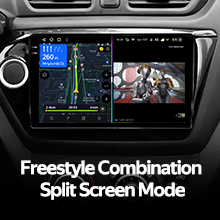
Image: The head unit displaying two applications simultaneously in split-screen mode.

Image: User interface for the DSP audio processing, highlighting the dual DSP chips.
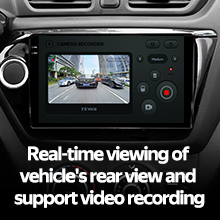
Image: Display showing real-time rear view camera feed with video recording functionality.
6. Технічне обслуговування
Proper maintenance ensures the longevity and optimal performance of your TEYES CC3 2K head unit.
- Прибирання: Use the provided cleaning cloth or a soft, dry cloth to wipe the screen and unit exterior. Avoid abrasive cleaners or solvents.
- Оновлення програмного забезпечення: Periodically check for and install software updates to ensure the latest features and bug fixes.
- температура: Уникайте тривалого перебування пристрою під прямими сонячними променями або екстремальними температурами.
7. Вирішення проблем
Зверніться до цього розділу, щоб дізнатися про поширені проблеми та їх вирішення. Якщо проблема не зникає, зверніться до служби підтримки клієнтів.
| проблема | Можлива причина | Рішення |
|---|---|---|
| Пристрій не вмикається. | Нещільне з'єднання живлення, перегорілий запобіжник, від'єднаний акумулятор автомобіля. | Перевірте з'єднання кабелів живлення. Перевірте запобіжники автомобіля. Переконайтеся, що акумулятор підключено. |
| Немає звуку. | Volume too low, audio cables disconnected, incorrect audio source selected. | Increase volume. Verify speaker wire connections. Select correct audio source (e.g., Radio, USB, Bluetooth). |
| Сигнал GPS слабкий або втрачений. | GPS-антена неправильно розміщена або відключена. | Переконайтеся, що GPS-антена надійно підключена та розташована у вільному місці. |
| Проблеми з підключенням Bluetooth. | Пристрій не сполучено, Bluetooth вимкнено на телефоні/пристрої, є перешкоди. | Переконайтеся, що Bluetooth увімкнено на обох пристроях. Повторно з’єднайте пристрої. Підійдіть ближче до пристрою. |

Image: An icon representing the Frequently Asked Questions (FAQ) section, indicating support resources.
8. Технічні характеристики
| Особливість | Деталь |
|---|---|
| Номер моделі | CC3 2K |
| Розмір дисплея | 9.5 дюймів |
| Технологія дисплея | 2K In-cell Display, Gamut Coverage 157% |
| Операційна система | Android 10 |
| Процесор | 8 cores 2.0GHz |
| ОЗУ | 6 ГБ |
| ROM | 128 ГБ |
| Підключення | Bluetooth (QCC3031QFN Qualcomm), USB, Wi-Fi, Hotspot, 4G Internet |
| Режим аудіовиходу | Стерео |
| DSP | 2*ЦПС ADAU1701 + ROHM32107 |
| Аудіовихід | Optical and coaxial digital audio output |
| Особливості | Touchscreen, Built-in wireless CARPLAY and ANDROID AUTO, RDS support, TEYES Vision & TEYES Yahu software, Real-time rear view with recording. |
| Included Rear Camera | AHD 1080p |
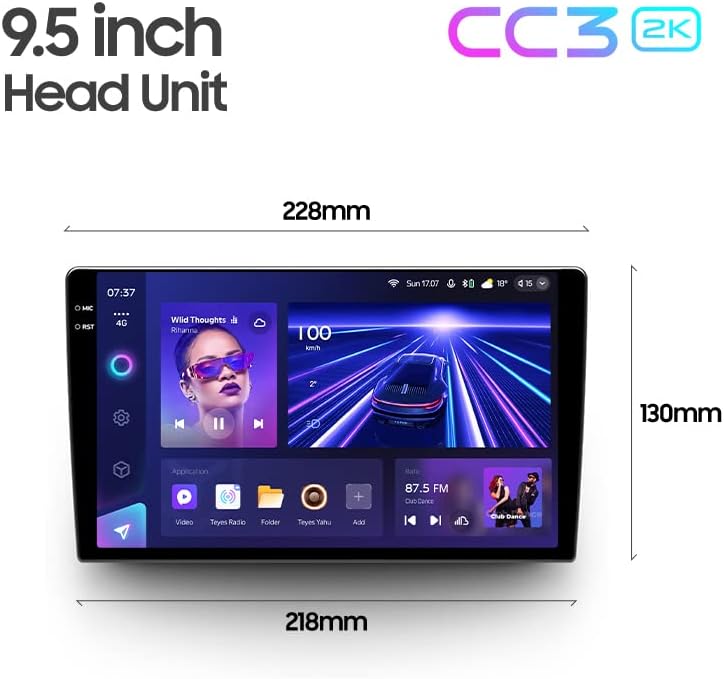
Image: Diagram showing the dimensions of the TEYES CC3 2K Headunit.
9. Гарантія та підтримка
The TEYES CC3 2K Headunit comes with a Гарантія 1 рік з дати покупки.
For technical support, warranty claims, or further assistance, please contact TEYES customer service through their official webсайт або магазин, де було придбано продукт. Зберігайте чек про покупку для підтвердження гарантії.
Manufacturer: Shenzhen TEYES High tech Co., Ltd.