
JCROBOT L7C Pro Plus +
JCROBOT 3-Axis Phone Gimbal User Manual
Model: L7C Pro Plus +
1. Вступ
Thank you for choosing the JCROBOT 3-Axis Phone Gimbal. This device is designed to provide stable and smooth video recording for smartphones, featuring an innovative magnetic AI active tracker that operates without the need for a dedicated application. This manual will guide you through the setup, operation, and maintenance of your gimbal to ensure optimal performance.
2. Вміст упаковки
Будь ласка, перевірте, чи всі перелічені нижче предмети входять до вашої упаковки:
- JCROBOT 3-Axis Phone Gimbal
- Magnetic AI Active Tracker
- Міні штатив
- USB-кабель для зарядки
- Сумка для зберігання
- Посібник користувача (цей документ)

3. Налаштування
3.1 Заряджання стабілізатора
Before first use, fully charge the gimbal. Connect the provided USB charging cable to the gimbal's charging port and to a USB power source. The indicator lights will show charging status.

3.2 Підключення смартфона
- Розкладіть карданний підвіс у робоче положення.
- Розширити термін служби телефонуamp та надійно розмістіть свій смартфон по центру.
- Attach the magnetic AI Active Tracker to the designated magnetic area on the phone clamp. Ensure it clicks into place. The AI tracker can be powered by the gimbal or can power the gimbal in reverse.
This gimbal is designed for immediate use without complex balancing. Simply clip your phone in the center, and it's ready.

3.3 Кріплення штатива
For stable tabletop use or extended shooting, screw the mini tripod into the 1/4-inch thread at the bottom of the gimbal handle.
4. Керування карданним підвісом
4.1 Увімкнення/вимкнення живлення
Press and hold the power button located on the handle to turn the gimbal on or off. Indicator lights will illuminate when the device is active.
4.2 3-осьова стабілізація
The gimbal features advanced 3-axis stabilization to ensure your footage remains smooth and free of shake, regardless of hand movement. This technology automatically compensates for motion, providing professional-grade stability.

4.3 Magnetic AI Active Tracker
The AI Active Tracker provides intelligent face and body tracking without requiring any external application. It ensures the subject remains in focus and centered within the frame. The tracker can rotate 180 degrees for forward and reverse tracking.

4.4 Керування жестами
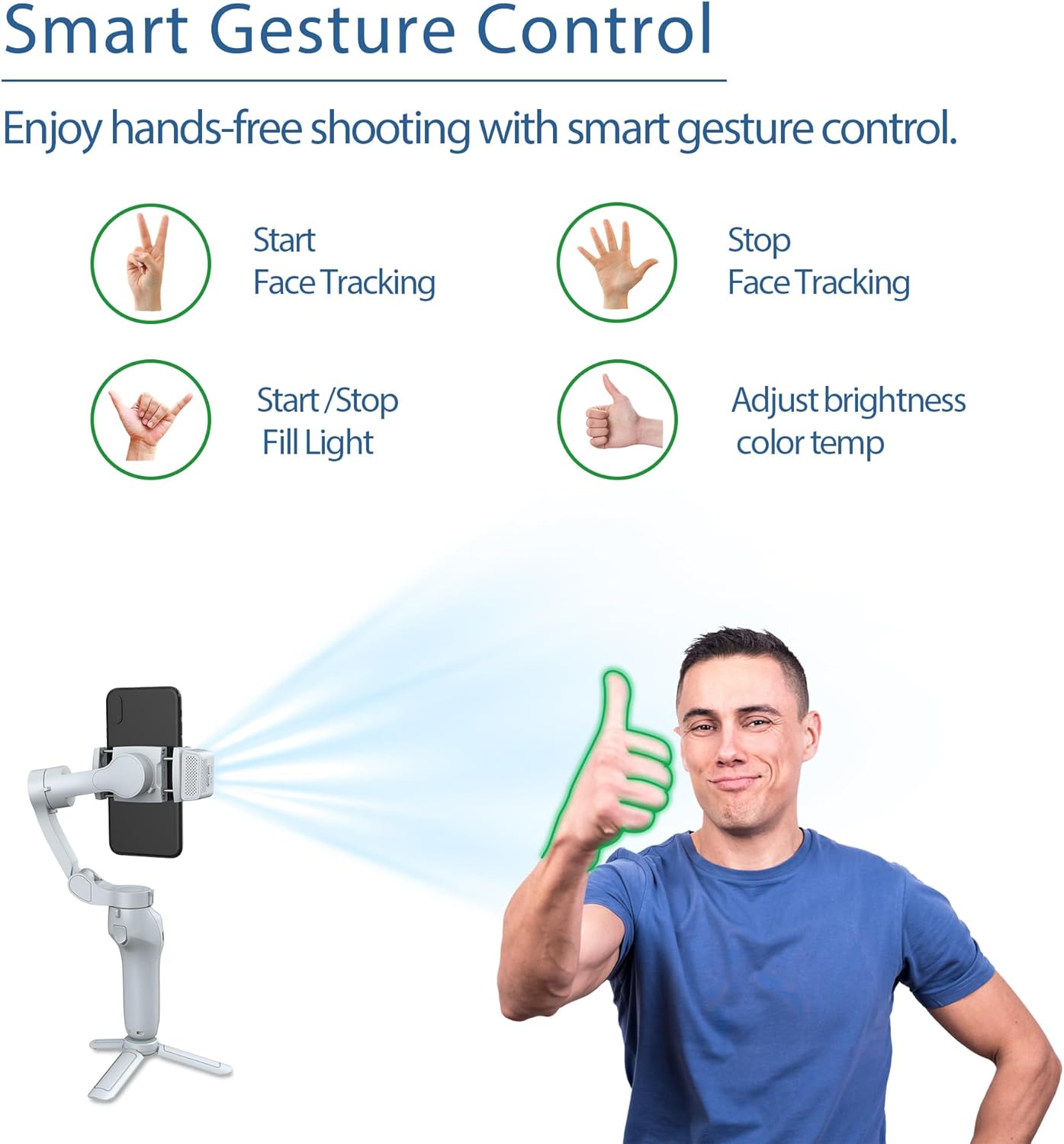
The AI tracking unit supports gesture control for hands-free operation:
- Start Face Tracking: Make a 'V' sign with your fingers.
- Stop Face Tracking: Show an open palm.
- Start/Stop Fill Light: Make an 'OK' sign.
- Налаштування яскравості/колірної температури: Give a 'thumbs up' gesture.
4.5 Заповнює світло
The AI tracking unit integrates a fill light with 3 different color temperatures and 9 levels of brightness settings. This allows you to customize lighting for various shooting conditions and enhance your video quality.
4.6 Multiple Shooting Angles
The gimbal supports a variety of shooting angles to capture dynamic shots:
- Pan (Horizontal Rotation): 340°
- Tilt (Vertical Rotation): 160°
- Roll (Rotation along lens axis): 325°

5. Технічне обслуговування
5.1 Очищення
Протріть стабілізатор м’якою сухою тканиною. Не використовуйте рідкі засоби для чищення або розчинники, оскільки вони можуть пошкодити пристрій.
5.2 Зберігання
When not in use, fold the gimbal to its compact size and store it in the provided storage pouch. Keep it in a cool, dry place away from direct sunlight and extreme temperatures.

5.3 Догляд за акумулятором
To prolong battery life, avoid fully discharging the battery frequently. Charge the gimbal regularly, even if not in use for extended periods.
6. Вирішення проблем
6.1 Підвіс не вмикається
- Ensure the gimbal is fully charged. Connect it to a power source and wait for the charging indicator to show sufficient charge.
- Натисніть і утримуйте кнопку живлення кілька секунд, щоб переконатися, що вона зареєструвалася.
6.2 Нестабільний Footage
- Ensure your smartphone is securely clamped in the center of the phone holder.
- Check for any obstructions preventing the gimbal motors from moving freely.
- Verify the gimbal is powered on and properly initialized.
6.3 AI Tracker Not Responding
- Ensure the AI Active Tracker is securely attached to the magnetic mount.
- Check if the AI tracker's indicator light is on.
- Ensure you are performing the gestures correctly and within the tracker's detection range.
6.4 Проблеми заряджання
- Try a different USB charging cable and power adapter.
- Ensure the charging port on the gimbal is clean and free of debris.
7. Технічні характеристики
| Особливість | Деталь |
|---|---|
| Виробник | JCROBOT |
| Номер моделі | L7C Pro Plus + |
| Розміри продукту | 11 х 4.65 х 15.19 см |
| Вага товару | 353.8 г (0.78 фунта) |
| Рекомендована максимальна вага | 0.66 фунта |
| Розмір у складеному вигляді | 5.98 x 4.33 x 1.83 дюймів |
| Акумулятори | 1 літій-іонний акумулятор (у комплекті) |
| Сумісні пристрої | Мобільний телефон |
| Колір | Сірий |
8. Гарантія та підтримка
For warranty information and detailed support, please refer to the official JCROBOT website or the warranty card included with your product. If you encounter issues not covered in this manual, please contact JCROBOT customer service for assistance.
Підтримка клієнтів: Будь ласка, відвідайте офіційний сайт виробника webна сайті для отримання контактної інформації.
Ask a question about this manual
Ask about setup, troubleshooting, compatibility, parts, safety, or missing instructions. Manuals+ will review the question and use this page’s manual context to help answer it.