
BULIST UD01S
BULIST UD01S Smart Lock User Manual
Model: UD01S | Brand: BULIST
вступ
This manual provides comprehensive instructions for the installation, operation, and maintenance of your BULIST UD01S Smart Lock. Please read this manual thoroughly before installation and use to ensure proper function and safety. Keep this manual for future reference.
Важлива інформація з безпеки
- Не намагайтеся розбирати або ремонтувати замок самостійно. Зверніться до служби підтримки клієнтів за допомогою.
- Use only the specified battery type (4 AA Alkaline batteries). Do not mix old and new batteries or different types of batteries.
- Ensure the lock is installed correctly and securely to prevent unauthorized access.
- Regularly check battery levels and replace batteries promptly when the low voltage reminder activates.
- Keep your master code and fingerprints secure and do not share them with unauthorized individuals.
Вміст упаковки
Будь ласка, перевірте наявність усіх компонентів перед початком встановлення.

Зображення: Оверview of the BULIST UD01S Smart Lock package contents, showing the exterior keypad, interior lock unit, a set of AA batteries, the Wi-Fi gateway, and branding.
- Зовнішня клавіатура в зборі
- Блок замка всередині салону
- Монтажна пластина
- Засувний засув
- Ударна пластина
- Гвинти та кріплення
- 4 x лужні батарейки типу АА
- Шлюз Wi-Fi
- Аварійні ключі (2)
- Посібник користувача (цей документ)
Продукт закінченийview і особливості
The BULIST UD01S Smart Lock offers multiple convenient and secure entry methods for your home or office.
- Multiple Unlock Modes: Fingerprint, Passcode, Tuya App, and Physical Key.
- Розпізнавання відбитків пальців: Fast 0.3-second recognition with 99.9% accuracy. Stores up to 50 fingerprints.
- Клавіатура з підсвічуванням: Ensures visibility and ease of use in low-light conditions. Stores up to 50 passcodes.
- Tuya App Control: Remote unlock/lock, temporary code generation, member management, and activity logs via Wi-Fi gateway.
- Аварійне живлення: USB Type-C port for emergency power supply if batteries are depleted.
- Тривалий термін служби батареї: Approximately 10-12 months of battery life with a low voltagе нагадування.
- Міцна конструкція: Tested for keypad life, intensity, temperature resistance, and impact.
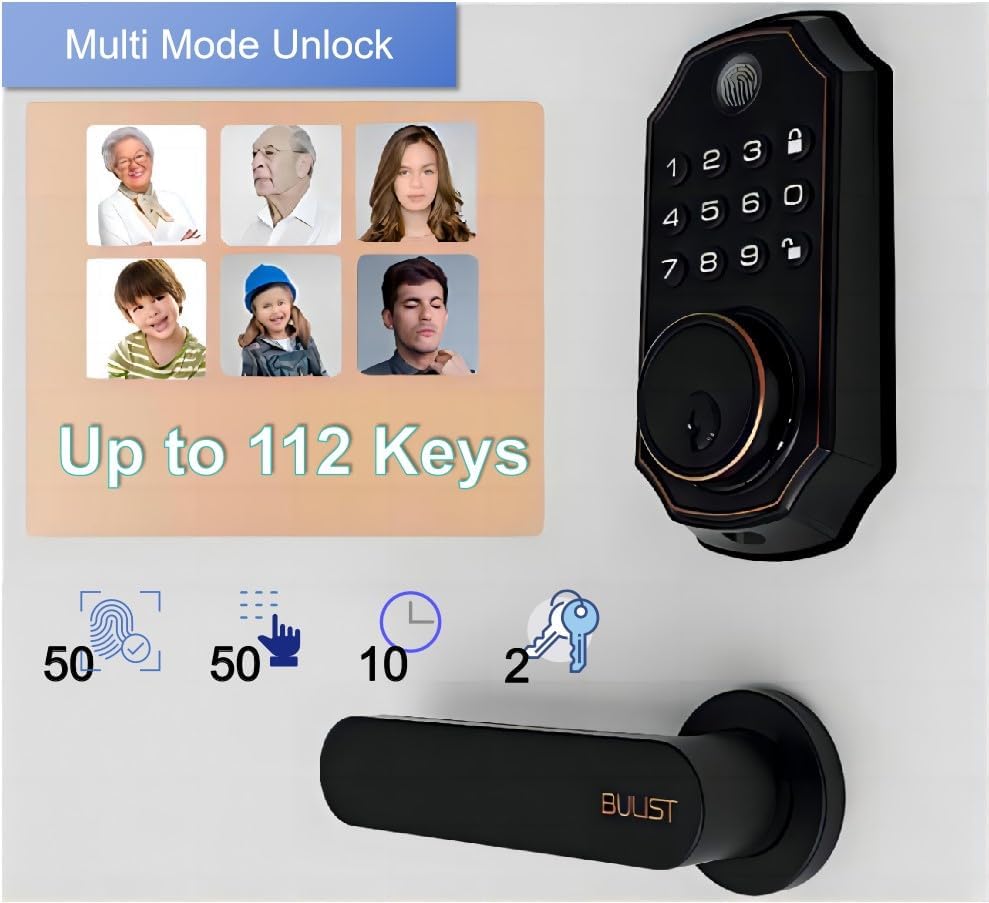
Image: The BULIST UD01S Smart Lock highlighting its multi-mode unlock capabilities, including fingerprint, keypad codes, and traditional keys. It indicates support for up to 50 fingerprints, 50 passcodes, and 2 physical keys.

Image: A child using the fingerprint sensor on the BULIST UD01S Smart Lock, illustrating the ease and speed of fingerprint recognition. Text overlays indicate a 0.3-second recognition time and 99.9% accuracy.

Зображення: Крупний план view of the BULIST UD01S Smart Lock's backlit keypad, demonstrating its visibility and usability in low-light conditions. A finger is shown interacting with the keypad.
Налаштування та встановлення
Installation of the BULIST UD01S Smart Lock is designed to be straightforward. A single screwdriver is typically sufficient for the process.
Необхідні інструменти:
- Викрутка для головки Phillips
Кроки встановлення:
- Підготуйте двері: Ensure your door is properly prepped for a standard deadbolt installation. Remove any existing deadbolt hardware.
- Встановіть засувку ригеля: Вставте засув у край дверей. Переконайтеся, що стрілка «ВГОРУ» на засувці спрямована вгору. Закріпіть гвинтами.
- Встановлення зовнішньої клавіатури: Feed the cable from the exterior keypad through the door hole and under the deadbolt latch. Position the exterior keypad flush against the door.
- Встановіть монтажну пластину: Route the cable through the mounting plate. Secure the mounting plate to the door using screws, ensuring it aligns with the exterior keypad.
- Підключіть кабелі: Connect the cable from the exterior keypad to the corresponding port on the interior lock unit.
- Install the Interior Lock Unit: Align the interior lock unit with the mounting plate and the deadbolt tailpiece. Secure it with screws.
- Встановіть акумулятори: Open the battery cover on the interior unit and insert the 4 AA alkaline batteries, observing polarity.
- Перевірте замок: Manually operate the deadbolt to ensure smooth movement. Test with the physical key.
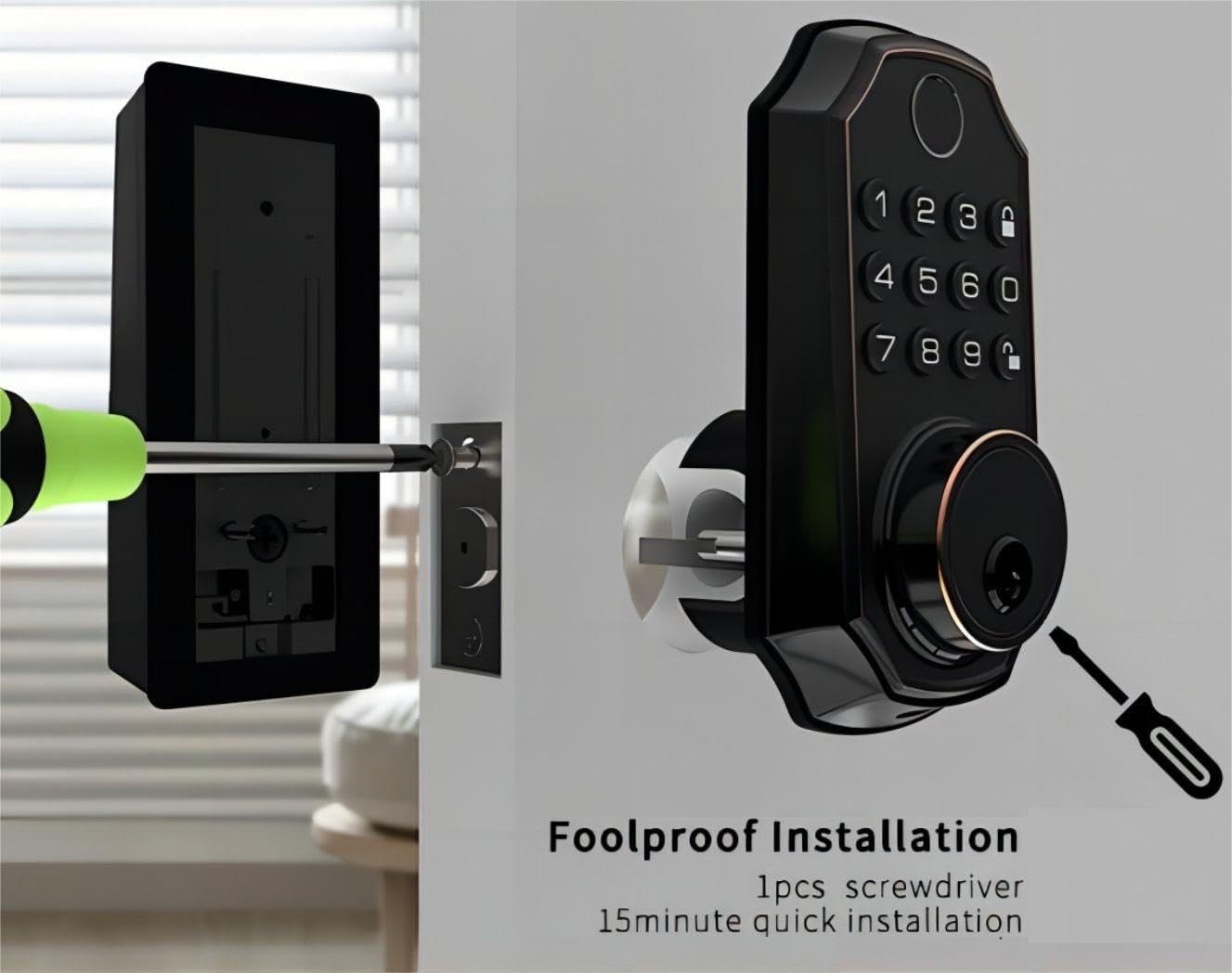
Image: An illustration of the BULIST UD01S Smart Lock installation, depicting a screwdriver being used to secure the exterior keypad assembly to the door. This highlights the "foolproof installation" claim.
Інструкція з експлуатації
Initial Setup and Master Code Programming:
Upon first power-up, the lock uses a default master code. It is crucial to change this immediately.
- Увійдіть у режим програмування:
- Enter the default code: 123456
- Натисніть Розблокувати button (keypad icon).
- Натисніть номер 1.
- Натисніть Розблокувати button again. The lock should indicate it is in "add user mode" or similar.
- Set New Master Code:
- Enter your desired new master code (6-8 digits).
- Натисніть Розблокувати кнопку.
- Re-enter your new master code.
- Натисніть Розблокувати button. The lock will confirm the new master code.
Важливо: Remember your new master code. It is required for all subsequent programming.
Adding User Passcodes:
You can add up to 50 user passcodes.
- Введіть свій Головний код.
- Натисніть Розблокувати кнопку.
- Натисніть номер 1.
- Натисніть Розблокувати button. The lock will indicate "add user mode".
- Enter the new user passcode (6-8 digits).
- Натисніть Розблокувати кнопку.
- Re-enter the new user passcode.
- Натисніть Розблокувати button. The lock will confirm the addition.
Adding User Fingerprints:
You can add up to 50 user fingerprints. This can also be done via the app (see App Integration).
- Введіть свій Головний код.
- Натисніть Розблокувати кнопку.
- Натисніть номер 2.
- Натисніть Розблокувати button. The lock will prompt for fingerprint scanning.
- Place your finger on the fingerprint sensor. Lift and repeat 5 times, rotating your finger slightly each time for better recognition.
- The lock will confirm successful fingerprint registration.
Відмикання дверей:
- За відбитком пальця: Place your registered finger on the sensor. The lock will unlock if recognized.
- By Passcode: Enter your 6-8 digit passcode, then press the Розблокувати кнопку.
- За фізичним ключем: Insert the emergency key into the keyhole and turn to unlock.
- Через додаток Tuya: Use the app's remote unlock function (requires Wi-Fi gateway).
Блокування дверей:
- Автоматичне блокування: The lock will automatically engage after a set period (configurable in the app).
- Ручне блокування: Натисніть і утримуйте Замок button (padlock icon) on the keypad for 2 seconds.
- Через додаток Tuya: Use the app's remote lock function.
Tuya App Integration
The BULIST UD01S Smart Lock integrates with the Tuya Smart app for enhanced control and monitoring. A Wi-Fi gateway is required for remote functionality.
1. Install the Tuya Smart App:
- Download "Tuya Smart" from your smartphone's app store (iOS or Android).
- Зареєструйте обліковий запис або увійдіть, якщо він у вас вже є.
2. Set up the Wi-Fi Gateway:
The gateway acts as a bridge between your lock (Bluetooth) and your home Wi-Fi network.
- Plug in the Wi-Fi gateway within 20 feet (approximately 6 meters) of your smart lock.
- In the Tuya Smart app, tap "+" to add a new device.
- Select "Gateway" or "Bridge" from the device list and follow the in-app instructions to connect it to your 2.4GHz Wi-Fi network.
3. Pair the Smart Lock with the Gateway:
- On the smart lock keypad, enter your Головний код.
- Натисніть Розблокувати кнопку.
- Натисніть номер 3.
- Натисніть Розблокувати button. The lock will enter Bluetooth pairing mode (e.g., "distributing network").
- In the Tuya Smart app, navigate to your connected gateway. Select "Add Device" or "шукати Sub-devices".
- The app should discover your UD01S Smart Lock. Follow the prompts to complete pairing.

Image: A person approaching a door equipped with the BULIST UD01S Smart Lock, while a smartphone screen displays the Tuya app interface, illustrating the "App Full Control" feature for remote management.
4. App Functions:
- Дистанційне розблокування/блокування: Control your door from anywhere.
- Тимчасові коди: Generate one-time or time-limited passcodes for guests or service providers. These codes are automatically deleted after use.
- Управління членами: Add, edit, or delete user passcodes and fingerprints. You can also grant remote access to other users.
- Журнали активності: View a history of lock/unlock events.
- Налаштування: Configure auto-lock duration, enable/disable remote unlock, and other preferences.

Image: A woman with groceries looking at her smartphone, which displays the Tuya app interface showing a temporary passcode "159357" for the BULIST UD01S Smart Lock. This illustrates the temporary code sharing feature.
Технічне обслуговування
Заміна батареї:
The lock will provide a low voltage reminder when batteries are running low. Replace all four AA batteries promptly to ensure continuous operation.
- Remove the battery cover on the interior lock unit.
- Вийміть старі батареї.
- Вставте 4 нові лужні батарейки типу АА, дотримуючись правильної полярності (+/-).
- Замініть кришку акумулятора.
Примітка: If batteries are completely depleted, you can use a USB Type-C power bank to temporarily power the lock via the emergency power port on the exterior unit.

Image: The BULIST UD01S Smart Lock illustrating its battery features, including 10-12 months of battery life, a low voltage reminder, and the emergency power supply option via a USB Type-C port.
Прибирання:
Wipe the lock's surface with a soft, dry cloth. Avoid using abrasive cleaners or solvents, which can damage the finish or electronic components.
Усунення несправностей
| проблема | Можлива причина | Рішення |
|---|---|---|
| Блокування не відповідає. | Розряджені батареї. | Replace batteries. Use emergency USB Type-C power if needed. |
| Відбиток пальця не розпізнано. | Finger not placed correctly; sensor dirty; fingerprint not registered. | Ensure finger is clean and covers the sensor. Try different angles. Re-register fingerprint if necessary. |
| Пароль не працює. | Incorrect passcode entered; passcode not registered. | Verify the passcode. Ensure it is 6-8 digits. Re-register passcode if necessary. |
| Не вдається підключитися до застосунку Tuya. | Gateway not powered; gateway too far from lock; incorrect Wi-Fi password; 5GHz Wi-Fi network. | Ensure gateway is powered and within 20 feet of the lock. Verify Wi-Fi credentials. Ensure you are connecting to a 2.4GHz Wi-Fi network. Re-pair the lock with the gateway. |
| Lock jams or does not fully extend/retract. | Misalignment during installation; obstruction in door frame. | Check for obstructions. Re-check installation alignment. Ensure deadbolt moves freely. |
Технічні характеристики
| Номер моделі | UD01S |
| Бренд | БУЛІСТ |
| матеріал | Цинк |
| Колір | Бронза, натерта маслом |
| Джерело живлення | 4 лужні батарейки типу АА (в комплекті) |
| Аварійне живлення | USB Type-C |
| Підключення | Bluetooth (via Wi-Fi Gateway for remote access) |
| Методи розблокування | Fingerprint, Passcode, Tuya App, Physical Key |
| Ємність відбитків пальців | До 50 |
| Ємність пароля | До 50 |
| Робоча температура | -30°F to 151°F (-34°C to 66°C) (based on test data) |
| Розміри упаковки | 22.7 х 18.4 х 8.5 см |
| Вага товару | 1.21 кг |

Image: The BULIST UD01S Smart Lock with text indicating various durability tests it has undergone, such as 200,000 keypad life test, 4400N intensity test, -30°F to 151°F temperature test, and 100J impact test.
Гарантія та підтримка
For warranty information and technical support, please refer to the warranty card included with your product or contact BULIST customer service directly. Contact details can typically be found on the manufacturer's official webсайті або на чеку про покупку.
Ask a question about this manual
Ask about setup, troubleshooting, compatibility, parts, safety, or missing instructions. Manuals+ will review the question and use this page’s manual context to help answer it.