
1. Вступ
This manual provides detailed instructions for the setup, operation, and maintenance of your Logitech POP Mouse. The POP Mouse is a compact, wireless mouse designed for multi-device use with customizable features.

Image: The Logitech POP Mouse in Graphite, showcasinйого компактний та ергономічний дизайн.
2. Вміст упаковки
- Logitech POP Wireless Mouse
- 1x AA Battery (pre-installed)
- Документація користувача

Image: The Logitech POP Mouse and a single AA battery, representing the items included in the product package.
3. Інструкції з налаштування
3.1. Встановлення батареї
- Gently remove the top cover of the mouse. The cover is magnetically attached.
- Вставте батарейку типу АА, що додається, дотримуючись правильної полярності (+/-).
- Replace the top cover, ensuring it snaps securely into place.
3.2. Підключення через Bluetooth
- Увімкніть мишу за допомогою перемикача живлення, розташованого внизу.
- Press and hold one of the Easy-Switch buttons (1, 2, or 3) on the bottom of the mouse until the LED indicator starts blinking rapidly. This indicates pairing mode.
- On your device (computer, tablet, or phone), open Bluetooth settings.
- Select "Logitech POP Mouse" from the list of available devices to complete the pairing process.
- The LED indicator will glow solid for a few seconds, then turn off, confirming a successful connection.

Image: The underside of the POP Mouse, highlighting the Easy-Switch buttons for multi-device pairing.
4. Інструкція з експлуатації
4.1. Основні функції
- Клацніть лівою кнопкою миші: Primary selection and interaction.
- Клацніть правою кнопкою миші: Доступ до контекстних меню.
- Колесо прокрутки: Вертикальна навігація по документах та web сторінки.
4.2. Технологія SilentTouch
The POP Mouse features SilentTouch Technology, which significantly reduces click noise, providing a quieter user experience without compromising tactile feedback.

Image: A hand operating the POP Mouse, illustrating the quiet operation provided by SilentTouch Technology.
4.3. SmartWheel Scrolling
The SmartWheel automatically switches between two modes:
- Режим точності: For detailed, line-by-line navigation.
- Speed Scroll Mode: For rapid scrolling through long documents or web сторінки.

Image: A user's hand demonstrating the use of the SmartWheel for efficient navigation.
5. Налаштування
5.1. Customizable Top Button (Emoji Button)
The top button, located below the scroll wheel, is customizable. By default, it can be configured to open an emoji menu or assign other shortcuts.
- Download and install the Logitech Options+ Software from the official Logitech webсайт (logitech.com/optionsplus).
- Open the Logitech Options+ Software.
- Select your POP Mouse from the detected devices.
- Navigate to the button customization settings.
- Assign your desired function to the top button, such as an emoji shortcut, Snip Screen, Mic Mute, or Voice-to-Text.
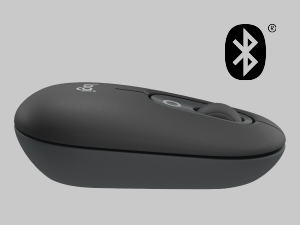
Image: A visual representation of the customizable top button on the POP Mouse, showing its function to access an emoji menu on a connected computer.
6. Підключення кількох пристроїв
The Logitech POP Mouse can connect to up to three different devices simultaneously using Bluetooth. You can easily switch between these devices.
6.1. Комутаційні пристрої
To switch between paired devices, press the Easy-Switch button (1, 2, or 3) on the bottom of the mouse corresponding to the desired device. The LED indicator will briefly light up to confirm the selected channel.
6.2. Logitech FLOW (Advanced Feature)
For seamless control across multiple computers, install Logitech Options+ Software on all devices. With Logitech FLOW enabled, you can move your mouse cursor across screens as if they were a single desktop, even copying and pasting text, images, and files між ними.
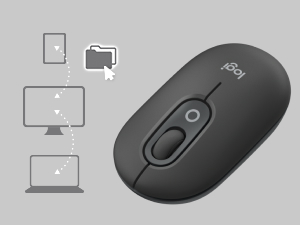
Image: A diagram showing how the POP Mouse can control multiple devices, illustrating the FLOW feature for cross-device interaction.
7. Технічне обслуговування
7.1. Заміна батареї
The POP Mouse operates on a single AA battery with an estimated life of up to 24 months. When the battery is low, the LED indicator on the bottom of the mouse may flash. Replace the battery by following the steps in Section 3.1.
7.2. прибирання
Для очищення миші використовуйте м’яку тканину без ворсу. Для стійкого бруду злегкаampпромийте тканину водою. Уникайте використання агресивних хімікатів або абразивних матеріалів.
8. Вирішення проблем
| проблема | Рішення |
|---|---|
| Миша не вмикається. | Ensure the power switch on the bottom of the mouse is in the 'ON' position. Check and replace the AA battery if necessary. |
| Mouse not connecting via Bluetooth. |
|
| Рух курсора нерівномірний або не реагує. |
|
| Custom button not working. | Ensure Logitech Options+ Software is installed and running on your computer, and the button is correctly configured. |
9. Технічні характеристики
| Особливість | Деталь |
|---|---|
| Номер моделі | 910-007165 |
| Підключення | Bluetooth 5.1 |
| Дальність бездротового зв'язку | До 10 метрів (32.81 футів) |
| Сенсорні технології | Logitech High Precision Optical Tracking |
| Кількість кнопок | 4 (Left/Right click, Scroll wheel click, Top customizable button) |
| Тип батареї | 1 батарея типу АА |
| Термін служби батареї | До 24 місяців (може змінюватися залежно від використання) |
| Розміри (ДxШxВ) | 14.12 x 2.34 x 1.38 дюйми (35.86 x 5.94 x 3.51 см) |
| вага | 2.89 унції (82 г з батареєю) |
| Сумісність операційної системи | Windows 10 or later, macOS 10.15 or later, iPadOS, Chrome OS, Android |

Image: Technical drawing displaying the length, width, and height measurements of the Logitech POP Mouse.
10. Гарантія та підтримка
Щоб отримати інформацію про гарантію та технічну підтримку, відвідайте офіційний сайт підтримки Logitech. website or refer to the user documentation included in your product package.
- Інтернет-підтримка: support.logi.com
- Реєстрація товару: Registering your product can help you receive faster support and updates.