
1. Вступ
This user manual provides essential information for the installation, operation, and maintenance of your Palit GeForce RTX 4060 StormX 8GB graphics card. Please read this manual thoroughly before installing and using the product to ensure proper functionality and to prevent damage.
2. Вміст упаковки
Перевірте наявність усіх елементів у вашій упаковці:
- Palit GeForce RTX 4060 8GB Storm X Graphics Card
- Короткий посібник з встановлення (якщо входить до комплекту)
- Driver CD/DVD (if included, otherwise download latest drivers online)
3. Налаштування та встановлення
3.1 Контрольний список перед установкою
- Ensure your power supply unit (PSU) meets the minimum wattage requirement (typically 550W or higher for an RTX 4060, check specific PSU recommendations).
- Confirm your motherboard has an available PCI Express x16 slot.
- Turn off your computer and disconnect the power cable before proceeding.
- Заземліться, щоб розрядити статичну електрику.
3.2 Встановлення обладнання
- Відкрийте корпус комп'ютера.
- Знайдіть вільний слот PCI Express x16 на материнській платі.
- Зніміть будь-які кришки слотів розширення, які перешкоджають встановленню.
- Carefully align the graphics card with the PCIe slot and press it firmly until it is securely seated. Ensure the retention clip locks into place.
- Закріпіть відеокарту до корпусу гвинтами.
- Connect the required 8-pin PCIe power connector from your power supply to the graphics card.
- Закрийте корпус комп'ютера.

Малюнок 1: Спереду view of the Palit GeForce RTX 4060 StormX 8GB graphics card, showing the single fan cooling solution.
3.3 Встановлення драйвера
- Підключіть кабель дисплея (HDMI або DisplayPort) від відеокарти до монітора.
- Увімкніть комп'ютер.
- Once the operating system loads, download the latest NVIDIA drivers for the GeForce RTX 4060 from the official NVIDIA webсайт (www.nvidia.com/drivers).
- Дотримуйтесь інструкцій на екрані, щоб завершити встановлення драйвера. Можливо, знадобиться перезавантаження системи.
4. Робота з відеокартою
4.1 Підключення дисплея
The Palit GeForce RTX 4060 StormX 8GB supports multiple display outputs. Connect your monitor(s) using the available ports:
- HDMI: For high-definition audio and video output.
- DisplayPort: Для дисплеїв з високою роздільною здатністю та високою частотою оновлення.
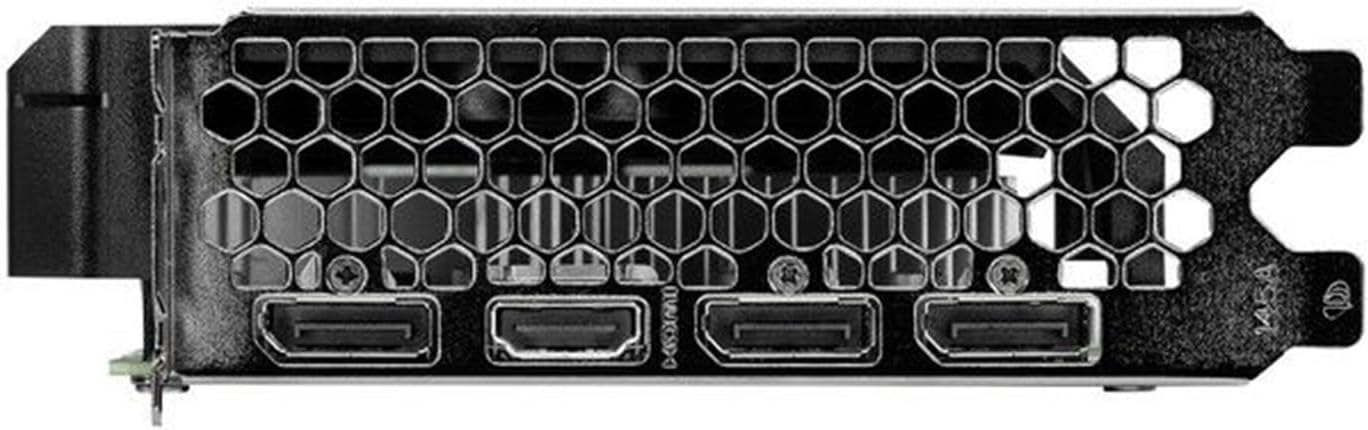
Figure 2: Rear I/O panel showing the HDMI and DisplayPort outputs.
4.2 Основні характеристики
- NVIDIA G-SYNC: Enjoy smooth, tear-free gameplay at high refresh rates when paired with a compatible G-SYNC monitor.
- DLSS 3 & Ray Tracing: Experience enhanced visual fidelity and performance in supported games with NVIDIA's Deep Learning Super Sampling and real-time ray tracing technologies.
- 0dB Technology: The fan remains off during light workloads, ensuring silent operation. Fan activation occurs only under heavier loads to maintain optimal temperatures.
- ThunderMaster Utility: Palit's proprietary software allows you to monitor GPU status, adjust fan speeds, and manage overclocking settings for personalized performance. Download from the official Palit webсайт.
- Mini-ITX Form Factor Support: With a compact length of 17cm, this card is suitable for small form factor PC builds, offering powerful performance in a space-saving design.
5. Технічне обслуговування
Регулярне технічне обслуговування допомагає забезпечити довговічність та оптимальну продуктивність вашої відеокарти.
- Видалення пилу: Periodically clean dust from the graphics card heatsink and fan using compressed air. Ensure the computer is powered off and unplugged before cleaning. Hold the fan blades gently to prevent over-spinning during cleaning.
- Оновлення драйверів: Keep your graphics drivers updated by regularly checking the official NVIDIA website for the latest versions. Driver updates often include performance improvements, bug fixes, and support for new games.
- Контроль температури: Use monitoring software (like Palit ThunderMaster or other third-party tools) to keep an eye on GPU temperatures, especially during heavy loads, to ensure it operates within safe limits.
6. Вирішення проблем
Якщо у вас виникли проблеми з відеокартою, зверніться до наступних поширених кроків усунення несправностей:
- Немає виводу на дисплей:
- Переконайтеся, що кабель дисплея надійно підключений як до відеокарти, так і до монітора.
- Переконайтеся, що монітор увімкнено та налаштовано на правильне джерело вхідного сигналу.
- Check if the graphics card is properly seated in the PCIe slot and the 8-pin power connector is firmly attached.
- Try connecting to a different display output port on the card or a different monitor if available.
- Проблеми з драйверами:
- Perform a clean installation of the latest drivers from the NVIDIA website. Use the 'Custom' installation option and select 'Perform a clean installation'.
- Якщо проблеми не зникають, спробуйте повернутися до попередньої стабільної версії драйвера.
- Погана продуктивність/Збої:
- Переконайтеся, що ваша система відповідає мінімальним вимогам для програм або ігор, які ви запускаєте.
- Monitor GPU temperatures to rule out overheating.
- Перевірте наявність фонових програм, що споживають системні ресурси.
- Verify your power supply unit is sufficient and providing stable power.
- Шум вентилятора:
- Ensure no cables or obstructions are interfering with the fan blades.
- Clean any dust buildup on the fan and heatsink.
- Use the ThunderMaster utility to adjust fan curves if desired, but avoid setting fan speeds too low under load.
If these steps do not resolve your issue, please contact Palit customer support or your retailer for further assistance.
7. Технічні характеристики
| Особливість | Специфікація |
|---|---|
| Графічний процесор | NVIDIA GeForce RTX 4060 |
| Ядра CUDA | 3072 |
| Підвищити годинник | 2460 МГц |
| Розмір пам'яті | 8 ГБ GDDR6 |
| Інтерфейс пам'яті | 128-бітний |
| Швидкість пам'яті | 17 Гбіт/с |
| Тип автобуса | PCI Express 4.0 x16 |
| Виходи дисплея | 1x HDMI, 3x DisplayPort |
| Максимальна цифрова роздільна здатність | 8K Ultra HD |
| Роз'єм живлення | 1x 8-контактний |
| TDP | 115 Вт |
| Охолодження | Active (Single Fan) |
| Розміри (ДxШxВ) | 12.6 x 7.09 x 2.36 дюйма (приблизно 320 x 180 x 60 мм) |
| Номер моделі товару | NE64060019P1-1070F |
8. Гарантія та підтримка
Palit products are manufactured to the highest quality standards. This product is covered by a limited warranty provided by Palit or your retailer. Please refer to the warranty information provided with your purchase or visit the official Palit webсайт для детальних умов.
For technical support, driver downloads, or further assistance, please visit the official Palit webсайт за адресою www.palit.com or contact your local retailer.