
вступ
This instruction manual provides comprehensive guidance for the 8Bitdo Media Remote (White Short Edition), designed for seamless media control on your Xbox One, Xbox Series X, and Xbox Series S consoles. This remote offers dedicated media playback buttons, Xbox system navigation, and motion-activated backlighting for enhanced usability.
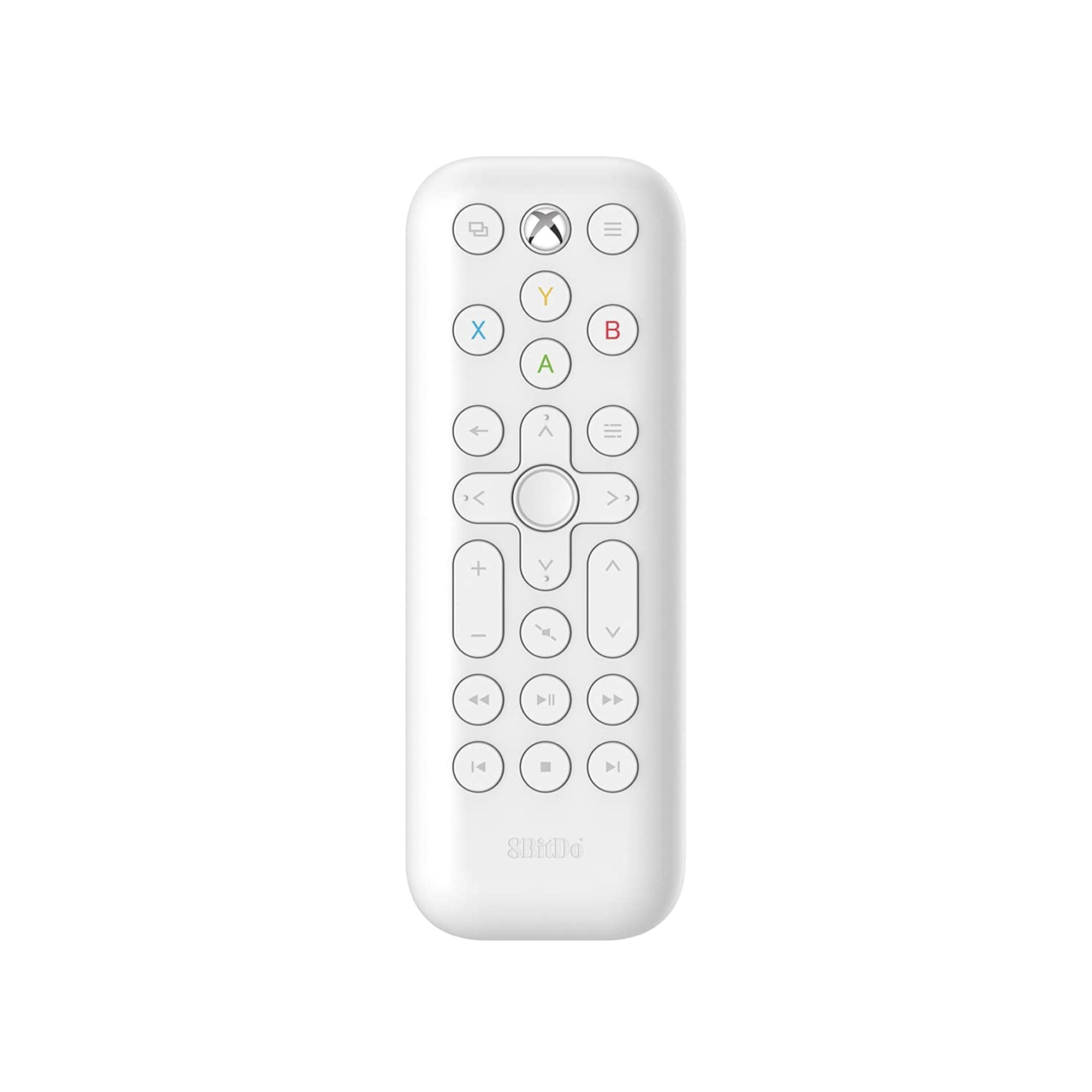
Image: The 8Bitdo Media Remote in White, Short Edition, showcasinйого компактний дизайн та розташування кнопок.
Налаштування
1. Встановлення батареї
The 8Bitdo Media Remote requires two AAA batteries for operation. These are typically included with your purchase.
- Знайдіть кришку відсіку для батарейок на задній панелі пульта дистанційного керування.
- Посуньте кришку вниз, щоб відкрити відсік.
- Вставте дві батарейки типу AAA, дотримуючись правильної полярності (+ та -).
- Засуньте кришку батарейного відсіку назад на місце, доки вона надійно не клацне.

Image: A hand demonstrating how to open the battery compartment and insert AAA batteries into the remote.
2. Початкове підключення
The 8Bitdo Media Remote uses infrared (IR) technology. No manual pairing is required. Simply ensure a clear line of sight between the remote's IR emitter (located at the top) and your Xbox console's IR receiver.

Image: A user holding the 8Bitdo Media Remote, pointing it towards an Xbox Series S console, illustrating the line-of-sight requirement for infrared communication.
Інструкція з експлуатації
1. Powering On/Off and Navigation
- Dedicated Home Button: Press the Xbox Home button (located at the top center) to instantly wake your Xbox console.
- Спрямований джойстик (D-Pad): Use the circular D-Pad for navigating menus and selecting items.
- Кнопки A/B/X/Y: These colored buttons correspond to standard Xbox controller functions for menu selection and interaction.

Image: The 8Bitdo Media Remote being used to wake an Xbox console, highlighting the dedicated Home button functionality.
2. Елементи керування відтворенням медіа
The remote features a full suite of media playback buttons:
- Відтворення/пауза: Початок або призупинення відтворення медіафайлів.
- Перемотування вперед/назад: Skip forward or backward through content.
- Збільшення/зменшення гучності: Adjust the volume of your media.
- Вимкнути звук: Вимкніть або ввімкніть звук.
3. Motion-Activated Backlight
The buttons on the remote are motion-activated and will illuminate when the remote is picked up or moved, making it easy to use in low-light conditions.
4. OneGuide Button Customization
The OneGuide button (three horizontal lines icon) can be customized to launch a specific application on your Xbox. To configure this:
- On your Xbox, go to Налаштування.
- Перейдіть до Devices & connections, потім виберіть Медіа віддалений.
- Choose the desired action or app to launch when the OneGuide button is pressed.
5. TV Volume Control (HDMI-CEC)
Your Xbox can control your TV's volume if your TV supports HDMI-CEC (Consumer Electronics Control). To enable this:
- Press the Xbox button on your controller to open the guide.
- Перейти до Налаштування > Загальний > Варіанти телевізорів та дисплеїв.
- Виберіть Контроль пристрою > HDMI-CEC and enable all options.
- Consult your TV manufacturer's manual for specific HDMI-CEC settings.
Технічне обслуговування
1. Заміна батареї
Replace the AAA batteries when the remote's performance diminishes or the backlight becomes dim. Refer to the 'Battery Installation' steps in the Setup section.
2. прибирання
Wipe the remote with a soft, dry cloth. Avoid using harsh chemicals or abrasive materials that could damage the finish or buttons.
Усунення несправностей
- Пульт не відповідає:
- Переконайтеся, що нові батарейки встановлені правильно.
- Verify a clear line of sight between the remote and your Xbox console. Obstructions can block the infrared signal.
- Confirm your Xbox console is powered on and not in a deep sleep mode that disables IR reception.
- Backlight constantly active:
- The backlight is motion-activated. Any movement will trigger it. This is normal operation.
- If battery life is a concern due to frequent backlighting, consider using rechargeable AAA batteries.
- Не працює регулювання гучності телевізора:
- Ensure your TV supports HDMI-CEC and that it is enabled in your TV's settings.
- Verify HDMI-CEC settings are correctly configured on your Xbox console (Settings > General > TV & display options > Device control > HDMI-CEC).
Технічні характеристики
| Модель | 6922621501848 (White Short Edition) |
| Бренд | 8Бітдо |
| Підключення | Інфрачервоний (ІЧ) |
| Сумісність | Xbox Series X, Xbox Series S, Xbox One |
| Джерело живлення | 2 батареї AAA (у комплекті) |
| Dimensions (Short Edition) | 134.25 x 48 x 18.8 мм |
| Вага товару | 2.88 унції |

Image: A visual comparison of the 8Bitdo Media Remote in both short and long editions, detailing their respective dimensions.

Image: An illustration showing the 8Bitdo Media Remote's compatibility with Xbox One, Xbox Series X, and Xbox Series S consoles.
Гарантія та підтримка
8Bitdo is committed to producing high-quality gaming hardware. For specific warranty information, product support, or to access the latest firmware updates, please visit the official 8Bitdo webсайт або зверніться безпосередньо до служби підтримки клієнтів. Зберігайте чек про покупку для гарантійних випадків.
Щоб отримати додаткові ресурси та інформацію про продукт, ви можете відвідати Магазин 8Bitdo на Amazon.
Продукт закінченийview відео
Відео: Посадовець надview of the 8Bitdo Media Remote for Xbox One and Xbox Series X|S, demonstrating its features and functionality.