
1. Вступ
This manual provides essential information for the setup, operation, and maintenance of your Dell PowerEdge T140 Mini Tower Server. Please read this guide thoroughly before operating the server to ensure proper functionality and safety.
The Dell PowerEdge T140 is designed for small businesses, branch locations, and home offices, offering reliable performance and storage capabilities.
2. Інформація про безпеку
Дотримуйтесь наступних запобіжних заходів, щоб запобігти травмам та пошкодженню обладнання:
- Ensure the server is placed on a stable, level surface with adequate ventilation.
- Connect the server to a grounded power outlet using the provided power cable.
- Do not block ventilation openings. Maintain proper airflow around the server.
- Avoid exposing the server to moisture or extreme temperatures.
- Before performing any internal maintenance, disconnect the server from the power source.
- Only qualified personnel should perform service on the server.
3. Продукт закінчивсяview
3.1 Спереду View
The front panel provides access to power controls, USB ports, and optical drive (if installed).

Малюнок 1: Спереду view of the Dell PowerEdge T140 Mini Tower Server, showing the power button, USB ports, and the hexagonal mesh design.
3.2 Задня панель
The rear panel contains various ports for connectivity, including video outputs, USB ports, network ports, and the power input.
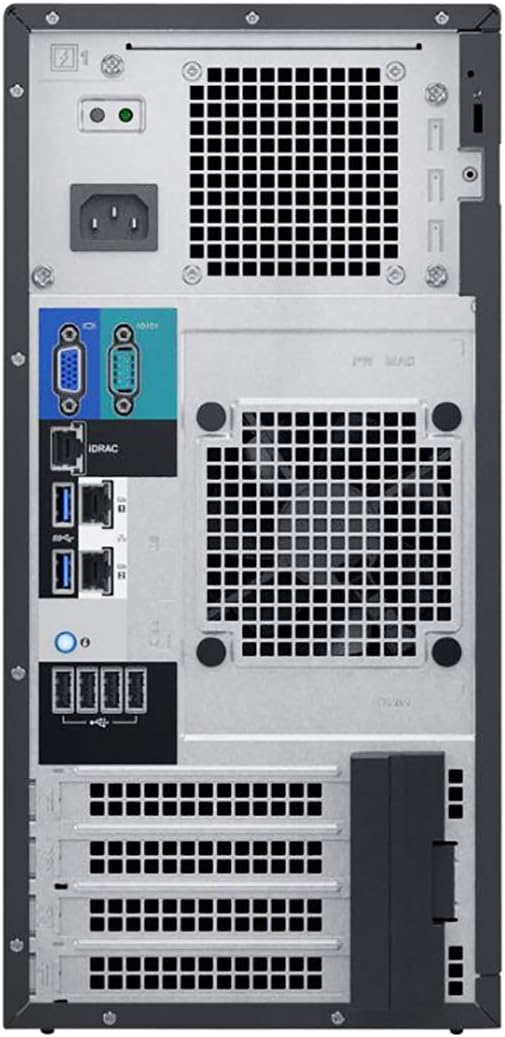
Figure 2: Rear panel of the Dell PowerEdge T140, displaying VGA, HDMI, DisplayPort, USB ports, network ports, and power connector.
3.3 Внутрішні компоненти
Understanding the internal layout is crucial for maintenance and upgrades. Key components include the motherboard, CPU, RAM slots, and hard drive bays.

Малюнок 3: Внутрішній view of the Dell PowerEdge T140, showing the motherboard, CPU heatsink, RAM slots, and hard drive bays.
4. Налаштування
4.1 Розпакування та розміщення
- Обережно вийміть сервер з упаковки.
- Place the server on a flat, stable surface in a well-ventilated area. Ensure at least 10 cm (4 inches) of clearance around all ventilation openings.
4.2 Підключення периферійних пристроїв
- Connect a monitor to one of the video output ports (VGA, HDMI, or DisplayPort) on the rear panel.
- Підключіть USB-клавіатуру та мишу до доступних USB-портів.
- Connect one or more Ethernet cables from your network to the network ports on the rear panel.
4.3 Підключення живлення
- Connect the power cable to the power input on the rear panel of the server.
- Підключіть інший кінець кабелю живлення до заземленої електричної розетки.
5. Інструкція з експлуатації
5.1 Увімкнення/вимкнення
- Щоб увімкнути: Натисніть кнопку живлення на передній панелі. Індикатор живлення засвітиться.
- Щоб вимкнути: Perform a graceful shutdown through the operating system. Alternatively, press and hold the power button for 4 seconds for a forced shutdown (use only when necessary).
5.2 Initial Boot-Up and OS Configuration
Upon first power-on, the server will initiate the boot process. If an operating system (e.g., Windows Server) is pre-installed, follow the on-screen prompts for initial setup. If no OS is installed, you will need to install one from a bootable media.
5.3 iDRAC9 Basic Remote Access
The server is equipped with iDRAC9 Basic for remote management. To access iDRAC, connect a network cable to the dedicated iDRAC port (if available) or one of the LOM ports. Refer to the Dell iDRAC documentation for detailed setup and usage instructions, including initial IP address configuration and login credentials.
5.4 Конфігурація RAID
The server includes a PERC S140 6Gb/s RAID Controller. For optimal data protection and performance, it is recommended to configure RAID arrays for your hard drives. This is typically done during the initial setup phase through the server's BIOS or a dedicated RAID configuration utility. Consult the Dell PERC S140 documentation for specific steps.
6. Технічне обслуговування
6.1 Очищення
- Regularly clean the exterior of the server with a soft, dry cloth.
- Use compressed air to clear dust from ventilation openings and internal components (ensure server is powered off and unplugged).
- Do not use liquid cleaners directly on the server.
6.2 Оновлення програмного забезпечення
Keep the server's operating system, drivers, and firmware updated to ensure optimal performance, security, and compatibility. Visit the Dell support website for the latest updates for your PowerEdge T140.
6.3 Hardware Checks
Periodically inspect cables for secure connections and signs of wear. Monitor server health indicators through iDRAC or the operating system for any potential hardware issues.
7. Вирішення проблем
This section addresses common issues you might encounter. For more complex problems, refer to Dell's official support resources.
7.1 Немає живлення
- Verify the power cable is securely connected to both the server and the electrical outlet.
- Переконайтеся, що розетка працює, перевіривши її за допомогою іншого пристрою.
- Check the power supply unit (PSU) status indicators, if available.
7.2 Немає виводу на дисплей
- Confirm the monitor is powered on and connected correctly to the server's video output port.
- Try a different video cable or monitor to rule out faulty peripherals.
- Переконайтеся, що на моніторі вибрано правильне джерело вхідного сигналу.
7.3 Проблеми з підключенням до мережі
- Check that Ethernet cables are securely connected to both the server and the network switch/router.
- Verify network adapter drivers are installed and up to date in the operating system.
- Confirm network settings (IP address, subnet mask, gateway) are correctly configured.
8. Технічні характеристики
| Особливість | Специфікація |
|---|---|
| Бренд | Dell |
| Модель | PowerEdge T140 |
| Процесор | Intel Xeon E-2124 Quad-Core 3.3GHz (Max Turbo 4.3GHz) |
| Пам'ять | 32GB DDR4 PC4-21300 2666MHz Unbuffered |
| Зберігання | Жорсткі диски SATA 3.5 дюйма ємністю 8 ТБ (4 x 2 ТБ) 7.2 КБ 6 Гбіт/с |
| RAID контролер | PERC S140 6Gb/s |
| Віддалений доступ | iDRAC9 Basic |
| Мережевий інтерфейс | On-Board Dual Port 1Gb LOM |
| Операційна система | Windows Server (variant dependent) |
| Відеовихід | HDMI, VGA, DisplayPort |
| Загальна кількість портів USB | 10 |
| Розміри (позиція) | 31 x 24 x 18 дюймів |
9. Гарантія та підтримка
This Dell PowerEdge T140 server is a renewed product. Renewed products typically come with a limited warranty provided by the seller or refurbisher. Please refer to your purchase documentation for specific warranty terms and duration. For this product, a 90-day return/replacement policy is generally offered.
For technical support, driver downloads, and additional documentation, please visit the official Dell Support website and search for the PowerEdge T140 model. Have your service tag or express service code ready for faster assistance.