
вступ
This manual provides instructions for the safe and efficient operation of your RIDGID R84086B 18-Volt Cordless Mini Bluetooth Radio. This compact and versatile device offers portable audio entertainment and device charging, featuring AM/FM radio, Bluetooth connectivity, and an auxiliary input. It is powered by RIDGID 18-Volt batteries and can also function as a power bank for charging other devices.
Інформація про безпеку
Always read and understand all safety warnings and instructions before operating this product. Failure to follow these instructions may result in electric shock, fire, and/or serious injury.
- Do not expose the radio to rain or wet conditions. Water entering the radio will increase the risk of electric shock.
- Use only with specified battery packs. Using any other battery packs may create a risk of injury and fire.
- Do not operate the radio in explosive atmospheres, such as in the presence of flammable liquids, gases, or dust.
- Keep the radio away from heat sources, direct sunlight, and extreme temperatures.
- Always ensure the battery is properly seated before use.
Продукт закінченийview
Familiarize yourself with the components of your RIDGID R84086B radio.
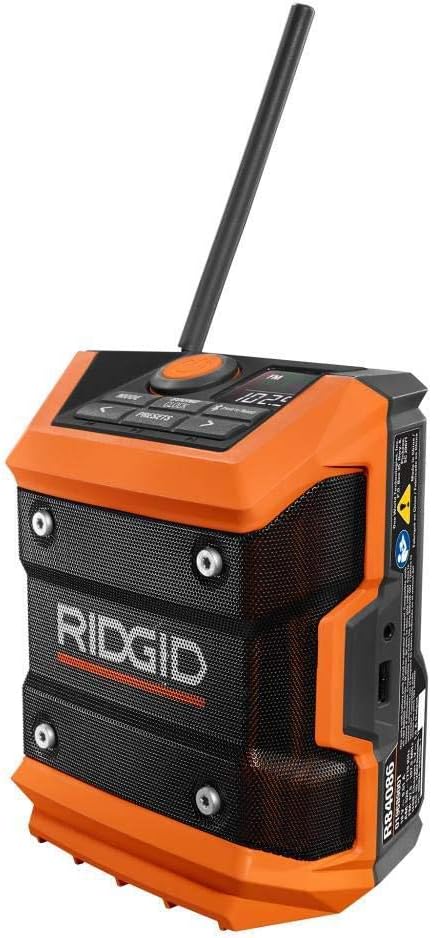
Малюнок 1: Спереду view of the RIDGID R84086B radio, showing the control panel, speaker, and extended antenna.

Figure 2: The RIDGID R84086B radio in a workshop setting, demonstrating its portability and use with a smartphone.
Налаштування
Установка батареї
- Переконайтеся, що радіо вимкнено.
- Align a charged RIDGID 18-Volt battery pack with the battery port on the radio.
- Вставте акумуляторний блок у порт, доки він надійно не зафіксується.
Регулювання антени
For optimal radio reception, extend and adjust the antenna as needed. The antenna can be rotated and tilted to improve signal strength.
Інструкція з експлуатації
Увімкнення/вимкнення живлення
Press the orange power button located on the control panel to turn the radio on or off.
Вибір режиму
Натисніть РЕЖИМ button to cycle through available audio sources: FM Radio, AM Radio, Bluetooth, and Auxiliary (AUX) input.
Radio Tuning (AM/FM)
- Виберіть режим FM або AM за допомогою РЕЖИМ кнопку.
- Use the left (<) і праворуч (>) arrow buttons to manually tune to a desired frequency.
- Щоб зберегти станцію як попередньо налаштовану, натисніть і утримуйте PRESETS button, then use the arrow buttons to select a preset number and press PRESETS знову для підтвердження.
Bluetooth-парування
- Виберіть режим Bluetooth за допомогою РЕЖИМ button. The Bluetooth icon on the display will flash, indicating it is in pairing mode.
- На мобільному пристрої ввімкніть Bluetooth і знайдіть доступні пристрої.
- Select "RIDGID Radio" from the list of devices to pair. Once paired, the Bluetooth icon will stop flashing and remain solid.
Допоміжний вхід
To use the auxiliary input, connect an audio device (e.g., smartphone, MP3 player) to the 3.5mm AUX port on the side of the radio using a standard audio cable. Select AUX mode using the РЕЖИМ кнопку.
Регулювання звуку
Натисніть SOUND/CLOCK button to access sound settings. Use the arrow buttons to adjust bass and treble levels for your preferred audio experience.
Функціональність портативного зарядного пристрою
The radio features a USB port that allows you to charge compatible devices. Connect your device to the USB port using an appropriate charging cable. The radio's battery will provide power to charge your device.
Video: Demonstration of the RIDGID R84086B radio's features, including battery installation, mode selection, radio tuning, auxiliary input, and power bank functionality.
Технічне обслуговування
прибирання
Регулярно чистіть радіо м’яким, damp cloth. Do not use harsh chemicals or abrasive cleaners. Ensure all ports are free of dust and debris.
Догляд за акумулятором
Store battery packs in a cool, dry place away from direct sunlight. Do not store battery packs in a discharged condition. Always charge batteries fully before extended storage.
Усунення несправностей
Немає живлення
- Переконайтеся, що акумуляторний блок повністю заряджений та правильно вставлений.
- Check for any obstructions in the battery port.
Поганий радіоприйом
- Extend and adjust the antenna for better signal.
- Move the radio to a different location to avoid interference.
Проблеми з підключенням Bluetooth
- Переконайтеся, що радіо перебуває в режимі сполучення Bluetooth.
- Make sure your mobile device's Bluetooth is enabled and within range.
- Спробуйте розірвати пару та знову підключити пристрій.
Технічні характеристики
| Бренд | РІДГІД |
| Номер моделі | R84086B |
| Технологія підключення | Bluetooth |
| Джерело живлення | Battery Powered (RIDGID 18-Volt) |
| Вага товару | 1.75 фунта |
| Сумісні пристрої | Смартфон |
| Апаратний інтерфейс | USB |
| UPC | 723548648427 |
Гарантія та підтримка
Інформація про гарантію
This product comes with a 90-day limited warranty. Please refer to the warranty card included with your purchase for full terms and conditions.
Підтримка клієнтів
For technical assistance, troubleshooting, or warranty claims, please contact RIDGID customer support. Contact information can typically be found on the official RIDGID webсайті або на упаковці вашого продукту.