
1. Важлива інформація з безпеки
Read all instructions before using this product. Failure to follow these instructions may result in serious injury or property damage.
- Не використовуйте цей продукт, якщо у вас були операції в ротовій порожнині або яснах протягом попередніх 2 місяців. Зверніться до стоматолога, якщо після використання цього продукту виникає надмірна кровотеча або якщо кровотеча продовжується після 1 тижня використання.
- This appliance contains no user-serviceable parts. Do not modify or attempt to repair the appliance.
- Keep the charging base away from water. Do not place or store the product where it can fall or be pulled into a tub or sink.
- This product is designed for cleaning teeth, gums, and tongue only. Do not use it for any other purpose.
- Supervise children when using this product. This appliance is not intended for use by persons with reduced physical, sensory, or mental capabilities unless they have been given supervision or instruction.
2. Продукт закінчивсяview
компоненти
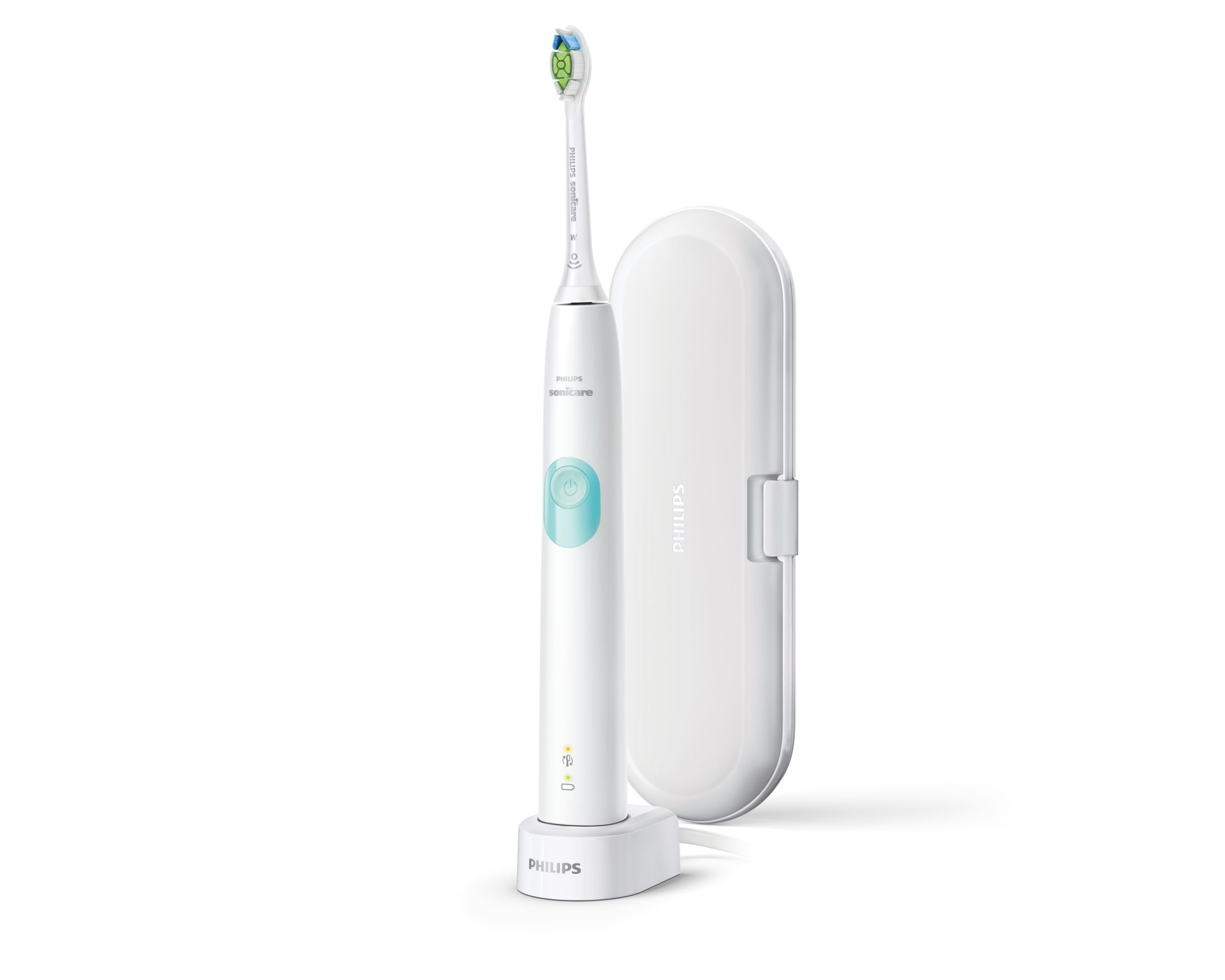
This image displays the Philips Sonicare 4300 Series electric toothbrush in white, featuring a light blue power button. It is shown standing on its charging base. To the right, a white travel case is visible, designed to protect the toothbrush and a brush head during transport.
- А. Щітка для голови
- B. Ручка
- C. Кнопка ввімкнення/вимкнення живлення
- D. Intensity indicator (Low/High)
- E. Pressure sensor light ring
- F. Індикатор батареї
- G. Charging base
- H. Travel case
3. Налаштування
3.1 Заряджання зубної щітки
- Place the handle on the charging base.
- Підключіть зарядну базу до електричної розетки.
- The battery indicator will flash to show the toothbrush is charging. A full charge takes approximately 24 hours.
- The battery indicator will glow solid green when fully charged.
3.2 Прикріплення головки щітки
Align the brush head with the handle so the bristles face the same direction as the power button. Push the brush head down firmly onto the metal shaft until it stops.
4. Інструкція з експлуатації
4.1 Чищення зубів
- Намочіть щетину і нанесіть невелику кількість зубної пасти.
- Прикладіть головку щітки до зубів під невеликим кутом до лінії ясен.
- Натисніть кнопку живлення, щоб увімкнути зубну щітку.
- Обережно, повільно переміщуйте головку щітки по зубах невеликими рухами вперед і назад, дозволяючи Sonicare виконувати свою роботу.
- Continue brushing for the full 2-minute cycle.
4.2 Smartimer and QuadPacer
- Smartimer: The toothbrush automatically turns off after 2 minutes of brushing, indicating that you have brushed for the dentist-recommended time.
- Квадратний Пейсер: This feature beeps at 30-second intervals to signal when to move to the next quadrant of your mouth, ensuring thorough cleaning.
4.3 Датчик тиску
The toothbrush features a built-in pressure sensor. If you apply too much pressure during brushing, the light ring on the handle will illuminate. Reduce pressure to turn off the light and protect your gums and teeth.
4.4 Modes and Intensity
The Philips Sonicare 4300 Series offers one cleaning mode with two intensity settings (Low and High).
- To change intensity, press the power button repeatedly while the toothbrush is on. The intensity indicator lights will show the current setting.
- The toothbrush remembers your last selected intensity setting for the next use.
5. Технічне обслуговування
5.1 Очищення
- Після кожного використання ретельно промийте головку щітки та щетину під проточною водою.
- Протріть ручку рекламоюamp тканиною. Не занурюйте ручку у воду.
- Періодично очищуйте зарядну базу за допомогою рекламиamp тканина. Перед чищенням переконайтеся, що він відключений від мережі.
5.2 Зберігання
Store the toothbrush in a clean, dry place. If storing for an extended period, ensure the battery is fully charged before storage and recharge every 6 months.
5.3 Заміна головки щітки
Replace your brush head every 3 months, or sooner if the bristles are splayed or worn. Worn bristles are less effective at cleaning.
6. Вирішення проблем
6.1 Загальні проблеми
- Зубна щітка не включається: Ensure the battery is charged. Place the handle on the charging base for at least 24 hours.
- Toothbrush stops during use: The battery may be low. Recharge the toothbrush.
- Pressure sensor light activates frequently: You may be brushing too hard. Reduce the pressure applied to your teeth and gums.
- Reduced brushing effectiveness: Replace the brush head. Ensure the brush head is securely attached to the handle.
- Battery indicator not working: Ensure the toothbrush is correctly placed on the charging base and the base is plugged in.
7. Технічні характеристики
7.1 Технічні дані
| Особливість | Специфікація |
|---|---|
| Бренд | PHILIPS |
| Номер моделі | HX6807/28 |
| Колір | White/Mint |
| Number of Intensities | 2 |
| Сумісність | Дорослий |
| Особливості | LED Indicators, Pressure Sensor |
| Вага товару | 510 г |
| Джерело живлення | Працює від батареї |
| Технологія акумулятора | Літій-іонний (літій-іонний) |
| Вхід змінного струмуtage | 110 - 220 В |
| 2-хвилинний таймер | так |
| Датчик тиску | так |
| Дорожній кейс | так |
8. Гарантія та підтримка
8.1 Інформація про гарантію
This Philips Sonicare product is covered by a 2 рік обмеженої гарантії from the date of purchase. This warranty covers defects in materials and workmanship under normal use. It does not cover damage caused by misuse, neglect, unauthorized modification, or normal wear and tear.
Зберігайте підтвердження покупки для гарантійних претензій.
8.2 Підтримка клієнтів
For product support, troubleshooting assistance, or warranty service, please visit the official Philips website or contact Philips customer service in your region. Refer to the contact information provided in your product packaging or on the Philips webсайт.