
вступ
This manual provides detailed instructions for the setup, operation, maintenance, and troubleshooting of your Panasonic DECT 6.0 Expandable Cordless Phone System, model KX-TGD393CB. Please read these instructions carefully to ensure proper use and to maximize the features of your new phone system.

Figure 1: Panasonic DECT 6.0 Cordless Phone System with base unit and three handsets. This image displays the complete Panasonic DECT 6.0 Cordless Phone System, including the main base unit with one handset docked, and two additional handsets each on their respective charging cradles. All units are black.
1. Налаштування
1.1 Розпакування та перевірка компонентів
Перш ніж почати, переконайтеся, що всі компоненти присутні:
- Базовий блок
- Бездротові телефони (3 в комплекті)
- Handset Chargers (2 included for additional handsets)
- Адаптер змінного струму для базового блоку
- Шнур телефонної лінії
- Rechargeable Batteries for Handsets (3 sets included)
- Затискачі для ременя (3 в комплекті)
1.2 Підключення базового блоку
- Підключіть адаптер змінного струму до базового пристрою та увімкніть його у стандартну електричну розетку.
- Connect the telephone line cord to the base unit and to your telephone wall jack.
1.3 Handset Battery Installation and Initial Charge
- Відкрийте кришку відсіку для батарейок на задній панелі кожної трубки.
- Insert the provided rechargeable batteries, ensuring correct polarity (+/-).
- Закрийте кришку батарейного відсіку.
- Place each handset on its respective base unit or charger. The charge indicator should illuminate. Allow at least 7 hours for the initial charge.
1.4 Реєстрація трубки
Your handsets are pre-registered to the base unit. If a handset displays "Unregistered" or you are adding new handsets, follow these steps:
- На базовому пристрої натисніть і утримуйте ЛОКАТОР приблизно 5 секунд, доки не пролунає сигнал реєстрації.
- На трубці натисніть МЕНЮ, then scroll to "Initial setting" and press ВИБРАТИ.
- Scroll to "Registration" and press ВИБРАТИ.
- Дотримуйтесь підказок на екрані, щоб завершити реєстрацію.
1.5 Встановлення дати та часу
It is recommended to set the date and time for accurate call logs and answering machine timestamps.
- Прес МЕНЮ на телефонній трубці.
- Scroll to "Initial setting" and press ВИБРАТИ.
- Scroll to "Date & time" and press ВИБРАТИ.
- Enter the current month, day, year, hour, and minute using the dial pad.
- Прес ВИБРАТИ зберегти.
2. Інструкція з експлуатації
2.1 Здійснення та отримання дзвінків
- Щоб зателефонувати: Прес ПОГОВОРИТИ, а потім наберіть номер телефону.
- Щоб прийняти дзвінок: Прес ПОГОВОРИТИ або будь-яку клавішу набору (0-9, *, #).
- Щоб завершити дзвінок: Прес ВИМКНЕНО.
2.2 Регулювання гучності
Під час розмови натисніть ГУЧНІСТЬ (вгору/вниз) on the handset to adjust the earpiece or speaker volume. On the base unit, use the ОБ'ЄМ +/- buttons to adjust the speaker volume for answering machine playback.
2.3 спікерфон
Щоб скористатися функцією гучного зв'язку під час дзвінка, натисніть SP-ТЕЛЕФОН кнопку на трубці. Натисніть її ще раз, щоб повернутися до динаміка.
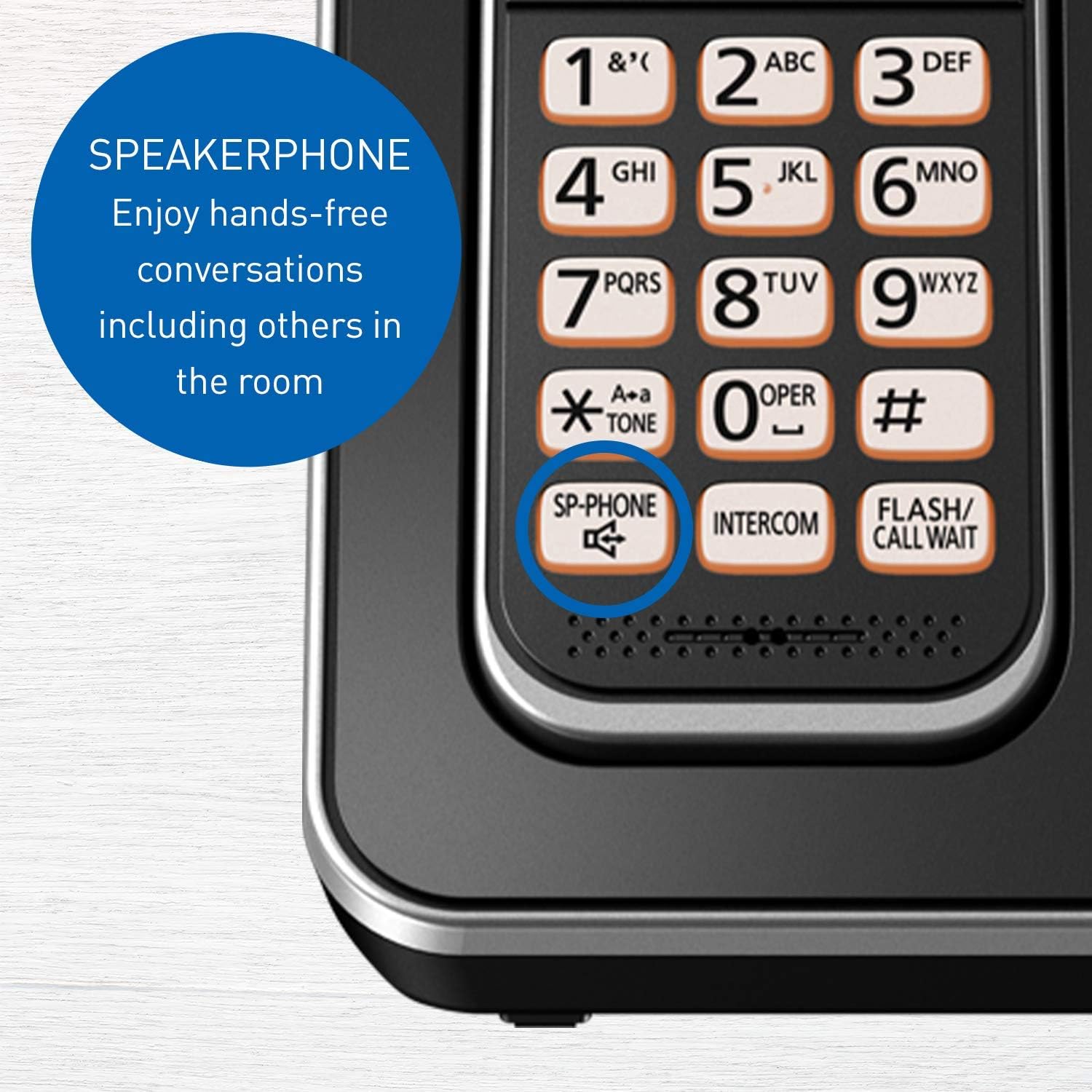
Figure 2: Close-up of the Panasonic Cordless Phone handset highlighting the 'SP-PHONE' button. This button activates the speakerphone for hands-free conversations, allowing others in the room to participate.
2.4 Розмовний ідентифікатор абонента
When an incoming call is received, the handset will announce the caller's name or number between rings. This feature requires a subscription to Caller ID service from your telephone provider.

Figure 3: The handset display showing an incoming call with the Talking Caller ID feature. This feature announces the caller's name between rings, provided you have a Caller ID service subscription.
2.5 Блокування дзвінків
You can block up to 60 unwanted numbers. To block a number:
- Під час дзвінка з небажаного номера натисніть БЛОК Дзвонення (або МЕНЮ then navigate to Call Block).
- Follow the on-screen prompts to add the number to the block list.

Figure 4: A close-up of the base unit and handset, illustrating the Call Block feature. This allows registration of up to 60 unwanted numbers, requiring a Caller ID service subscription.
2.6 Автовідповідач
The digital answering system can record up to 15 minutes of messages.
- Щоб увімкнути/вимкнути: Прес ВІДПОВІДЬ УВІМК. / ВИМК на базовому блоці.
- Щоб відтворити повідомлення: Прес ГРАТИ/СТОП on the base unit. You can also access messages from a handset via the МЕНЮ.

Рисунок 5: Детальний view of the base unit's answering machine controls. The 'ANSWER ON/OFF' and 'PLAY/STOP' buttons are visible, indicating the system's capacity to record up to 15 minutes of messages.
2.7 Домофон
Make calls between handsets within your home or office.
- Прес ІНТЕРКОМ на телефонній трубці.
- Dial the number of the desired handset (e.g., 2 for handset 2).
- The other handset will ring. To answer, press ПОГОВОРИТИ.

Figure 6: An illustrative diagram showing how multiple handsets can be used for intercom calls, facilitating communication between different rooms within a home or office.
2.8 Handset Locator
Якщо ви загубили слухавку, натисніть ЛОКАТОР button on the base unit. All registered handsets will ring, helping you find them.
2.9 Нічний режим
Night Mode allows you to silence the ringer for a set period, ensuring undisturbed sleep. This can be configured through the handset's menu settings under "Initial setting" > "Night mode".

Figure 7: The phone system depicted in a nighttime setting, demonstrating the 'Night Mode' feature which allows users to silence the ringer for a specified period.
2.10 Інтелектуальний еко-режим
This feature automatically reduces power consumption when the handset is close to the base unit, extending talk time and battery life. An "ECO" indicator will appear on the handset display when active.

Figure 8: A close-up of the handset display with the 'ECO' indicator visible, signifying the Intelligent ECO Mode is active. This mode automatically reduces power consumption when the handset is near the base unit.
3. Технічне обслуговування
3.1 Очищення пристроїв
Wipe the phone units with a soft, damp cloth. Do not use abrasive cleaners, benzene, thinner, or any other harsh chemicals, as these can damage the surface.
3.2 Battery Replacement and Care
- Use only the specified rechargeable batteries. Using non-rechargeable batteries or incorrect types can cause damage or injury.
- If the handset battery life significantly decreases, it may be time to replace the batteries. Refer to section 1.3 for installation instructions.
- Уникайте впливу екстремальних температур на акумулятори.
4. Вирішення проблем
| проблема | Рішення |
|---|---|
| Немає тону набору. | Переконайтеся, що телефонний шнур надійно підключено як до базової станції, так і до розетки. Перевірте, чи правильно підключено адаптер змінного струму. |
| Не вдається здійснювати або приймати дзвінки. | Check all connections. Ensure handsets are charged and registered. If using a DSL service, a DSL filter may be required. |
| Handset not charging or beeping. | Ensure the handset is correctly seated in the charger. Clean the charging contacts on both the handset and charger with a dry cloth. Verify the charger is plugged into a working outlet. |
| Display shows incorrect date/time. | Re-set the date and time manually (refer to section 1.5). If the issue persists, a power cycle of the base unit might be necessary. |
| Caller ID not working. | Confirm you have subscribed to Caller ID service from your telephone provider. |
| Погана якість звуку або статичні перешкоди. | Підійдіть ближче до базової станції. Уникайте розміщення базової станції поблизу інших електронних пристроїв (наприклад, мікрохвильових печей, комп’ютерів), які можуть спричиняти перешкоди. |
4.1 General Reset
If you experience persistent issues, try resetting the base unit:
- Unplug the AC power adapter from the base unit.
- Зачекайте приблизно 5 хвилин.
- Plug the AC power adapter back into the base unit.
5. Технічні характеристики
| Особливість | Деталь |
|---|---|
| Номер моделі | KX-TGD393CB |
| технології | DECT 6.0 |
| Кількість трубок | 3 (розширюється до 6) |
| Система автовідповідача | Цифровий, час запису до 15 хвилин |
| Дисплей | 1.8" Clear white backlit LCD |
| Місткість блоку викликів | До 60 номерів |
| Тип батареї | Rechargeable Ni-MH (Product Specific, included) |
| Розміри телефонної трубки (В x Ш x Г) | 165 мм x 48 мм x 32 мм (приблизно) |
| Розміри базового блоку (В x Ш x Г) | 108 мм x 109 мм x 89 мм (приблизно) |
| Handset Weight (with battery) | 130 г (приблизно) |
| Вага базового блоку | 150 г (приблизно) |
| Charger Unit Weight | 100 г (приблизно) |
| Сумісність зі слуховими апаратами | так |

Figure 9: This image provides detailed measurements for the handset, base unit, and charger unit, including screen size (1.8 inches) and weight specifications for each component.
6. Гарантія та підтримка
6.1 Гарантія на виріб
Panasonic products are manufactured to high quality standards and are covered by a limited warranty. Please refer to the warranty card included with your product for specific terms and conditions, or visit the official Panasonic webдля отримання детальної інформації про гарантію.
6.2 Підтримка клієнтів
For technical assistance, troubleshooting beyond this manual, or warranty service, please contact Panasonic Customer Support. You can find contact information, including phone numbers and online support resources, on the official Panasonic webсайт (Www.panasonic.com).
7. Офіційні відео про продукт
Наразі офіційні відео товару від продавця недоступні для вбудовування.