
1. Продукт закінчивсяview
The Arteck 2.4G Wireless Keyboard is a stainless steel, ultra-slim keyboard designed for various computing devices. It offers a comfortable and quiet typing experience with its low-profile keys and durable construction. This keyboard is built for convenience and long-lasting performance, featuring a built-in rechargeable battery.
Its compact size and lightweight design make it suitable for use with computers, desktops, PCs, laptops, Surface devices, and Smart TVs running Windows 11/10/8/7/Vista/XP.

Figure 1: Arteck 2.4G Wireless Keyboard (Front View)
2. Вміст упаковки
Після відкриття упаковки переконайтеся, що всі наступні предмети присутні:
- Arteck Stainless 2.4G Wireless Keyboard
- Нано-USB-приймач
- USB кабель для зарядки
- Ласкаво просимо керівництво
3. Інструкції з налаштування
Setting up your Arteck 2.4G Wireless Keyboard is a straightforward process:
- Locate the Nano USB Receiver: The small USB receiver is typically found in the keyboard's packaging or sometimes stored in a compartment on the keyboard itself for safekeeping.
- Вставте приймач: Plug the nano USB receiver into an available USB port on your computer, desktop, PC, laptop, Surface device, or Smart TV.
- Увімкнення клавіатури: Locate the power switch on the keyboard (usually on the back or side) and slide it to the "ON" position.
- Автоматичне підключення: The keyboard should automatically connect to your device within a few seconds. No additional drivers are typically required.

Figure 2: Easy Setup - Plug the wireless nano USB receiver.

Figure 3: Power switch and silicone non-slip pads on the back of the keyboard.
4. Робота з клавіатурою
The Arteck 2.4G Wireless Keyboard provides a standard QWERTY layout with additional function keys for enhanced productivity.
4.1. Ключові характеристики
- Low-Profile Ключі: Designed for quiet and comfortable typing. The scissor-kick key construction ensures durability, rated for over 3 million continuous uses.
- Функціональні клавіші (Fn): Utilize the 'Fn' key in combination with other keys to access multimedia controls and system functions. These include volume control, playback control, copy/paste, web навігація та багато іншого.
- Компактний дизайн: Despite its full-size keys, the keyboard maintains an ultra-thin and light profile, making it highly portable.
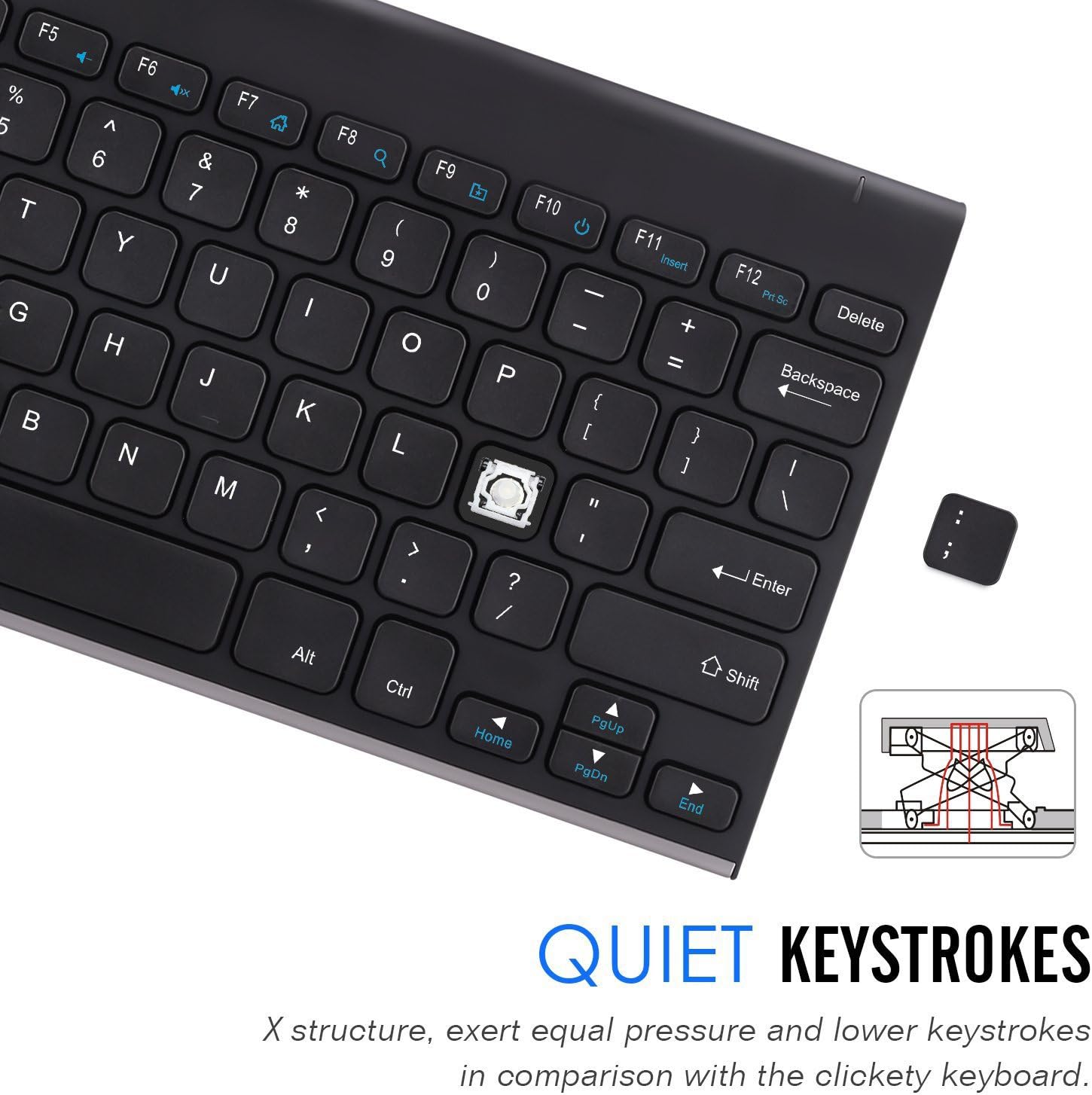
Figure 4: Quiet Keystrokes with X-structure design.
5. Технічне обслуговування та термін служби батареї
The Arteck 2.4G Wireless Keyboard features a built-in rechargeable Li-polymer battery, offering extended usage on a single charge.
5.1. Заряджання клавіатури
- Connect the provided USB charging cable to the keyboard's charging port and the other end to a USB power source (e.g., computer USB port, USB wall adapter).
- A charging indicator light (if present) will typically illuminate during charging and turn off or change color when fully charged.
5.2. Термін служби батареї
A full charge provides approximately 6 months of use, based on 2 hours of non-stop use per day. For optimal battery longevity, it is recommended to fully charge the keyboard when the battery is low.

Рисунок 5: Збільшений термін служби батареї.
6. Вирішення проблем
If you encounter issues with your Arteck 2.4G Wireless Keyboard, try the following troubleshooting steps:
- Клавіатура не реагує:
- Переконайтеся, що клавіатуру увімкнено.
- Check if the nano USB receiver is securely plugged into a working USB port on your device.
- Спробуйте підключити приймач до іншого USB-порту.
- Recharge the keyboard fully. A low battery can cause connectivity issues.
- Перезавантажте комп’ютер або пристрій.
- Keys Not Working Correctly:
- Переконайтеся, що клавіатура повністю заряджена.
- Clean around and under the keys to remove any debris that might be obstructing them.
- If specific keys are unresponsive, it might indicate a hardware issue.
- Переривчасте підключення:
- Ensure the keyboard is within the effective range (up to 33 feet or 10 meters) of the USB receiver.
- Мінімізуйте перешкоди від інших бездротових пристроїв, що працюють на частоті 2.4 ГГц.
- Try moving the USB receiver closer to the keyboard.
Якщо ці кроки не вирішать проблему, зверніться до розділу гарантії та підтримки для отримання додаткової допомоги.
7. Технічні характеристики
| Особливість | Деталь |
|---|---|
| Бренд | Артек |
| Номер моделі | HW086 |
| Технологія підключення | Бездротовий зв'язок 2.4 ГГц радіочастота |
| Сумісні пристрої | Laptop, PC, Desktop, Surface, Smart TV |
| Сумісність операційної системи | Windows 11/10/8/7/Vista/XP |
| Тип батареї | Акумуляторний літій-полімерний |
| Середній термін служби батареї | 6 months (based on 2 hours non-stop use per day) |
| Розміри (ДxШxВ) | 11.1 x 5.3 x 0.16 дюйми (28 x 13.5 x 0.4 см) |
| Вага товару | 10.2 унції (310 г) |
| Колір | чорний |
| Тип ключа | Низькопрофесійнийfile, Scissor-kick mechanism |

Рисунок 6: Розміри та вага клавіатури.
8. Гарантія та підтримка клієнтів
Arteck provides a 24-month warranty for this product. For warranty claims or any customer service inquiries, please refer to the contact information provided in your welcome guide or visit the official Arteck support webсайт.
For additional support, you may also contact Arteck customer service directly. Contact details are typically available on the manufacturer's official webсайті або через продавця, де було придбано товар.