
1. Вступ
Thank you for choosing the OSD Audio PRE-1 High Definition Preamplifier. This unit is designed to enhance your audio experience by providing versatile source selection and precise audio control. The PRE-1 acts as a central hub for various audio components, including turntables, CD/DVD players, and tape decks, delivering a clean and powerful signal to your main ampліфірник.
This manual provides detailed instructions for the proper setup, operation, and maintenance of your PRE-1 preamplifier. Please read this manual thoroughly before operating the unit to ensure optimal performance and longevity.
2. Важлива інформація з безпеки
- Джерело живлення: Підключайте пристрій лише до того типу джерела живлення, який зазначено на етикетці з маркуванням.
- Вентиляція: Ensure adequate ventilation. Do not block any ventilation openings. Install in accordance with the manufacturer’s instructions.
- Вода і вологість: Не використовуйте цей пристрій поблизу води та не піддавайте його впливу крапель чи бризок.
- Тепло: Не встановлюйте поблизу будь-яких джерел тепла, таких як радіатори, обігрівачі, печі або інші пристрої (включаючи ampліфікатори), які виробляють тепло.
- Прибирання: Чистіть тільки сухою ганчіркою.
- Обслуговування: Не намагайтеся самостійно обслуговувати цей виріб. Зверніть усі послуги до кваліфікованого обслуговуючого персоналу.
- Заземлення: Цей пристрій має бути належним чином заземлений.
3. Вміст упаковки
Будь ласка, перевірте, чи входять до вашої упаковки такі предмети:
- OSD Audio PRE-1 High Definition Preampлібератор
- Кабель живлення
- Посібник користувача (цей документ)
4. Продукт закінчивсяview
4.1. Передня панель
The front panel provides access to all primary controls and a microphone input for convenient use.

This image displays the front panel of the OSD Audio PRE-1 Preamplifier, including its physical dimensions for installation planning.

Детальний view of the left side of the PRE-1's front panel, highlighting the Microphone Level, Bass, Midrange, and Treble adjustment knobs.

Детальний view of the right side of the PRE-1's front panel, showing the Loudness, Balance, and Volume controls, along with input selection and function buttons.
- Кнопка живлення: Вмикає або вимикає пристрій.
- Вхід мікрофона: 1/4-дюймовий роз'єм для підключення мікрофона.
- Рівень мікрофона: Регулює гучність мікрофонного входу.
- Регулювання басів: Регулює низькочастотний вихідний сигнал.
- Mid Control: Adjusts the mid-range frequency output.
- Контроль високих частот: Регулює високочастотний вихідний сигнал.
- Гучність: Engages or disengages a loudness contour for enhanced bass and treble at low volumes.
- Баланс: Регулювання балансу лівого/правого каналів.
- обсяг: Master volume control for all outputs.
- Вибір входу: Rotary knob to choose between Phono, AUX1, AUX2, and CD/DVD inputs.
- Tape Button: Activates the Tape Monitor loop.
- Моно кнопка: Combines stereo signals into a monaural output.
- Низький фільтр: Engages a low-frequency cut-off filter.
- Вимкнути звук: Silences all audio output.
4.2. Задня панель
The rear panel houses all the necessary input and output connections for your audio system.
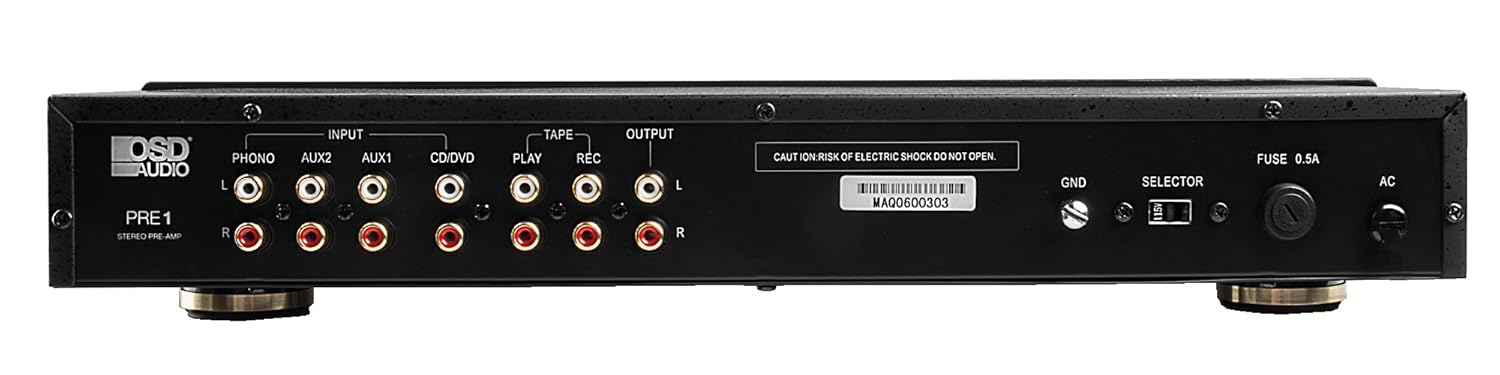
The rear panel of the PRE-1 Preamplifier, showing all input and output connections for various audio devices.
- Phono Input (L/R): RCA inputs for connecting a turntable. Includes a ground terminal.
- AUX1 Input (L/R): RCA inputs for general auxiliary devices.
- AUX2 Input (L/R): RCA inputs for a second auxiliary device.
- CD/DVD Input (L/R): RCA inputs for CD or DVD players.
- Tape Play (L/R): RCA inputs for the playback output of a tape deck or other recording device.
- Tape Rec (L/R): RCA outputs for connecting to the recording input of a tape deck or other recording device.
- Вихід (Л/П): RCA outputs to connect to your main power ampліфірник.
- Заземлювальний вивід (GND): Connects to the ground wire of your turntable to reduce hum.
- Перемикач: For internal configuration (typically left in default position unless specified).
- Запобіжник: Замінюйте запобіжник лише на запобіжник зазначеного типу та номіналу.
- Вхід живлення змінного струму: Connects to the supplied power cable.
5. Налаштування та підключення
Follow these steps to properly set up your OSD Audio PRE-1 Preampліфтер:
- Розміщення: Place the PRE-1 on a stable, flat surface, ensuring adequate ventilation around the unit. Avoid placing it near heat sources or in direct sunlight.
- Вимкнення живлення: Ensure all audio components, including the PRE-1 and your main amplifier, are turned off before making any connections.
- Підключити джерела:
- Поворотний столик: Connect the RCA cables from your turntable to the Phono Input (L/R) on the PRE-1. Connect the turntable's ground wire to the GND terminal on the PRE-1.
- CD/DVD-програвач: Connect the RCA cables from your CD/DVD player to the CD/DVD Input (L/R).
- Other Devices (e.g., Streamer, Tuner): Connect RCA cables from these devices to the AUX1 Input (L/R) or AUX2 Input (L/R).
- Tape Deck: Connect the playback outputs of your tape deck to the Tape Play (L/R) inputs. Connect the recording inputs of your tape deck to the Tape Rec (L/R) виходи.
- Підключитися до Ampліфтер: Підключіть Output (L/R) RCA jacks on the PRE-1 to the input jacks of your main power ampліфірник.
- Підключення живлення: Під’єднайте кабель живлення з комплекту до Вхід змінного струму on the rear panel of the PRE-1, then plug it into a suitable wall outlet.
- Початкове ввімкнення: Turn on your main power amplifier first, then turn on the PRE-1. When powering off, turn off the PRE-1 first, then your main ampліфірник.
6. Інструкція з експлуатації
Once your PRE-1 is connected, follow these steps for basic operation:
- Виберіть вхід: Використовуйте Вибір введення rotary knob on the front panel to choose the desired audio source (Phono, AUX1, AUX2, CD/DVD).
- Регулювання гучності: Почніть з Обсяг knob at its minimum setting. Begin playing your selected audio source and slowly increase the volume to a comfortable listening level.
- Регулювання тембру: Використовуйте Бас, середина, і Високі частоти knobs to adjust the tonal characteristics of your audio. Turn clockwise to increase, counter-clockwise to decrease.
- Контроль балансу: Відрегулюйте Баланс knob to fine-tune the left and right channel output for optimal stereo imaging.
- Гучність: Натисніть Гучність button to activate a contour that boosts bass and treble frequencies, which can be beneficial at lower listening volumes. Press again to deactivate.
- Низький фільтр: Натисніть Низький фільтр button to engage a filter that reduces very low frequencies. This can help eliminate rumble from turntables or other unwanted low-frequency noise. Press again to deactivate.
- Мононуклеоз: Натисніть Мононуклеоз button to combine the left and right stereo channels into a single monaural signal. This is useful for playing mono recordings. Press again for stereo.
- Вимкнути звук: Натисніть Вимкнути звук button to instantly silence the audio output. Press again to restore sound.
- Використання мікрофона: Plug a microphone into the Мікрофонний вхід. Adjust the microphone's volume using the Рівень мікрофона ручка.
- Tape Monitoring/Recording: If you have a tape deck connected, select the appropriate input for playback. To record, ensure your tape deck is set to record and the PRE-1 is passing the desired source through the Tape Rec outputs.
7. Технічне обслуговування
Proper care and maintenance will ensure the longevity and optimal performance of your PRE-1 Preampліфірник.
- Прибирання: Use a soft, dry cloth to clean the exterior of the unit. Do not use liquid cleaners, aerosols, or harsh chemicals, as they may damage the finish or internal components.
- Вентиляція: Periodically check that the ventilation openings are free from dust and obstructions.
- Підключення: Occasionally check all cable connections to ensure they are secure. Loose connections can lead to signal loss or interference.
- Зберігання: Якщо пристрій зберігатиметься протягом тривалого часу, від’єднайте його від розетки та зберігайте в прохолодному, сухому місці, подалі від прямих сонячних променів та екстремальних температур.
8. Вирішення проблем
If you experience issues with your OSD Audio PRE-1, refer to the following common problems and solutions:
| проблема | Можлива причина | Рішення |
|---|---|---|
| Немає живлення | Power cable not connected; Power outlet not active; Blown fuse | Ensure power cable is securely connected. Test the outlet with another device. Check and replace the fuse if necessary (refer to specifications for fuse type). |
| Немає звуку | Incorrect input selected; Volume too low; Mute engaged; Loose audio cables; Main amplifier off or incorrect input selected | Select the correct input source. Increase the volume. Disengage Mute. Check all RCA cable connections. Ensure your main amplifier is on and set to the correct input. |
| Спотворений звук | Volume too high (clipping); Incorrect tone control settings; Faulty cables | Reduce the volume. Adjust Bass, Mid, and Treble controls to neutral or desired settings. Try replacing audio cables. |
| Дзижчання або дзижчання | Ground loop; Loose ground wire (Phono); Interference from other electronics | Ensure turntable ground wire is connected to the PRE-1's GND terminal. Try moving the PRE-1 or other audio components away from power cables or other electronic devices. Use a ground loop isolator if necessary. |
| Мікрофон не працює | Mic not connected; Mic Level too low; Faulty microphone | Ensure microphone is securely plugged into the Mic Input. Increase the Mic Level. Test with another microphone if available. |
9. Технічні характеристики
Below are the technical specifications for the OSD Audio PRE-1 Preampліфтер:
| Особливість | Специфікація |
|---|---|
| Модель | PRE-1 |
| Бренд | Звук екранного меню |
| Кількість каналів | 2 |
| Тип монтажу | Поверхневий монтаж |
| UPC | 819603012446 |
| ASIN | B01MPYJLPX |
| Виробник | Звук екранного меню |
10. Гарантія та підтримка
OSD Audio products are designed for reliability and performance. For specific warranty details and terms, please refer to the warranty card included with your product or visit the official OSD Audio website. If you require technical assistance or have questions not covered in this manual, please contact OSD Audio customer support.
OSD Audio Customer Support: Please visit the OSD Audio webсайт для контактної інформації та ресурсів підтримки.