
BOSCH D-Tect150
Інструкція з експлуатації сканера для стін та підлоги Bosch D-Tect 150
Model: D-Tect150
1. Продукт закінчивсяview
The Bosch D-Tect 150 is an advanced wall and floor scanner designed for precise detection of various materials. Utilizing state-of-the-art Ultra-Wide Band (UWB) radar technology, it accurately identifies ferrous and non-ferrous metals, electrical cables, wooden beams, and plastics, including heating pipes in floors and walls. This tool provides millimetre-accurate detection, indicating objects via acoustic and visual signals on its large, illuminated color display.
The D-Tect 150 offers an intuitive user interface with a multilingual menu and specific modes tailored for different applications. Its robust design ensures durability on construction sites, featuring IP54 dust and splash protection and remaining fully functional even after drops from up to 1 meter. The device is calibration-free, self-calibrating throughout its operation for immediate and continuous use.

Figure 1: Bosch D-Tect 150 Wall and Floor Scanner. This image shows the front view of the blue and black scanner with its digital display showing detection results.
2. Інформація про безпеку
Always read and understand all safety warnings and instructions before operating the Bosch D-Tect 150. Failure to follow these instructions may result in electric shock, fire, and/or serious injury.
- Електрична безпека: Be aware of live electrical cables. The device detects power cables, but always exercise extreme caution. Do not rely solely on the detection device to determine the presence of live wires.
- Поводження з акумулятором: Use only specified batteries (4 x 1.5 V LR6 (AA)). Ensure correct polarity. Do not mix old and new batteries or different types of batteries. Remove batteries if the device is not used for extended periods.
- Умови навколишнього середовища: The device has IP54 dust and splash protection. However, avoid direct exposure to heavy rain or immersion in water. Operate within specified temperature ranges.
- Перешкоди: Strong electromagnetic fields or large metal objects nearby may affect detection accuracy.
- Використання за призначенням: This device is intended for detecting objects in walls and floors. Do not use for purposes other than its intended use.
3. Компоненти та що входить до комплекту
The Bosch D-Tect 150 package includes the following items:
- Bosch D-Tect 150 Wall and Floor Scanner
- М'яка футляр для переноски
- 4 батарейки типу АА 1.5 В

Figure 2: Contents of the Bosch D-Tect 150 package. The image displays the scanner, its soft carrying case, and the included AA batteries.
4. Налаштування
4.1. Встановлення батареї
- Відкрийте кришку відсіку для батарейок, розташовану на задній панелі пристрою.
- Insert the 4 x 1.5V LR6 (AA) batteries, ensuring correct polarity as indicated inside the compartment.
- Надійно закрийте кришку батарейного відсіку.
4.2. Початкове увімкнення та вибір мови
- Натисніть старт кнопку для ввімкнення пристрою.
- Upon first use, the device may prompt you to select a language. Use the arrow buttons to navigate and the Налаштування кнопку для підтвердження вибору.
4.3. Калібрування
The Bosch D-Tect 150 is designed for calibration-free operation. It automatically calibrates from the start of detection and continues to self-calibrate throughout your project, ensuring readiness for use at any time.
5. Інструкція з експлуатації
5.1. Selecting Detection Mode
The D-Tect 150 offers seven distinct detection modes for various materials and conditions:
- Бетон: For standard concrete.
- Wet Concrete: For concrete with higher moisture content.
- Deep Concrete: For detecting objects at greater depths in concrete.
- In-Floor Heating: Specifically for locating heating pipes in floors.
- Гіпсокартон: For detecting studs, pipes, and wires behind drywall.
- Метал: For general metal detection.
- Сигнал View: Provides a detailed graphical representation of the signal strength, useful for complex situations.
Use the menu and arrow buttons on the device to select the appropriate mode for your application.
5.2. Виконання сканування
- Ensure the selected detection mode is suitable for the material you are scanning.
- Place the scanner flat against the surface to be scanned.
- Натисніть старт кнопку.
- Move the device slowly and steadily across the surface. The display will show the location and depth of detected objects.
- Objects are indicated by both visual cues on the display and an acoustic signal.

Figure 3: The Bosch D-Tect 150 being used to scan a wall, showing its ability to detect hidden pipes and electrical wires.

Figure 4: A user marking the location of detected objects on a wall after scanning with the Bosch D-Tect 150, demonstrating its precision for drilling applications.
5.3. Інтерпретація дисплея
The large, illuminated color display provides critical information:
- Object Location: Indicates the exact position of the object.
- Глибина: Shows the depth of the object from the surface.
- Властивості матеріалу: Displays the likely material of the detected object (e.g., metal, wood, plastic).
- Permitted Drilling Depth: Suggests a safe drilling depth to avoid detected objects.
- Detection Strength: Visual bars indicate the strength of the detected signal.
For a visual demonstration of the product's capabilities and operation, please watch the official product video:
Video 1: Bosch D-Tect 150 Wall and Floor Scanner with Ultra Wide Band Radar Technology. This video provides an overview of the scanner's features, applications, and how it operates in various detection modes.
6. Технічне обслуговування
6.1. прибирання
- Тримайте пристрій у чистоті, щоб забезпечити його оптимальну роботу.
- Протріть зовнішню поверхню м’якою, damp тканина. Не використовуйте абразивні засоби чи розчинники.
- Regularly clean the sensor area to prevent debris from affecting detection accuracy.
6.2. Зберігання
- Store the device in its soft carrying case when not in use.
- Store in a dry, dust-free environment, away from extreme temperatures.
- Вийміть батарейки, якщо зберігаєте їх протягом тривалого часу, щоб запобігти витіканню.
7. Вирішення проблем
| проблема | Можлива причина | Рішення |
|---|---|---|
| Пристрій не включається. | Розряджені або неправильно встановлені батареї. | Перевірте полярність батарейок. Замініть батарейки новими. |
| Inaccurate detection. | Incorrect mode selected; dirty sensor; strong interference; rapid scanning. | Select appropriate mode. Clean sensor. Move away from interference sources. Scan slowly and steadily. |
| No detection of known objects. | Object too deep; material not detectable in current mode; device malfunction. | Try "Deep Concrete" or "Signal View" mode. Ensure object is within detection limits. Contact support if issue persists. |
| Дисплей тьмяний або нечитабельний. | Низький заряд батареї; налаштування дисплея. | Replace batteries. Check display brightness settings in the menu. |
If you encounter issues not listed here or if solutions do not resolve the problem, please contact Bosch customer support.
8. Технічні характеристики
| Особливість | Деталь |
|---|---|
| Бренд | BOSCH |
| Номер моделі | D-Tect150 |
| Технологія виявлення | Ultra-Wide Band (UWB) Radar |
| Max. Detection Depth | 150 мм (приблизно 6 дюйми) |
| Max. Detection Depth (Water-filled plastic pipe) | Up to 60 mm (2-3/8 inch) |
| Measuring Accuracy of Object Centre | ± 5 мм |
| Виявлювані матеріали | Ferrous and non-ferrous metals, electrical cables, wooden beams, plastics (e.g., heating pipes) |
| Захист від пилу та бризок | IP54 |
| Джерело живлення | 4 x 1.5 V LR6 (AA) batteries |
| Розміри (Д x Ш x В) | 220 x 97 x 120 мм (прибл. 8.75 x 3.78 x 4.34 дюйма) |
| Вага товару | 0.7 кг (приблизно 1.6 фунтів) |
| Тип дисплея | Кольоровий LCD |
| Самокалібрування | Так, безперервно |
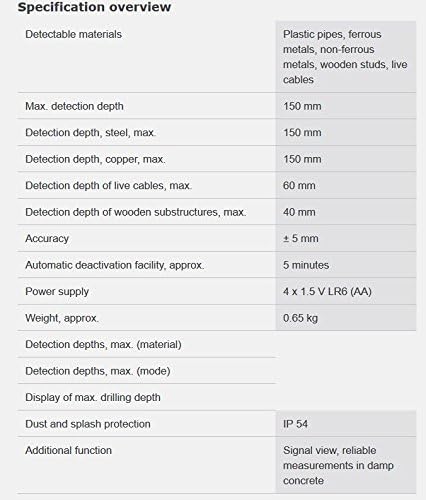
Figure 5: A detailed specification overview table for the Bosch D-Tect 150, listing detectable materials, detection depths, accuracy, power supply, and other key features.
9. Гарантія та підтримка
9.1. Інформація про гарантію
Bosch provides a limited warranty for the D-Tect 150 Wall and Floor Scanner. Please refer to the warranty card included with your product for specific terms, conditions, and duration of coverage. Keep your purchase receipt as proof of purchase for warranty claims.
9.2. Підтримка клієнтів
For technical assistance, troubleshooting, or warranty service, please contact Bosch customer support. You can find contact information on the official Bosch webсайті або в документації, що надається разом із вашим продуктом.
Additional resources, including user guides and manuals, may be available online: