
1. Вступ
This manual provides detailed instructions for the safe and efficient operation of your Panasonic RX-D29 CD/Radio/Cassette Boombox. Please read this manual thoroughly before using the unit and retain it for future reference. The RX-D29 is a versatile audio system featuring a CD player with MP3 playback capability, an AM/FM radio tuner, and a cassette recorder/player.
2. Інформація про безпеку
- Не піддавайте цей пристрій дії дощу або вологи.
- Не знімайте кришку. Звертайтеся до кваліфікованого персоналу для обслуговування.
- Avoid placing the unit in direct sunlight, near heat sources, or in dusty/humid environments.
- Забезпечте належну вентиляцію навколо пристрою.
- Використовуйте лише вказане джерело живлення.
- Тримайте батареї в недоступному для дітей місці.
3. Вміст упаковки
Перевірте, чи всі перелічені нижче предмети входять до вашої упаковки:
- Panasonic RX-D29 Boombox Unit
- Пульт дистанційного керування
- Шнур живлення змінного струму
- Посібник користувача (цей документ)
4. Продукт закінчивсяview
The Panasonic RX-D29 boombox features a compact design with integrated speakers and a clear display. The included remote control provides convenient access to various functions.
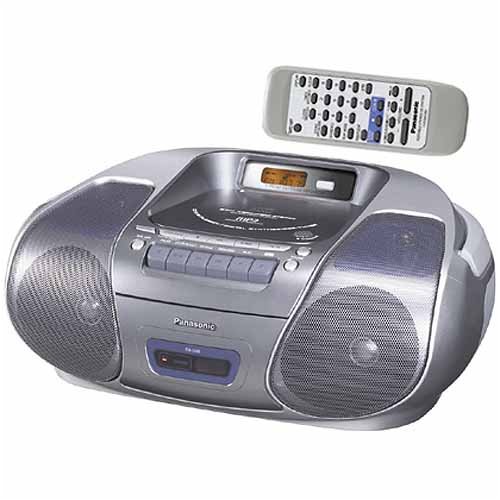
An image showing the silver Panasonic RX-D29 boombox with its top-loading CD compartment, front-facing speakers, cassette deck controls, and a separate remote control unit positioned above it.
4.1 Main Unit Controls and Components
- Відсік для компакт-дисків: Вертикальне завантаження для аудіо компакт-дисків та MP3-дисків.
- Касетна дека: Front-loading for cassette tapes.
- Доповідачі: Integrated 2-way speakers for stereo sound.
- Панель дисплея: Shows track information, radio frequency, and time.
- Функціональні кнопки: Play, Stop, Pause, Fast Forward, Rewind for CD and Cassette.
- Елементи керування тюнером: For AM/FM radio selection and tuning.
- Регулювання гучності: Регулює рівень вихідного аудіо.
- Антена: Telescopic FM antenna.
4.2 Пульт дистанційного керування
The remote control provides access to all primary functions, including power, volume, track selection, radio presets, and sound adjustments. Ensure 2 AA batteries (not included) are installed correctly in the remote control.
5. Налаштування
5.1 Джерело живлення
The RX-D29 can be powered by AC current or batteries.
- Живлення змінного струму: Connect the supplied AC power cord to the AC IN jack on the unit and then to a standard wall outlet.
- Потужність батареї: For portable use, insert 6 C-cell batteries (not included) into the battery compartment on the bottom of the unit. Ensure correct polarity.
- Резервне копіювання пам'яті: To retain time, timer settings, and radio presets when the unit is disconnected from AC power or main batteries are depleted, install 3 AA batteries (not included) in the memory backup compartment.
5.2 Початкове налаштування
- Налаштування годинника: Refer to the remote control section for instructions on setting the internal clock.
- Автоматичне налаштування сканування: Upon first power-up, the unit may automatically scan and store radio presets.
6. Operating the CD Player
- Завантаження компакт-диска: Open the top-loading CD compartment cover and place a CD (audio CD, CD-R/RW, or MP3 CD) with the label side facing up. Close the cover securely.
- Відтворення: Натисніть ГРАТИ button. The unit will begin playing the first track.
- Вибір треку: Використовуйте ПРОПУСТИТИ кнопки (<< / >>) для переміщення між доріжками.
- Пауза/зупинка: Прес ПАУЗА to temporarily stop playback, and СТІЙ щоб завершити відтворення.
- Режими відтворення:
- Normal Play: Plays tracks in sequential order.
- Повторне відтворення: Повторює поточну доріжку або весь диск.
- Довільне відтворення: Відтворює треки у випадковому порядку.
- Програма відтворення: Allows you to program a specific sequence of tracks.
- MP3 CD Playback:
- The unit supports multi-session MP3 discs.
- Albums and tracks will play in alphanumeric order. Number your files and folders for desired playback sequence.
- The boombox does not support MP3 song and album title display.
- If a CD-ROM contains both MP3 and non-MP3 files, лише MP3 files можна буде грати.
7. Керування радіо
- Вибір діапазону: Натисніть БЕНД для перемикання між FM та AM.
- Ручна настройка: Використовуйте ТЮНІНГ кнопки для ручного налаштування частоти.
- Автоматична настройка: Натисніть і утримуйте ТЮНІНГ кнопки для автоматичного сканування наступної доступної станції.
- Попередньо встановлені станції: The digital synthesizer tuner allows storage of up to 32 stations (20 FM, 12 AM). Use the PRESET buttons to recall stored stations.
- Регулювання антени: Extend and adjust the telescopic FM antenna for optimal FM reception. For AM reception, rotate the unit itself.
8. Operating the Cassette Player
- Loading a Cassette: Відкрийте дверцята касетного відділення та вставте касету. Закрийте дверцята.
- Відтворення: Натисніть ГРАТИ кнопку.
- Запис:
- CD Synchro Start: To record from a CD, ensure the CD is loaded and the cassette is ready to record. Press the ЗАПИС button on the cassette deck. The CD will automatically start playing and recording.
- Запис радіо: Tune to the desired radio station. Press the ЗАПИС кнопку.
- Only normal-type cassette tapes are supported for recording and playback.
- Перемотування вперед/назад: Використовуйте FF/REW кнопки.
- Автоматична зупинка: The unit features full auto stop, which automatically stops the tape mechanism at the end of playback or rewind to conserve battery life and tape wear.
- CD Cue and Review: For CDs, these controls help locate specific sections.
9. Налаштування звуку
- XBS (Extra Bass System): Activates a bass boost function for enhanced low-frequency sound. This can typically be toggled via a button on the unit or remote.
- Preset Equalizer Settings: Choose from four preset equalizer settings to tailor the sound to your preference:
- Вокал
- ясно
- М'який
- (Default/Off)
- Sound Virtualizer Circuit: Simulates surround sound from the unit's two speakers, creating a wider soundstage. This function is typically controlled via the remote.
- Re-Master Circuit (for MP3): This feature reproduces treble frequencies that may be lost during MP3 compression, aiming to restore sound quality closer to the original source.
10. Технічне обслуговування
- Очищення пристрою: Wipe the exterior with a soft, dry cloth. For stubborn stains, use a cloth lightly dampводою з м’яким мийним засобом, потім витріть насухо. Не використовуйте абразивні засоби для чищення або розчинники.
- CD Lens Cleaning: Якщо проблеми з відтворенням виникають через забруднення лінзи, використовуйте комерційно доступний засіб для чищення лінз компакт-дисків.
- Очищення головки касети: Periodically clean the cassette heads, pinch rollers, and capstans with a cotton swab lightly moistened with isopropyl alcohol to ensure optimal sound quality and prevent tape damage.
- Заміна батареї: Replace all batteries with new ones when they are depleted. Do not mix old and new batteries or different types of batteries.
11. Вирішення проблем
| проблема | Можлива причина | Рішення |
|---|---|---|
| Немає живлення | AC cord not connected; batteries depleted or incorrectly inserted. | Ensure AC cord is securely plugged in. Replace or correctly insert batteries. |
| CD не відтворюється | CD inserted incorrectly; CD dirty or scratched; lens dirty; unit in wrong function mode. | Insert CD with label side up. Clean or replace CD. Clean CD lens. Select CD function. |
| Поганий радіоприйом | Antenna not extended/adjusted; unit location. | Extend and adjust FM antenna. Rotate the unit for AM reception. Relocate the unit for better signal. |
| Касета не відтворюється/не записується | Tape inserted incorrectly; tape damaged; cassette heads dirty. | Insert tape correctly. Use a different tape. Clean cassette heads. |
| Пульт не працює | Розряджені або неправильно вставлені батарейки; перешкода між пультом дистанційного керування та пристроєм. | Replace remote batteries. Ensure clear line of sight to the unit's sensor. |
12. Технічні характеристики
- модель: RX-D29
- Бренд: Panasonic
- Джерело живлення: AC 120V, 60Hz or 6 x C-cell batteries (DC 9V)
- Резервне копіювання пам'яті: 3 x AA batteries (DC 4.5V)
- Розміри (Ш x В x Г): Приблизно 17 x 7 x 12 дюйма (43.2 x 17.8 x 30.5 см)
- вага: Приблизно 3 фунта (1.36 кг) без батарей
- CD плеєр: Top-loading, CD-R/RW, MP3 playback compatible
- Радіо тюнер: Digital Synthesizer AM/FM, 32 presets (20 FM, 12 AM)
- Касетна дека: Front-loading, recording function, auto stop, normal tape type only
- Доповідачі: 2-смугове стерео
- Аксесуари в комплекті: Remote control, AC power cord
13. Гарантія та підтримка
Щоб отримати інформацію про гарантію або технічну підтримку, зверніться до гарантійного талона, що додається до вашого продукту, або відвідайте офіційний веб-сайт Panasonic. webсайт. Зберігайте чек про покупку як підтвердження покупки для гарантійних претензій.
Підтримка клієнтів Panasonic: For further assistance, please contact Panasonic customer service through their official channels.