
1. Giriş
This manual provides essential information for the safe and efficient use of your HP 17.3 Inch FHD Business Laptop. Please read this guide thoroughly before operating your device to ensure optimal performance and longevity. This laptop is designed for business and everyday computing tasks, offering a large display, robust performance, and portability.
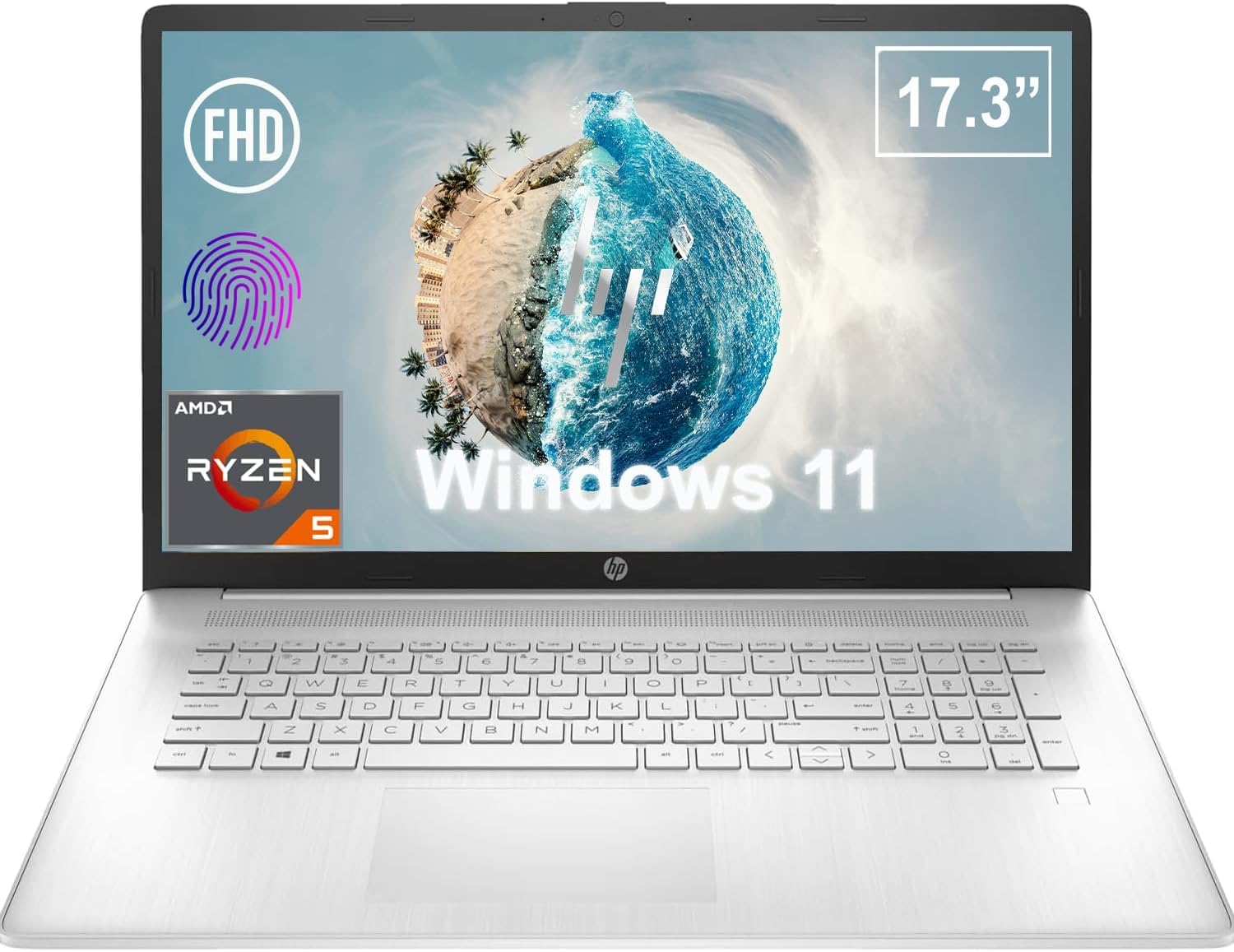
Şekil 1.1: Ön view of the HP 17.3 Inch FHD Business Laptop, showcasing the large display and keyboard.
2. Kurulum
2.1 Kutudan Çıkarma ve İlk İnceleme
Tüm bileşenleri ambalajından dikkatlice çıkarın. Aşağıdaki öğelerin mevcut olduğundan emin olun:
- HP 17.3 Inch FHD Business Laptop
- Power Adapter (45 W Smart AC Power Adapter)
- Belgeler (bu kılavuz, garanti bilgileri)
Inspect the laptop and accessories for any signs of damage. If any items are missing or damaged, contact your retailer or HP support immediately.
2.2 Güç Adaptörünün Bağlanması
Before first use, ensure the laptop is fully charged. Connect the power adapter to the AC smart pin port on the side of the laptop and then plug the adapter into a power outlet.
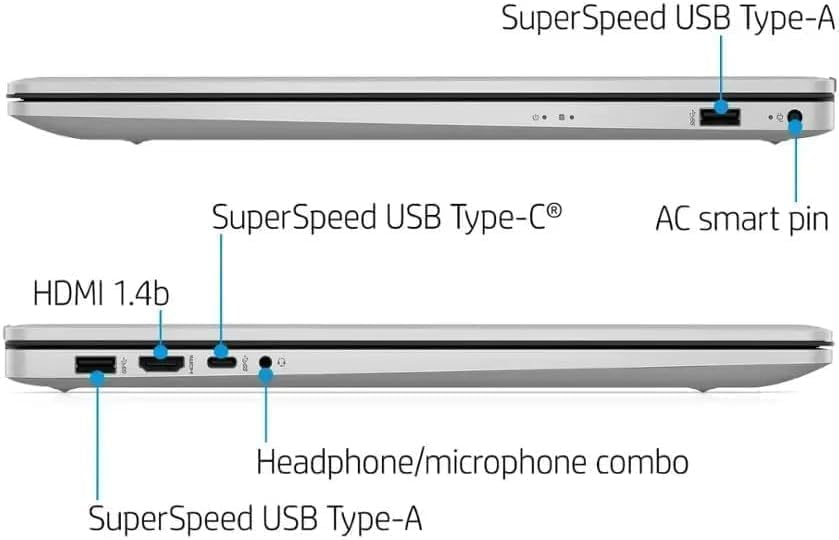
Şekil 2.1: Yan view illustrating the location of the AC smart pin and other ports.
2.3 İlk Açılış ve Windows Kurulumu
Press the power button to turn on the laptop. Follow the on-screen instructions to complete the Windows 11 Home setup process. This includes setting up your user account, network connection, and initial preferences.
3. Dizüstü Bilgisayarı Çalıştırma
3.1 Klavye ve Dokunmatik Yüzey
The laptop features a full-size QWERTY keyboard with a 10-key number pad for efficient data entry. The integrated touchpad provides precise cursor control. Refer to the operating system's settings for customizing touchpad gestures and keyboard shortcuts.
3.2 Parmak İzi Okuyucu
For enhanced security and convenient login, utilize the integrated fingerprint reader. Set up your fingerprints through Windows Hello in the Windows 11 settings.
3.3 Webkamera ve Mikrofonlar
The HP True Vision 720p HD Camera and integrated dual array digital microphones are located at the top of the display. These are suitable for video conferencing and online communication.
3.4 Bağlantı
- Wifi: The laptop supports 802.11a/b/g/n/ac Wi-Fi for wireless internet access. Connect to available networks via the Windows network settings.
- Bluetooth: Bluetooth 5 allows for wireless connection to compatible devices such as headphones, mice, and keyboards. Enable and manage Bluetooth devices through Windows settings.
3.5 Ports and External Devices
Dizüstü bilgisayar, harici cihazları bağlamak için çeşitli bağlantı noktalarına sahiptir:
- 1 x USB Type-C (5Gbps, Data Only): For connecting USB-C compatible devices and data transfer.
- 2 x USB Type-A (5Gbps): For connecting standard USB devices like external drives, mice, or keyboards.
- 1 x HDMI 1.4b: For connecting to external displays or projectors.
- 1 x Headphone/Microphone Combo: For connecting a headset with a single 3.5mm jack.
- 1 x AC Smart Pin: For connecting the power adapter.

Şekil 3.1: Açık view of the laptop, highlighting the keyboard and touchpad area.
3.6 Pil Yönetimi
The laptop is powered by a 3-Cell, 41 Wh Li-ion battery, offering up to 8 hours and 30 minutes of video playback. Use the provided 45 W Smart AC Power Adapter for charging. HP Fast Charge technology allows for quicker charging times.
4. Bakım
4.1 Dizüstü Bilgisayarı Temizleme
To maintain the laptop's appearance and functionality:
- Yumuşak, tüy bırakmayan bir bez kullanınampSuyla veya ekran için özel bir ekran temizleyiciyle silin.
- Klavye ve kasa için yumuşak ve kuru bir bez kullanın. Sert kimyasallardan veya aşındırıcı malzemelerden kaçının.
- Temizlemeden önce dizüstü bilgisayarınızın kapalı ve fişinin çekilmiş olduğundan emin olun.
4.2 Yazılım Güncellemeleri
Regularly update your Windows operating system and drivers to ensure optimal performance, security, and compatibility. Windows Update can be accessed through the Settings menu.
4.3 Security Software
The laptop comes preloaded with McAfee LiveSafe for security. Ensure this software is active and updated to protect against viruses and other threats.
5. Sorun Giderme
This section addresses common issues you might encounter with your HP laptop.
5.1 Güç Sorunları
- Dizüstü bilgisayar açılmıyor: Ensure the power adapter is securely connected to both the laptop and a working power outlet. Verify the battery is charged.
- Pil şarj olmuyor: Güç adaptörünü ve kablosunu hasar açısından kontrol edin. Farklı bir elektrik prizi deneyin.
5.2 Ekran Sorunları
- Ekranda görüntü yok: Sorunun dizüstü bilgisayarın ekranından kaynaklanıp kaynaklanmadığını kontrol etmek için harici bir monitör bağlayın. Dizüstü bilgisayarı yeniden başlatın.
- Titreyen veya bozuk görüntü: Grafik sürücülerini güncelleyin. Windows ayarlarından ekran çözünürlüğünü ve yenileme hızını ayarlayın.
5.3 Bağlantı Sorunları
- Wi-Fi bağlanmıyor: Ensure Wi-Fi is enabled. Restart your router and the laptop. Check network settings for correct password and configuration.
- Bluetooth cihazı eşleşmiyor: Her iki cihazda da Bluetooth'un etkinleştirildiğinden emin olun. Cihazın eşleştirme modunda olduğundan ve menzil içinde olduğundan emin olun.
Daha karmaşık sorunlar için HP destek sayfasına başvurun. website veya müşteri hizmetleriyle iletişime geçin.
6. Özellikler
| Özellik | Detay |
|---|---|
| Marka | HP |
| Model Adı | HP17 |
| Model Numarası | i5-1135G7 |
| Ekran Boyutu | 17.3 inç |
| Görüntü Türü | IPS, Anti-Glare, LED |
| Çözünürlük | 1920x1080 (Tam HD) |
| Yenileme Hızı | 60 Hz |
| İşlemci | AMD Ryzen 5 5500U (6 Cores, 12 Threads, up to 4.0 GHz Max Boost Clock) |
| Grafikler | Entegre AMD Radeon Grafikleri |
| RAM Bellek | 32 GB DDR4-3200 MHz (Max 64 GB) |
| Depolamak | 1 TB PCIe NVMe M.2 SSD |
| İşletim Sistemi | Windows 11 Home, 64-bit, English |
| Kablosuz Bağlantı | 802.11a/b/g/n/ac Wi-Fi, Bluetooth 5 |
| Limanlar | 1x USB Type-C (5Gbps), 2x USB Type-A (5Gbps), 1x HDMI 1.4b, 1x Headphone/Microphone Combo, 1x AC Smart Pin |
| Webkam | HP True Vision 720p HD Camera |
| Ses | Dual Speakers, Integrated Dual Array Digital Microphones |
| Pil | 3-Cell, 41 Wh Li-ion (Up to 8.5 hours video playback) |
| Güç Adaptörü | 45 W Smart AC Power Adapter |
| Boyutlar (G x D x Y) | 40.07 x 25.78 x 2.06 cm (14.14"L x 9.31"W x 0.78"Th) |
| Ağırlık | 2.07 kg'dan başlayan |
| Özel Özellikler | Fingerprint Reader, Lightweight Design, HP Fast Charge |
7. Garanti ve Destek
7.1 Garanti Bilgileri
This HP laptop comes with a 1-year manufacturer's limited warranty. For detailed terms and conditions, please refer to the warranty documentation included with your product or visit the official HP support webalan.
7.2 Müşteri Desteği
If you encounter issues that cannot be resolved using the troubleshooting steps in this manual, please contact HP customer support. You can find contact information and additional resources on the official HP webalan:
- HP Desteği Webalan: destek.hp.com
- HP Store: Amazon'da HP Mağazası