
1. Giriş
The YUNZII X98 is a 98% layout QMK/VIA compatible wireless mechanical keyboard designed for versatility and performance. It features tri-mode connectivity (wired, 2.4GHz wireless, and Bluetooth 5.0), hot-swappable switches, a gasket-mounted structure for enhanced typing feel, and vibrant RGB backlighting. This manual provides detailed instructions for setting up, operating, and maintaining your YUNZII X98 keyboard.
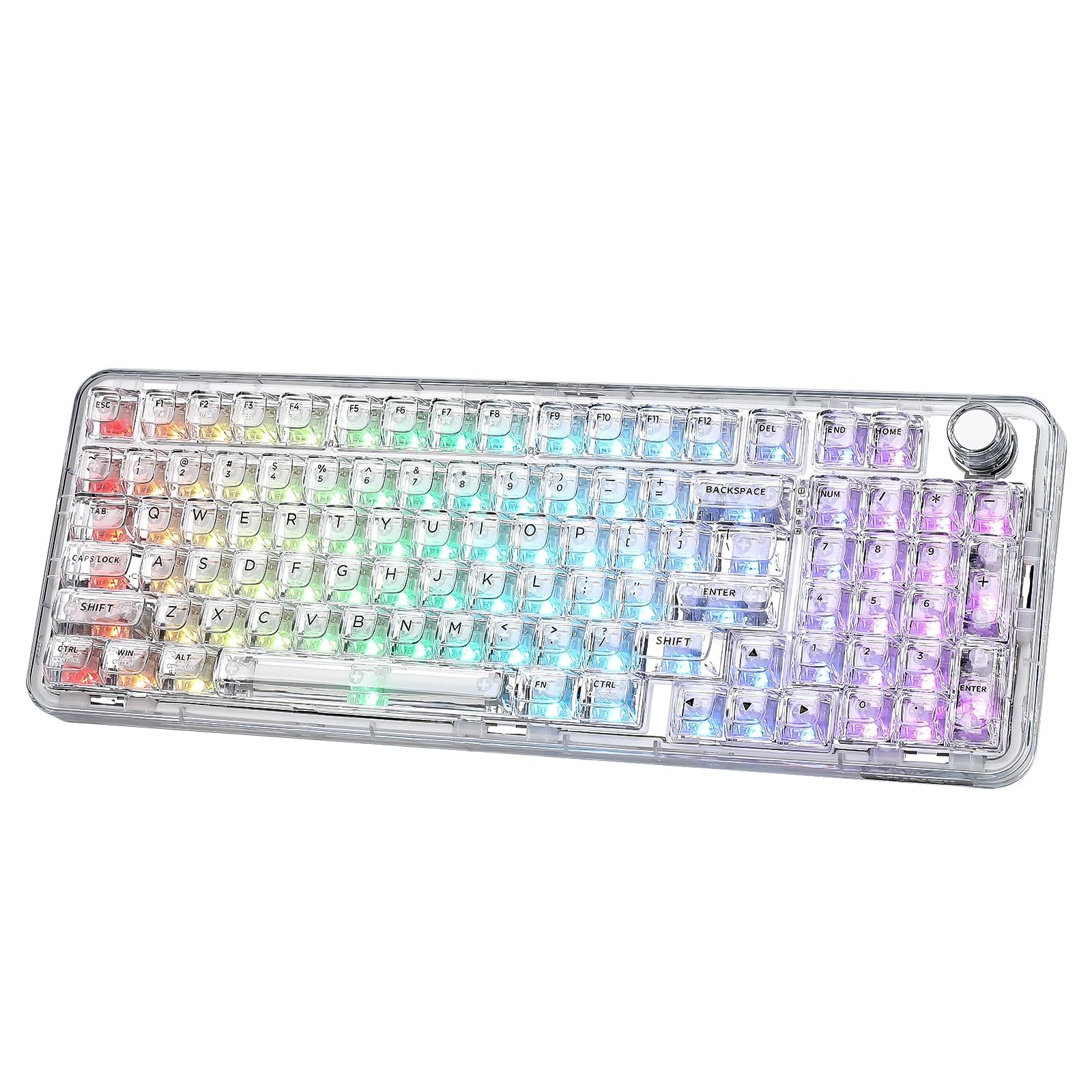
Şekil 1: YUNZII X98 QMK/VIA Kablosuz Mekanik Oyun Klavyesi.

Şekil 2: Üzeriview of YUNZII X98 key features including 96% layout, tri-mode connectivity, 8000mAh battery, hot-swappable switches, QMK/VIA programmability, multi-function knob, full RGB, and gasket structure.
2. Paket İçeriği
Lütfen aşağıdaki öğelerin kutucuğunu işaretleyin:
- YUNZII X98 Mechanical Keyboard
- USB C Tipi Kablo
- 2.4G Wireless Dongle (often stored in the keyboard's back compartment)
- Anahtar ve Tuş Kapağı Sökücü
- Ekstra Klavye Tuşları ve Anahtarlar
- Function Card & Manual
- Toz Kapağı
3. Kurulum
3.1 İlk Şarj
Before first use, it is recommended to fully charge the keyboard. Connect the provided USB Type-C cable to the keyboard's Type-C port and the other end to a USB power source (e.g., computer USB port, wall adapter). The keyboard features an 8000mAh battery.

Figure 3: The YUNZII X98 features an 8000mAh battery, offering up to 45 hours with RGB on and 320 hours with RGB off. Charging takes approximately 13 hours.
3.2 Bağlantı Modları
The YUNZII X98 supports three connection modes: Wired, 2.4GHz Wireless, and Bluetooth 5.0. Use the mode switch located on the side of the keyboard to select your desired connection type.
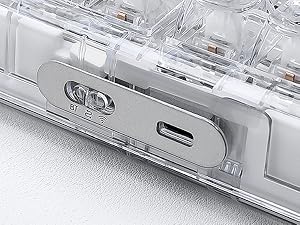
Figure 4: Close-up of the mode switch for Bluetooth (BT), 2.4G Wireless, and Wired connections.
3.2.1 Kablolu Bağlantı
- Set the mode switch to the 'Wired' position.
- Klavyeden bilgisayarınıza USB Type-C kablosunu bağlayın.
- Klavyeniz işletim sisteminiz tarafından otomatik olarak tanınacaktır.
3.2.2 2.4 GHz Kablosuz Bağlantı
- Set the mode switch to the '2.4G' position.
- Retrieve the 2.4G USB dongle from its storage slot on the back of the keyboard.
- 2.4G dongle'ı bilgisayarınızdaki kullanılabilir bir USB bağlantı noktasına takın.
- Basılı tutun FN + 4 Eşleştirme moduna girmek için. Gösterge ışığı yanıp sönecektir.
- Bağlantı kurulduktan sonra gösterge ışığı sürekli yanacaktır.

Figure 5: Steps for connecting the YUNZII X98 via 2.4GHz wireless mode, including locating the dongle and pairing.
3.2.3 Bluetooth Bağlantısı
Klavye en fazla 3 adet Bluetooth cihazını destekler.
- Set the mode switch to the 'BT' position.
- Kısa basın FN + 1, FN + 2, veya FN + 3 Bir Bluetooth kanalı seçmek için.
- Seçilen yere uzun süre basılı tutun. FN + (1/2/3) key combination for 3-5 seconds to enter Bluetooth pairing mode. The corresponding key's backlight will flash rapidly.
- On your device (PC, laptop, smartphone, tablet), search for Bluetooth devices and select 'YUNZII X98 BT1/BT2/BT3'.
- Once paired, the key's backlight will stop flashing and remain solid for a few seconds before returning to the normal lighting effect.

Figure 6: Instructions for connecting the YUNZII X98 via Bluetooth, including channel selection and pairing process.
3.3 Ayarlanabilir Ayak
Klavyenin alt tarafında, ergonomik konfor için yazma açısını özelleştirmeye olanak tanıyan ayarlanabilir ayaklar bulunmaktadır.
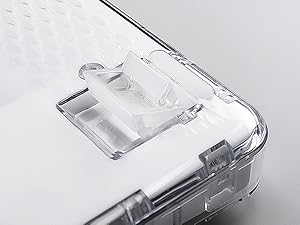
Figure 7: Close-up of the adjustable feet on the YUNZII X98 keyboard, allowing users to modify the typing angle.
4. Kullanım Talimatları
4.1 QMK/VIA Özelleştirmesi
The YUNZII X98 supports QMK/VIA open-source firmware, allowing for extensive customization of key mappings, macros, and RGB lighting effects. To use VIA, download the appropriate JSON file for your X98 model from the YUNZII official website and load it into the VIA software.
- Anahtar Yeniden Eşleme: İş akışınıza veya oyun tarzınıza uyacak şekilde herhangi bir tuşun işlevini değiştirin.
- Makrolar: Create complex sequences of key presses and assign them to a single key.
- Multiple Layers: Configure different key layouts for various applications or operating systems.

Figure 8: The QMK/VIA interface allows for comprehensive customization of key settings, RGB lighting, and macros.
4.2 RGB Aydınlatma Kontrolü
The YUNZII X98 features 16.8 million colors RGB backlighting with south-facing LEDs. You can control the lighting effects directly from the keyboard using FN key combinations or through the VIA software for advanced customization.
4.2.1 Onboard RGB Control
- FN + Backspace: Toggle Backlight Effect ON/OFF
- FN + Tab: Toggle White Light ON/OFF
- FN + \|: Arka Işık Efektini Değiştir
- FN + Enter: Arka Işık Rengini Değiştir
- FN + ↑: Parlaklığı Artır
- FN + ↓: Parlaklığı Azalt
- FN + ←: Yanıp Sönme Hızını Artırın
- FN + →: Yanıp Sönme Hızını Azalt

Figure 9: Visual guide to FN key shortcuts for controlling RGB lighting effects on the YUNZII X98.
4.3 Çok İşlevli Düğme
The rotary knob on the YUNZII X98 provides convenient control over various functions. By default, it controls volume.
- Döndür: Ses seviyesini ayarlayın (varsayılan).
- Kısa Basış: Mute/Unmute (default).
- FN + Kısa Basın: Düğmenin RGB efektini değiştirin.
- VIA Özelleştirme: The knob's function can be customized using VIA software to control other parameters like brightness, scroll, etc.

Figure 10: The multi-function knob allows for volume control, muting, and changing its RGB effect with FN key combinations.
4.4 Çalışırken Değiştirilebilen Anahtarlar
The YUNZII X98 is hot-swappable, allowing you to change mechanical switches without soldering. It is compatible with both 3-pin and 5-pin switches.
- Anahtarların Çıkarılması: Verilen anahtar sökme aletini kullanarak anahtarı dikkatlice kavrayın ve düz yukarı doğru çekin.
- Anahtarların Kurulumu: Yeni anahtarın pimlerini PCB üzerindeki deliklerle hizalayın. Anahtar yerine oturana kadar hafifçe aşağı doğru bastırın. Pimlerin bükülmediğinden emin olun.

Figure 11: The YUNZII X98 supports full key hot-swapping, compatible with 3-pin and 5-pin mechanical switches.
4.5 FN Shortcuts
The keyboard includes various FN key shortcuts for quick access to system functions, compatible with both Windows and macOS.

Figure 12: A detailed chart of FN key shortcuts for both Windows (FN+A) and macOS (FN+S) users, covering screen brightness, media control, and volume.
5. Bakım
5.1 Temizlik
- Klavye kullanılmadığı zamanlarda toz birikmesini önlemek için birlikte verilen toz kapağını kullanın.
- For general cleaning, use a soft, lint-free cloth.
- Tuş kapaklarının arasını temizlemek için basınçlı hava veya küçük bir fırça kullanın.
- For stubborn dirt, remove keycaps using the keycap puller and clean them with mild soap and water. Ensure they are completely dry before reattaching.
5.2 Anahtar ve Tuş Kapağı Değişimi
Refer to section 4.4 for detailed instructions on hot-swapping switches. Use the provided keycap puller to carefully remove keycaps without damaging the switches.
6. Sorun Giderme
- Klavye yanıt vermiyor: Ensure the keyboard is charged. Check the mode switch position (Wired, 2.4G, BT) and verify the connection. For wired mode, try a different USB port or cable. For wireless modes, re-pair the device.
- Bluetooth bağlantı sorunları: Ensure the keyboard is in Bluetooth pairing mode (FN + 1/2/3 long press). Remove previous pairings from your device and try connecting again. Ensure your device's Bluetooth is enabled.
- 2.4GHz kablosuz sorunları: Ensure the dongle is securely plugged in. Try a different USB port. Re-pair the keyboard by holding FN + 4.
- RGB aydınlatma çalışmıyor: Check if RGB is toggled off (FN + Backspace). Adjust brightness (FN + ↑/↓). If using VIA, ensure the lighting settings are correctly configured.
- Tuşlar algılanmıyor: If only specific keys are affected, the switch might be faulty. Try hot-swapping the switch with one of the extra switches provided. Ensure the switch is fully seated.
- VIA yazılımı klavyeyi algılamıyor: Ensure the keyboard is connected via USB-C. Download the correct JSON file for the X98 model from the YUNZII website and load it into VIA.
7. Özellikler
| Özellik | Tanım |
|---|---|
| Marka | YUNZII |
| Örnek | X98 |
| Düzen | 98% Layout (96 keys) |
| Bağlantı | Tri-Mode: USB-C Wired, 2.4GHz Wireless, Bluetooth 5.0 |
| Anahtarlar | Pre-lubed Crystal Switches (Linear) |
| Sıcak-Swap | Yes, compatible with 3-pin and 5-pin mechanical switches |
| Montaj Stili | Gasket Mount (5 layers of dampening materials) |
| keycaps | Transparent PC material, shine-through |
| Arka aydınlatma | RGB, 16.8 million colors, South-facing LEDs |
| Programlanabilirlik | QMK/VIA compatible |
| Pil Kapasitesi | 8000mAh |
| Uyumlu işletim sistemi | Windows, macOS |
| Malzeme | Plastic (transparent PC) |

Şekil 13: Patlatılmış view of the YUNZII X98 gasket mount keyboard, highlighting its 5 layers of dampening materials for a satisfying sound and feel.

Figure 14: Detailed specifications for the pre-lubed Crystal Switch, including type (Linear), pin (5-pin), operating force, end force, total travel, and pre-travel.
8. Garanti ve Destek
The YUNZII X98 keyboard comes with a 1-year warranty. For technical support, warranty claims, or any inquiries, please contact YUNZII customer service through the platform where you purchased the product or visit the official YUNZII webDestek kaynakları için site.

Figure 15: Guide on how to contact YUNZII customer support via Amazon, both before and after placing an order.
9. Ürün Videoları
9.1 YUNZII X98 Unboxing and Typing Sound (Preview)
Video 1: Kısa bir önview gösteriasing the unboxing experience and the satisfying typing sound of the YUNZII X98 keyboard.
9.2 YUNZII X98 RGB Lighting Demonstration (Preview)
Video 2: A brief demonstration of the YUNZII X98's vibrant RGB lighting effects and color changes.
9.3 YUNZII X98 Features Overview (Önview)
Video 3: Kısa bir genel bakışview of the YUNZII X98's design, connectivity options, and key features.