
giriiş
Thank you for choosing the Digitus DA-70919 USB-C 8K 12-Port Docking Station. This device is designed to expand the connectivity of your USB-C enabled laptop or computer, providing a comprehensive solution for video output, data transfer, network access, and power delivery. Please read this manual carefully to ensure proper installation and operation.
Ürün Bittiview
The Digitus DA-70919 docking station offers 12 essential ports to enhance your workspace. It supports high-resolution video output, fast data transfer, and efficient power delivery to your host device.

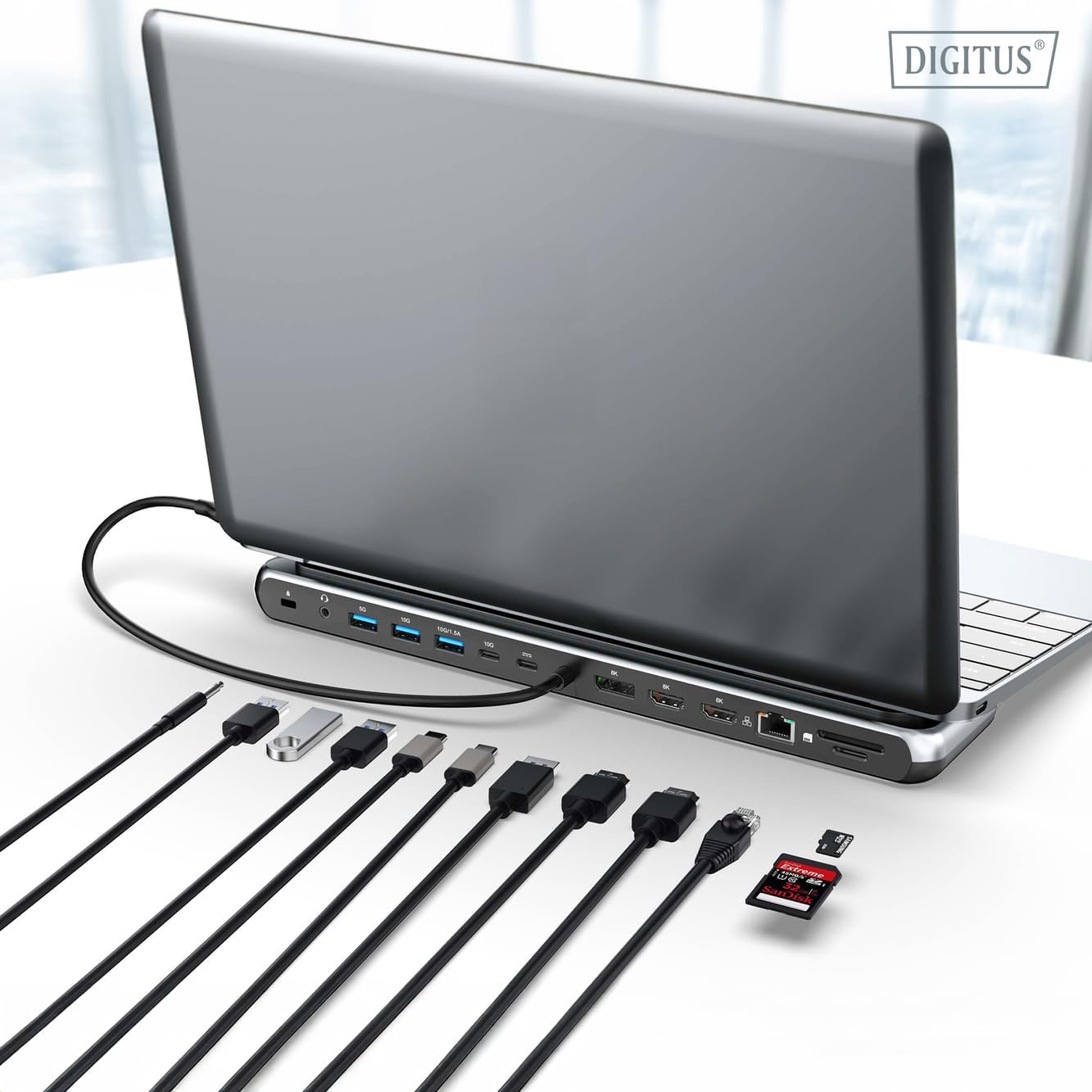
Şekil 1: Detailed diagram of the Digitus DA-70919 docking station ports and their functions. This diagram labels each of the 12 ports on the docking station, including Audio Jack, USB-A, USB-C, USB-C PD, DisplayPort, HDMI, RJ45 Gigabit Ethernet, and SD/MicroSD card slots, along with anti-theft protection.

Şekil 2: Ön view of the Digitus DA-70919 docking station showing all accessible ports. A clear view of the docking station's front panel, displaying the various input and output ports including USB-A, USB-C, HDMI, DisplayPort, Ethernet, and card readers.
Temel Özellikler:
- Video Çıkışı: 2x HDMI, 1x DisplayPort (DP) supporting up to 8K/30Hz for single display, or multi-display configurations.
- USB Veri Bağlantı Noktaları: 2x USB-A 3.2 Gen 2 (10Gbps), 1x USB-A 3.2 Gen 1 (5Gbps), 1x USB-C 3.2 Gen 2 (10Gbps).
- Güç Dağıtımı (PD): USB-C PD 3.0 port for charging your host laptop (up to 85W output).
- Ağ: Gigabit Ethernet (RJ45) for stable wired internet connection.
- Kart Okuyucular: SD and MicroSD card slots with 104 MBps transfer speed.
- Ses: Kulaklık veya hoparlör için 3.5 mm ses girişi.
Kurulum Talimatları
Follow these steps to set up your Digitus DA-70919 docking station:
- Check Host USB-C Port Compatibility: Ensure your laptop's USB-C port supports DisplayPort Alternate Mode (DP Alt Mode) for video output and Power Delivery for charging. Without DP Alt Mode, video output will not function.

Şekil 3: Guide to USB-C port compatibility for DisplayPort Alternate Mode. This graphic explains which types of USB-C ports on your laptop support the full functionality of the docking station, specifically highlighting the requirement for DisplayPort Alternate Mode (DP Alt Mode) for video output.
- Ana Bilgisayara Bağlan: Connect the integrated USB-C cable from the docking station to the USB-C port on your laptop.
- Güç Adaptörünü Bağlayın (İsteğe Bağlı, Ancak Önerilir): If you wish to charge your laptop via the docking station or power high-demand peripherals, connect a USB-C Power Delivery adapter (not included, up to 100W recommended) to the USB-C PD input port on the docking station.
- Harici Ekranları Bağlayın: Monitörlerinizi uygun kablolar kullanarak yerleştirme istasyonundaki HDMI ve/veya DisplayPort çıkışlarına bağlayın.
- Çevre Birimlerini Bağlayın: Plug in your USB devices (keyboard, mouse, external drives), Ethernet cable, SD/MicroSD cards, and audio devices to the corresponding ports on the docking station.
- Sürücü Kurulumu: In most cases, the docking station is plug-and-play and does not require additional drivers. If prompted, allow your operating system to install any necessary drivers automatically.
Kullanım Talimatları
Görüntüleme Modları
Yerleştirme istasyonu çeşitli ekran yapılandırmalarını destekler:
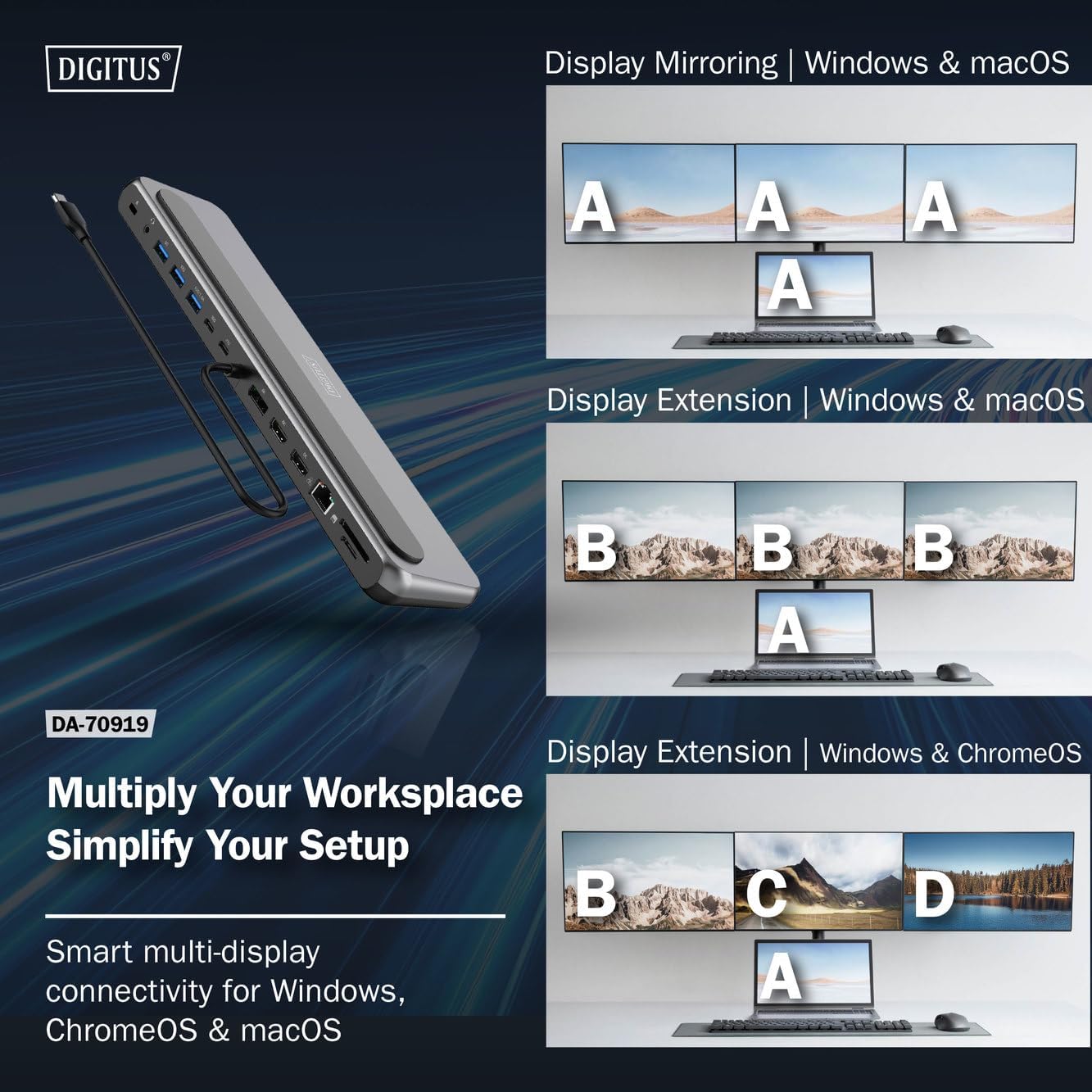
Şekil 4: Diagram showing display mirroring and extension modes for Windows, macOS, and ChromeOS. This image illustrates the various display configurations supported by the docking station, including mirroring your screen or extending it across multiple external monitors on Windows, macOS, and ChromeOS.
- Ayna Modu: Duplicates your laptop's display onto the external monitors.
- Extend Mode (Windows/ChromeOS): Extends your desktop across multiple external monitors, allowing for a multi-tasking environment. Supports dual monitors (2x 4K/60Hz) and triple monitors (1x 4K/60Hz + 2x 4K/30Hz) in MST (Multi Stream Transport) mode.
- Extend Mode (macOS): macOS typically supports extended desktop to one external monitor, with other external monitors mirroring each other.
To configure display settings, access your operating system's display settings (e.g., Windows Display Settings, macOS System Preferences > Displays).
Veri Transferi
Utilize the USB-A and USB-C data ports for connecting external storage devices, keyboards, mice, and other USB peripherals. The USB 3.2 Gen 2 ports offer speeds up to 10Gbps, while the USB 3.2 Gen 1 port offers speeds up to 5Gbps.
Güç Dağıtımı
When a compatible USB-C PD power adapter is connected to the docking station's PD input port, the docking station can deliver up to 85W of power to charge your connected laptop. This allows you to power your laptop and peripherals through a single USB-C connection.
Şekil 5: Illustration of the docking station's fast charging capability via USB-C Power Delivery. This image demonstrates the Power Delivery function, showing a 100W input to the docking station and an 85W output to charge the connected laptop.
Ağ Bağlantısı
Connect an Ethernet cable to the RJ45 port for a stable and high-speed wired network connection (10/100/1000 Mbps Gigabit Ethernet).
Kart Okuyucular
Insert SD or MicroSD cards into the dedicated slots for quick access to photos, videos, and other files. The card readers support transfer speeds up to 104 MBps.
Ses Çıkışı
Connect your headphones or speakers to the 3.5mm audio jack for audio output.
Bakım
- Temizlik: Use a soft, dry cloth to clean the surface of the docking station. Avoid using liquid cleaners or solvents.
- Depolamak: Yerleştirme istasyonunu serin, kuru ve doğrudan güneş ışığından ve aşırı sıcaklıklardan uzak bir yerde saklayın.
- İşleme: Avoid dropping or subjecting the device to strong impacts. Do not attempt to disassemble the docking station.
Sorun giderme
Bağlantı istasyonunuzla ilgili sorunlarla karşılaşırsanız, lütfen aşağıdaki yaygın çözümlere bakın:
- Görüntü Çıkışı Yok:
- Dizüstü bilgisayarınızın USB-C bağlantı noktasının DisplayPort Alternatif Modunu desteklediğinden emin olun.
- Check all video cables (HDMI/DP) are securely connected to both the docking station and the monitor.
- Monitörün açık olduğunu ve doğru giriş kaynağına ayarlandığını doğrulayın.
- Sorunu izole etmek için bir seferde bir monitörü bağlamayı deneyin.
- Dizüstü bilgisayarınızın grafik sürücülerini güncelleyin.
- Dizüstü bilgisayara güç aktarımı yok:
- Ensure a compatible USB-C PD power adapter (up to 100W) is connected to the docking station's PD input port.
- Dizüstü bilgisayarınızın USB-C bağlantı noktasının Güç Dağıtımı (Power Delivery) özelliğini desteklediğinden emin olun.
- Güç adaptöründe ve kabloda hasar olup olmadığını kontrol edin.
- USB Aygıtları Tanınmıyor:
- USB aygıtını yerleştirme istasyonundaki farklı bir bağlantı noktasına yeniden bağlayın.
- Ensure the docking station is properly connected to the host laptop.
- If using a high-power USB device, ensure the docking station is connected to an external power adapter.
- Ethernet Bağlantı Sorunları:
- Hem docking istasyonuna hem de yönlendiricinize/modeme bağlanan Ethernet kablosunun bağlantısını kontrol edin.
- Dizüstü bilgisayarınızdaki ağ ayarlarını doğrulayın.
- Yönlendiricinizi/modeminizi ve dizüstü bilgisayarınızı yeniden başlatın.
- Card Reader Not Working:
- Ensure the SD/MicroSD card is inserted correctly and fully.
- Test the card with another device to confirm it is not damaged.
Özellikler
| Özellik | Şartname |
|---|---|
| Örnek | DA-70919 |
| Ana Bilgisayar Bağlantısı | USB-C (entegre kablo) |
| Video Çıkışı | 2x HDMI, 1x DisplayPort (DP) |
| Max. Single Display Resolution | 8K (7680x4320) @ 30Hz |
| Max. Dual Display Resolution (MST) | 2x 4K (3840x2160) @ 60Hz |
| Max. Triple Display Resolution (MST) | 1x 4K@60Hz + 2x 4K@30Hz |
| USB-A Veri Bağlantı Noktaları | 2x USB 3.2 Gen 2 (10Gbps), 1x USB 3.2 Gen 1 (5Gbps) |
| USB-C Veri Bağlantı Noktası | 1 adet USB 3.2 Gen 2 (10Gbps) |
| Power Delivery (PD) Input | USB-C PD 3.0 (up to 100W) |
| Power Delivery (PD) Output to Host | 85W'a kadar |
| Ethernet | RJ45 Gigabit (10/100/1000 Mbps) |
| Kart Okuyucular | SD, MicroSD (104 MBps) |
| Ses | 1x 3.5 mm Ses Jakı |
| Uyumluluk | Windows, macOS, ChromeOS |
| Çalışma Sıcaklığı | 0°C ila 45°C (32°F ila 113°F) |
| Depolama Sıcaklığı | -10°C ila 70°C (14°F ila 158°F) |
Garanti ve Destek
The Digitus DA-70919 USB-C 8K 12-Port Docking Station comes with a 2 yıllık garanti Satın alma tarihinden itibaren geçerlidir. Bu garanti, üretim hatalarını kapsar ve ürünün normal kullanımda belirtildiği gibi çalışmasını sağlar.
For technical support, warranty claims, or further assistance, please contact your retailer or visit the official Digitus website for contact information. Please have your product model number (DA-70919) and proof of purchase ready when seeking support.