
1. Giriş
This user manual provides detailed instructions for the setup, operation, and maintenance of your BOXPUT Q11 Android TV Box. The Q11 is a high-performance streaming media player featuring the Amlogic S905X4 Quad-Core processor, Android 11.0 operating system, and support for 8K and 4K UHD video streaming. It includes dual-band Wi-Fi (2.4/5GHz) and a 1000M Ethernet port for stable network connectivity, along with an IRI Voice Remote for convenient control. Please read this manual thoroughly to ensure proper use and to maximize your viewDeneyim.

Image: The BOXPUT Q11 Android TV Box, its IRI Voice Remote, and the product packaging, showcasing the device's sleek design and included accessories.
2. Paket İçeriği
Aşağıda listelenen tüm öğelerin ürün paketinizde bulunduğunu doğrulayın:
- 1 x BOXPUT Q11 Android TV Box
- 1 x IRI BT Voice Remote Control
- 1 x US Güç Adaptörü
- 1 x HDMI Kablosu
- 1 x Kullanım Kılavuzu

Image: A visual representation of the BOXPUT Q11 TV Box and its included accessories: the TV box, remote controller, user guide, power adapter, and HDMI cable.
3. Ürün Bittiview
The BOXPUT Q11 features a compact design with essential ports for connectivity. Familiarize yourself with the device's layout and available connections.
Aygıt Bağlantı Noktaları ve Arayüzleri:
- LAN 1000M: Gigabit Ethernet port for wired network connection.
- AV Çıkışı: For connecting to older televisions.
- Optical Audio Output (SPDIF): Dijital ses bağlantısı için.
- HDMI: For connecting to modern displays.
- DC 5V: Güç girişi bağlantı noktası.
- Mikro SD Kart Yuvası: Supports up to 128GB for expanded storage.
- USB 2.0: Standard USB port for peripherals.
- USB 3.0: High-speed USB port for faster data transfer.
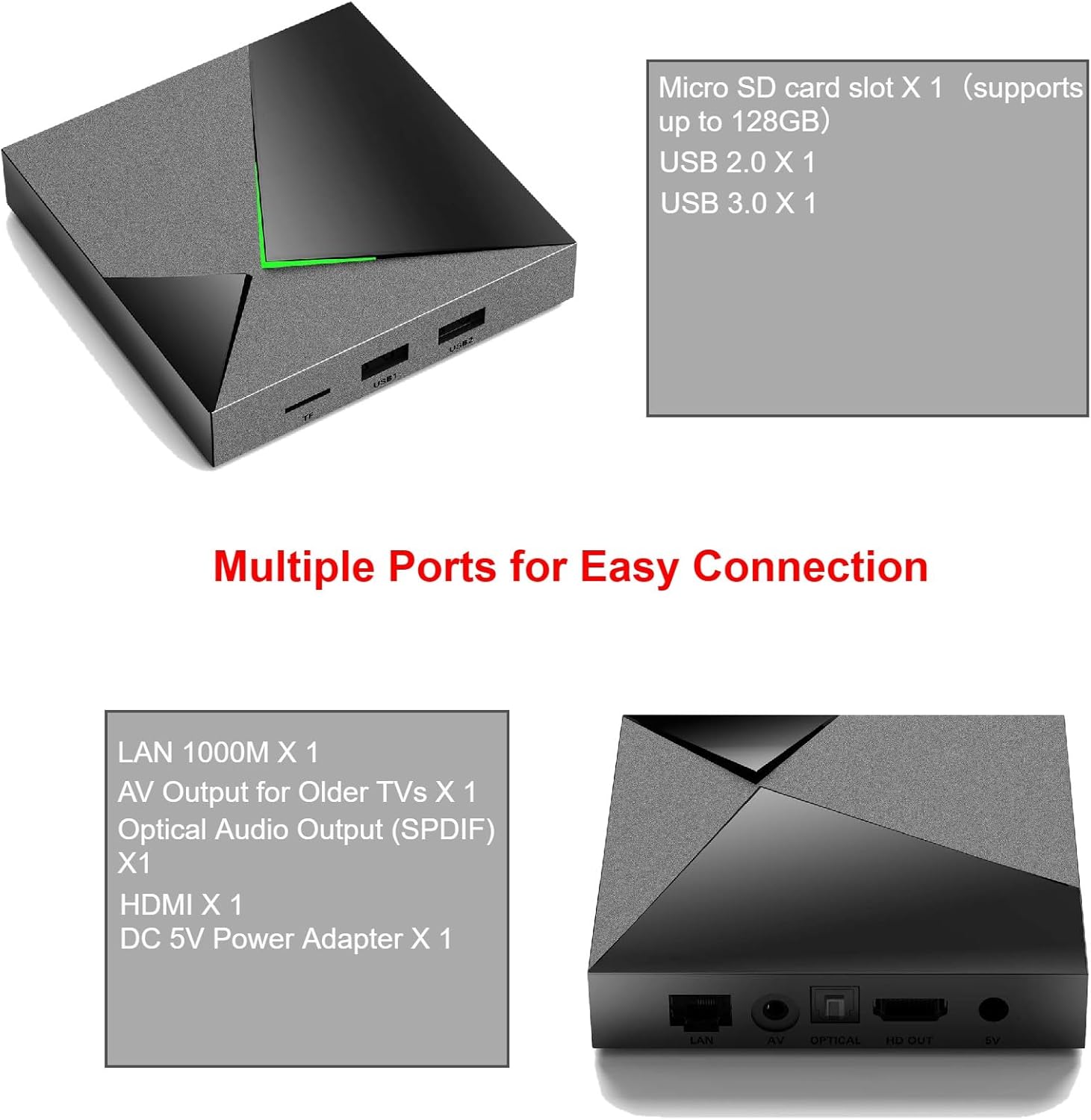
Image: A detailed diagram illustrating the various input and output ports on the BOXPUT Q11 Android TV Box, including LAN, AV, Optical, HDMI, DC 5V, Micro SD, USB 2.0, and USB 3.0.
4. Kurulum
Follow these steps to set up your BOXPUT Q11 Android TV Box:
- Televizyona bağlanın: Connect one end of the provided HDMI cable to the HDMI port on the Q11 TV Box and the other end to an available HDMI input on your television.
- Gücü bağlayın: Plug the US power adapter into the DC 5V port on the Q11 TV Box, then plug the adapter into a wall outlet.
- Ağ Bağlantısı (Opsiyonel):
- Kablolu: For a stable connection, connect an Ethernet cable from your router to the LAN 1000M port on the Q11 TV Box.
- Kablosuz: If using Wi-Fi, you will configure this after the initial boot-up.
- Güç Açık: Turn on your television and select the correct HDMI input source. The Q11 TV Box should automatically power on and display the boot-up screen.
- Başlangıç konfigürasyonu: Ekranda beliren yönergeleri izleyerek dil seçimi, Wi-Fi bağlantısı (Ethernet kullanmıyorsanız) ve Google hesabınıza giriş de dahil olmak üzere ilk kurulumu tamamlayın.

Image: The BOXPUT Q11 TV Box positioned in front of a television screen, illustrating a typical setup for home entertainment, highlighting its Android 11 OS, S905X4 processor, Dual WiFi, and Bluetooth 4.2 capabilities.
5. Kullanım Talimatları
Once set up, navigate the Android TV interface using the IRI BT Voice Remote Control. The remote allows for intuitive control and voice commands.
Temel Gezinme:
- Use the directional pad (up, down, left, right) to move between menu items.
- Basın OK bir öğe seçmek için düğmesine basın.
- Basın Geri Önceki ekrana dönmek için düğmesine basın.
- Basın Ev button to go to the main Android TV home screen.
Ses Kontrolü:
Press the dedicated voice button on your IRI BT Voice Remote to activate voice commands. Speak clearly into the remote to search for content, open applications, or control playback.
Ekran Yansıtma (Miracast):
The Q11 supports one-click screen mirroring, allowing you to cast games or live sports from your compatible phone or tablet directly to your TV. Access the Miracast feature from the device's settings or a dedicated app.
6. Bağlantı
The BOXPUT Q11 offers robust connectivity options to ensure a smooth streaming experience.
Wi-Fi Bağlantısı:
The device supports dual-band 2.4GHz and 5GHz Wi-Fi, providing flexibility and improved performance in congested wireless environments. To connect to Wi-Fi:
- Git Ayarlar Ana ekranda.
- Seçme Ağ ve İnternet.
- İstediğiniz Wi-Fi ağını listeden seçin.
- İstenirse Wi-Fi şifresini girin.
Ethernet Bağlantısı:
For the most stable and fastest connection, use the built-in 1000M Gigabit Ethernet port. Simply connect an Ethernet cable from your router to the LAN port on the Q11 TV Box. The device will automatically detect and use the wired connection.
Bluetooth:
The Q11 features Bluetooth connectivity, primarily used for the IRI BT Voice Remote Control. It can also be used to connect other compatible Bluetooth accessories.
7. 8K/4K UHD Streaming
Experience ultra-high-definition content with the BOXPUT Q11, designed to deliver stunning visuals.
8K@60fps Çıkış:
The Q11 streaming box supports 8K resolution at 60 frames per second, providing exceptional detail and clarity. This requires an 8K-compatible television and 8K content.
HDR (Yüksek Dinamik Aralık):
Enjoy brighter, more realistic colors and greater detail with HDR support. This technology enhances the contrast and color accuracy of compatible content.

Image: A visual comparison demonstrating the enhanced clarity and detail of 8K HDR compared to HD and 4K resolutions, highlighting the vibrant colors and sharper image quality.
Advanced Video Formats:
The Q11 is compatible with advanced video codecs including H.265, VP9, and AV1, ensuring efficient decoding of high-quality video streams.

Image: An illustration detailing the efficiency of the AV1 codec (50% more efficient than H.264, 20% more efficient than HEVC) and a comparison of 60 frames per second playback on the Q11 versus standard TV boxes, showing smoother motion.
8. Gelişmiş Özellikler
VPN Sharing:
The Q11 TV Box supports sharing VPN internet access. You can log in to your VPN application via an Ethernet connection, and the Q11 can then function as a software Wi-Fi router to share the VPN-protected internet with other devices in your home.

Image: A diagram illustrating how the BOXPUT Q11 can share a VPN connection. The Q11 connects to the internet via a 1G cable Ethernet, runs a VPN app, and then broadcasts a 2T2R Wi-Fi signal to other devices, effectively acting as a VPN router.
9. Bakım
To ensure the longevity and optimal performance of your BOXPUT Q11 Android TV Box, follow these maintenance guidelines:
- Temizlik: Cihazın dışını temizlemek için yumuşak ve kuru bir bez kullanın. Sıvı temizleyiciler veya aşındırıcı malzemeler kullanmaktan kaçının.
- Havalandırma: Cihazın aşırı ısınmasını önlemek için iyi havalandırılan bir alana yerleştirildiğinden emin olun. Havalandırma açıklıklarını kapatmayın.
- Kapat: Uzun süre kullanılmayacaksa güç adaptörünün fişinin çekilmesi önerilir.
- Yazılım Güncellemeleri: En son özelliklere ve güvenlik yamalarına sahip olduğunuzdan emin olmak için cihaz ayarlarınızda sistem güncellemelerini düzenli olarak kontrol edin.
10. Sorun Giderme
If you encounter issues with your BOXPUT Q11, refer to the following common problems and solutions:
- Güç Yok/Ekran Yok:
- Güç adaptörünün hem cihaza hem de çalışan bir elektrik prizine güvenli bir şekilde bağlandığından emin olun.
- Verify that the HDMI cable is properly connected to both the TV Box and the TV, and that the correct HDMI input is selected on your TV.
- İnternet bağlantısı yok:
- For Wi-Fi, check your network settings and ensure the correct password is entered. Try restarting your router.
- For Ethernet, ensure the cable is securely connected and your router is functioning correctly.
- Uzaktan Kumanda Yanıt Vermiyor:
- Uzaktan kumandanın pillerini kontrol edin ve gerekiyorsa değiştirin.
- Uzaktan kumanda ile TV kutusu arasında herhangi bir engel olmadığından emin olun.
- If it's a Bluetooth remote, try re-pairing it in the device's Bluetooth settings.
- Kötü Video Kalitesi:
- Ensure your internet connection is stable and fast enough for high-resolution streaming.
- Verify that your TV supports the resolution (e.g., 4K or 8K) you are trying to stream.
- Check the video output settings on the Q11 TV Box.
11. Özellikler
| Özellik | Şartname |
|---|---|
| Marka | KUTU |
| Model Numarası | Q11 |
| İşletim Sistemi | Android 11.0 |
| İşlemci | Amlogic S905X4 Quad-Core |
| Veri deposu | 4 GB |
| ROM | 32 GB |
| Video Çıkışı | 8K@60fps, H.265, VP9, AV1 |
| Bağlantı | Dual-band 2.4GHz/5GHz Wi-Fi, 1000M Ethernet, Bluetooth |
| Limanlar | HDMI, USB 2.0, USB 3.0, Micro SD, LAN, AV, Optical (SPDIF), DC 5V |
| Boyutlar | 7.8 x 5.6 x 2.2 inç |
| Ağırlık | 1.21 pound (0.55 Kilogram) |
| Renk | Siyah |
| Özel Özellikler | Convenient control, Easy to install, Miracast |
12. Garanti ve Destek
BOXPUT is committed to providing quality products and customer satisfaction. While specific warranty details are not provided in this manual, the product includes access to a friendly after-sales support team.
For any questions, technical assistance, or support needs, please refer to the contact information provided with your purchase or visit the official BOXPUT website. Our support team is available to assist you with any issues or inquiries regarding your Q11 Android TV Box.

Image: A person seated at a desk, using a computer, with the BOXPUT Q11 TV Box and remote control nearby, symbolizing readily available customer support and assistance.