
SatelliteSale SS-RC-NOTUS-M2
SatelliteSale Notus M2 Remote Control User Manual
Model: SS-RC-NOTUS-M2 | Brand: SatelliteSale
1. Giriş
This manual provides detailed instructions for the SatelliteSale Notus M2 Remote Control, a voice-activated Bluetooth replacement designed for Optimum Stream Devices. It covers setup, operation, maintenance, and troubleshooting to ensure optimal performance and user experience.

Resim: Ön view of the SatelliteSale Notus M2 Remote Control.
2. Paket İçeriği
Paketin içinde tüm öğelerin mevcut olduğundan emin olun:
- 1 x SatelliteSale Notus M2 Remote Control
- 2 adet AAA pil (önceden takılı veya ayrı olarak dahil)
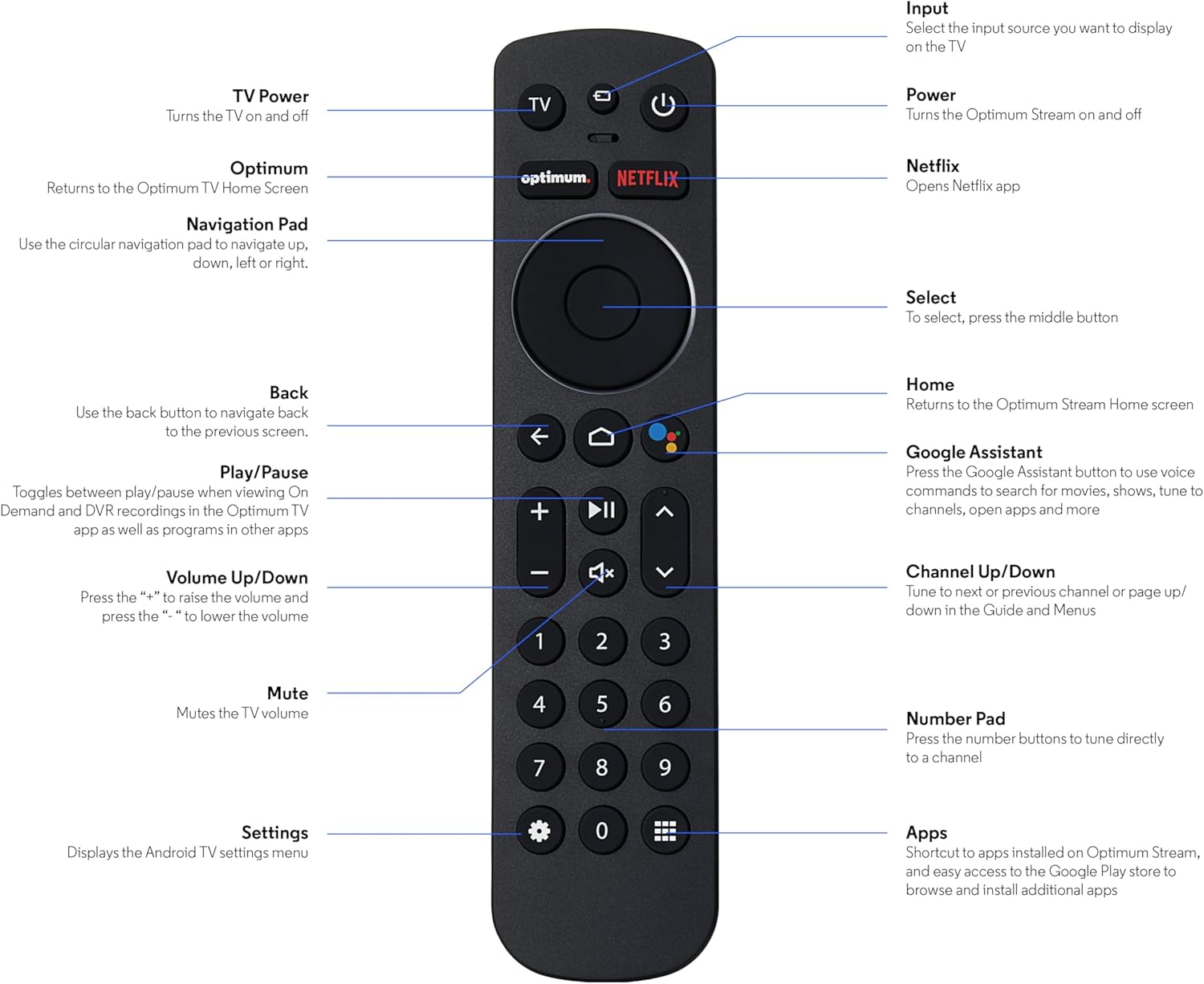
Image: The SatelliteSale Notus M2 Remote Control shown alongside two AAA batteries.
3. Remote Control Layout and Functions
Familiarize yourself with the buttons and their functions on your SatelliteSale Notus M2 Remote Control.

Image: Detailed diagram of the SatelliteSale Notus M2 Remote Control with labels for each button and its corresponding function.
- Televizyon Gücü: TV'yi açar ve kapatır.
- Giriş: Selects the input source to display on the TV.
- Güç: Turns the Optimum Stream device on and off.
- Optimum: Returns to the Optimum TV Home Screen.
- Netflix: Opens the Netflix application directly.
- Gezinti Paneli (Dairesel): Use to navigate up, down, left, or right within menus.
- Select (Middle Button of Nav Pad): Bir seçimi onaylar.
- Geri: Önceki ekrana döner.
- Ev: Returns to the Optimum Stream Home screen.
- Google Assistant (Microphone Icon): Activates voice commands for search, playback control, and hands-free assistance.
- Oynat/Duraklat: Toggles between play and pause for content.
- Sesi Artır/Azalt (+/-): TV'nin ses düzeyini ayarlar.
- Sesini kapatmak: Mutes the TV volume.
- Channel Up/Down (Arrows): Tunes to the next or previous channel, or navigates pages in guides and menus.
- Sayısal Tuş Takımı (0-9): Directly tunes to a channel or enters numerical input.
- Ayarlar (Dişli Simgesi): Displays the Android TV settings menu.
- Apps (Grid Icon): Provides shortcuts to installed apps on Optimum Stream and access to the Google Play Store.
4. Kurulum
4.1 Pil Kurulumu
The remote requires two AAA batteries. Ensure correct polarity when inserting.
- Uzaktan kumandanın arkasındaki pil bölmesini bulun.
- Pil kapağını açmak için aşağı doğru kaydırın.
- Bölmenin içindeki işaretlere uygun olarak (+) ve (-) kutuplarını eşleştirerek iki adet AAA pil takın.
- Replace the battery cover by sliding it back into place until it clicks.

Resim: View Pil bölmesi açık haldeki uzaktan kumandanın, AAA pillerin doğru şekilde takılması için yönünü gösteren fotoğrafı.
4.2 Pairing Your Remote with Optimum Stream Device
Your remote is designed to be paired with your Optimum Stream device for full functionality, including Bluetooth connectivity and voice control. If your remote becomes unpaired or if you are setting up a new remote, follow these steps:

Image: An illustration explaining the importance of direct line of sight for initial pairing and the flexibility of remote placement after pairing.
Önemli Not: For initial pairing, the Optimum Stream box needs to be in direct line of sight of the remote. If your box is behind a TV or in a cabinet, you may need to temporarily relocate it so the remote can be directly pointed at the Stream box. Once pairing is complete, the Stream box can be moved out of sight as the remote uses Bluetooth.
- Ensure batteries are correctly installed in your remote.
- Turn on your TV and your Optimum Stream cable box.
- Press any button on the Stream remote to ensure you are on the Home Screen.
- Ana Ekrandan şunu seçin: Ayarlar (dişli çark simgesi).
- Seçme Device and Remote Settings > Uzaktan Kumandalar ve Aksesuarlar.
- Seçme Add Stream Remote.
- Eşleştirme işlemini tamamlamak için ekrandaki talimatları izleyin.
- You will see an on-screen confirmation once the remote is successfully paired.

Image: Visual representation of pairing steps 1 through 5, showing the remote and on-screen prompts.

Image: Visual representation of pairing steps 6 through 9, detailing the final stages of the pairing process.
5. Kullanım Talimatları
5.1 Ses Kontrolü
The SatelliteSale Notus M2 remote features voice control for convenient operation. Press the microphone button (Google Assistant icon) and speak your command clearly. You can use voice commands to:
- Arama content (movies, TV shows, actors).
- Oynatma kontrolü (oynat, duraklat, ileri sar, geri sar).
- Başvuruları açın.
- Tune to specific channels.
- Get information (weather, sports scores).

Image: A person using the voice control feature of the remote, with sound waves emanating from the remote towards the TV screen.

Resim: Eski bir sevgiliample of a voice command, "Hey Google, turn on the Spider-Man movie," displayed on screen with the remote.
5.2 Bluetooth Wireless Connectivity
Once paired, the remote utilizes Bluetooth for communication with your Optimum Stream device. This means you do not need a direct line of sight to operate the device, allowing for greater flexibility in remote usage and device placement.
5.3 Dedicated Streaming App Buttons
The remote includes dedicated buttons for popular streaming applications, such as Netflix. Pressing these buttons provides one-touch access to your favorite entertainment platforms.
6. Bakım
- Temizlik: Kumandayı temizlemek için yumuşak, kuru bir bez kullanın. Sıvı temizleyiciler veya aerosoller kullanmayın.
- Pil Değişimi: Replace batteries when the remote's response becomes sluggish or it stops functioning. Always replace both batteries at the same time with new AAA batteries.
- Depolamak: Uzaktan kumandayı serin, kuru ve doğrudan güneş ışığından ve aşırı sıcaklıklardan uzak bir yerde saklayın.
7. Sorun Giderme
| Sorun | Olası Neden | Çözüm |
|---|---|---|
| Uzaktan kumanda yanıt vermiyor. | Piller bitmiş veya azalmış. | Her iki AAA pili de yenileriyle değiştirin. |
| Remote not controlling Optimum Stream device. | Remote is unpaired or pairing failed. | Follow the pairing instructions in Section 4.2. Ensure direct line of sight during initial pairing. |
| Ses kontrolü çalışmıyor. | Remote not paired via Bluetooth, or microphone issue. | Ensure the remote is properly paired via Bluetooth (Section 4.2). Speak clearly and close to the microphone. |
| Tuşlar yapışkan veya tepkisiz. | Düğmelerin altında kir veya kalıntı var. | Clean the remote with a soft, dry cloth. Avoid spills. |
8. Özellikler
| Özellik | Detay |
|---|---|
| Model Numarası | SS-RC-NOTUS-M2 |
| Bağlantı | Bluetooth Kablosuz |
| Özel Özellikler | Voice Activated (Google Assistant), Dedicated App Buttons, Ergonomic Design |
| Uyumlu Cihazlar | Optimum Stream Box (powered by Android TV) |
| Güç Kaynağı | 2 x AAA Pil (dahil) |
| Renk | Mat Siyah |
| Ürün Ağırlığı | 3.66 ons |
| Paket Boyutları | 7.28 x 1.89 x 1.22 inç |
9. Garanti ve Destek
For warranty information or technical support, please refer to the official SatelliteSale webSite üzerinden satın alabilir veya doğrudan müşteri hizmetleriyle iletişime geçebilirsiniz. Garanti talepleriniz için satın alma fişinizi saklayın.
Üretici: UyduSatışı
Ask a question about this manual
Ask about setup, troubleshooting, compatibility, parts, safety, or missing instructions. Manuals+ will review the question and use this page’s manual context to help answer it.