
1. Giriş
This manual provides comprehensive instructions for the setup, operation, maintenance, and troubleshooting of your EPOMAKER Aula Hero 68 HE Wired Magnetic Gaming Keyboard. Please read this manual thoroughly to ensure proper use and to maximize your keyboard's performance.

Image 1.1: EPOMAKER Aula Hero 68 HE Wired Magnetic Gaming Keyboard.
2. Paket İçeriği
Paketin içinde tüm öğelerin mevcut olduğundan emin olun:
- EPOMAKER Aula Hero 68 HE Keyboard
- USB A'dan C'ye Kablo
- 2-in-1 Keycap-and-Switch Puller
- 2 Extra Magnetic Switches
- Keyboard Ribbon
- Kullanım Kılavuzu (bu belge)
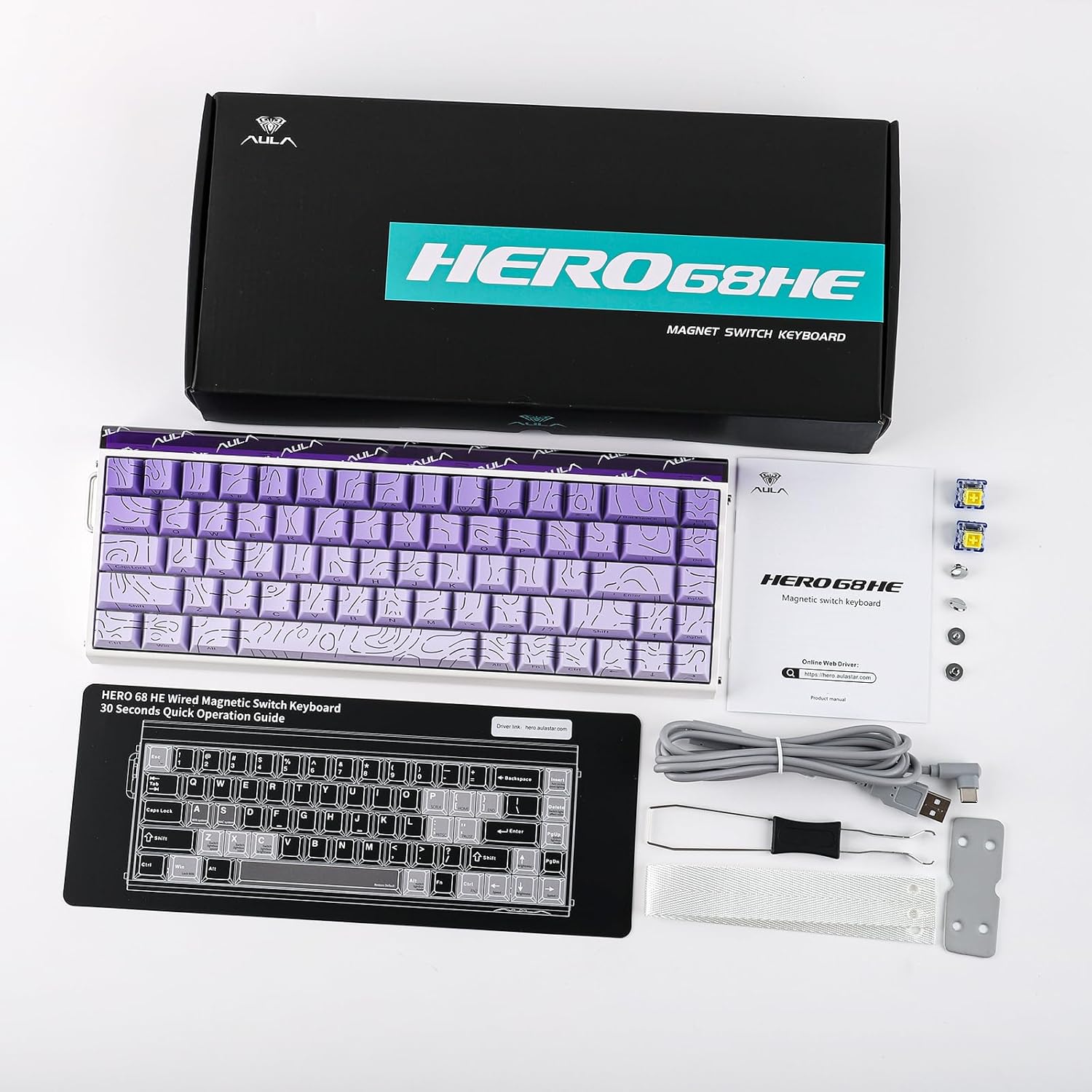
Image 2.1: Contents included in the EPOMAKER Aula Hero 68 HE package.
3. Ürün Bittiview
3.1 Temel Özellikler
- Magnetic Hall Effect Switches: Offers adjustable actuation from 0.01mm to 3.4mm.
- 8kHz Polling Rate: Provides ultra-low latency for rapid response.
- 5 Katmanlı Ses Dampkapanış: Enhances typing acoustics.
- RGB Box & Backlight: Customizable per-key RGB lighting and side light effects.
- Sıcak Değiştirilebilir Tasarım: Compatible with various magnetic switches.
- Web Sürücü: Online configuration tool for advanced customization.
- Gelişmiş Oyun Özellikleri: Includes SOCD, Mod Tap, and Dynamic Keystroke.
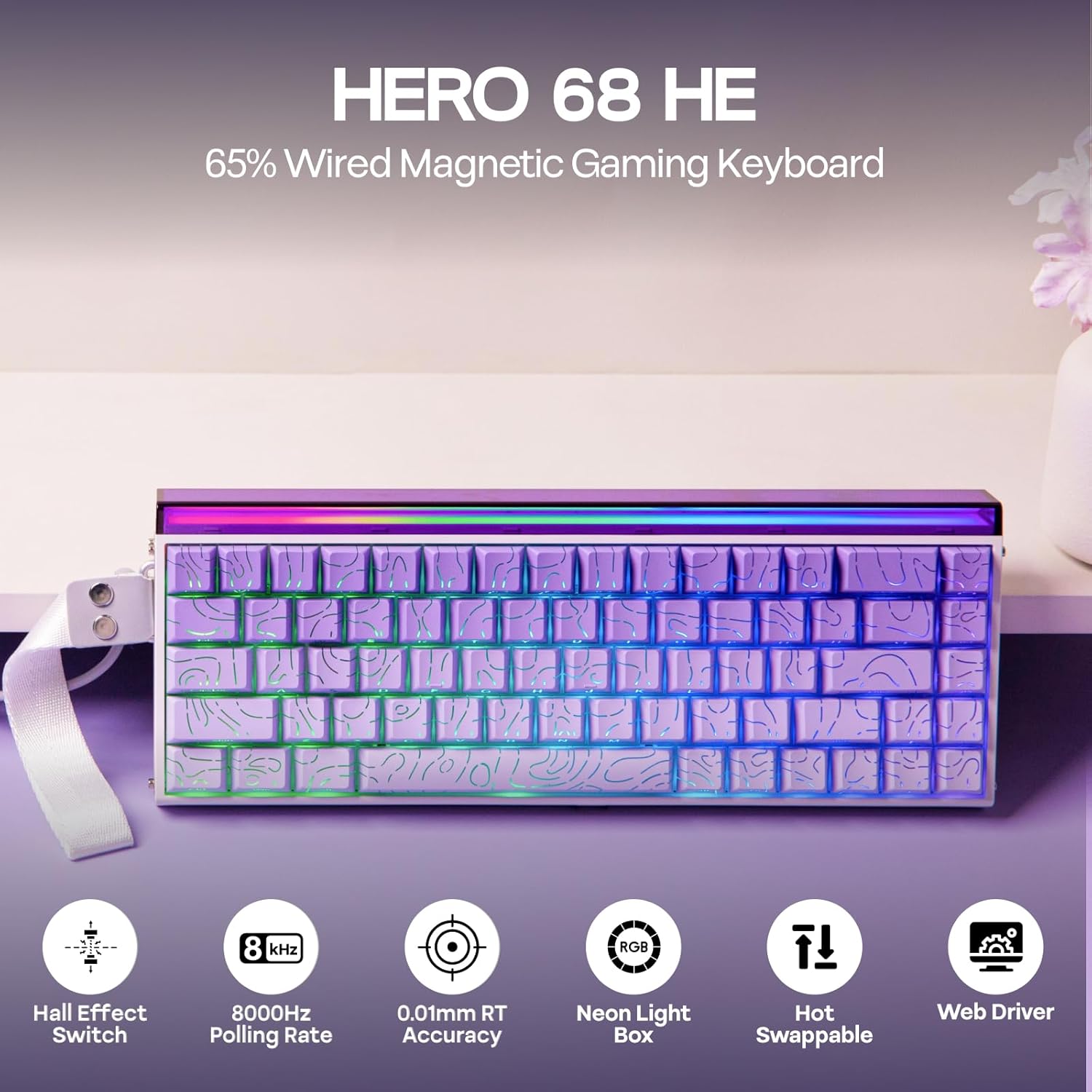
Resim 3.1: Üzeriview of the Hero 68 HE keyboard and its main features.
3.2 Klavye Düzeni
The Hero 68 HE features a 65% compact layout with 68 keys, designed for efficiency and space-saving. The keycaps are side-printed PBT with a Cherry profile Ergonomik konfor için.

Image 3.2: Details of the keycap design and ergonomic profile.
4. Kurulum
4.1 Klavyenin Bağlanması
- Locate the USB A to C cable included in the package.
- Kablonun USB-C ucunu klavyedeki girişe takın.
- Kablo ucunun USB-A ucunu bilgisayarınızdaki veya uyumlu cihazınızdaki kullanılabilir bir USB bağlantı noktasına takın.
- Klavyeniz işletim sisteminiz tarafından otomatik olarak tanınacaktır.
The Hero 68 HE is a wired-only keyboard, ensuring consistent performance without wireless latency.

Image 4.1: The keyboard is compatible with Windows, macOS, Laptops, Xbox, PlayStation, and Switch.
5. Kullanım Talimatları
5.1 Ayarlanabilir Hareket
The magnetic Hall Effect switches allow for precise adjustment of the actuation point from 0.01mm to 3.4mm. This feature enables users to customize key sensitivity for different tasks, such as rapid trigger for gaming or a deeper press for typing accuracy.

Image 5.1: Visual representation of adjustable actuation for magnetic switches.
5.2 Anket Oranı
The keyboard supports an 8kHz polling rate, significantly reducing input latency to 0.125ms. This high polling rate ensures that every keystroke is registered almost instantaneously, which is crucial for competitive gaming.

Image 5.2: Latency and polling rate settings for the Hero 68 HE keyboard.
5.3 Customization with Web Sürücü
The Hero 68 HE utilizes a web-based driver for comprehensive customization. Access the driver via a Chromium-based browser to configure:
- Anahtar Yeniden Eşleme
- RGB Effect Settings
- Hall Effect Switch Customization
- Makro Kaydı
- Dynamic Keystroke and Mod Tap functions
- SOCD (Simultaneous Opposite Cardinal Directions) settings
The web driver allows for advanced control over your keyboard's behavior without installing desktop software.

Image 5.3: The programmable web driver for customizing keyboard settings.
5.4 RGB Aydınlatma
The keyboard features per-key RGB backlighting and a side light box. Lighting effects, colors, saturation, brightness, and speed can be fully customized through the web driver to match your preferences.

Image 5.4: The keyboard's customizable RGB lighting and light box.
5.5 Sıcak Değiştirilebilir Anahtarlar
The Hero 68 HE is hot-swappable, allowing you to easily change switches without soldering. This provides flexibility for users to experiment with different magnetic switch types.

Image 5.5: The hot-swappable design allows for easy switch replacement.
6. Bakım
6.1 Klavyeyi Temizleme
- Genel Temizlik: Yumuşak, tiftiksiz bir bez kullanın ve hafifçe kurulayın.ampTuş kapaklarını ve kasayı silmek için su veya hafif bir temizleme solüsyonu kullanın. Aşırı nemden kaçının.
- Toz Giderimi: Tuş başlıkları ve anahtarlar arasındaki toz ve kalıntıları temizlemek için basınçlı hava kullanın.
- Tuş Takımının Çıkarılması: Use the included keycap puller to carefully remove keycaps for deeper cleaning. Gently pull straight up to avoid damaging the switch stem.
6.2 Anahtar Bakımı
While magnetic switches are durable, avoid exposing them to strong magnetic fields or excessive force. If replacing switches, use the included switch puller and ensure proper alignment before pressing them into the PCB.
7. Sorun Giderme
| Sorun | Olası Neden | Çözüm |
|---|---|---|
| Klavye yanıt vermiyor | Gevşek kablo bağlantısı, arızalı USB portu, sürücü sorunu. | Ensure USB cable is securely connected. Try a different USB port. Restart your computer. Check the web Herhangi bir hata mesajı için sürücü. |
| RGB aydınlatma çalışmıyor | Lighting disabled, software conflict, faulty LED. | RGB ayarlarını kontrol edin. web driver. Ensure no other lighting software is interfering. |
| Anahtarlar kaydedilmiyor veya çift yazılıyor | Switch issue, actuation point set too low/high, debris under keycap. | Clean under the keycap. Adjust actuation point in the web driver. If a specific switch is faulty, replace it using the hot-swap feature. |
| Web driver not accessible | Browser incompatibility, internet connection issue. | Ensure you are using a Chromium-based browser (e.g., Chrome, Edge). Check your internet connection. |
8. Özellikler
| Özellik | Detay |
|---|---|
| Örnek | Hero 68 HE |
| Klavye Açıklaması | Manyetik Oyun Klavyesi |
| Bağlantı Teknolojisi | Wired Only (USB A to C cable included) |
| Harekete geçirme | 0.01mm - 3.4mm Adjustable |
| Anket Oranı | 8 kHz |
| Ses DampEning | 5-Layer Construction |
| Arka aydınlatma | RGB (Per-key & Side Light Box) |
| Anahtarlar | Hall Effect, Hot-Swappable |
| Uyumlu Cihazlar | Gaming Console, Laptop, PC, Projector |
| Ürün Boyutları | 4.7 x 12.3 x 1.2 inç (12 cm Uzunluk x 31.2 cm Genişlik x 3 cm Yükseklik) |
| Ürün Ağırlığı | 2.46 pound (1.11 kg) |
| Malzeme | Plastik |

Image 8.1: Detailed technical specifications and physical dimensions.

Image 8.2: Internal structure illustrating the five-layer sound dampsonlandırma sistemi.
9. Garanti ve Destek
9.1 Garanti Bilgileri
EPOMAKER products typically come with a standard manufacturer's warranty. For specific warranty terms and conditions, please refer to the warranty card included with your product or visit the official EPOMAKER webSite. Koruma planları ayrıca genişletilmiş kapsam için de mevcut olabilir.
9.2 Müşteri Desteği
For technical assistance, troubleshooting, or product inquiries, please contact EPOMAKER customer support through their official website. You can also refer to the digital user manual (PDF) available at https://manuals.plus/m/3bf63b34745dab409acedb4a4009fb12c0590896132f9c6ba67c6c5c399490a5 Daha fazla bilgi için.