
1. Giriş
This manual provides detailed instructions for the Symcode Wearable Glove Barcode Scanner. This device is designed for efficient, hands-free barcode scanning, featuring dual wireless connectivity (Bluetooth 6.0 & 2.4G) and a long-lasting battery. It is suitable for various applications including warehouses, retail, and logistics, offering fast decoding of 1D, 2D, and QR codes.
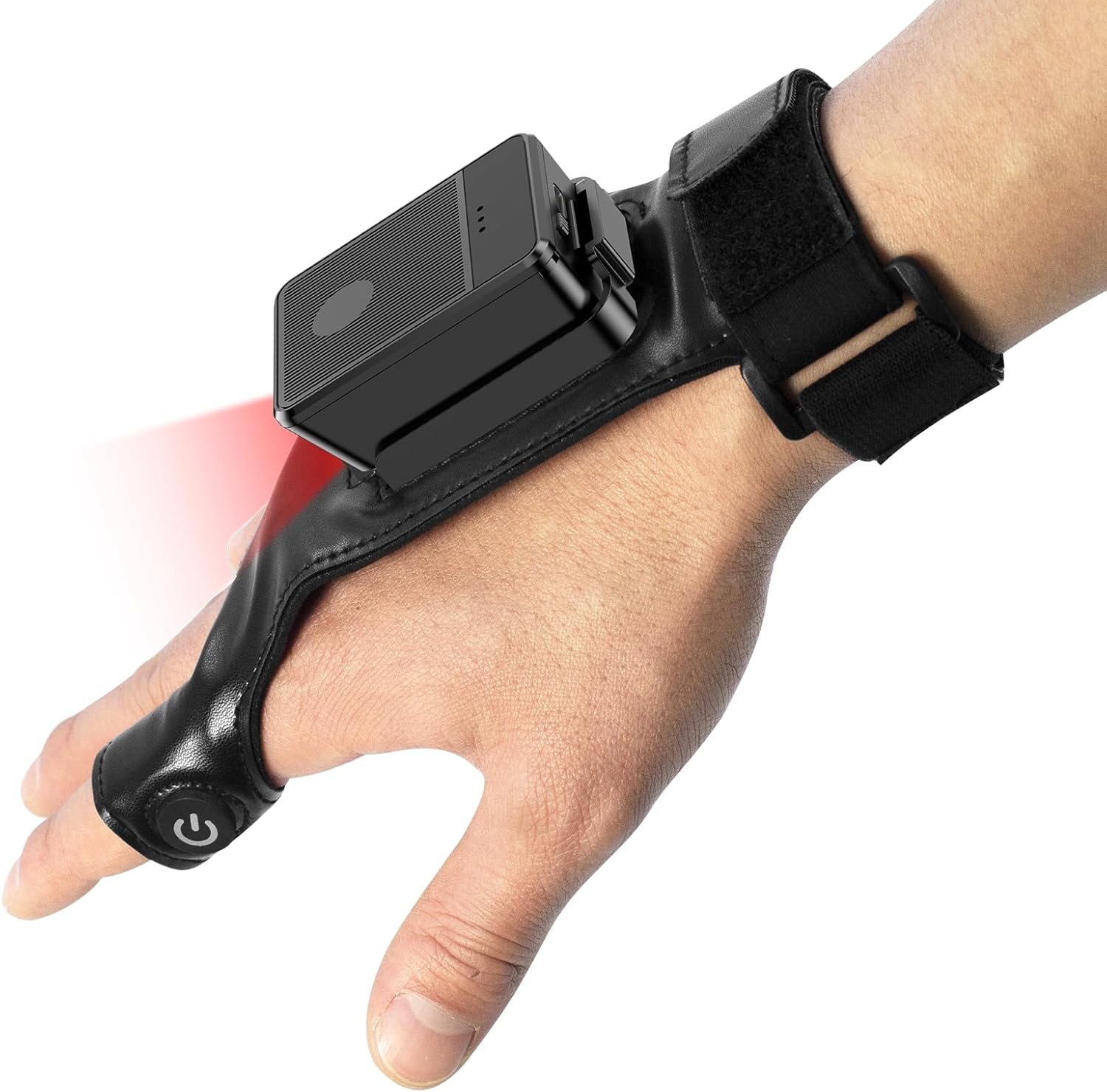
This image shows the Symcode Wearable Glove Barcode Scanner attached to a user's hand, demonstrating its ergonomic, hands-free design. The scanner unit is positioned on the back of the hand, with the scanning beam visible.
2. Güvenlik Bilgileri
- Cihazı aşırı sıcaklıklara, neme veya aşındırıcı maddelere maruz bırakmayın.
- Tarama ışığına doğrudan göz temasından kaçının.
- Cihazı kendiniz sökmeye veya onarmaya çalışmayın. Servis için yetkili personele başvurun.
- Hasar oluşmasını önlemek için yalnızca ürünle birlikte verilen şarj kablosunu ve adaptörü kullanın.
3. Paket İçeriği
Lütfen paketi teslim aldığınızda içeriğini kontrol edin. Herhangi bir ürün eksik veya hasarlıysa, satıcınızla iletişime geçin.
- Symcode Wearable Glove Barcode Scanner
- USB Şarj Kablosu
- 2.4G Kablosuz Dongle
- Kullanıcı Kılavuzu
4. Ürün Bittiview
The Symcode Wearable Glove Barcode Scanner consists of a compact scanning unit and an adjustable glove-style strap. The scanning unit features a durable trigger button, indicator lights, and a charging port. The glove is designed for comfort and secure fit, allowing for hands-free operation.

Yakın çekim view of the scanner on a hand, highlighting the red scanning beam and the durable resin material of the trigger button located on the index finger. The image also shows a roll of barcode labels, indicating its primary function.
5. Kurulum
5.1 Cihazı Şarj Etme
Before first use, fully charge the scanner. Connect the USB charging cable to the scanner's charging port and to a power source (e.g., computer USB port or USB wall adapter). The charging indicator light will show charging status. A full charge takes approximately 5 hours.
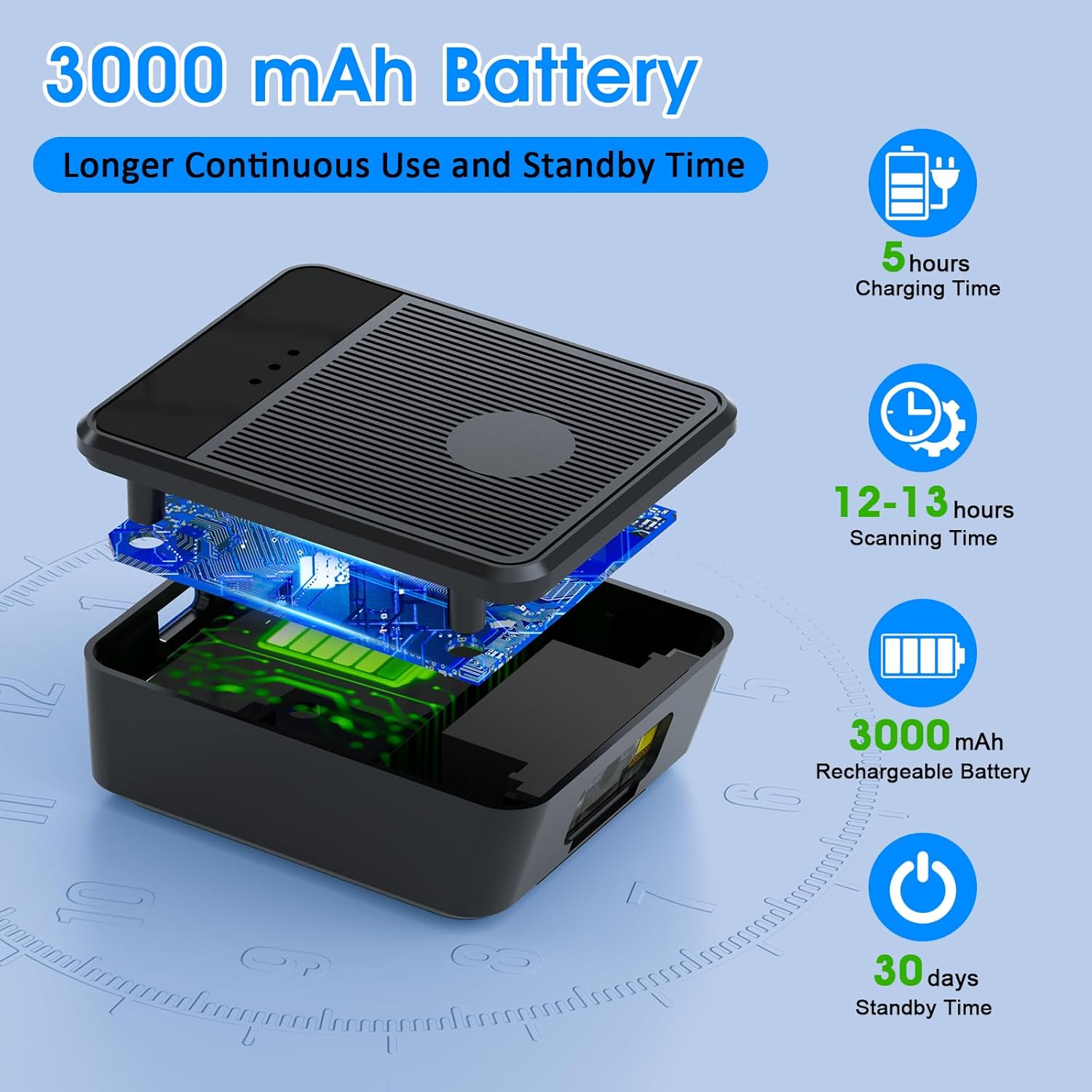
bir patladı view diagram of the scanner unit, emphasizing its 3000 mAh rechargeable battery. Accompanying text indicates a 5-hour charging time, 12-13 hours of continuous scanning, and 30 days of standby time.
5.2 Tarayıcının Takılması
Slide your hand into the glove, ensuring the scanner unit is positioned comfortably on the back of your hand. Adjust the strap for a secure fit. The trigger button should align with your index finger for easy access.

Two workers are shown in a warehouse environment, handling boxes. One worker is actively using the wearable barcode scanner on their hand to scan a package, demonstrating the hands-free benefit of the device during logistics operations.
5.3 Cihaza Bağlanma
The scanner supports two wireless connection methods:
5.3.1 2.4G Wireless Dongle Connection
- Plug the 2.4G wireless dongle into a USB port on your computer or compatible device.
- Tarayıcıyı açın. Otomatik olarak dongle ile eşleşmelidir.
- A successful connection is indicated by a specific light pattern or sound (refer to device indicators).
5.3.2 Bluetooth 6.0 Bağlantısı
- Tarayıcıyı açın.
- Ana cihazınızda (örneğin, akıllı telefon, tablet, bilgisayar) Bluetooth'u etkinleştirin.
- Arama available Bluetooth devices and select the Symcode scanner from the list.
- Pairing may require a confirmation or a default PIN (check device documentation for specific PIN if required).
6. Kullanım Talimatları
6.1 Temel Tarama
To scan a barcode, point the scanner's beam at the barcode and press the trigger button located on your index finger. A successful scan will typically be indicated by a beep, a vibration, or a change in the indicator light.
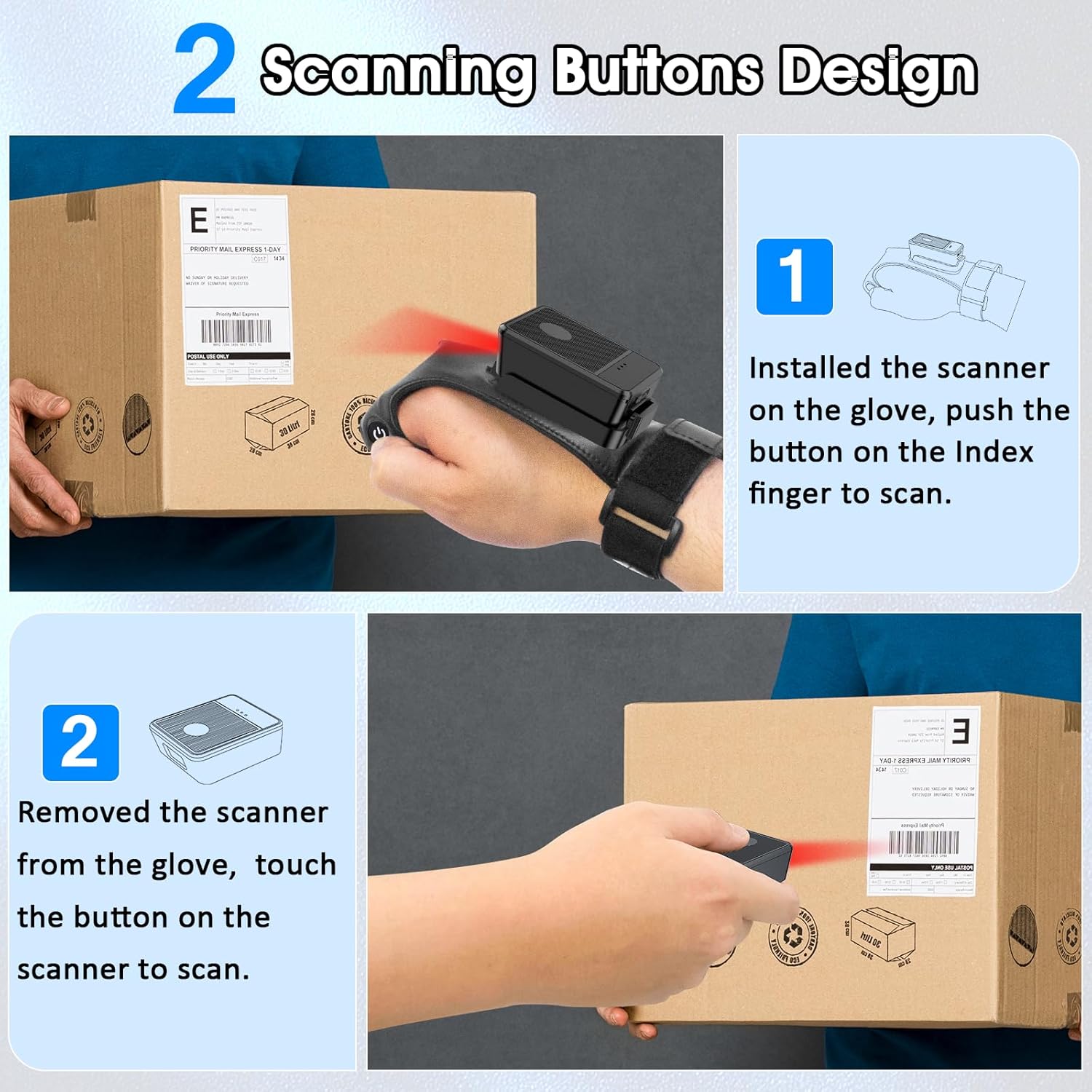
This diagram illustrates two ways to use the scanner: 1) installed on the glove, scanning with the index finger button, and 2) removed from the glove, scanning by touching the button directly on the scanner unit. Both methods are shown with the scanner pointed at a package.
6.2 Çalışma Modu
The scanner supports two operational modes:
6.2.1 Anında Yükleme Modu
In this mode, scanned barcode data is immediately transmitted to the connected host device. This is ideal for real-time inventory updates or point-of-sale transactions.
6.2.2 Offline Storage Mode
This mode allows the scanner to store up to 50,000 barcodes internally when not connected to a host device or when connectivity is intermittent. Data can then be uploaded to a computer or POS system at a later time.
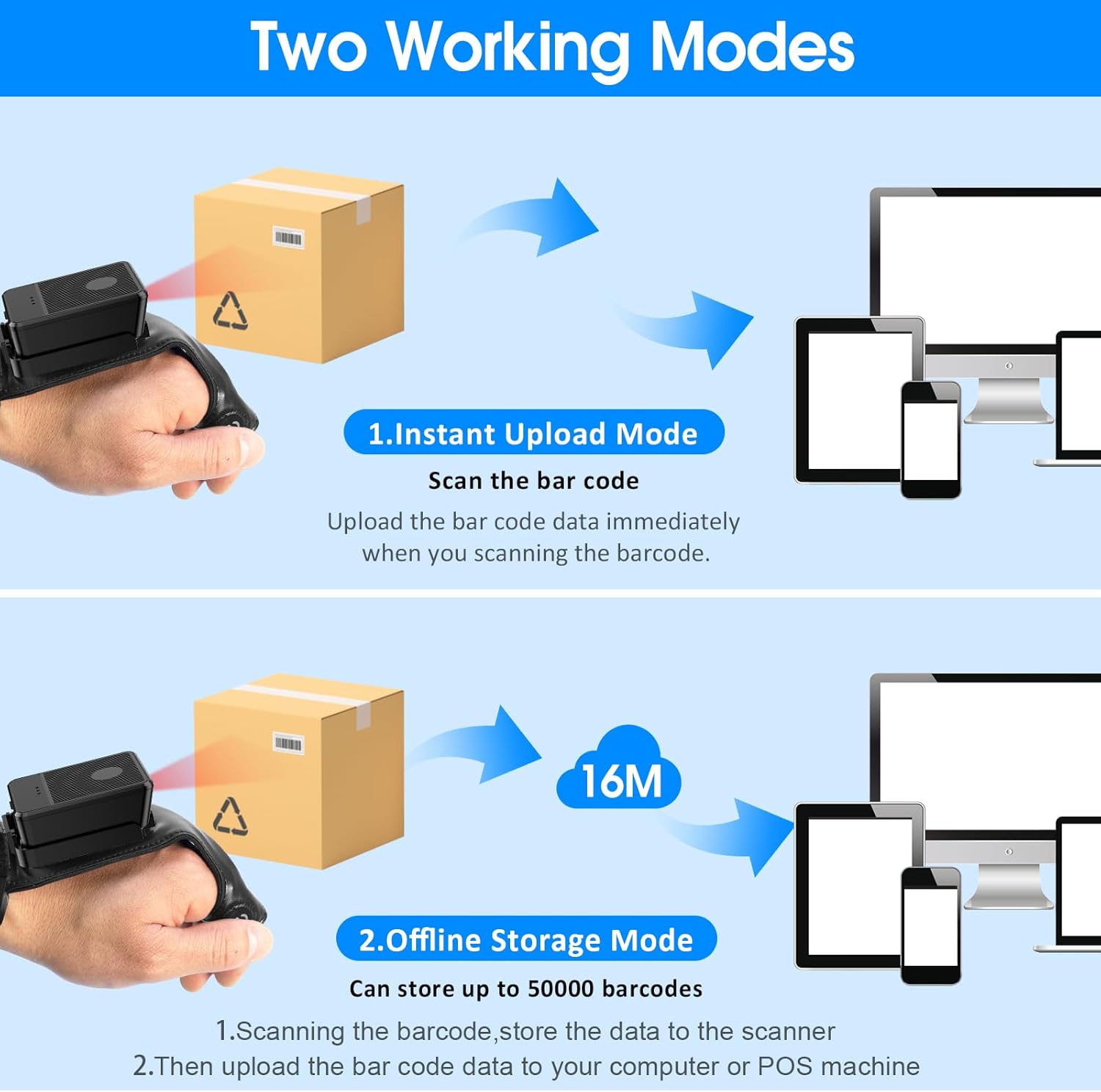
This image explains the two operational modes: Instant Upload Mode, where scanned data is immediately sent to a connected device, and Offline Storage Mode, which allows storing up to 50,000 barcodes internally before uploading them to a computer or POS system.
6.3 Ayarların Özelleştirilmesi
The scanner allows for customization of various settings, including:
- Ses: Enable or disable the audible beep for successful scans.
- Titreşim: Enable or disable vibration alerts for successful scans, useful in quiet environments.
- Klavye İşlevleri: Add keyboard functions such as TAB or Enter after each scan for seamless data entry into applications.
Refer to the quick setup guide or manufacturer's website for specific programming barcodes to adjust these settings.
7. Bakım
- Temizlik: Use a soft, dry cloth to clean the scanner's exterior. For stubborn dirt, slightly dampBezi suyla yıkayın. Sert kimyasallar veya aşındırıcı temizleyiciler kullanmayın.
- Depolamak: Tarayıcıyı kullanılmadığı zamanlarda serin, kuru ve doğrudan güneş ışığından ve aşırı sıcaklıklardan uzak bir yerde saklayın.
- Pil Bakım: Pil ömrünü uzatmak için pili sık sık tamamen boşaltmaktan kaçının. Cihazı sürekli kullanımda olmasa bile düzenli olarak şarj edin.
8. Sorun Giderme
8.1 Tarayıcı Açılmıyor
- Pilinin dolu olduğundan emin olun. Tarayıcıyı bir güç kaynağına bağlayın ve tekrar açmayı denemeden önce en az 30 dakika şarj olmasına izin verin.
8.2 Unable to Connect Wirelessly
- 2.4G Bağlantısı: Verify the 2.4G dongle is securely plugged into the host device. Try plugging it into a different USB port. Ensure the scanner is within range of the dongle.
- Bluetooth Bağlantısı: Ensure Bluetooth is enabled on your host device. Delete any previous pairings for the scanner and attempt to pair again. Ensure the scanner is in pairing mode (refer to device indicators).
- Hem tarayıcıyı hem de ana cihazı yeniden başlatın.
8.3 Tarayıcı Barkodları Okumuyor
- Barkodun temiz, hasarsız ve açıkça basılmış olduğundan emin olun.
- Tarayıcı ile barkod arasındaki mesafeyi ve açıyı ayarlayın.
- Check if the scanner is in the correct working mode (Instant Upload or Offline Storage).
- Verify that the barcode type is supported by the scanner (1D, 2D, QR codes are supported).
9. Özellikler
| Marka | sembol kodu |
| Örnek | Wearable Glove Barcode Scanner (B0F1FSMWCD) |
| Bağlantı Teknolojisi | 2.4G, Bluetooth 6.0 |
| Uyumlu Cihazlar | Desktop, Laptop, Tablet, Smartphone (Windows XP/7/8/10, Android, iOS) |
| Güç Kaynağı | Pil ile çalışır |
| Pil Türü | 1 Lityum Polimer pil (dahil) |
| Pil Kapasitesi | 1100mAh (Product Description) / 3000mAh (Image) - Note: Discrepancy in source data, refer to product packaging for accurate capacity. |
| Sürekli Çalışma Süresi | Up to 10 hours (Product Description) / 12-13 hours (Image) - Note: Discrepancy in source data, refer to product packaging for accurate time. |
| Şarj Süresi | Yaklaşık 5 saat |
| Bekleme Süresi | 30 güne kadar |
| Tarama Hızı | Saniyede 300'e kadar tarama |
| Tarama Aralığı | 2 ila 4.9 fit |
| Çevrimdışı Depolama Kapasitesi | 50,000'e kadar barkod |
| Ürün Ağırlığı | 5 ons |
| Paket Boyutları | 7.48 x 3.74 x 2.44 inç |
10. Garanti Bilgileri
This Symcode product is covered by a manufacturer's warranty. For specific warranty terms, duration, and conditions, please refer to the warranty card included with your product or visit the official Symcode webSite. Satın alma belgenizi garanti talepleriniz için saklayın.
11. Müşteri Desteği
If you encounter any issues or have questions regarding your Symcode Wearable Glove Barcode Scanner, please contact Symcode customer support. Contact details can typically be found on the product packaging, the official Symcode websitenizden veya perakendeciniz aracılığıyla.