
Samsung SM-A066B
Samsung Galaxy A06 5G Kullanım Kılavuzu
Model: SM-A066B
1. Giriş
Welcome to the user manual for your new Samsung Galaxy A06 5G smartphone. This guide provides essential information on setting up, operating, maintaining, and troubleshooting your device. Please read this manual thoroughly to ensure optimal performance and longevity of your smartphone.

Resim: Ön ve arka view Samsung Galaxy A06 5G'nin.
2. Başlarken
2.1. Paket İçeriği
Ensure your product package contains the following items:
- Samsung Galaxy A06 5G Akıllı Telefon
- Veri Kablosu (USB-C - USB-C)
- SIM Kart Çıkarma Pimi
- Hızlı Başlangıç Kılavuzu
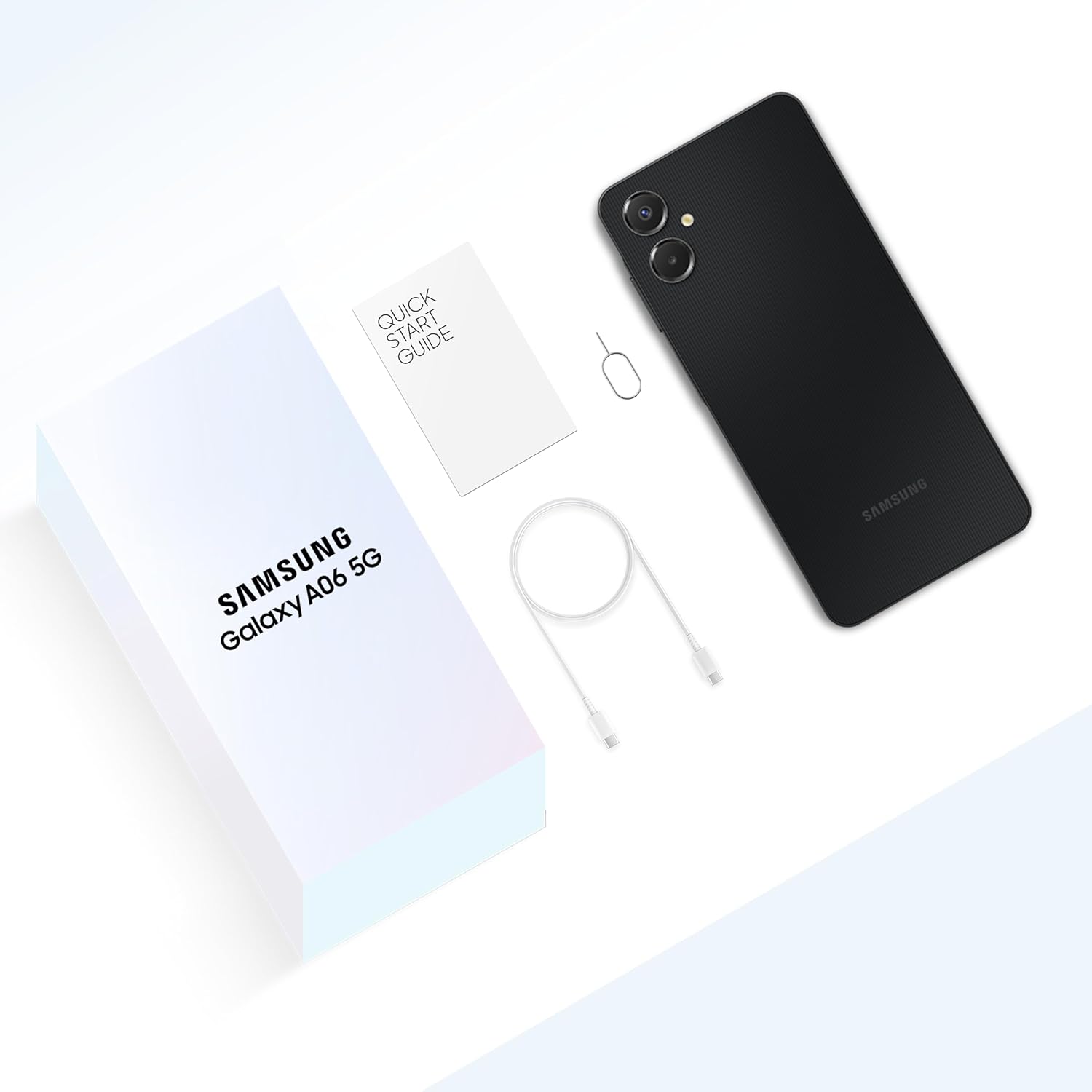
Image: Unboxed contents of the Samsung Galaxy A06 5G.
2.2. SIM Kart ve MicroSD Kartın Takılması
- Cihazınızın yan tarafında bulunan SIM kart tepsisini bulun.
- SIM kart yuvasını açmak için SIM kart çıkarma iğnesini yuvanın yanındaki küçük deliğe takın.
- Nano-SIM kartınızı/kartlarınızı ve/veya microSD kartınızı altın temas noktaları aşağı bakacak şekilde tepsiye yerleştirin.
- Tepsiyi yerine oturana kadar yavaşça itin.
2.3. Cihazın Şarj Edilmesi
Before first use, fully charge your device. Connect the USB-C cable to the phone's charging port and the other end to a compatible power adapter. Plug the adapter into a wall outlet.
2.4. Açma/Kapama
- To power on: Press and hold the Side key until the Samsung logo appears.
- To power off: Press and hold the Side key and Volume Down button simultaneously, then tap 'Power off'. Alternatively, swipe down from the top of the screen to open the Quick Panel, tap the Power icon, and select 'Power off'.
2.5. İlk Kurulum Sihirbazı
Upon first power-on, follow the on-screen instructions to set up your device. This includes selecting your language, connecting to Wi-Fi, signing in to your Google account, and setting up security features.
3. Cihaz Bittiview ve Temel Özellikler

Image: Key features of the Galaxy A06 5G.
3.1. Ekran
The Galaxy A06 5G features an immersive 6.7-inch HD+ display with a 20:9 aspect ratio and smooth 90Hz scrolling for an enhanced viewDeneyim.

Image: Large display of the Galaxy A06 5G.
3.2. Performans
Equipped with the MediaTek Dimensity 6300 Processor, the device offers superior performance for multitasking, gaming, and video streaming.

Image: Device performance for smooth app usage.
3.3. Bağlantı
Experience true 5G connectivity with support for up to 12 5G bands and 4 antennas, ensuring fast and reliable network access. The device also supports Wi-Fi, Bluetooth, USB, and built-in GPS.

Image: Superfast 5G connectivity.
3.4. Kamera Sistemi
Capture high-quality photos and videos with the pro-grade 50MP main camera, a 2MP depth camera, and an 8MP front camera for clear selfies.
- Ana Kamera: 50 Megapiksel
- Derinlik Kamerası: 2 Megapiksel
- Ön Kamera: 8 Megapiksel

Image: Pro-grade 50MP main camera diagram.

Resim: Sample photos demonstrating high-definition capture.
3.5. Pil
The device is powered by a 5000 mAh (typical) battery, providing extended usage. It also supports 25W Fast Charging to quickly power up your device.

Image: 5000 mAh battery and fast charging capability.
3.6. Dayanıklılık
With an IP54 rating, the Galaxy A06 5G offers reliable protection against dust and splashes of water, suitable for daily use.

Image: IP54 rating for dust and splash resistance.
3.7. Software & Security
- İşletim Sistemi: Runs on Android 15.0, with a commitment to 4 generations of OS upgrades and 4 years of security updates.
- Voice Focus: Eliminates background noise during calls for crystal clear conversations.
- Knox Güvenliği: Samsung Knox Vault provides a secure environment for sensitive data like PINs and passwords.
- Parmak izi sensörü: A side-mounted fingerprint sensor offers secure and convenient unlocking.

Image: Commitment to OS upgrades.

Image: Voice Focus feature for clear calls.

Image: Side fingerprint sensor for secure unlocking.

Image: Samsung Knox Vault for data security.
4. Temel İşlem
4.1. Gezinme
The Galaxy A06 5G uses a touchscreen interface. You can navigate by tapping, swiping, pinching, and spreading your fingers on the screen.
4.2. Arama Yapma
Open the Phone app, enter the number using the keypad, and tap the call icon. To answer an incoming call, swipe the green phone icon upwards. To decline, swipe the red phone icon downwards.
4.3. Mesaj Gönderme
Open the Messages app, tap the 'New message' icon, enter the recipient's number or select from contacts, type your message, and tap the send icon.
4.4. Kamerayı Kullanma
Kamera uygulamasını açın. Fotoğraf çekmek için deklanşör düğmesine dokunun. Fotoğraf ve video modları arasında geçiş yapmak için sola veya sağa kaydırın. Ön ve arka kameralar arasında geçiş yapmak için kamera değiştirme simgesine dokunun.
4.5. Wi-Fi ve Bluetooth'a bağlanma
Git Ayarlar > Bağlantılar. Toggle Wi-Fi or Bluetooth on. For Wi-Fi, select a network and enter the password if required. For Bluetooth, select a device from the list to pair.
4.6. Managing Notifications and Quick Panel
Swipe down from the top of the screen to access notifications and the Quick Panel. The Quick Panel allows quick access to frequently used settings like Wi-Fi, Bluetooth, and flashlight.

Image: Accessing Quick Panel and Notifications.
5. Bakım ve Özen
5.1. Yazılım Güncellemeleri
Cihazınızın en son özelliklere, güvenlik yamalarına ve performans iyileştirmelerine sahip olduğundan emin olmak için yazılım güncellemelerini düzenli olarak kontrol edin ve yükleyin. Ayarlar > Yazılım güncellemesi > İndir ve yükle.
5.2. Cihazınızı Temizleme
Use a soft, lint-free cloth to clean your device. Avoid using harsh chemicals or abrasive materials. For stubborn smudges, slightly dampBezi suyla veya elektronik cihazlar için tasarlanmış bir ekran temizleyiciyle silin.
5.3. Pil Optimizasyonu
Pil ömrünü uzatmak için:
- Ekran parlaklığını azaltın.
- Kullanılmadığı zaman Wi-Fi, Bluetooth ve GPS'yi kapatın.
- Arka planda çalışan, kullanılmayan uygulamaları kapatın.
- Enable Power saving mode in Settings.
5.4. Depolama Yönetimi
Gereksiz olanları düzenli olarak temizleyin fileKullanılmayan uygulamaları kaldırın ve büyük medya dosyalarını taşıyın. files to a microSD card or cloud storage to free up internal storage and maintain device performance.
6. Sorun Giderme
6.1. Yaygın Sorunlar
- Cihaz açılmıyor: Ensure the battery is charged. If not, connect to a charger and wait a few minutes before attempting to power on.
- Zayıf pil ömrü: Pil optimizasyonu ipuçları için Bölüm 5.3'e bakın.
- Bağlantı sorunları (Wi-Fi/Bluetooth): Try toggling the respective setting off and on. Restart your device or the router/Bluetooth accessory.
- Uygulamaların çökmesi veya donması: Close the app and reopen it. If the issue persists, clear the app's cache (Settings > Apps > [App Name] > Storage > Clear cache).
6.2. Fabrika Ayarlarına Sıfırlama
Cihazınızda sürekli sorunlar yaşanıyorsa, fabrika ayarlarına sıfırlama işlemi bu sorunları çözebilir. Uyarı: A factory reset will erase all data from your device. Back up important data before proceeding. Go to Ayarlar > Genel yönetim > Sıfırla > Fabrika ayarlarına sıfırlama.
7. Özellikler
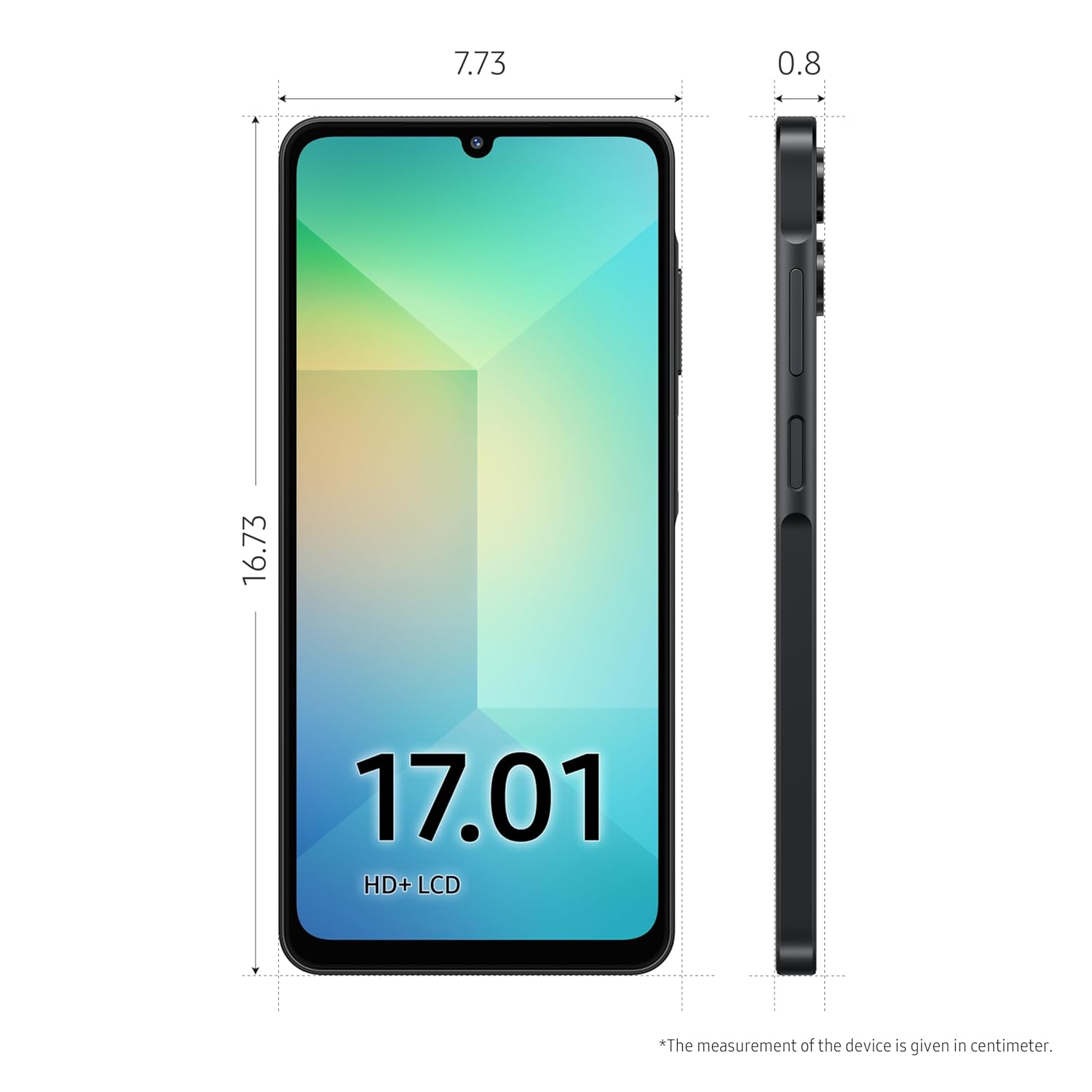
Image: Physical dimensions of the device.
| Özellik | Şartname |
|---|---|
| Model Numarası | SM-A066B |
| İşletim Sistemi | Android 15.0 |
| İşlemci | MediaTek Dimensity 6300 |
| Veri deposu | 4 GB |
| Dahili Depolama | 64 GB |
| Ekran Boyutu | 6.7 inç HD+ |
| Çözünürlük | 720x1600 |
| Ana Kamera | 50 MP |
| Ön Kamera | 8 MP |
| Pil Kapasitesi | 5000 mAh |
| Bağlantı | 5G (12 bands), Bluetooth, USB, Wi-Fi |
| Özel Özellikler | Built-In GPS, Dual SIM, Expandable Memory, Mobile Hotspot, Stereo Speakers, IP54 Rating, Voice Focus, Side Fingerprint Sensor |
| Boyutlar (UxGxY) | 0.8x7.73x16.73 cm |
| Ağırlık | 191 gr |
8. Garanti ve Destek
8.1. Garanti Bilgileri
Your Samsung Galaxy A06 5G comes with a limited manufacturer's warranty. Please refer to the warranty card included in your product package or visit the official Samsung webAyrıntılı şartlar ve koşullar için site.
8.2. Müşteri Desteği
For technical assistance, service, or additional information, please contact Samsung Customer Service. You can find contact details and online support resources on the official Samsung webalan: www.samsung.com/support
Ask a question about this manual
Ask about setup, troubleshooting, compatibility, parts, safety, or missing instructions. Manuals+ will review the question and use this page’s manual context to help answer it.