
DOOGEE V Max Pro
DOOGEE V Max Pro Dayanıklı Telefon Kullanım Kılavuzu
Model: V Max Pro
giriiş
This manual provides comprehensive instructions for the safe and efficient use of your DOOGEE V Max Pro Rugged Phone. Please read this manual thoroughly before operating the device to ensure optimal performance and longevity. The DOOGEE V Max Pro is designed for durability and high performance, featuring a robust build and advanced mobile technology.

Figure 1: DOOGEE V Max Pro Rugged Phone and included Tablet Stand.
Kurmak
1. Kutudan Çıkarma ve İlk İnceleme
Carefully unpack all components from the box. Verify that the package contains the DOOGEE V Max Pro phone, the tablet stand, a charging cable, and a power adapter. Inspect all items for any signs of damage.
2. İlk Şarj
Before first use, fully charge the phone. Connect the charging cable to the phone's charging port and the power adapter, then plug the adapter into a wall outlet. The phone supports 33W fast charging. A full charge ensures optimal battery calibration.
3. SIM Kart ve MicroSD Kart Kurulumu
Locate the SIM card tray on the side of the phone. Use the provided SIM ejector tool to open the tray. Insert your Nano-SIM card(s) and/or a MicroSD card (up to 2TB supported) into the designated slots. Ensure the cards are correctly oriented before reinserting the tray firmly into the phone.
4. Açma
Press and hold the power button located on the side of the phone until the DOOGEE logo appears on the screen. Follow the on-screen prompts to complete the initial setup, including language selection, Wi-Fi connection, and Google account setup.
5. Tablet Stand Assembly and Usage
The included tablet stand is designed for versatile viewing. Unfold the stand to its desired angle. Place your DOOGEE V Max Pro or a compatible tablet onto the stand's cradle. The stand features a sturdy base and adjustable angles for comfortable viewIng.
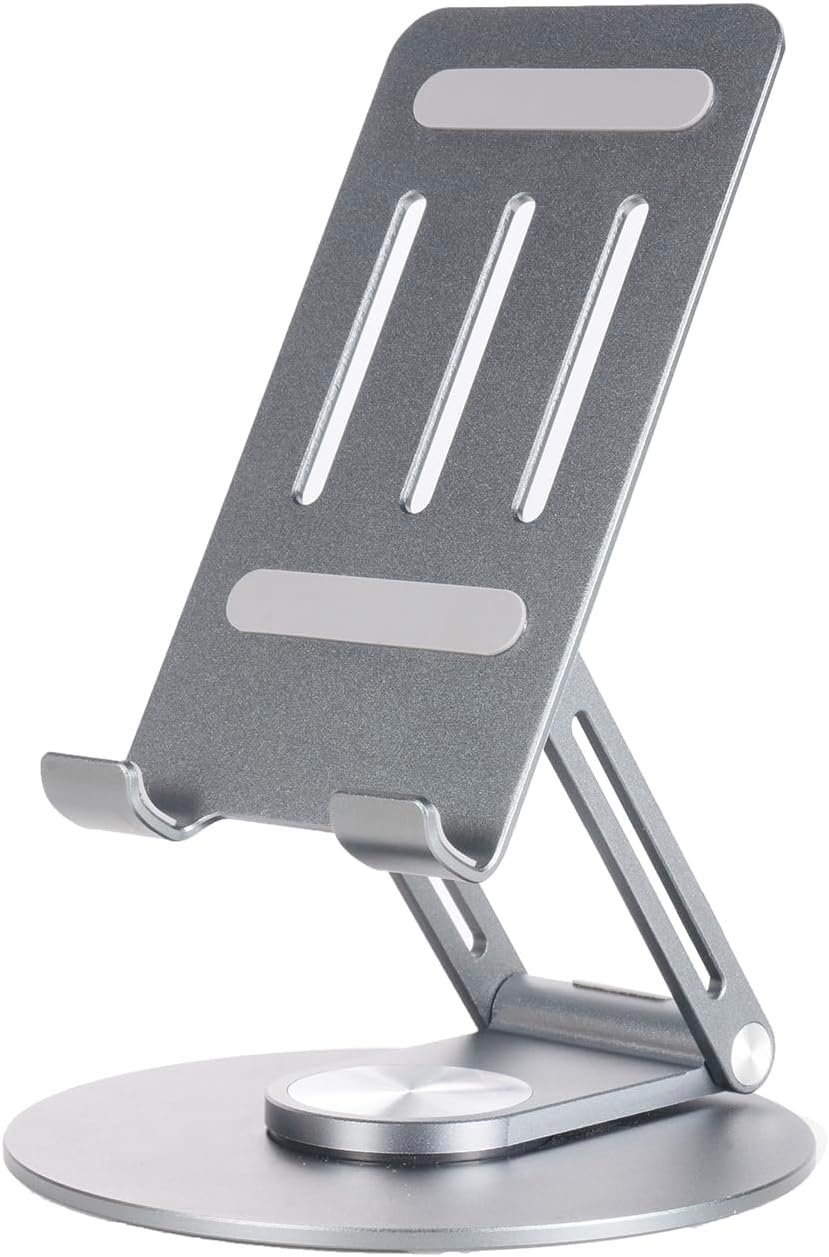
Figure 2: The adjustable tablet stand.

Figure 3: Tablet stand in use with a device.
Kullanım Talimatları
1. Temel Telefon Fonksiyonları
- Arama Yapma: Telefon uygulamasını açın, numarayı çevirin ve arama düğmesine basın.
- Mesaj Gönderme: Mesajlar uygulamasını açın, yeni bir konuşma başlatın, alıcıyı ve mesajınızı girin.
- İnternet bağlanabilirliği: Connect to Wi-Fi via Settings > Network & internet > Wi-Fi, or enable mobile data via Settings > Network & internet > Mobile network. The phone supports 5G connectivity for fast data speeds.
2. Ekran Özellikleri
The DOOGEE V Max Pro features a 6.58-inch FHD+ IPS Waterdrop Display with a 120Hz high refresh rate for smooth visuals. It offers 2.4K screen resolution, 401 PPI, 16.7 million colors, and a 1500:1 contrast ratio, ensuring vibrant and clear images. The display has an 85% screen-to-body ratio for an immersive viewDeneyim.

Figure 4: Visual representation of the 120Hz display and its specifications.
3. Kamera Kullanımı
The phone is equipped with a versatile camera system:
- 108MP AI Ana Kamera: Yapay zekâ destekli yüksek çözünürlüklü fotoğraflar için.
- 20MP Gece Görüş Kamerası: Loş ışıkta veya tamamen karanlıkta net görüntüler yakalar.
- 8 MP Geniş Açı ve Makro Kamera: Geniş manzara çekimleri veya detaylı yakın çekimler için.
- 16MP Ön Kamera: Selfie ve görüntülü görüşmeler için.
Open the Camera app and select your desired mode (Photo, Video, Night Vision, Macro, etc.). Tap the shutter button to capture images or start/stop video recording.

Şekil 5: Üzeriview of the phone's multi-camera system.
4. Pil Yönetimi
The DOOGEE V Max Pro features a massive 22000mAh battery, providing extended usage times. It supports 33W fast charging. The phone also supports OTG (On-The-Go) reverse charging, allowing you to use it as a power bank to charge other devices.
- Yanında olmak: 1540 saate kadar
- Çağrı: 156 saate kadar
- Müzik Çalıyor: 142 saate kadar
- Video İzleme: 45 saate kadar
- Web Gözatma: 18 saate kadar

Şekil 6: Pil kapasitesi ve tahmini kullanım süreleri.
5. Smart Interaction Lights
The phone features smart interaction lights that provide visual notifications for various events:
- Gelen Çağrılar
- SMS Bildirimleri
- Müzik Çalma
- Şarj Durumu

Şekil 7: Ör.amples of smart interaction light indications.
6. İşlemci ve Performans
The DOOGEE V Max Pro is powered by the Dimensity 7050 5G Octa-core Processor, designed for boosted performance and reduced power consumption. This ensures smooth multitasking, gaming, and overall system responsiveness.

Figure 8: Illustration of the Dimensity 7050 5G Octa-core Processor.
7. Depolama
The phone offers massive storage with up to 32GB RAM (12GB physical + 20GB extended RAM) and 512GB ROM. It also supports an external MicroSD card up to 2TB, providing ample space for applications, media, and documents.

Figure 9: Visual representation of RAM and ROM capacities.
Bakım
1. Temizlik
Telefonunuzu temizlemek için yumuşak, tiftiksiz bir bez kullanın. İnatçı lekeler için hafifçe silin.ampen the cloth with water or a screen cleaner. Avoid using harsh chemicals, abrasive materials, or excessive moisture, especially near ports.
2. Dayanıklılık ve Koruma
The DOOGEE V Max Pro is designed as a rugged phone, featuring a durable construction of metal or strong plastic composite. While it is built to withstand harsh environments, avoid intentional drops, extreme temperatures, or prolonged submersion in water beyond its rated capabilities (if any specific IP rating is available, it would be mentioned here, but it's not in the provided data). Ensure all port covers are securely closed to maintain water and dust resistance.
3. Yazılım Güncellemeleri
Regularly check for and install software updates to ensure your phone has the latest features, security patches, and performance improvements. You can usually find this option in Settings > System > System update.
Sorun giderme
Yaygın Sorunlar ve Çözümleri
- Telefon açılmıyor: Pilinin şarjlı olduğundan emin olun. Tekrar açmayı denemeden önce en az 15 dakika şarj cihazına bağlı bırakın.
- Ekran tepkisiz: Telefonun güç düğmesini yaklaşık 10-15 saniye basılı tutarak yeniden başlatmayı deneyin.
- Poor signal/connectivity: Check if SIM card is properly inserted. Try restarting the phone or toggling Airplane Mode on/off. Ensure you are in an area with network coverage.
- Uygulamalar çöküyor: Clear the cache of the problematic app (Settings > Apps > [App Name] > Storage & cache > Clear cache). If the issue persists, try reinstalling the app.
- Pilin çabuk bitmesi: Ekran parlaklığını azaltın, arka planda çalışan kullanılmayan uygulamaları kapatın ve kullanılmadığı zamanlarda GPS veya Bluetooth gibi gereksiz özellikleri devre dışı bırakın.
For issues not listed here, please refer to the official DOOGEE support website veya müşteri hizmetleriyle iletişime geçin.
Özellikler
| Özellik | Şartname |
|---|---|
| Örnek | DOOGEE V Max Pro |
| Pil Kapasitesi | 22000mAh |
| Şarj etme | 33W Hızlı Şarj, OTG Ters Şarj |
| İşlemci | Dimensity 7050 5G Octa-core |
| Veri deposu | Up to 32GB (12GB physical + 20GB extended) |
| ROM | 512 GB |
| Genişletilebilir Depolama | Supports up to 2TB MicroSD Card |
| Görüntülemek | 6.58" FHD+ 120Hz IPS Waterdrop Display |
| Ekran Çözünürlüğü | 2.4K Screen Resolution, 401 PPI |
| Ana Kamera | 108 MP Yapay Zeka Destekli Ana Kamera |
| Gece Görüş Kamerası | 20 MP |
| Geniş Açı ve Makro Kamera | 8 MP |
| Ön Kamera | 16 MP |
| Bağlantı | 5G |
| Malzeme | Metal or Strong Plastic Composite |
| ASIN | B0DR8DRWF7 |
| İlk Mevcut Tarih | 23 Aralık 2024 |
Ask a question about this manual
Ask about setup, troubleshooting, compatibility, parts, safety, or missing instructions. Manuals+ will review the question and use this page’s manual context to help answer it.