
XIAOMI X20 Pro EU (BHR8859EU)
Xiaomi Robot Vacuum X20 Pro EU
Kullanıcı Kılavuzu
giriiş
The Xiaomi Robot Vacuum X20 Pro EU is an intelligent all-in-one cleaning solution designed to simplify home maintenance. It combines powerful suction with high-speed rotating mops and advanced obstacle avoidance technology to effectively remove dust, dirt, and spills. This manual provides essential information for setting up, operating, maintaining, and troubleshooting your robot vacuum to ensure optimal performance and longevity.
Güvenlik Bilgileri
Yaralanmayı veya cihaza zarar gelmesini önlemek için her zaman aşağıdaki güvenlik önlemlerine uyun:
- İlk kullanımdan önce tüm talimatları dikkatlice okuyunuz.
- Çocukların veya evcil hayvanların robot süpürgeyi çalıştırmasına izin vermeyin.
- Şarj istasyonunun düz, sağlam bir yüzeye, duvara yaslanarak ve etrafında boş alan kalacak şekilde yerleştirildiğinden emin olun.
- Saçınızı, bol giysilerinizi, parmaklarınızı ve vücudunuzun tüm kısımlarını açıklıklardan ve hareketli parçalardan uzak tutun.
- Do not use the robot vacuum to pick up large objects, sharp objects, or burning/smoking materials.
- Sadece cihazla birlikte verilen orijinal güç adaptörünü ve şarj istasyonunu kullanın.
- Do not expose the robot vacuum or charging station to water or other liquids.
- En iyi performansı korumak için fırçaları ve sensörleri düzenli olarak temizleyin.
Ürün Bittiview
Familiarize yourself with the main components of your Xiaomi Robot Vacuum X20 Pro EU and its smart base station.

Robot Vacuum and Smart Base Station: The complete system, showing the robot docked in its all-in-one base station. The base station handles automatic mop cleaning, air drying, and dust collection.

Smart Base Station Functionality: An illustration highlighting the internal mechanisms of the smart base station, demonstrating how it cleans the robot's mop pads and empties the dustbin.
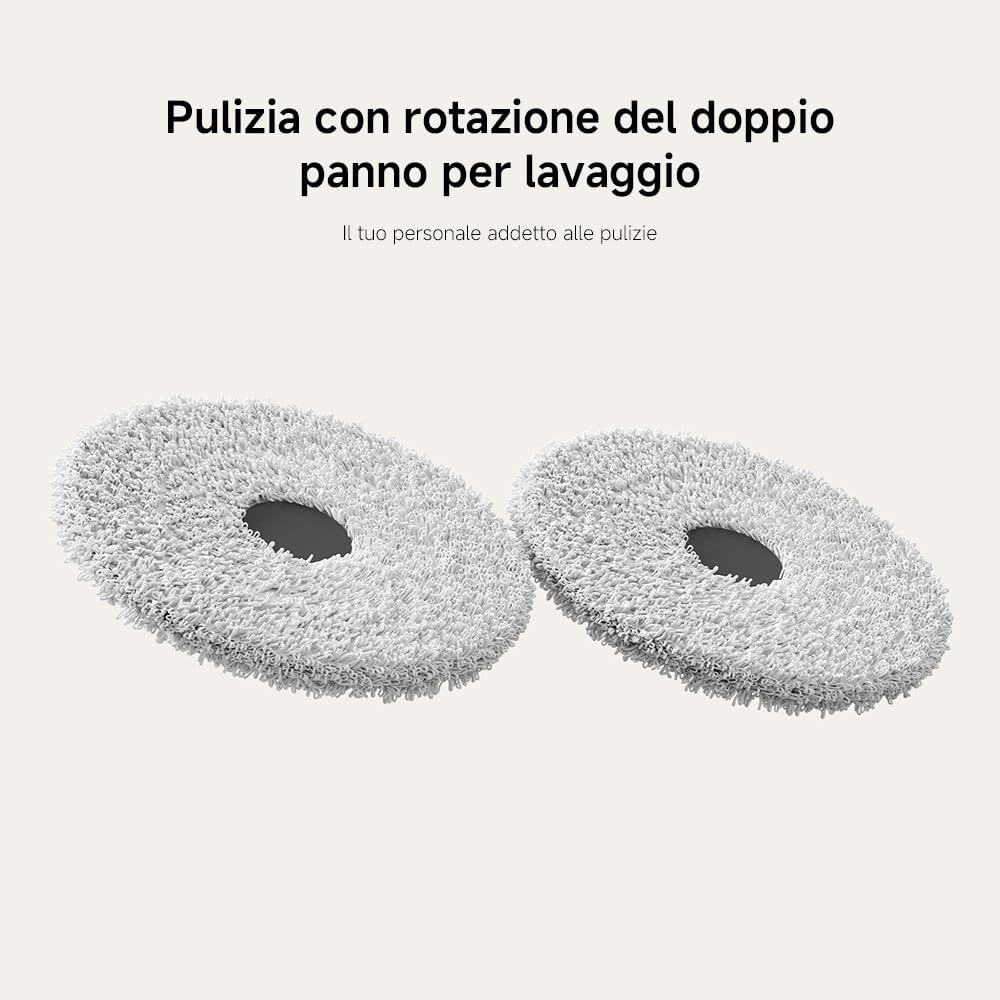
Dual Rotating Mop Pads: Kapatmak view of the two high-speed rotating mop pads, designed for effective scrubbing and cleaning of hard floors.

Powerful Suction System: Bir alt taraf view of the robot, illustrating the main brush and the powerful 7000Pa suction fan that efficiently collects dust and debris.
Kurmak
Paketin açılması:
Carefully remove all components from the packaging. Ensure all accessories are present, including the robot vacuum, smart base station, power cord, and cleaning tools.
Şarj İstasyonu Yerleşimi:
Place the smart base station against a wall on a hard, level surface. Ensure there is at least 0.5 meters (1.6 feet) of clear space on both sides and 1.5 meters (4.9 feet) in front of the station for optimal robot navigation and docking.
Başlangıç ücreti:
Connect the power cord to the smart base station and plug it into a power outlet. Place the robot vacuum onto the charging contacts of the base station. The robot will automatically begin charging. For first-time use, it is recommended to fully charge the robot before operation.
App Connection (Mi Home/Xiaomi Home App):
- Cihazınızın uygulama mağazasından Mi Home/Xiaomi Home uygulamasını indirin.
- Uygulamayı açın ve Xiaomi hesabınızı oluşturun veya hesabınıza giriş yapın.
- Bir cihaz eklemek için sağ üst köşedeki "+" simgesine dokunun.
- Select the Xiaomi Robot Vacuum X20 Pro EU from the list of available devices or scan the QR code on the robot.
- Follow the in-app instructions to connect the robot to your Wi-Fi network. This will enable remote control and advanced features.

Uzaktan Uygulama Kontrolü: A visual representation of the Mi Home/Xiaomi Home app interface, demonstrating how users can view the cleaning map and control the robot remotely.
Kullanım Talimatları
Your robot vacuum offers various intelligent features for efficient cleaning.
Temizliğe Başlama ve Durdurma
- Temizlemeye başla: Press the power button on the robot or use the Mi Home/Xiaomi Home app to initiate a cleaning cycle. The robot will automatically return to its base station upon completion.
- Duraklat/Sürdür: Temizleme işlemi sırasında duraklatmak için güç düğmesine bir kez basın. Devam etmek için tekrar basın.
- Temizliği Durdurun: Press and hold the power button for a few seconds to stop the current cleaning cycle and send the robot back to its base station.
Temizleme Modları
The robot supports multiple cleaning modes to suit different needs, configurable via the app.

Dört Temizleme Modu: An image depicting the robot vacuum in different operational scenarios, illustrating its versatility across various cleaning requirements.
- Sadece Vakum: Kuru atıkların toplanması için.
- Sadece Paspas: For wet cleaning with the rotating mop pads.
- Vakum ve Paspas: Kapsamlı temizlik için aynı anda süpürme ve paspaslama.
- Custom Zones: Define specific areas for cleaning or no-go zones within the app.
Haritalama ve Navigasyon
Equipped with LDS laser navigation and advanced obstacle avoidance, the robot efficiently maps your home and plans optimal cleaning routes.

LDS Lazer Navigasyon: A diagram illustrating the robot's 360° laser scanning capability to create precise maps of your home for efficient path planning.

High-Precision Obstacle Avoidance: The robot demonstrating its ability to detect and navigate around objects, ensuring thorough cleaning without collisions.

Intelligent Carpet Recognition: The robot automatically lifts its mop pads by 10mm when detecting carpets, preventing wetting and increasinHalıların derinlemesine temizliği için g emiş gücü.
Ses Kontrolü
Integrate your robot vacuum with smart home assistants for convenient voice commands.

Works with Amazon Alexa or Google Assistant: A user interacting with the robot vacuum using voice commands, demonstrating seamless integration with popular smart home platforms.
The Xiaomi Robot Vacuum X20 Pro EU is compatible with Amazon Alexa and Google Assistant. Link your device through the respective app settings to enable voice commands such as "Start cleaning" or "Return to dock."
Bakım
Düzenli bakım, robot süpürgenizin en yüksek verimlilikte çalışmasını sağlar.
Otomatik Toz Toplama

Otomatik Toz Toplama: An illustration showing the robot vacuum's dustbin being automatically emptied into the base station's dust bag, allowing for up to 75 days of hands-free operation.
The smart base station features dual auto-emptying ducts that transfer dust from the robot's dustbin to a large 2.5L dust bag in the station. This allows for up to 75 days of hands-free dust disposal. Replace the dust bag when full.
Automatic Mop Washing and Drying

Automatic Mop Washing and Hot Air Drying: The base station's internal mechanism for automatically washing the mop pads with a powerful water flow and then drying them with hot air to prevent mold and odors.
The base station automatically washes the mop pads during and after cleaning cycles. After washing, it uses hot air drying to prevent mold and odors. Ensure the clean and dirty water tanks are properly maintained.
Su Tankı Yönetimi

Büyük 4L Su Deposu: The large capacity clean water tank within the base station, which automatically refills the robot's water tank, enabling it to clean up to 120 m² on a single fill.
The base station features a 4L clean water tank and a 3.8L dirty water tank. Regularly empty the dirty water tank and refill the clean water tank to ensure continuous mopping functionality. The large capacity allows for cleaning up to 120 m² per refill.
Removable Cleaning Tray

Çıkarılabilir Temizlik Tepsisi: The easily detachable cleaning tray from the base station, designed for simple cleaning and maintenance to prevent residue buildup.
The cleaning tray within the base station is removable for easy cleaning. Regularly remove and rinse the tray to prevent dirt and bacteria buildup, ensuring a hygienic cleaning process.
General Cleaning and Replacement
- Ana Fırça: Remove and clean the main brush regularly to remove tangled hair and debris. Replace every 6-12 months depending on usage.
- Yan Fırça: Check for wear and tear. Replace if damaged or excessively worn.
- Filtreler: Clean the dustbin filter frequently. Replace the filter every 3-6 months.
- Sensörler: Wipe all sensors (cliff sensors, wall sensors, LDS sensor) with a clean, dry cloth to ensure accurate navigation.
- Şarj Kişileri: Hem robotun hem de baz istasyonunun şarj kontaklarını kuru bir bezle temizleyin.
Sorun giderme
| Sorun | Olası Neden | Çözüm |
|---|---|---|
| Robot başlamıyor veya yanıt vermiyor. | Pil zayıf; güç kapalı; robot sıkıştı. | Charge the robot; ensure power switch is on; clear any obstructions. |
| Robot şarj istasyonuna geri dönemez. | Charging station obstructed; robot too far; dirty charging contacts. | Clear area around station; manually place robot closer; clean contacts. |
| Zayıf temizleme performansı. | Full dustbin; tangled brushes; dirty filters; worn mop pads. | Empty dustbin; clean brushes; clean/replace filters; replace mop pads. |
| Robot sık sık takılıyor. | Çok fazla engel; karanlık yüzeyler; kirli sensörler. | Clear clutter; use virtual walls/no-go zones; clean sensors. |
| Paspas pedleri etkili temizlik yapmıyor veya iz bırakıyor. | Kirli su deposu dolu; temiz su deposu boş; paspas pedleri aşınmış. | Empty dirty water tank; refill clean water tank; replace mop pads. |
Özellikler
| Özellik | Detay |
|---|---|
| Marka | XIAOMI |
| Model Numarası | BHR8859AB |
| Renk | Beyaz |
| Boyutlar (U x G x Y) | 41 x 65 x 43 cm (Base Station); 34L x 42W x 56.3H cm (Robot) |
| Ağırlık | 12.3 Kilogram |
| Emiş Gücü | 7000 Pa |
| Pil Ömrü | 160 dakikaya kadar (Standart mod) |
| Pil Kapasitesi | 5200 mAh |
| Temiz Su Tankı Kapasitesi | 4 Litre |
| Kirli Su Tankı Kapasitesi | 3.8 Litre |
| Toz Torbası Kapasitesi (Ana İstasyon) | 2.5 Litre (75 güne kadar eller serbest kullanım) |
| Gürültü Seviyesi | 60 dB |
| Gezinme Türü | LDS Lazer Navigasyon |
| Özel Özellikler | Automatic Dust Collection, Automatic Mop Washing & Drying, Intelligent Mop Lifting, Obstacle Avoidance, Multi-floor Mapping |
| Uyumluluk | Mi Home/Xiaomi Home App, Amazon Echo, Google Home |

Long-Lasting 5200 mAh Battery: An image emphasizing the robot's powerful 5200 mAh battery, capable of managing large homes with extended cleaning sessions.
Garanti ve Destek
Your Xiaomi Robot Vacuum X20 Pro EU comes with a manufacturer's warranty. Please refer to the warranty card included in your product packaging for specific terms and conditions.
- Yedek Parça Bulunabilirliği: Spare parts are available for at least 2 years from the date of purchase.
- Teknik Destek: Teknik destek, bu kılavuzun ötesindeki sorun giderme veya garanti talepleri için lütfen Xiaomi müşteri desteğiyle resmi yollarla iletişime geçin. website or the Mi Home/Xiaomi Home app.
- Çevrimiçi Kaynaklar: Resmi Xiaomi'yi ziyaret edin website for updated FAQs, video tutorials, and the latest software updates for your device.
Ask a question about this manual
Ask about setup, troubleshooting, compatibility, parts, safety, or missing instructions. Manuals+ will review the question and use this page’s manual context to help answer it.