
1. Giriş
This manual provides essential information and instructions for the safe and efficient use of your Fujitsu LIFEBOOK AH40/H 15.6-inch laptop. Please read this manual thoroughly before using your device and retain it for future reference. This laptop is equipped with Windows 11 Home, an Intel Celeron 7305 processor, 8GB RAM, and a 256GB SSD.
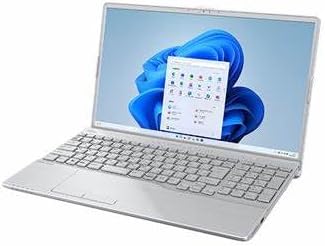
Figure 1: Fujitsu LIFEBOOK AH40/H Laptop
2. Kurulum
2.1 Kutudan Çıkarma ve İlk İnceleme
Tüm bileşenleri ambalajından dikkatlice çıkarın. Aşağıda listelenen tüm öğelerin mevcut ve hasarsız olduğundan emin olun:
- Fujitsu LIFEBOOK AH40/H Laptop
- AC Adaptörü ve Güç Kablosu
- Belgeler (Hızlı Başlangıç Kılavuzu, Garanti Bilgileri)
Herhangi bir ürün eksik veya hasarlıysa, derhal satıcınızla iletişime geçin.
2.2 Güç Adaptörünün Bağlanması
- Connect the AC adapter cable to the power input port on the side of your laptop.
- Güç kablosunu AC adaptörüne takın.
- Insert the power cord into a grounded electrical outlet.
The laptop battery will begin charging automatically.
2.3 İlk Önyükleme ve Windows 11 Kurulumu
- Dizüstü bilgisayarın kapağını açın ve güç düğmesine basın.
- Windows 11 Home kurulum sürecini tamamlamak için ekrandaki talimatları izleyin. Bu, bölgenizi ve dilinizi seçmeyi, bir Wi-Fi ağına bağlanmayı ve bir kullanıcı hesabı oluşturmayı içerir.
- Allow the system to install any necessary updates after the initial setup is complete. This may require a restart.
3. Dizüstü Bilgisayarınızı Çalıştırma
3.1 Klavye ve Dokunmatik Yüzey
The laptop features a full-sized keyboard and a precision touchpad. Use the touchpad for cursor control and multi-touch gestures. Refer to Windows 11 settings for customizing touchpad sensitivity and gestures.
3.2 Harici Cihazların Bağlanması
Your LIFEBOOK AH40/H includes various ports for connecting peripherals:
- USB Bağlantı Noktaları: For connecting USB devices like mice, keyboards, and external storage.
- HDMI Bağlantı Noktası: Harici ekranlara veya projektörlere bağlanmak için.
- Ses jakı: Kulaklık veya harici hoparlörler için.
- Ethernet Bağlantı Noktası: Kablolu ağ bağlantıları için.
3.3 Using the DVD-RW Drive
The integrated DVD-RW drive allows you to read and write CDs and DVDs. To open the tray, press the eject button located on the drive itself. Insert the disc with the label side facing up and gently push the tray back in until it clicks.
3.4 WPS Office 2
Your laptop comes pre-installed with WPS Office 2. This suite includes word processing, spreadsheet, and presentation applications. You can access these applications from the Windows Start Menu.
4. Bakım
4.1 Dizüstü Bilgisayarınızı Temizleme
Optimum performans ve görünümü korumak için:
- Yumuşak, tiftiksiz bir bez kullanın ve hafifçe kurulayın.ampSuyla veya ekran için özel bir ekran temizleyiciyle silin.
- Klavye ve kasa için yumuşak ve kuru bir bez kullanın. Sert kimyasallardan veya aşındırıcı malzemelerden kaçının.
- Periodically use compressed air to clear dust from keyboard keys and ventilation grilles.
4.2 Pil Bakımı
Pil ömrünü uzatmak için:
- Aşırı sıcaklıklardan kaçının.
- Pili sık sık tamamen boşaltmayın.
- Dizüstü bilgisayarı uzun süre saklayacaksanız, pilin yaklaşık %50-70 oranında şarjlı olduğundan emin olun.
4.3 Yazılım Güncellemeleri
Regularly check for and install Windows updates to ensure system stability, security, and performance. You can find update settings in Windows 11 under Ayarlar > Windows Update.
5. Sorun Giderme
This section addresses common issues you might encounter. For more complex problems, refer to the online support resources or contact customer service.
5.1 Güç Yok
- AC adaptörünün hem dizüstü bilgisayara hem de çalışan bir elektrik prizine güvenli bir şekilde bağlandığından emin olun.
- Başka bir cihaz takarak prizin çalışıp çalışmadığını kontrol edin.
- Pil tamamen boşalmışsa, açmayı denemeden önce birkaç dakika şarj olmasını bekleyin.
5.2 Ekran Sorunları
- If the screen is blank, try pressing the function key combination (e.g., Fn + F7 or F8) to toggle the display output.
- Harici monitörlerin doğru şekilde bağlı ve açık olduğundan emin olun.
- Dizüstü bilgisayarı yeniden başlatın.
5.3 Yavaş Performans
- Arka planda çalışan gereksiz uygulamaları kapatın.
- Bekleyen Windows güncelleştirmelerini kontrol edin ve yükleyin.
- SSD'nizde yeterli boş alan olduğundan emin olun.
- Virüs taraması yapın.
6. Özellikler
| Özellik | Şartname |
|---|---|
| Model Adı | LIFEBOOK AH40/H |
| Ürün Model Numarası | FMVA40HSJ2 |
| İşletim Sistemi | Windows 11 Ev |
| İşlemci | Intel Celeron 7305 (1.1 GHz) |
| Veri deposu | 8 GB DDR4 SDRAM |
| Depolamak | 256 GB SSD |
| Ekran Boyutu | 15.6 inç |
| Ekran Çözünürlüğü | 1366 x 768 piksel |
| Grafikler | Intel Grafikleri |
| Optik Sürücü | DVD-RW |
| Kablosuz Bağlantı | 802.11 ABGN |
| Pil | 1 Lithium Ion Battery (45 Wh) |
| Boyutlar (U x G x Y) | 45.5x35.4x13.2 cm |
| Ağırlık | 3 kilo |
| Dahil Yazılım | WPS Office 2 |
7. Garanti ve Destek
7.1 Garanti Bilgileri
This product is covered by the Amazon Renewed 180-day return guarantee. This warranty covers defects in materials and workmanship under normal use during the warranty period. For details on how to claim warranty service, please refer to the Amazon Renewed program terms and conditions or contact Amazon customer service.
7.2 Müşteri Desteği
For technical assistance, troubleshooting beyond this manual, or warranty claims, please contact Amazon customer support through your purchase history. Have your product model number (FMVA40HSJ2) and purchase details ready when contacting support.