
T300
Generic T300 LED Mini Projector User Manual
Modeli: T300
1. Giriş
Satın aldığınız için teşekkür ederizasing the Generic T300 LED Mini Projector. This compact and portable projector is designed for home theater use, offering a clear viewing experience with its short-focus optical lens and diffuse reflection imaging technology, which helps reduce eye strain. This manual provides essential information for setting up, operating, maintaining, and troubleshooting your projector.

Şekil 1.1: The T300 Mini Projector's compact size allows for easy portability, fitting conveniently into a bag.
2. Paket İçeriği
Lütfen kutuyu açtığınızda paket içeriğini kontrol ederek tüm öğelerin mevcut olduğundan emin olun:
- 1x T300 Projector
- 1 adet Güç Adaptörü (AB Fişi)
- 1x Uzaktan Kumanda
- 1x AV Kablosu
- 1x Kullanım Kılavuzu (bu belge)
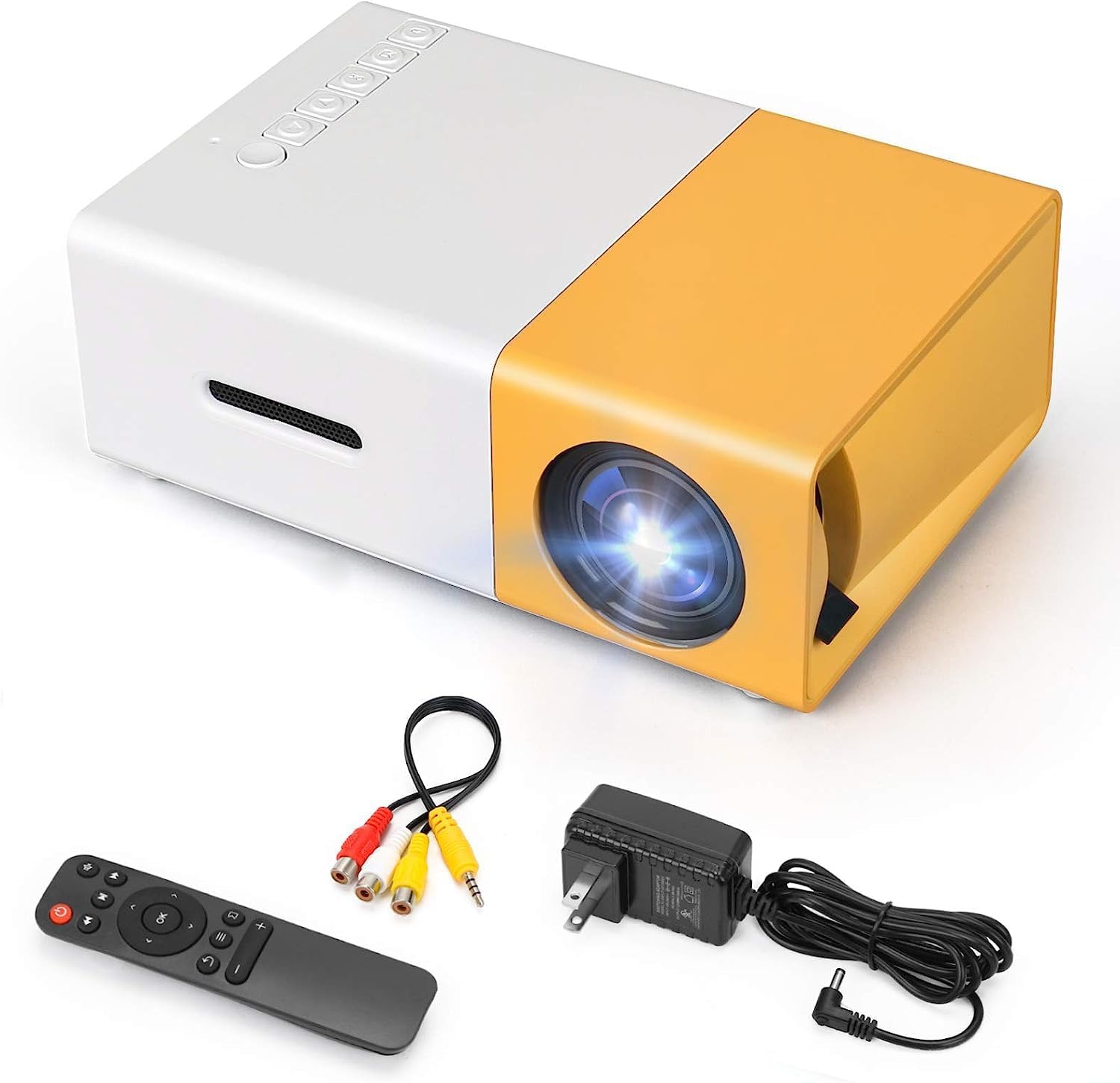
Şekil 2.1: The T300 Mini Projector and its included accessories.
3. Ürün Bittiview
Familiarize yourself with the various ports and controls on your T300 Mini Projector:

Şekil 3.1: Ön ve arka views of the T300 Mini Projector, detailing its input/output ports and control buttons.
3.1. Bağlantı Noktaları ve Arayüzler
- HDMI Girişi: Connect to laptops, TV boxes, gaming consoles, and other HDMI-enabled devices.
- USB Girişi: For playing media directly from USB drives.
- Mikro SD Kart Yuvası: Mikro SD kartlardan doğrudan medya oynatmak için.
- AV Girişi: Connect to older devices using the included AV cable.
- Micro USB (5V/2A): Power input option, compatible with power banks or car chargers.
- Earphone Slot: Harici kulaklık veya hoparlör bağlamak için.
- DC Güç Girişi: Main power input using the provided power adapter.
3.2. Kontroller
- Güç düğmesi: Projektörü açmak veya kapatmak için.
- Navigation Buttons (Left, Right, OK): Menüde gezinme ve seçim için.
- Giriş Düğmesi: Giriş kaynağını seçmek için.
- Geri düğmesi: Menülere geri dönmek için.
4. Kurulum
4.1. Güç Bağlantısı
- Connect the provided power adapter to the DC Power Input port on the projector.
- Güç adaptörünü duvar prizine takın.
- Alternatively, for portable use, connect a 5V/2A power bank or car charger to the Micro USB (5V/2A) port.
4.2. Cihaz Bağlantısı
The T300 projector supports various input sources:
- HDMI: Connect your laptop, TV box, gaming console (PS4/PS3), or other HDMI devices using an HDMI cable (not included).
- USB BAĞLANTI: Medya dosyalarını oynatmak için USB flash sürücüyü USB bağlantı noktasına takın. filedoğrudan s.
- Mikro SD kart: Insert a Micro SD card into the Micro SD card slot to play media files.
- AV: Use the included AV cable to connect to devices with AV output (e.g., DVD players).

Şekil 4.1: Multimedia connectivity options for the T300 Mini Projector.
4.3. Placement and Focus
- Projeksiyon cihazını sabit, düz bir yüzeye yerleştirin.
- Position the projector at a distance between 2 to 5 meters from the projection surface to achieve an optimal image size of 60 to 150 inches.
- Adjust the focus ring on the projector lens until the image appears clear and sharp. The short-focus optical lens allows focusing at a distance of 50cm.
5. Kullanım Talimatları
5.1. Açma/Kapama
Press the Power Switch on the projector or the power button on the remote control to turn the projector on or off.
5.2. Giriş Kaynağını Seçme
After powering on, use the 'Input' button on the projector or the remote control to cycle through available input sources (HDMI, USB, TF Card, AV) until your desired source is displayed.
5.3. Multimedya Oynatma
The projector supports multi-format video, audio, picture, and e-book playback. Navigate through your media files using the navigation buttons on the projector or remote control and press 'OK' to select.
5.4. Ses Çıkışı
The projector has a built-in miniature speaker. For enhanced audio, connect external speakers or headphones to the Earphone Slot.

Şekil 5.1: Versatile applications of the T300 Mini Projector for entertainment.
6. Bakım
6.1. Lensin Temizlenmesi
Use a soft, lint-free cloth or lens cleaning paper to gently wipe the projector lens. Avoid using abrasive materials or harsh chemicals that could scratch the lens.
6.2. Havalandırma
Ensure the projector's ventilation openings are not blocked during operation to prevent overheating. Keep the projector in a well-ventilated area.
6.3. Depolama
When not in use, store the projector in a cool, dry place, away from direct sunlight and excessive dust. It is recommended to use the original packaging or a protective case.
6.4.Lamp Hayat
LED lamp in your T300 projector has an estimated life of 20,000 hours, providing long-term use without frequent lamp yenisiyle değiştirme.
7. Sorun Giderme
Projeksiyon cihazınızla ilgili sorunlarla karşılaşırsanız, aşağıdaki yaygın sorunlar ve çözümlerine göz atın:
- Görüntülenen Resim Yok:
- Projektörün açık olduğundan ve güç adaptörünün güvenli bir şekilde bağlı olduğundan emin olun.
- Verify the input source is correctly selected (HDMI, USB, AV, etc.).
- Projeksiyon cihazı ile kaynak cihaz arasındaki bağlantı kablosunu kontrol edin.
- Görüntü bulanık:
- Görüntü netleşene kadar projektör merceğindeki odak halkasını ayarlayın.
- Yansıtma mesafesinin önerilen aralıkta (2-5 metre) olduğundan emin olun.
- Ses Yok:
- Projeksiyon cihazının ve kaynak cihazın ses ayarlarını kontrol edin.
- If using external speakers/headphones, ensure they are properly connected to the Earphone Slot.
- Verify the audio output settings on your source device.
- Uzaktan Kumanda Çalışmıyor:
- Uzaktan kumanda ile projektörün IR alıcısı arasında herhangi bir engel olmadığından emin olun.
- Replace the batteries in the remote control if necessary.
8. Özellikler
| Özellik | Şartname |
|---|---|
| Örnek | T300 |
| Destek Çözümü | 1920x1080 (Tam HD) |
| Yerel Çözünürlük | 1920x1080 |
| Görüntü Türü | LCD, DLP |
| Arayüzler | HDMI, USB, TF Card Slot, AV, Micro USB (5V-2A) |
| Dahili Hoparlör | Evet |
| Lamp Hayat | 20,000 saat |
| Ürün Boyutu | 114x87x50 mm |
| Önerilen Kullanımlar | Ev Sineması |
| Özel Özellik | Taşınabilir |
| Maksimum Görüntü Boyutu | 150 inç |
| Minimum Resim Boyutu | 60 inç |
| Maksimum Atış Mesafesi | 5 Metre |
| Minimum Atış Mesafesi | 2 Metre |
| Güç Girişi | 5V/2A |
9. Garanti ve Destek
9.1. Garanti Bilgileri
Bu ürün genellikle bir 10 günlük değişim politikası from the date of purchase. Please refer to your retailer's specific warranty terms and conditions for detailed information. The LED lamp is designed for a long life of 20,000 hours, which is not typically covered by short-term replacement policies.
9.2. Müşteri Desteği
For technical assistance, troubleshooting beyond this manual, or warranty claims, please contact your original retailer or the manufacturer, SHUBH LABH ENTERPRISES. Keep your purchase receipt or proof of purchase handy when contacting support.
Ask a question about this manual
Ask about setup, troubleshooting, compatibility, parts, safety, or missing instructions. Manuals+ will review the question and use this page’s manual context to help answer it.