
giriiş
The MSI MAG PANO M100R PZ White is a premium mid-tower gaming PC case designed for optimal performance and aesthetic appeal. It features a 270-degree panoramic display, offering a clear view of your internal components. This case is specifically designed to support Micro-ATX Back-connect motherboards, ensuring a clean and organized build. It comes equipped with pre-installed ARGB fans and a fan hub for easy lighting control. Key features include tool-free side panels, efficient cooling support, and convenient front I/O ports.

Şekil 1: Üzeriview of the MSI MAG PANO M100R PZ White PC Case.
Temel Özellikler
- Micro-ATX and Mini-ITX Motherboard Compatibility: Designed to be compatible with Micro-ATX Back-connect motherboards, measuring 440 x 235 x 405 mm.
- Önceden takılmış ARGB fanlar: Includes 4 x 120 mm ARGB pre-installed fans (3 at the side, 1 at the rear) for ambient illumination and improved airflow.
- Verimli Soğutma Sistemi: Features mesh in the side panel for enhanced airflow and supports up to a 360 mm radiator on the top.
- Kolay Montaj: Equipped with a level indicator and GPU stand to prevent sagging, along with 33 mm cable routing space and Velcro straps for simplified cable management.
- Tool-Free Dust Filters: Removable dust filters on the top and a magnetic dust filter at the bottom for easy cleaning and dust prevention.
- Insta-Light I/O Panel: Front I/O panel includes power & LED switch button, mic/audio jacks, a high-speed USB 3.2 Gen 2x2 Type-C (20Gbps) port, and USB 3.2 Gen 1 Type-A (5Gbps) ports.
Kurulum Kılavuzu
1. Anakart Kurulumu
The MAG PANO M100R PZ White case is optimized for Micro-ATX and Mini-ITX motherboards, especially those with back-connect designs. This allows for a cleaner internal layout by routing cables behind the motherboard tray.

Figure 2: Motherboard compatibility and fan layout.
2. Soğutma Sistemi Kurulumu
The case comes with four pre-installed 120mm ARGB fans to ensure efficient cooling. Three fans are located on the side panel, and one is at the rear. The design includes mesh for improved airflow. The case supports liquid cooling radiators up to 360mm on the top panel.

Figure 3: Internal cooling system with ARGB fans.

Figure 4: Cooling layout options.
3. Kablo Yönetimi
The case provides 33mm of cable routing space behind the motherboard tray, along with integrated Velcro straps, to help keep your build tidy and improve airflow. Utilize these features to route power and data cables efficiently.

Figure 5: Cable routing features.
4. Depolama Kurulumu
The case supports various storage configurations, including 2.5-inch and 3.5-inch drives. Plan your storage layout based on your needs, ensuring secure mounting of all drives.

Figure 6: Storage configuration options.
Kullanım Talimatları
1. ARGB Aydınlatma Kontrolü
The pre-installed ARGB fans offer customizable lighting. You can control the lighting effects directly from the Insta-Light button on the front I/O panel. Pressing this button cycles through various lighting modes and colors.

Figure 7: Insta-Light button on the front I/O panel.
2. Ön Giriş/Çıkış Paneli Kullanımı
The front I/O panel provides convenient access to essential ports for your peripherals. It includes:
- 1 x USB 3.2 Gen 2x2 Type-C (20Gbps) port
- 1 x USB 3.2 Gen 1 Type-A (5Gbps) port
- Mic-in / Audio-out jacks
- LED Switch button (for ARGB control)
- Güç düğmesi
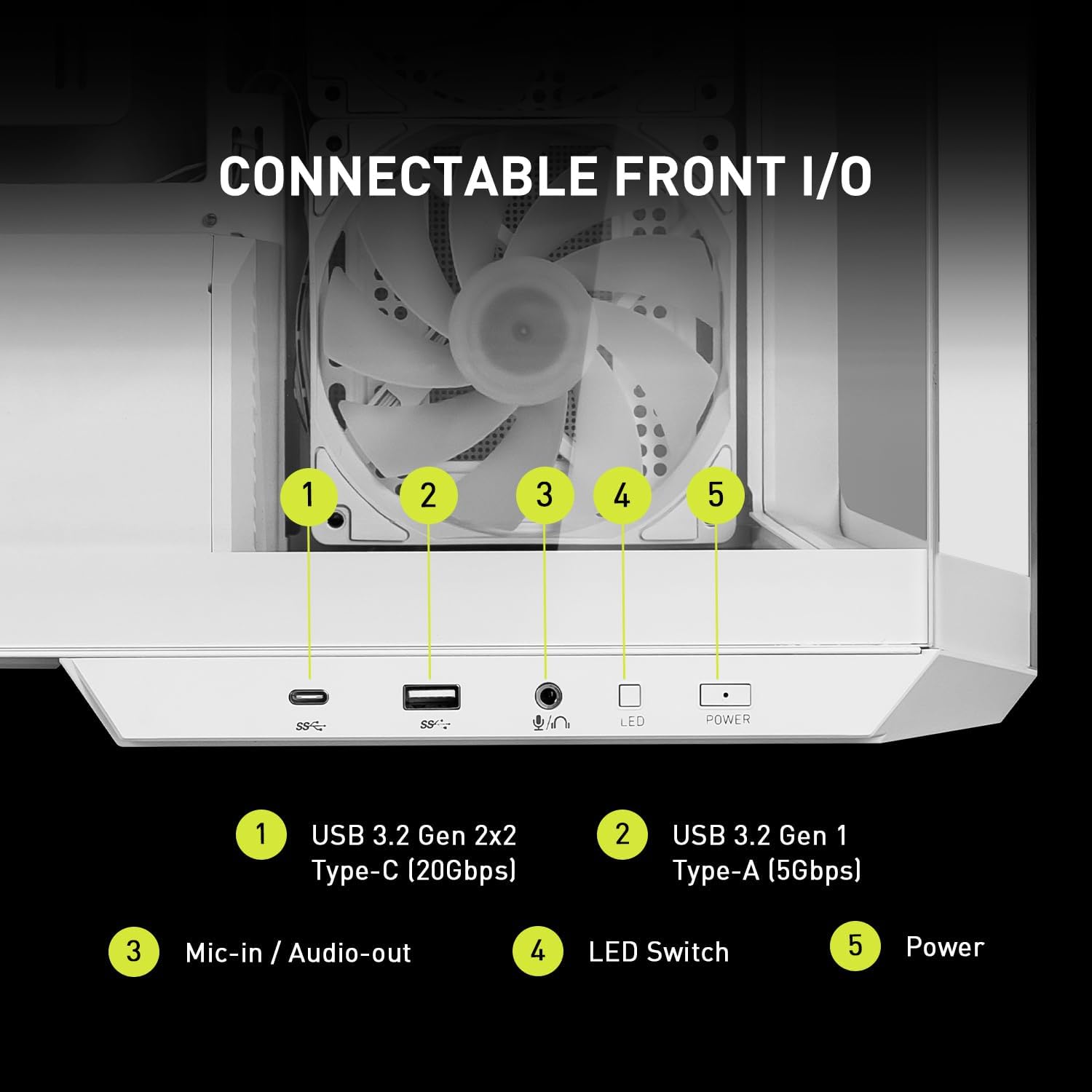
Figure 8: Front I/O panel details.
Bakım
Toz Filtresi Temizliği
To maintain optimal airflow and prevent dust buildup, regularly clean the dust filters. The top filter is tool-free and easily removable. The bottom filter is magnetic for convenient removal and reattachment.

Şekil 9: Toz filtresi konumları.
Sorun giderme
If you encounter issues with your MSI MAG PANO M100R PZ White case, consider the following general troubleshooting steps:
- Güç Yok: Ensure all power cables (24-pin ATX, CPU, GPU, SATA) are securely connected to the motherboard, components, and power supply unit. Check the power supply switch is in the 'ON' position.
- Fanlar Dönmüyor/RGB Çalışmıyor: Verify that all fan and ARGB cables are correctly connected to the fan hub and motherboard headers. Use the Insta-Light button to cycle through modes. If using motherboard software, ensure it's updated and configured correctly.
- USB bağlantı noktaları çalışmıyor: Check the internal USB headers (USB 3.0, USB 2.0, USB-C) are properly connected to the motherboard. Ensure motherboard drivers are installed.
- Aşırı Isınma: Ensure all fans are spinning correctly and dust filters are clean. Verify proper component installation and thermal paste application on CPU/GPU.
- Serbest Paneller: Ensure side panels are securely latched. For glass panels, check that all mounting points are aligned.
For more detailed troubleshooting, refer to your motherboard's specific manual or contact MSI support.
Özellikler
| Özellik | Detay |
|---|---|
| Marka | MSI |
| Seri | MAG PANO M100R PZ |
| Ürün Model Numarası | 824142337714 |
| Ürün Ağırlığı | 25.8 pound |
| Renk | Beyaz |
| Anakart Desteği | Micro-ATX, Mini-ITX (Micro-ATX Back-connect compatible) |
| Önceden yüklenmiş Fanlar | 4 x 120 mm ARGB (3 side, 1 rear) |
| Radyatör Desteği | Up to 360 mm (top) |
| Kablo Yönlendirme Alanı | 33 mm |
| Ön G / Ç Bağlantı Noktaları | 1x USB 3.2 Gen 2x2 Type-C (20Gbps), 1x USB 3.2 Gen 1 Type-A (5Gbps), Mic-in/Audio-out, LED Switch, Power Button |
Garanti ve Destek
This MSI product comes with a standard manufacturer's warranty. For detailed warranty information, including terms, conditions, and registration, please refer to the official MSI website or the warranty card included with your product. For technical support, driver downloads, and further assistance, visit the MSI support page or contact their customer service directly.
MSI Resmi Webalan: www.msi.com