
1. Giriş
This manual provides essential information for the safe and efficient operation of your TuTu TUB32HN1N 32-inch HD Ready TV. Please read it thoroughly before using the television and retain it for future reference.

Ön view of the TuTu TUB32HN1N 32-inch HD Ready TV, highlighting its borderless design and key features like HD Ready, Dolby Audio, USB, HDMI, Hotel Mode, CI+, and DVB-S2/T2/C tuners.
2. Güvenlik Bilgileri
Yangın, elektrik çarpması ve yaralanma riskini azaltmak için bu televizyonu kullanırken her zaman temel güvenlik önlemlerine uyun.
- TV'yi yağmura veya neme maruz bırakmayın.
- Kabini açmayın; tüm servis işlemlerini yetkili personele yaptırın.
- TV'nin etrafında uygun havalandırma olduğundan emin olun.
- Yıldırımlı havalarda veya uzun süre kullanılmayacaksa televizyonun fişini çekin.
- Televizyonu doğrudan güneş ışığından ve ısı kaynaklarından uzak tutun.
3. Paket İçeriği
Kutunun içindeki tüm öğelerin eksiksiz olduğundan emin olun:
- 1x TuTu TUB32HN1N 32-inch HD Ready TV
- 1x Kullanım Kılavuzu
- 1x Uzaktan Kumanda
- 1x TV Stand (base)
Note: 2x AA batteries for the remote control are not included.
4. Ürün Bittiview
4.1. Boyutlar
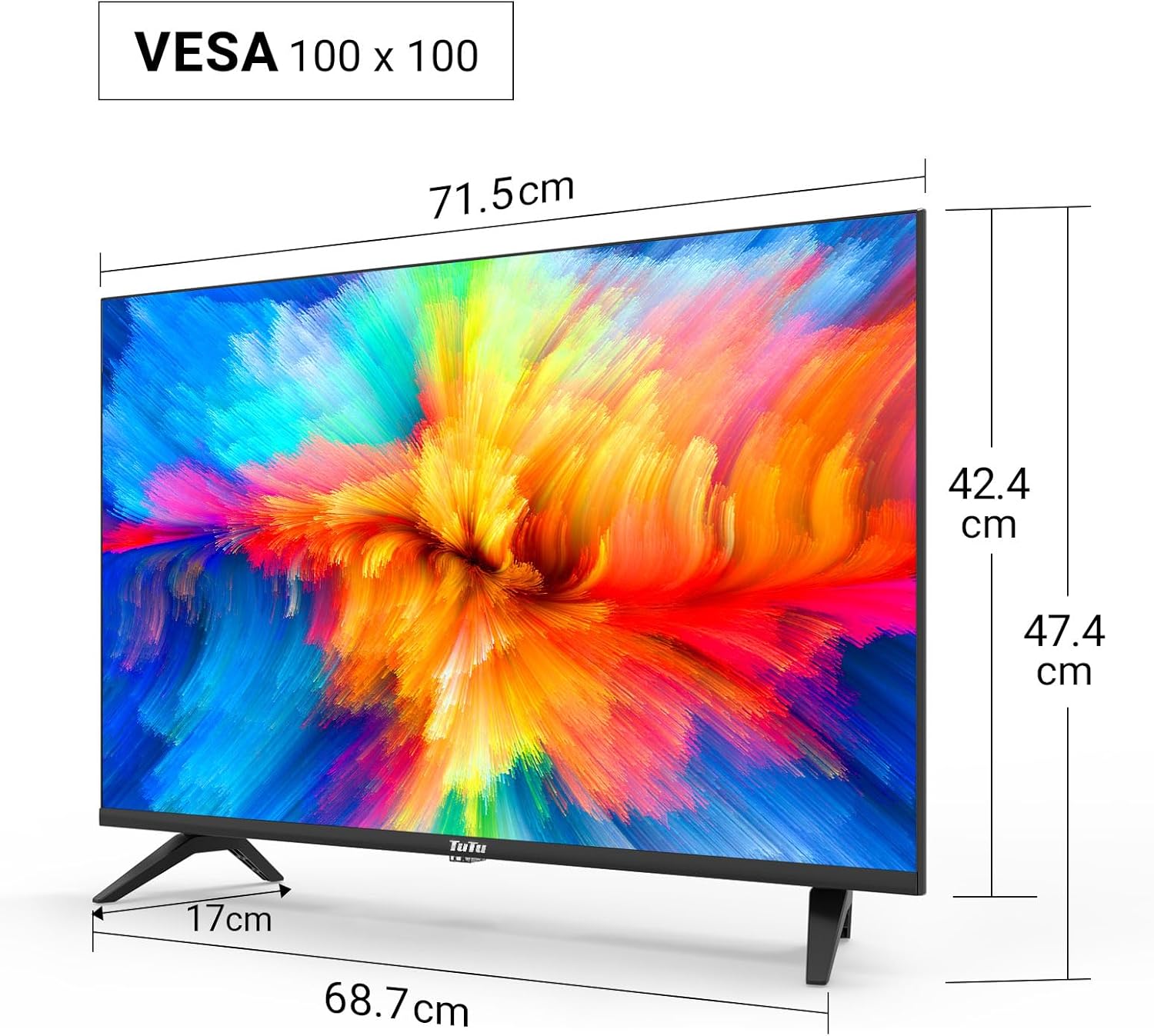
Technical drawing displaying the dimensions of the 32-inch TV, including screen width (71.5cm), height with stand (47.4cm), height without stand (42.4cm), and stand depth (17cm). VESA 100x100 compatibility is also indicated.
4.2. Connection Ports

Ayrıntılı view of the TV's input/output ports, including SCART, Coaxial Out, LNB In, RF (Antenna), 2x HDMI, USB, CI+ Common Interface, Mini AV, Mini YPbPr, and Earphone Out.
The TV features a variety of ports for connecting external devices:
- HDMI (x2): For connecting high-definition devices like Blu-ray players, game consoles, or external streaming devices.
- USB 2.0 (x1): For media playback and recording from USB storage devices.
- CI/CI+ Slot (x1): For inserting a Common Interface module to access encrypted digital channels.
- RF (Anten): Karasal veya kablolu anten bağlamak için.
- LNB In: Uydu anteni bağlamak için.
- SKART: Eski analog cihazları bağlamak için.
- Koaksiyel Çıkış: Dijital ses çıkışı için.
- Mini AV / Mini YPbPr: For analog video and audio input (adapters may be required).
- Kulaklık Çıkışı: Kulaklık bağlamak için.
5. Kurulum
5.1. Stand Montajı
TV sehpasını monte etmek için:
- Ekran hasarını önlemek için televizyonu dikkatlice, yüzü aşağıya gelecek şekilde yumuşak ve düz bir yüzeye yerleştirin.
- Sehpayı televizyonun altındaki montaj delikleriyle hizalayın.
- Verilen vidaları kullanarak standı sabitleyin.
5.2. Duvara Montaj
The TV supports VESA 100x100 wall mounts. Wall mount brackets are sold separately. Follow the instructions provided with your wall mount kit for proper installation.
5.3. Çevre Birimlerini Bağlama
Connect your antenna, satellite dish, or cable to the appropriate RF or LNB IN port. Use HDMI cables for high-definition devices. Insert USB drives into the USB port for media access.

Illustration of the TV's triple tuner capabilities, showing connections for DVB-S/S2 (satellite), DVB-C (cable), and DVB-T/T2 (terrestrial) reception.
5.4. First-Time Power On & Channel Scan
After connecting the power cable and antenna/satellite, press the power button on the remote control or TV. The TV will guide you through the initial setup, including language selection and automatic channel scanning for DVB-T/T2, DVB-C, and DVB-S/S2 signals.
6. Kullanım Talimatları
6.1. Uzaktan Kumanda İşlevleri
Refer to the remote control diagram in your printed manual for specific button layouts. Common functions include Power, Volume Up/Down, Channel Up/Down, Input Source, Menu, and Navigation buttons.
6.2. Giriş Kaynağı Seçimi
Press the 'Source' button on your remote to switch between connected devices (e.g., HDMI 1, HDMI 2, USB, DVB-T, DVB-S).
6.3. USB Media Playback and Recording
Insert a USB storage device into the USB port. The TV's media player will allow you to browse and play video, image, and music files. The TV also supports recording digital broadcasts to a connected USB device.

Image demonstrating the USB media player and recorder function, allowing playback of video, images, and music from a USB drive or external hard disk. The 'REC' indicator shows recording capability.
6.4. CI/CI+ Module Installation
To access encrypted channels, insert your CI/CI+ module (with smart card) into the CI slot on the side or rear of the TV. Ensure the module is inserted correctly according to its instructions.
6.5. Hotel Mode Configuration
The Hotel Mode feature allows for customized settings ideal for hospitality environments. This includes limiting volume range, creating custom channel lists, locking sources, and batch processing TV settings via USB.

Screenshot of the Hotel Mode menu, illustrating features such as limited volume range, custom channel list creation, source locking, and batch processing of TV settings via USB.
7. Bakım
To maintain your TV in optimal condition:
- Ekranın Temizlenmesi: Ekranı yumuşak, tüy bırakmayan bir bezle nazikçe silin. İnatçı lekeler için, doğrudan ekrana değil, beze uygulanan, TV'ler için özel olarak tasarlanmış bir ekran temizleyici kullanın.
- Kabinin Temizlenmesi: Televizyon sehpasını silmek için yumuşak, kuru bir bez kullanın. Aşındırıcı temizleyiciler veya çözücüler kullanmayın.
- Havalandırma: Televizyonunuzun arkasındaki havalandırma deliklerinin aşırı ısınmayı önlemek için kapatılmadığından emin olun.
8. Sorun Giderme
Televizyonunuzda sorunlarla karşılaşırsanız, aşağıdaki yaygın sorunlara ve çözümlere bakın:
| Sorun | Olası Çözüm |
|---|---|
| Güç yok | Güç kablosunun televizyona ve prize sıkıca takılı olduğundan emin olun. Farklı bir priz deneyin. |
| Görüntü yok, ancak ses mevcut | Doğru giriş kaynağının seçildiğinden emin olun. Harici cihazlara olan kablo bağlantılarını kontrol edin. |
| Ses yok ama görüntü var | Check the volume level and mute status. Verify audio cable connections. |
| Kanallar bulunamadı. | Ensure the antenna/satellite cable is properly connected. Perform an automatic channel scan again. Check antenna signal strength. |
| Uzaktan kumanda çalışmıyor | Pilleri değiştirin. Uzaktan kumanda ile televizyonun kızılötesi sensörü arasında herhangi bir engel olmadığından emin olun. |
9. Özellikler
Here are the technical specifications for the TuTu TUB32HN1N TV:
| Özellik | Şartname |
|---|---|
| Marka | TuTu |
| Örnek | TUB32HN1N |
| Ekran Boyutu | 32 İnç (80 cm) |
| Ekran Teknolojisi | LED (Direct LED Display) |
| Çözünürlük | HD Ready (1366x768p) |
| En Boy Oranı | 16:9 |
| Yenileme Hızı | 60 Hz |
| Tuner Teknolojisi | DVB-T/T2 (Terrestrial), DVB-C (Cable), DVB-S/S2 (Satellite) |
| HDMI Bağlantı Noktaları | 2 |
| USB Bağlantı Noktaları | 1 (USB 2.0) |
| CI/CI+ Slot | 1 |
| Ses Çıkışı Modu | Stereo (Dolby Digital) |
| Güç Tüketimi (SDR) | 27.0 B |
| Enerji Verimliliği Sınıfı | F |
| Ürün Boyutları (standlı) | 79.6x12.8x50.5 cm |
| Ağırlık | 5.04 kilo |
| VESA Uyumluluğu | 100x100 mm |

The EU energy label for the TuTu TUB32HN1N TV, showing an energy efficiency class of F and energy consumption of 27 kWh/1000h.

A detailed product information sheet (PRODUCT INFORMATION SHEET) providing technical parameters and compliance details for the TuTu TUB32HN1N TV. For more details, visit the official EPREL database: https://eprel.ec.europa.eu/qr/1589506
10. Garanti ve Destek
TuTu offers a two-year warranty policy for this product. For warranty claims, technical support, or any inquiries, please refer to the contact information provided in your purchase documentation or visit the official TuTu webalan.