
1. Giriş
Thank you for choosing the Defender Enjoy S200 Portable Bluetooth Speaker. This manual provides essential information for setting up, operating, and maintaining your speaker to ensure optimal performance and longevity. Please read this manual thoroughly before use.
The Defender Enjoy S200 is a versatile portable speaker featuring Bluetooth 5.3 connectivity, True Wireless Stereo (TWS) pairing, an integrated FM radio, and MP3 playback capabilities via USB flash drive or microSD card. It also includes an LED light and supports hands-free calling. Designed for portability, it offers up to 9 hours of playback on a single charge and convenient USB Type-C charging.
2. Ürün Bittiview
2.1 Temel Özellikler
- Bluetooth 5.3: For stable and efficient wireless audio streaming.
- Gerçek Kablosuz Stereo (TWS): Connect two Enjoy S200 speakers for a stereo sound experience.
- Çoklu Oynatma Modları: Bluetooth, FM Radio, USB Flash Drive, MicroSD Card (up to 32GB).
- Entegre LED Işık: Provides visual ambiance.
- Eller Serbest Arama: Telefon görüşmeleri için dahili mikrofon.
- Uzun Pil Ömrü: Up to 9 hours of continuous music playback.
- USB C Tipi Şarj: Modern ve kullanışlı şarj portu.
- Taşınabilir Tasarım: Compact and lightweight with a carrying strap.
2.2 Paket İçeriği
- Defender Enjoy S200 Portable Bluetooth Speaker
- C Tipi Şarj Kablosu
- Hızlı Başlangıç Kılavuzu
- Taşıma Kayışı

Image: The Defender Enjoy S200 Portable Bluetooth Speaker, showcasing its compact design and front grille with an illuminated LED ring.

Image: An infographic highlighting key features such as multi-colored LED lighting, True Wireless Stereo (TWS) pairing, Bluetooth 5.3, MP3 player, FM receiver, and hands-free calling.
3. Kurulum
3.1 Hoparlörü Şarj Etme
- Locate the Type-C charging port on the back of the speaker.
- Connect the provided Type-C charging cable to the speaker and the other end to a USB power adapter (not included) or a computer's USB port.
- LED göstergesi şarj durumunu gösterecektir. Tam şarj genellikle yaklaşık 3-4 saat sürer.
- Tamamen şarj olduktan sonra kabloyu çıkarın.
3.2 Açma/Kapatma
- To power on, slide the ON/OFF switch located on the back of the speaker to the 'ON' position.
- Cihazı kapatmak için, AÇMA/KAPATMA düğmesini 'KAPALI' konumuna getirin.
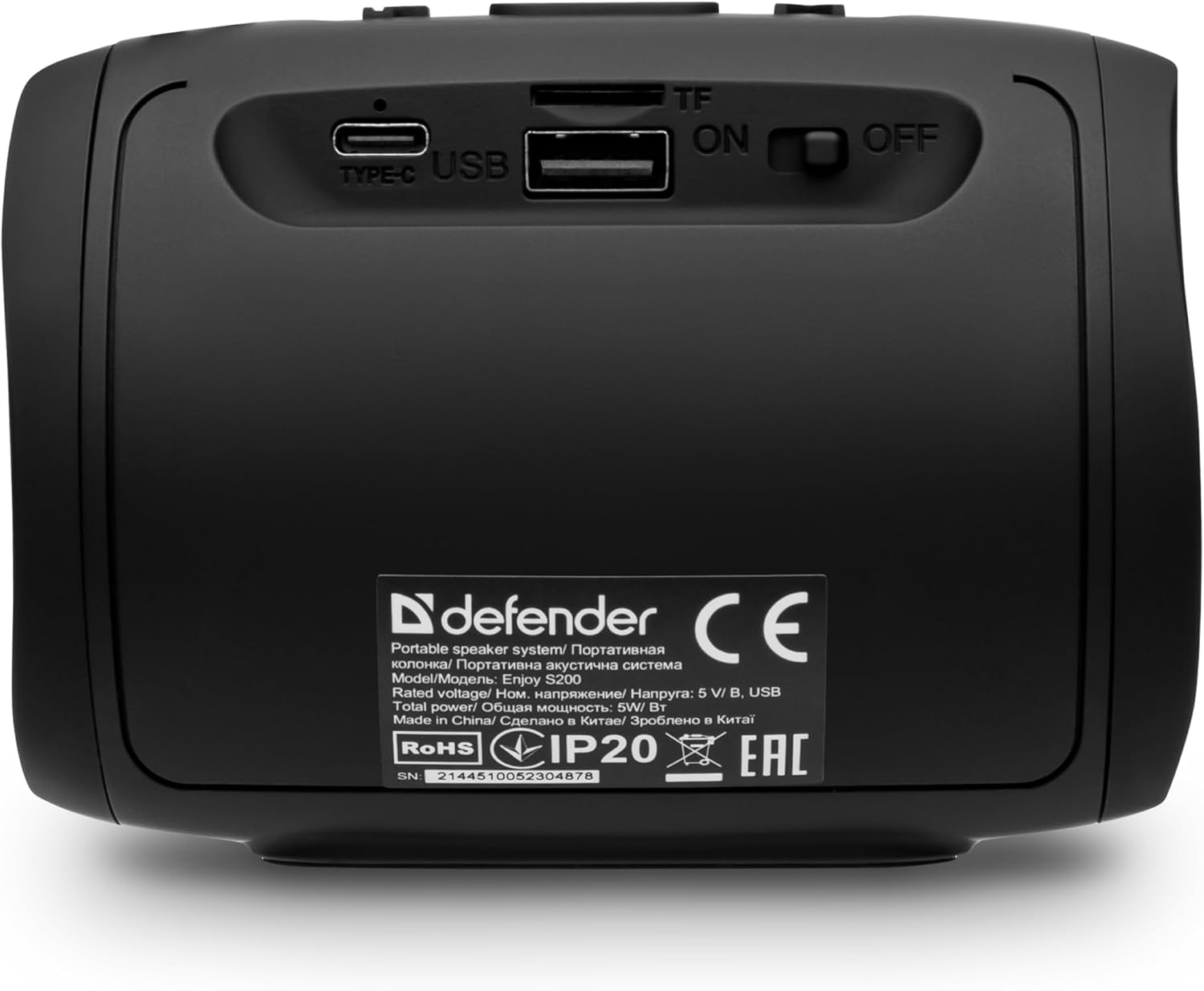
Resim: Arka view of the Defender Enjoy S200 speaker, showing the Type-C charging port, USB port, TF (microSD) card slot, and the ON/OFF power switch.
3.3 Bluetooth Eşleştirme
- Hoparlörün açık ve Bluetooth eşleştirme modunda olduğundan emin olun (yanıp sönen bir LED ile gösterilir).
- Cihazınızda (akıllı telefon, tablet vb.) Bluetooth'u etkinleştirin ve kullanılabilir cihazları arayın.
- Select "Defender Enjoy S200" from the list of devices.
- Eşleştirme işlemi tamamlandığında, hoparlör bir onay sesi çıkaracak ve LED ışığı yanıp sönmeyi durduracaktır.
3.4 Gerçek Kablosuz Stereo (TWS) Eşleştirme
To pair two Defender Enjoy S200 speakers for stereo sound:
- Her iki hoparlörün de açık olduğundan ve herhangi bir Bluetooth cihazına bağlı olmadığından emin olun.
- On one speaker (this will be the primary speaker), press and hold the TWS button (often indicated by a double-arrow icon) until you hear a pairing tone.
- The two speakers will automatically search and connect to each other. A confirmation tone will sound once connected.
- Now, connect your device to the primary speaker via Bluetooth as described in section 3.3. Audio will play in stereo through both speakers.

Image: A visual representation of two Defender Enjoy S200 speakers pairing wirelessly to create a True Wireless Stereo system, alongside icons for Bluetooth 5.3, MP3 player, FM receiver, and hands-free calling.
4. Kullanım Talimatları
4.1 Button Functions (Refer to top panel controls)
- Güç Düğmesi: Long press to power on/off. Short press to play/pause in music mode, or answer/end calls.
- Sesi Aç (+): Short press to increase volume. Long press for next track/station.
- Sesi kıs (-): Short press to decrease volume. Long press for previous track/station.
- Mod (M) Düğmesi: Short press to switch between Bluetooth, FM Radio, USB, and MicroSD modes.
- LED Işık Düğmesi: Short press to cycle through LED light modes or turn off the LED.
4.2 Bluetooth Oynatma
After successful Bluetooth pairing (Section 3.3), open your music application on your device and begin playback. Use the speaker's volume buttons or your device's volume controls to adjust the audio level.
4.3 FM Radyo Modu
- Press the 'M' (Mode) button until you hear the FM radio prompt.
- Long press the Play/Pause button to automatically scan and save available FM stations.
- Kaydedilmiş istasyonlar arasında gezinmek için Ses Açma (+) ve Ses Kısma (-) düğmelerini (uzun basma) kullanın.
4.4 USB/MicroSD Oynatma
- Insert a USB flash drive or a microSD card (up to 32GB) containing MP3 audio fileKabloları hoparlörün arkasındaki ilgili porta takın.
- Press the 'M' (Mode) button until the speaker automatically switches to USB or MicroSD mode and begins playback.
- Use the speaker's control buttons for play/pause, next track, and previous track.
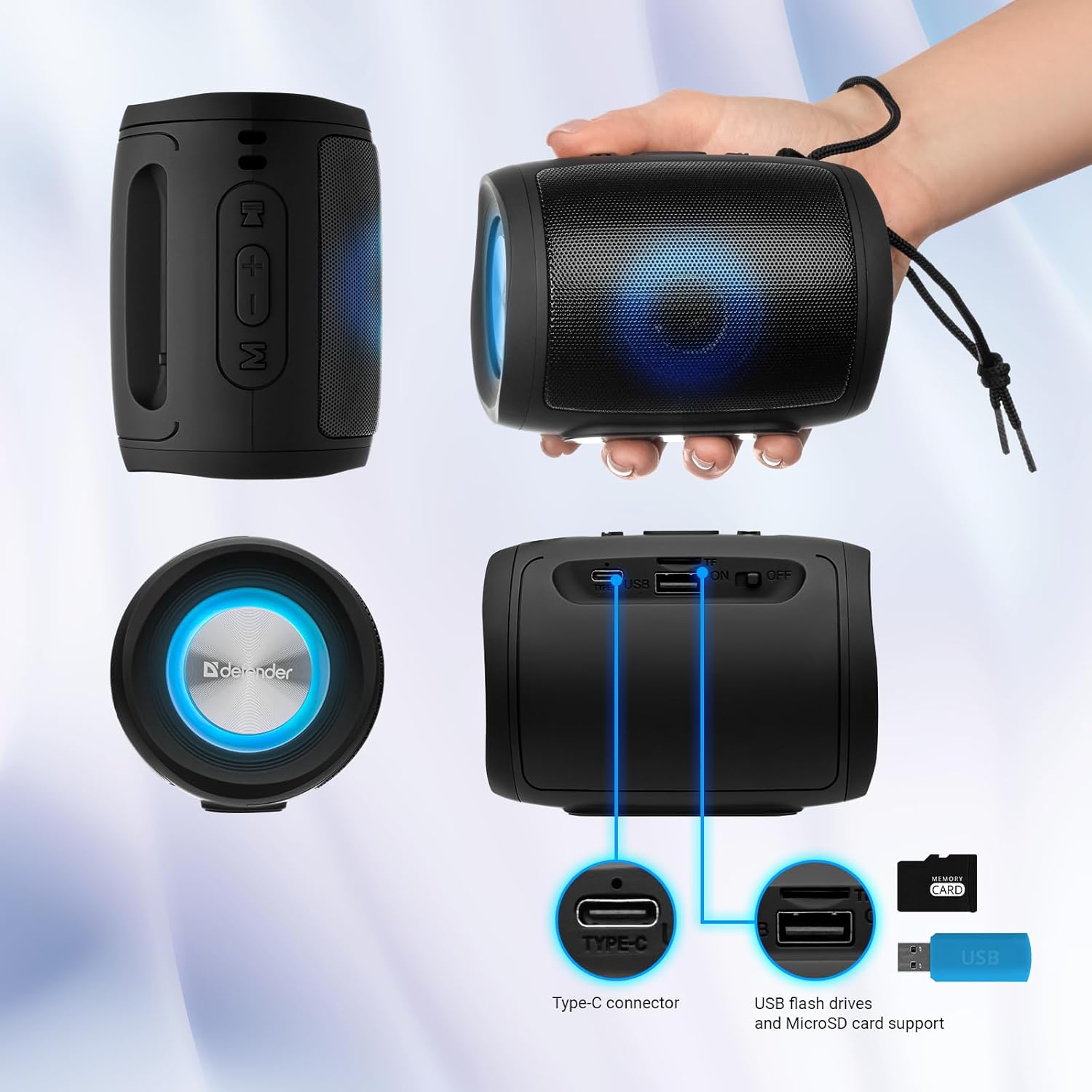
Image: A detailed diagram illustrating the Type-C connector, USB flash drive port, and MicroSD card slot on the Defender Enjoy S200 speaker.
4.5 Eller Serbest Arama
When connected to your smartphone via Bluetooth, the speaker's built-in microphone allows for hands-free calls.
- Cevap Çağrısı: Oynat/Duraklat düğmesine kısa basın.
- Çağrı Sonu: Oynat/Duraklat düğmesine kısa basın.
- Çağrıyı Reddet: Oynat/Duraklat düğmesine uzun basın.
5. Bakım
- Temizlik: Hoparlörün yüzeyini temizlemek için yumuşak, kuru bir bez kullanın. Aşındırıcı temizleyiciler veya çözücüler kullanmayın.
- Depolamak: Hoparlörü serin, kuru ve doğrudan güneş ışığından ve aşırı sıcaklıklardan uzak bir yerde saklayın.
- Suya Dayanıklılık: The speaker has an IP20 rating, meaning it is protected against solid objects larger than 12.5mm but has no protection against water. Avoid exposure to rain, splashes, or immersion in water.
- Pil Bakım: Pil ömrünü uzatmak için, hoparlörü ilk kullanımdan önce tamamen şarj edin ve düzenli olarak kullanılmıyorsa en az üç ayda bir şarj edin.
6. Sorun Giderme
- Güç Yok: Ensure the speaker is charged. Connect the Type-C cable and allow it to charge for a few minutes before attempting to power on again.
- Ses Yok: Check the volume levels on both the speaker and your connected device. Ensure the speaker is in the correct mode (Bluetooth, FM, USB, MicroSD).
- Bluetooth Eşleştirme Sorunları: Ensure the speaker is in pairing mode. Turn off Bluetooth on your device and turn it back on. Try unpairing and re-pairing the speaker. Move closer to the speaker to ensure you are within the 10-meter range.
- FM Radyo Alımı Zayıf: Ensure you are in an area with good signal. The charging cable can sometimes act as an antenna; try connecting it for improved reception.
- USB/MicroSD Not Playing: Sesi sağlayın files are in a compatible format (e.g., MP3). Check that the USB drive or microSD card is inserted correctly and is not corrupted.
7. Özellikler
| Model Adı | S200'in keyfini çıkarın |
| Ürün Model Numarası | 65200 |
| Marka | Savunmacı |
| Bağlantı Teknolojisi | Bluetooth 5.3, USB |
| Kablosuz İletişim Teknolojisi | Bluetooth, Radio Frequency |
| Hoparlör Tipi | Multimedya |
| Hoparlör Boyutu | 2 inç |
| Güç Çıkışı | 5 Watt |
| Ses Çıkışı Modu | Stereo |
| Güç Kaynağı | Pille Çalışır (1 adet Lityum iyon pil dahildir) |
| Özel Özellikler | Integrated Microphone, USB Port, Portable Bluetooth, LED Light, FM Radio, MicroSD Card Support, TWS |
| Ürün Boyutları (U x G x Y) | 8x11x8 cm |
| Ağırlık | 330 gram |
| Maksimum Menzil | 10 Metre |
| IP Derecelendirmesi | IP20 |
8. Garanti ve Destek
8.1 Garanti Bilgileri
Garantiyle ilgili ayrıntılı bilgiler genellikle satın alma belgelerinizde veya üreticinin resmi web sitesinde yer alır. website. Please refer to these resources for information regarding warranty coverage and duration.
8.2 Müşteri Desteği
For technical assistance, troubleshooting beyond this manual, or inquiries about your Defender Enjoy S200 speaker, please contact Defender Global customer support. Contact information can usually be found on the product packaging, the manufacturer's websiteyi veya satın alma fişinizi inceleyebilirsiniz.