
1. Giriş
Satın aldığınız için teşekkür ederizasing the Samsung WW90CGC04DTH Front Load Washing Machine. This appliance is designed to provide efficient and effective laundry care with advanced features. Please read this manual thoroughly before operating your washing machine to ensure safe and optimal performance. Keep this manual for future reference.
Key features of your washing machine include:
- EcoBubble™ Technology: Transforms detergent into active foam for powerful cleaning even at low temperatures.
- Yapay Zeka Enerji Modu: Helps monitor and reduce energy consumption.
- Less Microfiber Cycle: Reduces microplastic dispersion during washing.
- Dijital İnverter Motor: Ensures quiet operation and energy efficiency, backed by a 20-year warranty.
- Sanitizing Steam: Daha iyi hijyen için.

Şekil 1.1: Ön view of the Samsung WW90CGC04DTH washing machine, showcasing the control panel, detergent drawer, and front-loading door.
2. Önemli Güvenlik Bilgileri
Always follow basic safety precautions when using any electrical appliance to reduce the risk of fire, electric shock, or injury. This section outlines critical safety guidelines.
2.1 Genel Güvenlik
- Çocukların veya fiziksel, duyusal veya zihinsel yetenekleri kısıtlı kişilerin cihazı gözetimsiz kullanmasına izin vermeyin.
- Cihazın uygun şekilde topraklandığından emin olun.
- Do not install the washing machine in areas where it may be exposed to water or extreme temperatures.
- Cihazınızı temizlemeden veya herhangi bir bakım yapmadan önce fişini çekin.
2.2 Elektrik Güvenliği
- Use only a dedicated, grounded electrical outlet.
- Uzatma kablosu veya adaptör kullanmayın.
- Güç kablosu hasar görmüşse, tehlikeyi önlemek için üretici, servis acentesi veya benzer vasıflı kişiler tarafından değiştirilmelidir.
3. Kurulum ve Kurulum
Proper installation is crucial for the performance and longevity of your washing machine. Follow these steps carefully.
3.1 Paketin açılması
- Polistiren taban ve koruyucu film dahil tüm ambalaj malzemelerini çıkarın.
- Locate and remove the transit bolts from the rear of the machine. These bolts secure the drum during transport and must be removed before use. Keep them for future transport.

Şekil 3.1: Arka view of the washing machine, highlighting the water inlet and drain hose connections, and the locations for transit bolt removal.
3.2 Konum ve Seviyeleme
- Place the washing machine on a firm, level surface. Avoid carpets or soft flooring that could obstruct ventilation.
- Makinenin etrafında hava sirkülasyonu ve bakım için yeterli alan olduğundan emin olun.
- Makinenin altındaki dengeleme ayaklarını, tamamen dengeli ve düz olana kadar ayarlayın. Doğrulama için su terazisi kullanın.

Şekil 3.2: Yan view of the washing machine, illustrating its compact design and the adjustable leveling feet at the base.
3.3 Su ve Drenaj Bağlantıları
- Connect the cold water inlet hose to the cold water tap and the corresponding inlet on the back of the machine. Ensure connections are tight to prevent leaks.
- Tahliye hortumunu bir yükseltici boruya veya lavabonun kenarına yerleştirin ve çalışma sırasında yerinden çıkmasını önlemek için iyice sabitlendiğinden emin olun.
3.4 Güç Bağlantısı
- Güç kablosunu topraklı 220V'luk bir elektrik prizine takın.
- Do not overload the circuit or use extension cords.
4. Kullanım Talimatları
This section guides you through the daily operation of your Samsung washing machine.
4.1 Kontrol Paneli Üstüview
The control panel features a program selection dial, an LED display, and touch-sensitive buttons for various functions and settings.
4.2 Çamaşırların Yüklenmesi
- Çamaşır makinesinin kapısını açın.
- Load laundry loosely into the drum, ensuring not to overfill. The maximum capacity is 9 kg.
- Kapıyı tık sesi gelene kadar sıkıca kapatın.
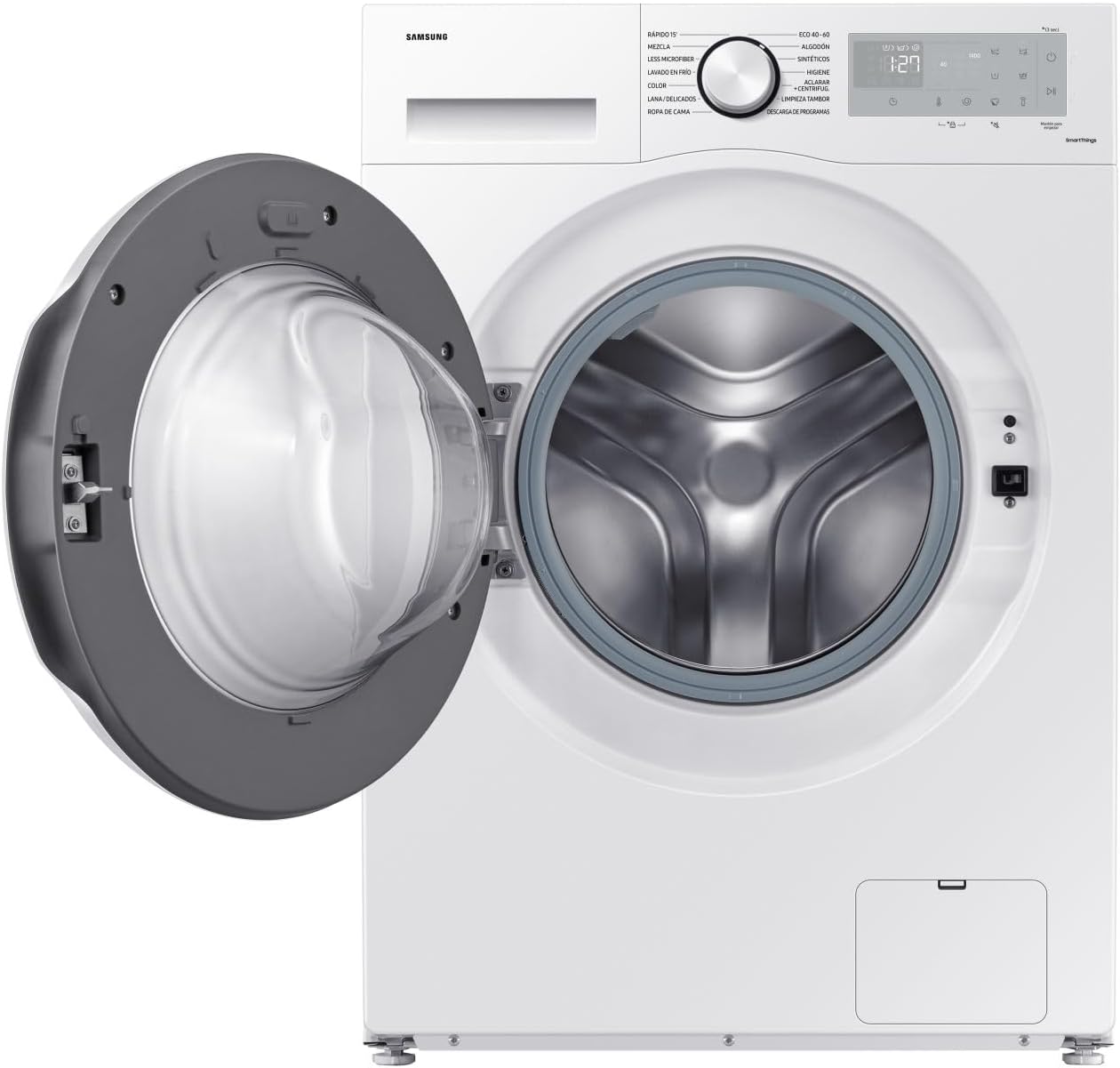
Şekil 4.1: Ön view of the washing machine with the door open, showing the drum ready for laundry loading.
4.3 Deterjan ve Yumuşatıcı Ekleme
Pull out the detergent drawer located on the top left of the control panel. Add appropriate amounts of detergent to the main wash compartment and fabric softener to its designated compartment.
4.4 Yıkama Programı Seçimi
Turn the program selection dial to choose from available cycles:
- Pamuk: Pamuklu ürünler için.
- Eko 40-60: Energy-efficient cycle for normally soiled cotton laundry.
- Karışık: Karışık kumaş yükleri için.
- Narinler/İpek: Hassas ürünler için nazik yıkama.
- Hızlı yıkama: Hızlı yıkama gerektiren hafif kirli çamaşırlar için.
- Hijyenik Buhar: Derinlemesine temizlik ve dezenfeksiyon için.
- Less Microfiber: Reduces microplastic release.
- Durulama + Sıkma: Sadece durulama ve sıkma işlemi içindir.
- Döndürmek: Sadece eğirme amaçlıdır.
Additional options like temperature, spin speed, and delayed start can be adjusted using the touch buttons on the display.
4.5 Bir Döngüyü Başlatma
Seçtiğiniz yıkama programını başlatmak için Başlat/Duraklat düğmesine basın. Ekranda kalan süre gösterilecektir.
4.6 Yapay Zeka Enerji Modu
Activate AI Energy Mode via the SmartThings app (if connected) or the control panel to optimize energy consumption based on your usage patterns.
5. Bakım ve Temizlik
Düzenli bakım, çamaşır makinenizin verimli çalışmasını sağlar ve ömrünü uzatır.
5.1 Deterjan Çekmecesinin Temizlenmesi
Periodically remove the detergent drawer and rinse it under running water to remove any detergent residue. Use a brush if necessary.
5.2 Tamburun Temizlenmesi
Run a 'Drum Clean' or 'Eco Drum Clean' cycle (if available) regularly to remove detergent buildup and bacteria from the drum. Refer to your control panel for this specific program.
5.3 Tahliye Filtresinin Temizlenmesi
The drain filter, located at the bottom front of the machine (behind a small access panel), should be cleaned every few months to prevent blockages. Place a shallow tray underneath to catch any residual water before unscrewing the filter.
5.4 Dış Cephenin Temizlenmesi
Dış yüzeyleri yumuşak, damp bezle silin. Aşındırıcı temizleyiciler veya çözücüler kullanmayın.
6. Sorun Giderme
Servisle iletişime geçmeden önce, sık karşılaşılan sorunlar ve çözümleri için bu bölüme bakın.
| Sorun | Olası Neden | Çözüm |
|---|---|---|
| Çamaşır makinesi çalışmıyor | Power cord unplugged; Door not closed properly; Delayed start activated. | Check power connection; Ensure door is latched; Cancel or wait for delayed start. |
| Su temini yok | Musluk kapalı; Su giriş hortumu bükülmüş; Su basıncı çok düşük. | Musluğu açın; Hortumu düzeltin; Evdeki su basıncını kontrol edin. |
| Aşırı titreşim/gürültü | Taşıma cıvataları çıkarılmamış; Makine düz değil; Dengesiz yük. | Taşıma cıvatalarını çıkarın; Dengeleme ayaklarını ayarlayın; Çamaşırları tamburun içine yeniden yerleştirin. |
| Su sızıntısı | Hose connections loose; Drain filter clogged; Detergent drawer overflowing. | Tighten hose connections; Clean drain filter; Do not overfill detergent drawer. |
| Görüntülenen hata kodu | Kodla belirtilen özel sorun. | Hata kodları ve çözümlerinin listesi için lütfen kullanım kılavuzunun tamamına bakın. |
7. Özellikler
Detailed technical specifications for the Samsung WW90CGC04DTH washing machine.
| Özellik | Şartname |
|---|---|
| Model Adı | Kristal Temizliği |
| Model Numarası | WW90CGC04D |
| Kurulum Türü | Serbest duran |
| Yük Türü | Önden yüklemeli |
| Kapasite | 9 kilo |
| Maksimum Sıkma Hızı | 1400 dev/dak |
| Enerji Verimliliği Sınıfı | A |
| Santrifüjlü Kurutma Verimlilik Sınıfı | B |
| Noise Class (Spin) | A (72 dB) |
| Boyutlar (G x D x Y) | 60 cm x 55 cm x 85 cm (approximate, based on 55 x 67 x 89 cm product dimensions) |
| Ağırlık | 69.41 kilo |
| Cilttage | 220 Volt |
| Kontrol Türü | Düğme, Dokunmatik |
| Görüntü Türü | NEDEN OLMUŞ |
| Kapı Menteşesi | Sol |
| Davul Tipi | Elmas Davul |
8. Garanti Bilgileri
Your Samsung WW90CGC04DTH washing machine comes with a standard manufacturer's warranty. The Digital Inverter Motor is specifically guaranteed for 20 years. For detailed terms and conditions, including warranty period and coverage, please refer to the warranty card included with your product or visit the official Samsung webBölgenizdeki siteyi ziyaret edin. Satın alma belgenizi garanti talepleriniz için saklayın.
9. Müşteri Desteği
If you encounter any issues that cannot be resolved using the troubleshooting guide, or if you require technical assistance, please contact Samsung Customer Service.
- Samsung'un resmi sitesini ziyaret edin. website for your region for support contact details, FAQs, and additional resources.
- Have your model number (WW90CGC04D) and serial number ready when contacting support.