
1. Giriş
Thank you for choosing the E-YOOSO Wireless Keyboard and Mouse Combo. This product is designed to provide a comfortable and efficient computing experience with its ergonomic design, stable 2.4GHz wireless connection, and intelligent power-saving features. This manual will guide you through the setup, operation, maintenance, and troubleshooting of your new device.

Image 1.1: The E-YOOSO Wireless Keyboard and Mouse Combo, featuring a full-sized keyboard with a wrist rest and a contoured mouse, both in white.
2. Paket İçeriği
- 1 x E-YOOSO Wireless Keyboard
- 1 x E-YOOSO Wireless Mouse
- 1 adet USB alıcı (farenin pil bölmesinde saklanır)
- 1 x Kullanım Kılavuzu
3. Kurulum Kılavuzu
Follow these steps for the initial setup of your E-YOOSO Wireless Keyboard and Mouse Combo:
- Pilleri Takın:
- For the mouse: Open the battery compartment on the underside of the mouse. Insert one AA battery (not included), ensuring correct polarity.
- For the keyboard: Open the battery compartment on the underside of the keyboard. Insert one AA battery (not included), ensuring correct polarity.
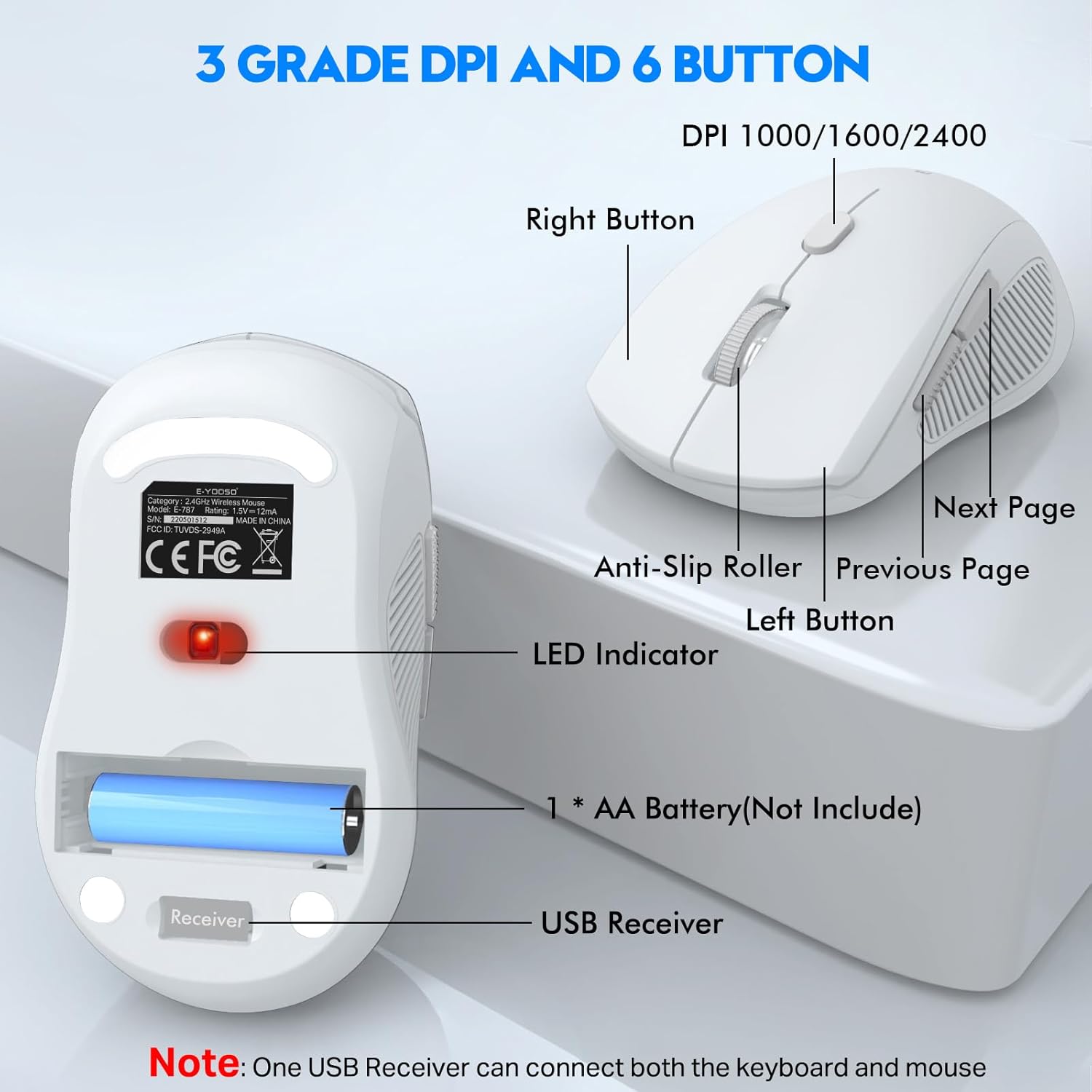
Image 3.1: Underside of the mouse, illustrating the battery compartment and the dedicated slot for the USB receiver.

Image 3.2: The keyboard's battery compartment, located on its underside, ready for AA battery insertion.
- USB Alıcısını Alın: The USB receiver is conveniently stored within the mouse's battery compartment. Gently pull it out.
- Alıcıyı Bağlayın: USB alıcısını bilgisayarınızdaki uygun bir USB bağlantı noktasına takın.
- Güç Açık: Ensure both the keyboard and mouse are switched on (if they have an on/off switch). The devices are plug-and-play and should connect automatically within a few seconds.

Image 3.3: The compact USB receiver, which establishes a stable 2.4GHz wireless connection for both the keyboard and mouse.
4. Kullanım Talimatları
4.1 Klavye Özellikleri
- Ergonomic Design with Palm Rest: The keyboard features an integrated palm rest and folding holders to provide a comfortable typing experience and reduce wrist fatigue during extended use.
- Dökülmeye Karşı Korumalı Tasarım: The keyboard is designed with a waterproof conductive membrane and multiple drainage holes, allowing liquids to drain out easily in case of accidental spills.
- Multimedya Kısayol Tuşları: Access common functions quickly using the dedicated multimedia hotkeys. (Note: Some multimedia functions may not be available with Mac OS).
- FN+F1: Medya Oynatıcısı
- FN+F2: Ses Kısma
- FN+F3: Sesi Aç
- FN+F4: Sessiz
- FN+F5: Önceki Parça
- FN+F6: Sonraki Parça
- FN+F7: Oynat/Duraklat
- FN+F8: Dur
- FN+F9: Ana Sayfa
- FN+F10: E-posta
- FN+F11: Bilgisayarım
- FN+F12: Favoriler

Image 4.3: The keyboard layout highlighting the multimedia hotkeys (F1-F12) accessible via the Function (FN) key.

Image 4.1: The ergonomic design of the keyboard, highlighting the integrated palm rest for enhanced comfort.

Image 4.2: Demonstration of the keyboard's spill-resistant feature, showing water droplets on its surface.
4.2 Fare Özellikleri
- Ayarlanabilir DPI: The optical wireless mouse offers 3 adjustable DPI levels (1000/1600/2400) to suit your sensitivity preferences. Press the DPI button located on top of the mouse to cycle through the settings.
- 6 Düğme: The mouse includes standard left and right click buttons, a scroll wheel, a DPI adjustment button, and dedicated forward and backward buttons on the side for enhanced navigation.
Resim 4.4: Ayrıntılı view of the mouse, indicating the DPI button and the arrangement of its six functional buttons.
4.3 Güç Tasarrufu Fonksiyonu
To conserve battery life, both the keyboard and mouse feature an automatic power-saving mode:
- Klavye, 5 dakika boyunca işlem yapılmadığında uyku moduna girecektir.
- The mouse will enter sleep mode after 2 minutes of inactivity.
To wake up the devices, simply press any key on the keyboard or move/click any button on the mouse.
Image 4.5: Visual representation of the automatic power-saving function, detailing sleep modes for both keyboard and mouse.
5. Bakım ve Özen
- Temizlik: Genel temizlik için yumuşak, damp cloth. For the keyboard, due to its splash-proof design, you can gently shake off any liquid after a spill and wipe it clean. Avoid using harsh chemicals or abrasive materials.
- Pil Değişimi: When the devices stop responding or show signs of low power, replace the AA batteries in both the keyboard and mouse. Refer to Section 3.1 for battery installation instructions.
- Depolamak: When not in use for extended periods, it is recommended to turn off the devices to further conserve battery life. Store the USB receiver in the mouse's dedicated compartment to prevent loss.
6. Sorun Giderme
If you encounter any issues with your E-YOOSO Wireless Keyboard and Mouse Combo, please refer to the following common problems and solutions:
| Sorun | Olası Neden | Çözüm |
|---|---|---|
| Klavye/Fare yanıt vermiyor | Low battery; USB receiver not connected or recognized; devices are in sleep mode. | Replace batteries. Ensure USB receiver is securely plugged into a working USB port. Move or click the mouse/press any key on the keyboard to wake from sleep. Try a different USB port. |
| Gecikmeli veya aralıklı bağlantı | Distance from receiver; interference from other wireless devices. | Ensure devices are within the 10m (33 feet) wireless range. Move the receiver closer to the keyboard and mouse. Minimize interference from other 2.4GHz devices. |
| Fare imleci düzensiz veya düzgün hareket etmiyor | Dirty optical sensor; unsuitable surface; low battery. | Clean the optical sensor on the underside of the mouse. Use the mouse on a clean, non-reflective surface or a mouse pad. Replace batteries. |
| DPI ayarı değişmiyor | DPI düğmesine doğru şekilde basılmamış. | Ensure you are pressing the dedicated DPI button on the mouse. Cycle through all three settings to confirm. |
If the problem persists after trying these solutions, please contact E-YOOSO customer support for further assistance.
7. Özellikler
| Özellik | Detay |
|---|---|
| Model Numarası | E-787-02 |
| Bağlantı Teknolojisi | 2.4G Kablosuz |
| kablosuz Menzil | 10 metreye (33 feet) kadar |
| Klavye Boyutları (U x G x Y) | 17.51 x 8.03 x 1.16 inç (445 x 204 x 35 mm) |
| Ürün Ağırlığı | 1.92 pound |
| Fare DPI Düzeyleri | 1000 / 1600 / 2400 Çözünürlük |
| Fare Düğmeleri | 6 Düğmeler |
| Güç Kaynağı | 1 x AA Battery (Keyboard), 1 x AA Battery (Mouse) |
| Uyumlu Cihazlar | Personal Computer (Windows 7/8/10/XP/Vista, Linux, Mac) |
| Özel Özellikler | Ergonomic Palm Rest, Spill-Proof Design, Auto Power Saving |
| Renk | Beyaz |
| Üretici | E-YOOSO |
| Menşei ülke | Çin |

Image 7.1: Detailed dimensions of the E-YOOSO Wireless Keyboard and Mouse Combo.
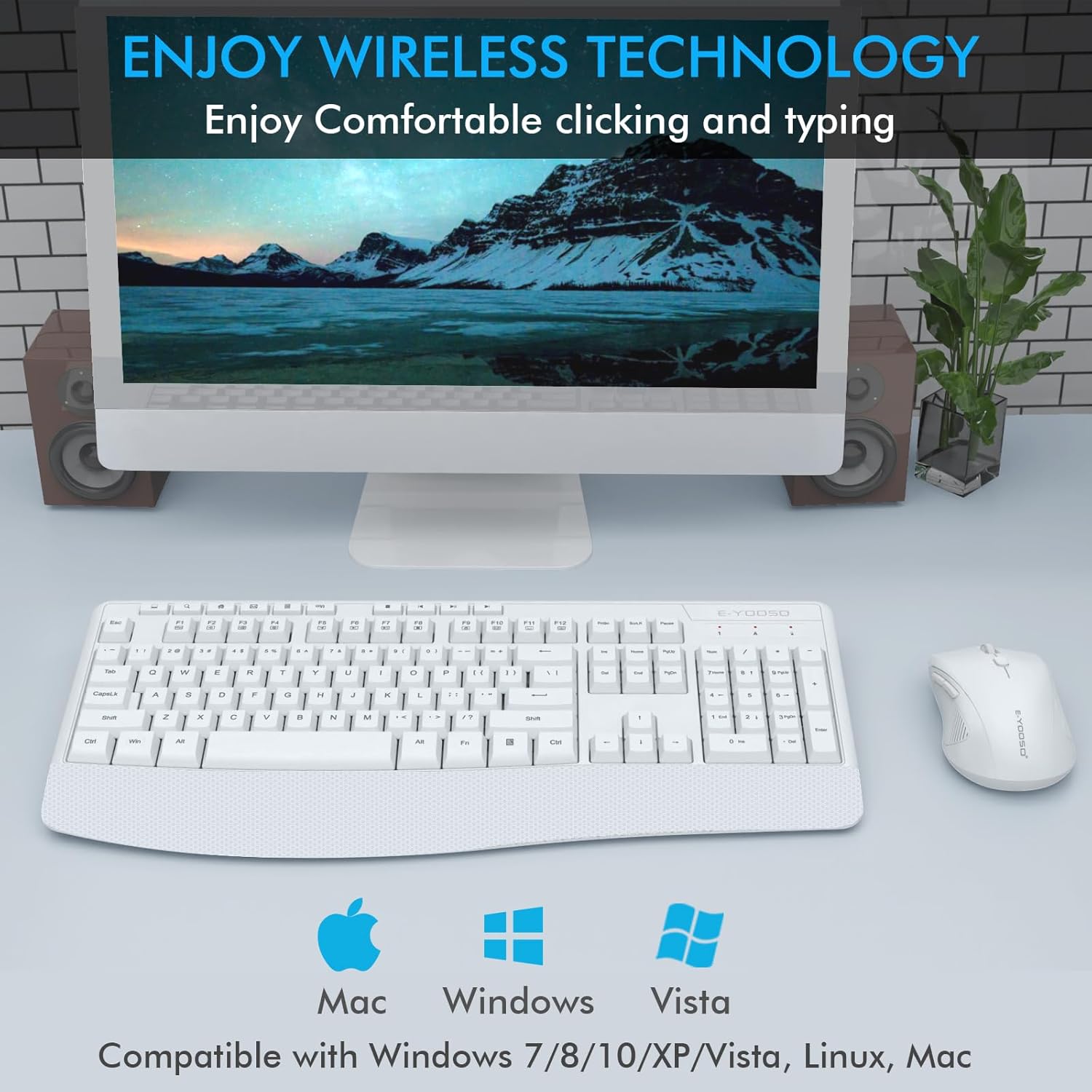
Image 7.2: Compatibility information for the E-YOOSO Wireless Keyboard and Mouse Combo, showing support for Mac, Windows, and Vista.
8. Garanti ve Destek
The E-YOOSO Wireless Keyboard and Mouse Combo comes with a 12 ay garanti Satın alma tarihinden itibaren geçerlidir. Bu garanti, üretim hatalarını kapsar ve ürününüzün normal kullanımda amaçlandığı gibi çalışmasını sağlar.
For warranty claims, technical support, or any questions regarding your product, please contact E-YOOSO customer service. Contact details can typically be found on the product packaging or the official E-YOOSO webalan.
We are committed to providing excellent customer service and will assist you promptly.