
1. Giriş
This manual provides detailed instructions for the setup, operation, and maintenance of your MAXDONE WiFi Bluetooth Trail Camera (Model PH820W). This advanced camera is designed for outdoor wildlife monitoring, hunting, and home/garden security, featuring high-resolution imaging, motion-activated recording, and convenient app control.
Temel özellikler şunlardır:
- 32 MP Photo Resolution and 1440p Video Resolution
- WiFi and Bluetooth Connectivity with 'TrailCam GO' App Control
- 0.2s Ultra-Fast Trigger Speed
- 940nm No-Glow Infrared Night Vision (up to 20 meters)
- IP66 Waterproof Rating for All-Weather Use
- Wide 100° Detection Angle
2. Kurulum
2.1 Paket İçeriği
Başlamadan önce, tüm bileşenlerin mevcut olduğundan emin olun:
- MAXDONE PH820W Trail Camera
- Montaj Kayışı
- USB kablosu
- Kullanıcı Kılavuzu
- 32GB SD Card (may vary by package)
2.2 Pil Kurulumu
The camera requires 4 or 8 AA batteries (not included). For optimal performance and extended battery life, it is recommended to use 8 high-quality alkaline or rechargeable AA batteries.
- Open the camera's latch and swing open the front cover.
- Kameranın alt kısmındaki pil yuvasını bulun.
- Insert the AA batteries according to the polarity indicators (+/-) inside the compartment.
- Pil bölmesi kapağını sıkıca kapatın.
2.3 SD Kart Kurulumu
The camera supports a Micro SD card up to 256GB. A 32GB SD card is often included.
- With the camera open, locate the SD card slot on the side.
- Metal kontakları aşağı bakacak şekilde Micro SD kartı yerine oturana kadar takın.
- To remove, push the card in again until it clicks, then release.

Image: The MAXDONE PH820W Trail Camera, demonstrating its compact design, the included 32GB SD card, and a smartphone displaying the companion app for remote control and viewIng.
2.4 Kamerayı Monte Etme
The camera can be mounted using the provided strap or a standard tripod thread.
- Kayış Montajı: Thread the strap through the slots on the back of the camera and secure it around a tree or pole. Adjust the strap to ensure the camera is stable and pointed towards the desired detection area.
- Tripod Montajı: Use the 1/4-inch tripod thread located at the bottom of the camera to attach it to a tripod or other compatible mounting accessory.
2.5 Uygulama Kurulumu ve Bağlantısı
The 'TrailCam GO' app allows for remote control and media management.
- Download the 'TrailCam GO' app from your smartphone's app store (iOS or Android).
- Akıllı telefonunuzda Bluetooth ve Wi-Fi'yi etkinleştirin.
- Kamerayı aç.
- Open the 'TrailCam GO' app and follow the on-screen instructions to connect to your camera via Bluetooth, then switch to Wi-Fi for faster data transfer.
- Note: The Wi-Fi connection range is approximately 14 meters (45 feet) and can be affected by obstructions.

Image: The MAXDONE Trail Camera securely mounted on a tree, illustrating its WiFi and Bluetooth connectivity for remote control and live viewAkıllı telefon uygulaması aracılığıyla.
3. Kameranın Çalıştırılması
3.1 Açma/Kapatma
To power on the camera, slide the mode switch to the 'ON' position. To power off, slide it to 'OFF'.
3.2 Mod Seçimi
The camera offers three capture modes, configurable via the app:
- Fotoğraf Modu: Hareket algılandığında durağan görüntüler yakalar.
- Video Modu: Hareket algılandığında video klipler kaydeder.
- Fotoğraf + Video Modu: Hareket algılandığında önce durağan bir görüntü, ardından bir video klibi kaydeder.
3.3 Adjusting Settings via App
The 'TrailCam GO' app allows you to customize various camera settings:
- Fotoğraf Çözünürlüğü: Select from various resolutions up to 32 MP for detailed images.
- Video Çözünürlüğü: Choose resolutions up to 1440p for clear and smooth video.
- Tetikleme Hızı: Set the ultra-fast 0.2s trigger speed to capture quick movements.
- PIR Hassasiyeti: Adjust the Passive Infrared (PIR) sensor sensitivity to control motion detection range and reduce false triggers.
- Algılama Alanı: Configure the 100° wide-angle detection area.
- Zaman Atlaması: Set intervals for capturing images over time.
- Şifre Koruması: Enable a password to protect camera settings.
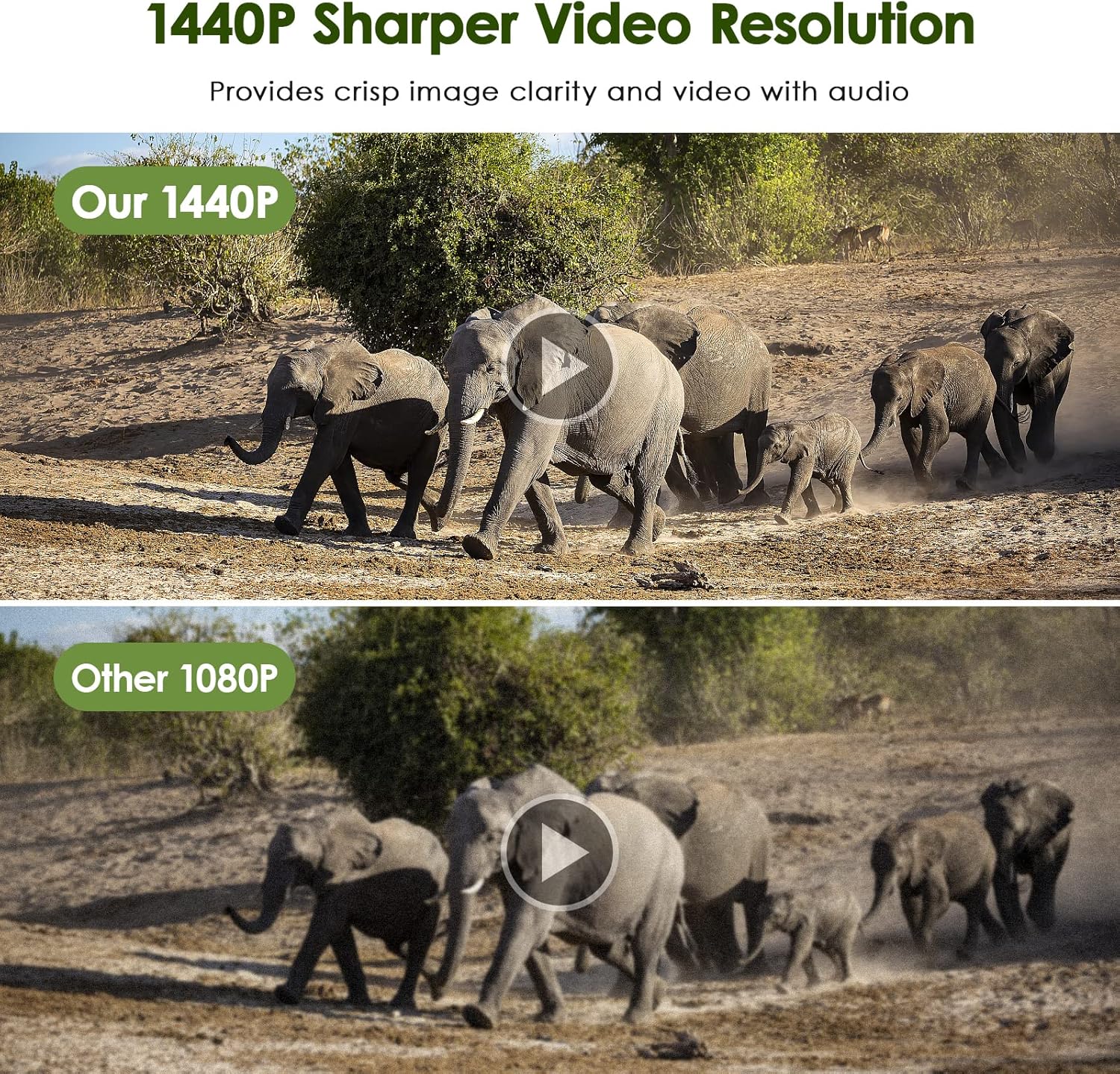
Image: The MAXDONE Trail Camera's rapid 0.2-second trigger speed is demonstrated by its ability to capture fast-moving subjects, such as a cheetah and a gazelle in motion, within its 100-degree wide-angle detection area.
3.4 Gece Görüş Yetenekleri
The camera is equipped with 26 pieces of 940nm infrared LEDs, providing clear black-and-white night vision without disturbing animals. The effective night vision range is up to 20 meters (65 feet).

Image: A visual comparison illustrating the MAXDONE Trail Camera's excellent night shooting capabilities, showing a ram in full color during the day and a clear black-and-white image at night, enabled by its 26-piece 940nm infrared LEDs and 0.2s trigger speed.
3.5 Viewing and Downloading Media
Yapabilirsiniz view and download captured photos and videos in two ways:
- Via 'TrailCam GO' App: Connect your smartphone to the camera via Wi-Fi using the app. You can browse, view, and download media directly to your phone without physically accessing the camera or SD card.
- SD Kart ile: Remove the SD card from the camera and insert it into a computer or compatible card reader to access the files.

Image: A comparison demonstrating the superior clarity and detail of the MAXDONE Trail Camera's 32MP photo resolution compared to a 20MP camera, showcasing a field with cows.

Image: A comparison illustrating the enhanced sharpness and clarity of the MAXDONE Trail Camera's 1440p video resolution versus 1080p, featuring a herd of elephants.
4. Bakım
4.1 Temizlik
- Gently wipe the camera lens and PIR sensor window with a soft, lint-free cloth to remove dirt or smudges.
- Fotoğraf makinesinin gövdesini ad ile temizleyin.amp bez. Sert kimyasallar veya aşındırıcı temizleyiciler kullanmayın.
4.2 Pil Değişimi
Replace batteries when the low battery indicator appears on the camera's screen or in the app. Always replace all batteries at once with new ones of the same type and brand.
4.3 SD Kart Yönetimi
- Regularly format the SD card using the camera's internal formatting function (accessible via the app) to ensure optimal performance and prevent data corruption.
- Önemli olanı yedekle files from the SD card to a computer or cloud storage before formatting.
4.4 Su Geçirmezlik Derecesi
The camera has an IP66 waterproof rating, making it resistant to dust and strong jets of water. While it is designed for outdoor use in various weather conditions, avoid submerging the camera in water.
5. Sorun Giderme
5.1 Kamera Açılmıyor
- Pillerin doğru kutuplara dikkat edilerek düzgün şekilde takıldığından emin olun.
- Check battery charge level; replace with fresh batteries if low.
- Verify the mode switch is in the 'ON' position.
5.2 No Recordings Captured
- Check if the SD card is properly inserted and not full. Format the SD card if necessary.
- Adjust PIR sensitivity settings; increase if no motion is detected.
- Ensure the camera is positioned correctly within the detection range (up to 20 meters).
- Verify the camera is in the correct capture mode (Photo, Video, or Photo+Video).
5.3 Düşük Görüntü/Video Kalitesi
- Kamera lensini ve PIR sensörü penceresini temizleyin.
- Ensure sufficient lighting during daytime recordings.
- For night vision, ensure no obstructions are blocking the IR LEDs.
- Check resolution settings in the app; set to higher values (32MP photo, 1440p video) for better quality.
5.4 Uygulama Bağlantı Sorunları
- Akıllı telefonunuzda Bluetooth ve Wi-Fi'nin etkinleştirildiğinden emin olun.
- Make sure the camera is powered on and within the 14-meter Wi-Fi connection range.
- Hem kamerayı hem de akıllı telefonunuzu yeniden başlatın.
- Update the 'TrailCam GO' app to the latest version.
6. Özellikler
| Özellik | Şartname |
|---|---|
| Model Numarası | PH820W |
| Fotoğraf Çözünürlüğü | 32 MP'ye kadar |
| Video Çözünürlüğü | Up to 1440p (30 fps) |
| Tetik Hızı | 0.2 saniye |
| Algılama Açısı | 100 derece |
| Gece Görüş Aralığı | 20 metreye (65 feet) kadar |
| IR LEDler | 26 pcs 940nm No-Glow Infrared LEDs |
| Su Geçirmezlik Derecesi | IP66 |
| Bağlantı | Wi-Fi, Bluetooth |
| Uyumlu Cihazlar | Smartphone (via 'TrailCam GO' app) |
| Depolamak | Mikro SD kart (256 GB'a kadar) |
| Güç Kaynağı | 4 or 8 AA Batteries (not included) |
| Boyutlar (U x G x Y) | 18x11x12 cm |
| Ağırlık | 570 gram |
7. Garanti ve Destek
For warranty information and customer support, please refer to the documentation included with your product package or visit the official MAXDONE website. If you encounter any issues not covered in this manual, please contact MAXDONE customer service for assistance.